


Radu Dumitrescu

As Head of Digital Transformation, Radu looks over multiple departments across the company, providing visibility over what happens in product, and what are the needs of customers. With more than 8 years in the Technology era, and part of BlueTweak since the beginning, Radu shifted from a developer (addressing end-customer needs) to a more business oriented role, to have an influence and touch base with people who use the actual technology.
Recent articles

Call Center Workforce Management (2026) Buyer’s Guide
Why Call Centre Workforce Management Matters in 2026
Contact centers are juggling hybrid teams, multiple channels, and rising customer expectations. Leaders now treat call centre workforce management as a strategic system for customer satisfaction and cost control, not just a scheduling tool. In a 2025 benchmark spanning 38 countries, 99% of WFM practitioners said workforce management is essential to business success, underscoring its central role in operational efficiency and agent experience.
At the same time, some sacred processes deserve scrutiny. The familiar “80/20” service level (answer 80% within 20 seconds) still appears in many playbooks, but experts argue it’s not a universal standard and can distract from customer outcomes if applied blindly. Treat SL as a contract shaped by intent, channel, and value, not a default.
Finally, planning must reflect reality. Average handling time (AHT) for service calls has climbed over the last two decades, meaning models built on outdated baselines will be understaffed and miss SLAs.
This guide turns that context into action by defining call center workforce management, highlighting the metrics that matter, outlining step-by-step practices for forecasting, scheduling, and intraday adherence, adding a buyer checklist and a 90-day rollout plan, and showing where BlueTweak fits alongside your WFM stack.
What Call Center Workforce Management Covers
Call center workforce management (WFM) is the discipline of forecasting contact demand, translating that demand into staffing levels, creating and maintaining agent schedules, and implementing real-time adjustments to meet service-level targets at the lowest reasonable operational costs. Done well, WFM raises customer satisfaction, protects employee satisfaction, and provides contact center leaders with a single source of truth for performance decisions.
Core components
- Forecasting & capacity planning: Predict call volumes and handle times across channels using historical data, seasonality, and event overlays.
- Scheduling & shift bidding: Create legally compliant rosters that respect agent preferences, skills, and time-off requests while meeting targets.
- Intraday management: Make real-time changes (break pulls, micro-shifts, channel rebalancing) when reality deviates from the plan.
- Adherence & performance: Track whether agents follow the plan and connect it to key performance indicators such as SL, AHT, first-call resolution, and customer experience strategy.
Analytics & governance: Report outcomes, capture decisions, and comply with labor laws and audit requirements.
The Fundamentals of Call Center Workforce Management in 2026

Before you compare features, align on what “good” looks like for workforce management in your operation. The fundamentals are simple and demanding at the same time: predict demand with enough accuracy to earn trust, translate that forecast into fair schedules that hit service levels without burning people out, and run the day with tight intraday decisions and transparent adherence so customers feel the benefit. With that frame in mind, use the pillars below to pressure-test your 2026 plan.
1) Forecasting that leaders can trust
Goal: Right people, right skills, right intervals.
- Inputs: 12–24 months of interval-level volume and AHT, holidays, promos, price changes, product launches, outages, and marketing calendars.
- Models: ARIMA/exponential smoothing for steady queues; gradient-boosting or Prophet-style models where promotions drive spikes; simple moving averages for thin history.
- Accuracy targets: Aim for ≤5–8% MAPE at the day level for voice and ≤10–12% for digital when volumes are mature; loosen targets for new lines until you have seasonality.
- Practical tip: Forecast workload (contacts × AHT) and convert to FTE, accounting for shrinkage (vacation, sickness, coaching, training, meetings), per site and channel.
What to check in a tool: clear forecast versioning, out-of-the-box short- and medium-term forecasts, and the ability to generate staffing from selected skills on historical data.
2) Scheduling that balances SL and people
Goal: Coverage without burnout.
- Constraints: Skills, cross-skills, multi-channel contact center coverage, lunch/break rules, labor laws, min/max weekly hours, fixed shifts, and agent preferences.
- Methods: Integer/linear programming or heuristic solvers; shift bidding windows; preference-based scheduling for work-life balance; reserve pools for late changes.
Outputs: Publishable rosters, future schedules, exception management, time-off workflows, and self-service swaps.
3) Intraday management that reacts in minutes
Goal: Hold the day when reality changes.
- Tactics: Micro-shifts, voluntary overtime/pulls, moving back-office work, channel rebalancing, and quick knowledge updates when AHT jumps.
- Signals: Interval-level gaps (offered vs forecast), SL at risk, sudden spikes, rising wait times, and above-target abandonment.
- Cadence: 30–60 minute huddles with Ops + WFM, and granular dashboards that let you make real-time adjustments quickly. Practical playbooks beat heroics.
4) Adherence that is fair and transparent
Goal: Reliable coverage with trust.
- Define: What counts as agent availability, handle, ACW, breaks, meetings, training, and exceptions.
- Measure: Schedule adherence at the interval level and variance (how far off, not just how often). Document how adherence ties to coaching, not punishment.
Coach: Focus on patterns, not one-offs; build employee engagement by sharing context on why adherence matters to customers.
Forecasting in Practice: a 5-Step Blueprint
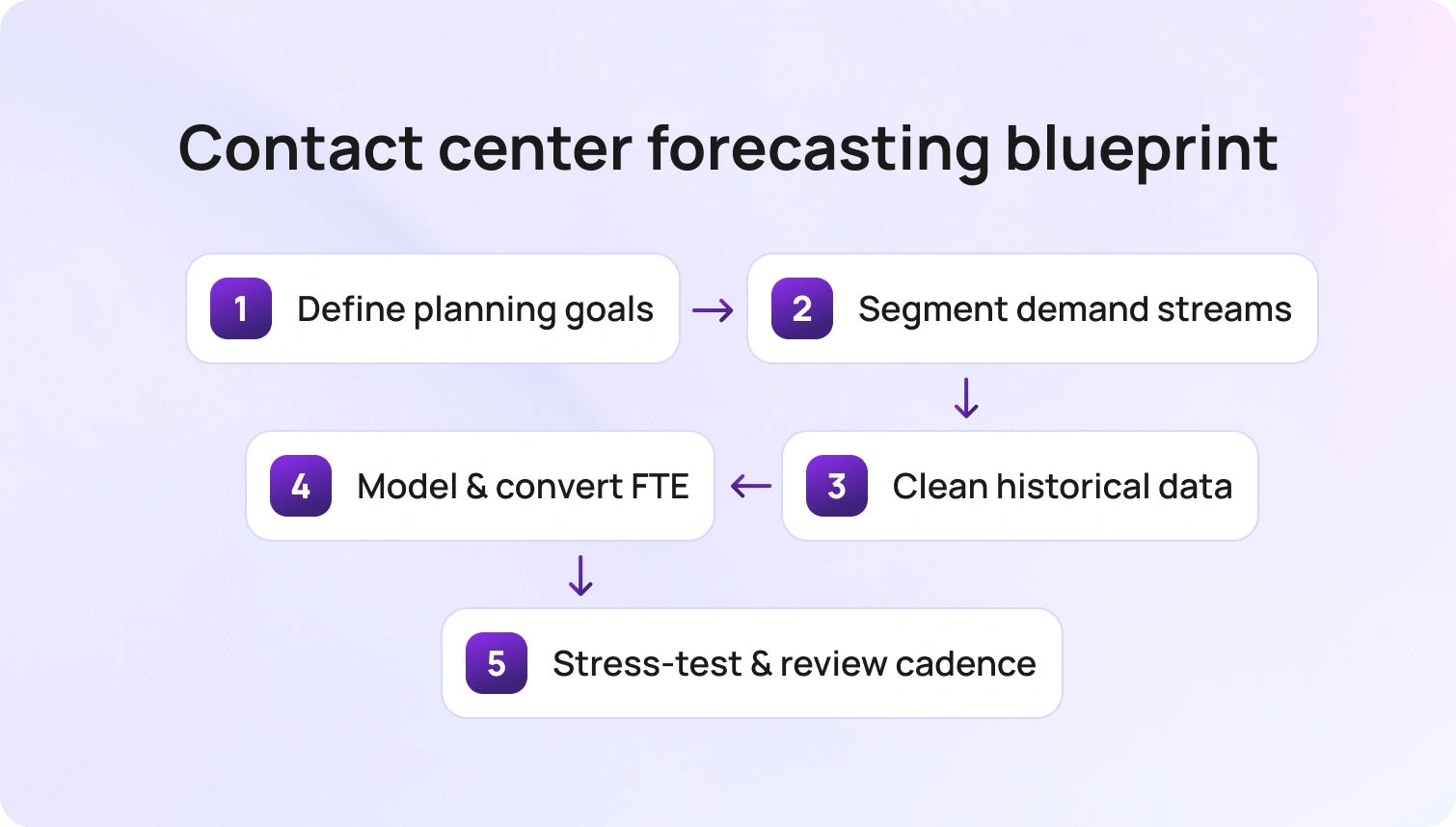
Before models, define the questions your plan must answer: how many agents by skill and channel, where the risk bands sit, and what “good” accuracy means for leadership. Then run this loop.
- Segment the work with intent and channel in mind
Split voice, chat, email, and social, then sub-segment by intent clusters such as billing, outages, and onboarding. Thin lines can be grouped if they share seasonality or skills. The result is cleaner signals and staffing that maps to real customer demand. - Stabilize history so the model learns reality
Tag outages, promotions, and releases; backfill missing intervals; smooth known anomalies rather than deleting them. Attach exogenous calendars for price changes and campaigns. Forecasts trained on labeled history will outperform generic time series. - Choose a base model per segment and evolve
Use classical time-series for stable queues, then layer exogenous regressors or machine-learning approaches for promo-heavy or event-driven lines. New or volatile work can start with moving averages and guardrails until seasonality emerges. Always forecast workload first, then convert to FTE using shrinkage by site and channel. - Stress-test the plan before it hits the floor
Run what-ifs for plus or minus 10% in volume and handle time, then check service-level exposure by interval. Build response playbooks for each scenario so intraday teams know the first three levers to pull when drift appears. - Lock a cadence and make it auditable
Publish a weekly forecast with daily intraday refreshes. Version each release, annotate big swings, and store accuracy metrics such as MAPE or WAPE by queue. Leadership trust improves when they can see why the number changed and how it performed versus actuals.
What to verify in a platform:
Look for forecast versioning, short and medium-term horizons, event overlays, staffing generation from historical skills, and accuracy dashboards by channel and intent. If you cannot see the model’s inputs and the error profile, you cannot manage the risk.
Scheduling That Balances Service Levels and People
Scheduling translates the plan into a contract with your people. Aim for coverage that hits service levels, while protecting fairness, preferences, and compliance.
- Bid windows: Publish monthly rosters with an equitable shift bidding period; freeze critical spans but allow swaps through controlled rules.
- Preference capture: Store recurring constraints (school runs, study days) to place the right agents at the right skills without endless manual edits.
- Flexible blocks: Use 15–30 minute granularity for breaks and offline work; reduce human error with templated patterns.
- Overtime and VTO: Offer in-app sign-ups for real-time management; pay attention to fairness and cost optics.
Compliance: Encode meal/rest rules and weekly caps; audit reports must be easy to export during reviews.
Intraday Management: Holding the Day
Scheduling translates the plan into a contract with your people. Aim for coverage that hits service levels, while protecting fairness, preferences, and compliance.
- Supply levers: Micro-shifts, same-day schedule moves, break pulls, moving meeting time, and tapping reserve pools.
- Demand levers: IVR callback activation, bot/assistant nudges for common intents, and on-the-fly knowledge updates that reduce AHT.
- Visibility: “At a glance” boards for SL at risk, queues breaching, and agent schedules with who is movable.
- Huddles: 30-minute cadence when volatile; hourly when steady. Declare the plan in writing to avoid DM chaos.
(If you’re formalizing intraday, look for playbooks and dashboards that make short-interval adjustments easy to action.)
The Metrics That Matter in 2026 (and How to Use Them)
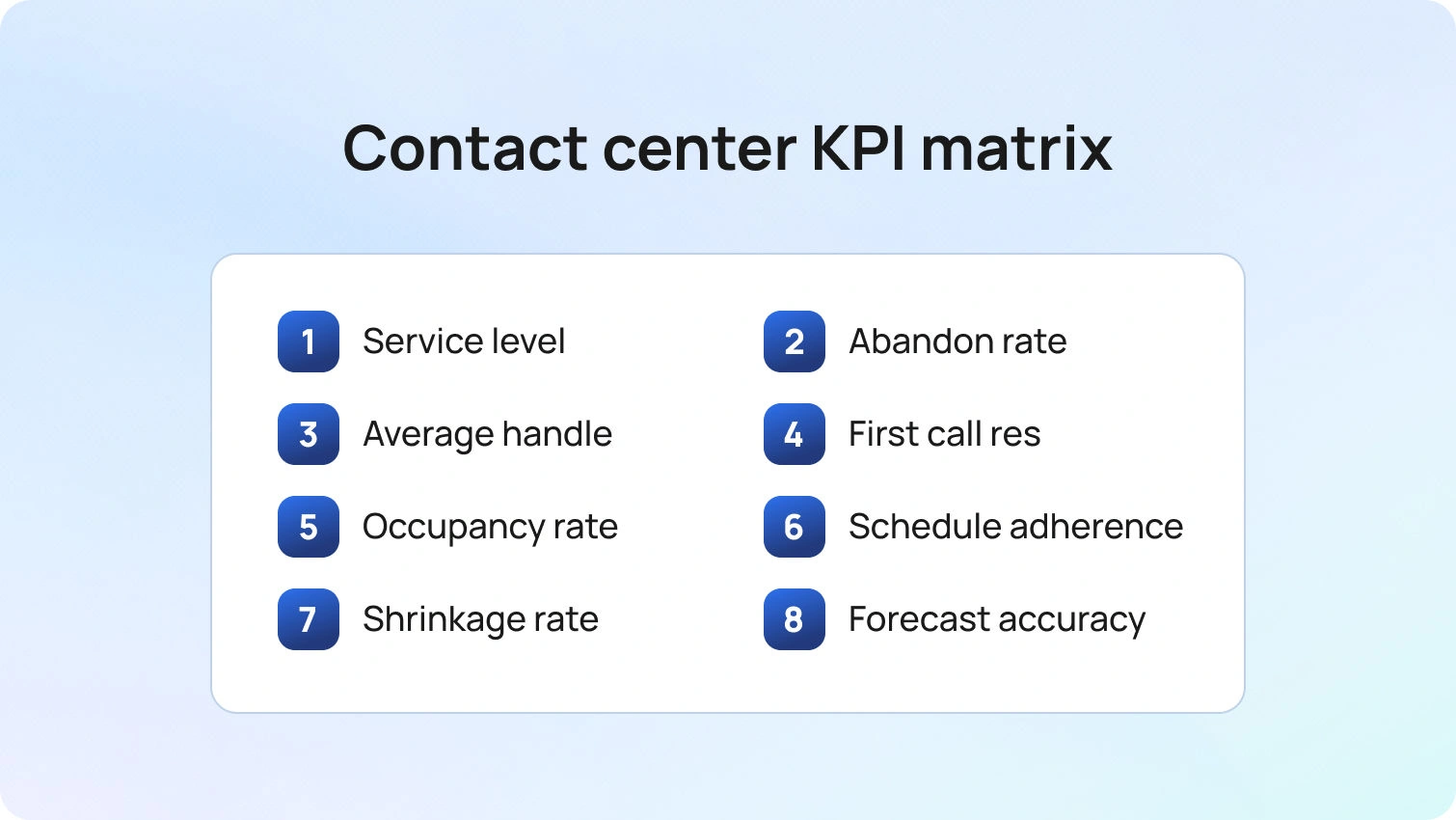
Service level (SL)
Define SL per queue and channel, shaped by customer value and intent rather than a blanket 80/20. Calibrate thresholds for voice, chat, email, and priority lines.
Why this metric: SL represents the promise you make to customers and is the primary constraint your staffing plan must satisfy.
Abandonment
Track both overall abandonment and “abandon after X seconds,” and segment by intent. Expect improvements when IVR menus, callbacks, or status messaging are tuned.
Why this metric: Abandonment reveals the patience curve and the cost of being late, quantifying lost demand that never reaches an agent.
AHT / Average handle time
Include talk, hold, and after-call work, and trend by intent and channel rather than as a single centerwide average.
Why this metric: AHT converts contacts into workload, which drives staffing levels and exposes process or knowledge gaps that inflate effort.
FCR / First call resolution
Tie FCR to deflection quality and knowledge freshness, and read it alongside reopens and transfers. Rising FCR often offsets longer AHT.
Why this metric: FCR is the most direct indicator of service quality and the strongest lever for lowering repeat volume and total cost to serve.
Occupancy and utilization
Set channel-specific guardrails, typically higher for voice than for concurrent chat, to avoid chronic overload.
Why this metric: Occupancy balances efficiency with human sustainability, protecting agent performance and preventing burnout.
Schedule adherence
Measure at the interval level, report variance and percentage, and document clear exception rules.
Why this metric: Adherence connects the plan to reality minute by minute, ensuring the coverage you forecast actually shows up.
Shrinkage
Track planned and unplanned shrinkage separately, with weekly views by site and team, and protect time for coaching and QA.
Why this metric: Shrinkage determines how many paid hours you need to buy to deliver the roster; misestimating it guarantees under-staffing.
Employee satisfaction and attrition
Run short, regular pulses, capture exit themes, and correlate results with schedule stability and preference fulfillment.
Why this metric: Agent sentiment predicts near-term performance and long-term cost, and highlights scheduling and coaching changes that improve retention.
Forecast accuracy (MAPE, WAPE)
Publish targets by channel and intent, version your forecasts, and annotate big deviations so stakeholders understand why the number moved.
Why this metric: Forecast accuracy builds trust in WFM, reduces whiplash in staffing decisions, and keeps the organization aligned on one plan.
2026 Buyer’s Checklist: Workforce Management Tools for Call Centers

Use this list to evaluate workforce management software or a broader workforce management solution bundled with your CCaaS.
Forecasting & planning
- Multiple forecast types (short/medium term), skill-level forecasts, event overlays, and version control.
- Accuracy dashboards (MAPE/WAPE) by queue and channel; alerting for drift.
Scheduling & preferences
- Multi-skill schedules, shift bidding, preference capture, automated time off requests, and labor-rule engines.
- Self-service swaps with guardrails; native mobile access for agents.
Intraday management
- Real-time adherence, “what-if” staffing, and one-click moves across channels.
- Callback/VTO/OT triggers; playbook notes visible to Ops and WFM.
Adherence & performance
- Interval-level adherence with variance; exception handling without ticket storms.
- Links to key performance indicators (SL, AHT, FCR, CSAT) and coaching workflows.
Analytics & governance
- Out-of-the-box reports for service level agreements, shrinkage, staffing variance, and agent performance.
- Audit trails, role-based access, and export to your BI or warehouse.
Architecture
- Open APIs/webhooks, SSO, and workforce management systems that play nicely with your CCaaS, HRIS, payroll, and quality systems.
- Low IT lift to implement; clear roadmap for AI-assisted forecasting and agent experience.
Tip: Compare the tool’s idea of “service levels” to your own. Some vendors still push a one-size metric. If you notice that your current support tool isn’t meeting your needs, it may be time to upgrade your customer support software. Your customers don’t live at “80/20.”
RFP Questions That Separate Real WFM From Reporting
Turn the checklist into proof. Ask vendors to show, not tell.
- Forecasting: “Show the last 12 months of our data with your model. What’s the day-level MAPE by queue? How do you handle promotions and outages?”
- Scheduling: “How do we encode our labor rules and union constraints? Can agents set standing preferences and bid via mobile?”
- Intraday: “Demonstrate a 20% spike: what are the one-click actions to hold SL for voice and chat?”
- Adherence: “How do we define exceptions? Can we report adherence variance as well as percentage?”
- Analytics: “Can we place CSAT/FCR next to SLA and adherence at the intent level?”
- Governance: “What audit logs and role controls exist? How easy is export to our BI stack?”
- Agent experience: “What’s built in for employee scheduling self-service, PTO, and fairness?”
- AI: “What is your roadmap for AI in forecasting and agent engagement? How do you avoid black-box staffing decisions?”
- TCO: “Price model, environments, training hours, and support SLAs; what’s the expected cost savings vs our current state?”
A 90-Day Rollout You Can Actually Ship
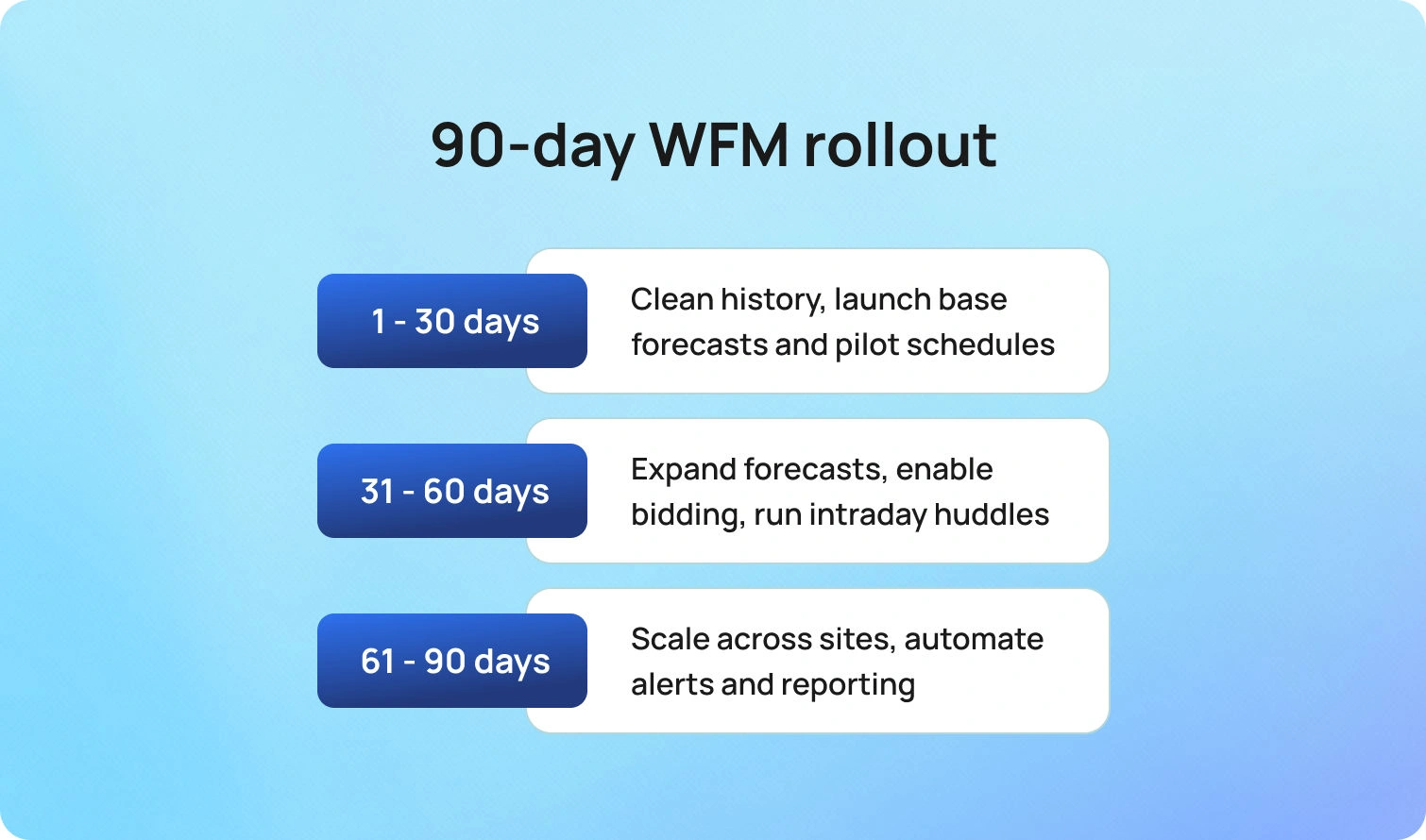
Three sprints take you from baseline to a dependable operating rhythm.
Days 1 to 30: Foundations
Clean twelve to twenty-four months of history and tag events. Stand up base forecasts for the top five queues and publish accuracy targets. Encode labor rules and pilot schedules for one site or team. Define adherence rules and exceptions, and enable interval-level reporting.
Days 31 to 60: Assist and intraday
Expand forecasts to major queues and digital channels. Launch shift bidding and preference capture and enable self-service PTO. Run daily intraday huddles and document playbooks for spikes and outages. Place CSAT and FCR next to SL and handle time by intent in weekly reviews.
Days 61 to 90: Scale and govern
Extend to the remaining sites or brands and roll up to a single WFM calendar. Automate variance alerts and what-if staffing. Publish a monthly WFM report with forecast accuracy, SL attainment, overtime and VTO, adherence variance, and wins or risks. Lock change control with versioned forecasts, schedule approvals, and audit logs.
With the operating model running, decide where WFM sits in your stack.
How BlueTweak helps (WFM Beside Routing and Analytics)
BlueTweak integrates WFM tools alongside omnichannel customer support queues, so planners and supervisors operate from a single workspace. Forecasts and agent schedules sit alongside routing, knowledge, and analytics; leaders can shift staffing by language, brand, and channel in real time while watching SL, AHT, FCR, and adherence for the same intents. That proximity shortens the loop between customer interactions and staffing decisions, improves operational efficiency, and supports global, multi-brand operations with scoped views and role-based access.
If you already own a WFM suite, BlueTweak’s API-open design integrates with external workforce management systems, bringing service level targets, forecast context, and adherence back into standard dashboards so Ops, Finance, and IT share a single picture.
Conclusion
In 2026, workforce management in a call center is the operating system for customer promises. Treat forecasting as a product, scheduling as a contract with your people, and intraday as a disciplined daily sport. Buy or integrate a workforce management solution that is accurate, explainable, and friendly to agents, not just efficient for spreadsheets. Put customer experience and employee satisfaction on the same page as SL and cost, and you’ll meet customer expectations with fewer surprises. If you want call center workforce management besides routing, knowledge, and analytics with real-time levers that Ops will actually use, book a BlueTweak demo.

12 Best AI Help Desk Software Platforms for 2026
Support teams aren't struggling because they lack AI. They're struggling because they're juggling disconnected tools, rising ticket volumes, and customer expectations that keep increasing.
Modern AI help desk software should do far more than generate response suggestions. The best platforms automate service requests, streamline support processes, surface customer history instantly, and give support agents the context they need to resolve issues faster.
If you're evaluating AI help desk software in 2026, BlueTweak stands out by combining omnichannel support, KB-grounded AI, workforce management, quality assurance, and analytics into a single platform, while the other vendors below each excel in different areas.
Quick Comparison: 12 AI Help Desk Platforms
If you're comparing AI help desk software, it helps to start with a high-level overview before exploring the details. The table below summarises all 12 platforms covered in this guide, highlighting their ideal use case, starting price, and key capabilities. The detailed reviews that follow explore each platform's features, strengths, limitations, and pricing in more depth to help you choose the right solution for your help desk operations.
*AI features available on higher-tier plans
Every business has different customer support requirements, so there isn't a one-size-fits-all solution. Whether you're looking for an affordable AI help desk, enterprise-grade service management, or a unified platform with built-in workforce management and quality assurance, the detailed reviews below break down each platform's pricing, capabilities, strengths, and limitations to help you build a confident shortlist.
Want to see how AI can reduce ticket volume and improve service delivery? Book a personalized BlueTweak demo to see KB-grounded AI, omnichannel support, workforce management, and intelligent automation in action.
12 AI Help Desk Software Options for 2026
The platforms below represent current AI help desk software options evaluated by support operations teams. Pricing and capabilities come from vendor websites and public documentation as of January 2026.
Where pricing lacks transparency, we note “Contact sales” or “Varies by plan.”
1. BlueTweak: Best for Unified AI-Powered Customer Support Operations

BlueTweak delivers an all-in-one CCaaS platform merging voice, chat, email, and social channels with AI-powered automation, workforce planning, and quality management. Purpose-built for mid-market operations (20-100 agents) and BPO environments, it offers KB-grounded AI eliminating hallucinations while providing accurate, context-aware responses across every channel.
Best for: BlueTweak is best for growing help desk operations that need a unified AI platform for voice, chat, email, and ticketing. Built-in workforce management, quality assurance, and KB-grounded AI help streamline support workflows, improve service delivery, and reduce reliance on multiple standalone tools.
Key features:
- Native voice infrastructure (call center, IVR, multilingual AI voicebot, transcription, translation)
- Chat powered by an AI customer service chatbot with real-time translation
- Email with AI proposed reply, template responses, and AI ticket summary
- KB-grounded AI assistance using a public knowledge base with a hierarchical structure
- Ticketing system featuring sentiment analysis, AI ticket classification, and customizable fields
- Built-in workforce management (forecasting, scheduling) plus quality assurance module
- Custom and prebuilt analytics dashboards
- Enterprise security (audit trails, role management, MFA, data residency controls)
- Open APIs with a sandbox testing environment
"The most successful AI deployments don't replace support agents, they amplify them. When AI understands customer history, knowledge base content, and business context, teams resolve issues faster while improving both customer and agent experiences." — Radu Dumitrescu, Head of Presale & Digital Transformation at BlueTweak
Pricing:
- €65/agent/month (all features included)
- No feature gating; unlimited users and integrations
Note: AI usage priced separately per customer interaction (transparent, predictable)
Pros:
- Unified platform eliminates juggling separate voice, chat, AI, and analytics vendors
- KB-grounded AI prevents hallucinations by citing actual knowledge base sources
- Included WFM and QA eliminates the typical $25-$50/agent/month add-on charges
- Transparent pricing without hidden usage caps
- Rapid deployment measured in weeks rather than quarters
- Comprehensive multilingual support (35+ languages) across voice and text
- Multi-tenant architecture purpose-built for BPO operations
Cons:
- Emerging brand versus established names like Zendesk or Salesforce
- Sweet spot is mid-market (20-100 agents); massive enterprises need customization
- AI costs scale with usage, requiring volume forecasting
- Smaller app marketplace compared to Zendesk's 1,200+ integrations
BlueTweak in Action:
BlueTweak has also delivered measurable improvements for enterprise customer support operations. For example, global BPO provider Conectys reduced data retrieval times by 30%, improved reporting efficiency by 40%, increased customer satisfaction (CSAT) by 35%, and cut resolution times by 25% after implementing the platform. These results demonstrate how combining KB-grounded AI, intelligent automation, and unified omnichannel support can streamline help desk operations while improving both agent productivity and the customer experience.
Experience AI-powered customer support, voice, email, chat, and workforce management in one platform. Start your free 14-day trial, no credit card required.
2. Intercom: Best for AI-Powered Conversational Customer Support

Intercom merges live chat, AI chatbot capabilities (Fin AI), and basic ticketing into a platform emphasizing proactive customer engagement over traditional ticket management. Strong for in-app messaging and product adoption, but voice support requires workarounds.
Best for: Intercom is best for SaaS businesses that prioritise conversational customer engagement through live chat and AI automation. Its strengths lie in proactive messaging, in-app support, and AI-driven customer conversations rather than managing complex omnichannel help desk operations.
Key features:
- Fin AI chatbot (GPT-based, knowledge-grounded, text channels only)
- Live chat and messaging infrastructure
- Product tours and targeted campaign tools
- Lightweight ticketing workflows
- Help center and article library
- Customer data aggregation
- Shared team inbox
- Analytics and reporting
- Multilingual bot support (45+ languages)
Pricing:
- Essential: From $29/seat/month
- Advanced: From $85/seat/month
- Expert: From $132/seat/month
- AI and premium features: Additional costs apply for Intercom Pro (from $99/month), Copilot ($29/agent/month), and Proactive Support Plus (from $99/month).
Pros:
- Excels at conversation-first, proactive customer engagement
- Modern chatbot experience with sophisticated AI
- Strong product onboarding and education capabilities
- Multilingual automation across messaging channels
- Clean, contemporary interface design
Cons:
- Voice support absent; text channels only
- Unpredictable costs as conversation volume fluctuates
- Limited traditional ticketing functionality
- Lacks workforce management tools
- AI resolution fees can spike unexpectedly
3. Zendesk: Best for Large Enterprises with Complex Support Ecosystems
Zendesk provides cloud-based help desk software with AI add-ons for ticket summarization, intent recognition, and chatbot automation. Covers email, chat, voice (through partners), and messaging, though advanced AI, WFM, and voice capabilities require separate purchases.
Best for: Zendesk is best for enterprises that need a mature help desk platform with extensive integrations, advanced reporting, and highly configurable support workflows. It's a strong choice for organisations willing to invest in additional AI, workforce management, and quality assurance add-ons.
Key features:
- Omnichannel ticketing with workflow automation
- Multilingual knowledge base
- Answer Bot (KB-powered chatbot, text only)
- AI-driven workflow and routing automation
- Zendesk Talk (partner-based voice integration)
- Workforce management (add-on: $25/agent/month)
- Quality assurance (add-on: $35/agent/month)
- Advanced analytics and reporting
- Marketplace offering 1,200+ integrations
Pricing:
- Support Team: $19/agent/month (billed annually)
- Suite Team: $55/agent/month (billed annually)
- Suite Professional: $115/agent/month (billed annually)
- Suite Enterprise: Contact sales
- Add-ons: AI Copilot $50/agent/month, Workforce Management $25/agent/month, Quality Assurance $35/agent/month
Pros:
- Established platform with a deep integration ecosystem
- Extensive marketplace (1,200+ apps)
- Enterprise security and compliance credentials
- Widely recognized interface
- Comprehensive documentation
Cons:
- Costs multiply rapidly with essential add-ons
- Voice relies on third-party partnerships
- Per-agent pricing becomes expensive at scale
- Complex configuration learning curve
- Core features locked in expensive tiers
4. Freshworks: Best for Affordable AI Help Desk Software
Freshworks offers cloud-based desk software with ticketing, automation, and self-service capabilities. Provides foundational omnichannel support with AI add-ons for chatbot and agent assistance functionality.
Best for: Freshworks is best for small to mid-sized businesses looking for an accessible, user-friendly interface with essential ticketing and AI capabilities. It provides a straightforward way to deploy AI and automate support processes without the complexity of enterprise platforms.
Key features:
- Ticketing infrastructure with automation and SLA tracking
- Email and social channel support
- SEO-optimized knowledge base
- Team collaboration (collision detection, private notes)
- Standard reporting and analytics
- Integration marketplace
- AI Copilot (add-on: $29/agent/month)
- AI Agent sessions (add-on: $100 per 1,000 sessions)
Pricing:
- Free: $0 (up to 10 agents)
- Growth: From $15/agent/month
- Pro: From $49/agent/month
- Enterprise: From $79/agent/month
- AI add-ons: Freddy AI Copilot ($23/agent/month) and Freddy AI Agent (usage-based pricing after the first 500 sessions).
Pros:
- Generous free tier for initial testing
- Competitive entry-level pricing
- Minimal learning curve
- Solid marketplace integrations
- Decent automation in lower tiers
Cons:
- Voice support needs third-party integration or upgrade
- AI features are paid add-ons
- Basic workforce management
- Reporting lacks the depth of enterprise platforms
- Missing native call center capabilities
5. Zoho Desk: Best for Businesses Already Using Zoho

Zoho Desk delivers context-aware service desk software with ticketing, automation, and self-service tools. Deep Zoho ecosystem integration plus AI assistant (Zia) in premium tiers.
Best for: Zoho Desk is best for organizations already invested in the Zoho ecosystem that want affordable AI-powered service management and customer support. Native integrations with other Zoho products make it particularly attractive for growing businesses looking to centralise operations.
Key features:
- Ticketing with workflow automation
- Multi-channel support (email, phone, chat, social)
- Knowledge base with community features
- AI assistant Zia (automation and insights)
- SLA tracking and custom workflows
- Analytics dashboards
Pricing:
- Free: 3 users, basic ticketing, email support, limited capabilities
- Express: €7/agent/month (social media, workflows, 5 users)
- Standard: €14/agent/month (instant messaging, SLAs, unlimited users)
- Professional: €23/agent/month (advanced AI, multi-department, 10 departments, unlimited users)
- Enterprise: €40/agent/month (custom modules, sandbox, 50 departments, unlimited users)
Pros:
- Highly affordable pricing structure
- Seamless Zoho suite integration
- AI included in upper tiers
- Strong value proposition for small teams
- Automation across all price points
Cons:
- Interface feels dated
- Voice needs Zoho PhoneBridge
- Limited WFM capabilities
- Smaller integration marketplace
- Customization complexity
6. Salesforce Service Cloud: Best for Enterprise CRM-Driven Support
Salesforce Service Cloud provides an enterprise CRM-based customer support platform with omnichannel capabilities and Einstein AI. Designed for large organizations already invested in the Salesforce ecosystem.
Best for: Salesforce Service Cloud is best for large enterprises that rely on Salesforce CRM and need highly customised customer support operations. Its AI capabilities, automation, and reporting are particularly valuable for organizations managing complex service delivery across multiple departments.
Key features:
- Case management with omnichannel routing
- Knowledge management system
- Einstein AI (automation and predictions)
- WFM (add-on), analytics, custom dashboards
- Extensive customization framework
- Salesforce ecosystem integration
Pricing:
- Starter Suite: $25/user/month (10-user maximum, basic features)
- Professional: $100/user/month (workflows, knowledge, reports)
- Enterprise: $175/user/month (advanced automation, 24/7 support)
- Unlimited: $350/user/month (premier support, configuration services)
- Agentforce 1 Service: $550/user/month (as with the Unlimited package, plus the full AI suite)
Note: Add-ons and implementation typically double the cost. Einstein AI features vary by tier.
Pros:
- Deep Salesforce ecosystem integration
- Highly customizable workflows
- Enterprise security and compliance
- Unified customer data across platforms
- Advanced Einstein AI capabilities
Cons:
- Expensive with required add-ons
- Complex requiring Salesforce expertise
- Steep learning curve
- Overkill without Salesforce investment
- Lengthy implementation timelines
7. Kustomer: Best for Customer History and Contextual Support

Kustomer provides a CRM-based AI help desk platform with timeline views that show the complete customer interaction history across channels. Emphasizes a unified context for complex customer journeys.
Best for: Kustomer is best for organizations that need a complete view of customer history across every interaction. Its timeline-based approach gives support agents rich context, making it well suited to businesses managing long, multi-touch customer journeys.
Key features:
- Customer timeline with full history
- Omnichannel support (email, chat, voice, SMS, social)
- Workflow automation and routing
- Knowledge base tools
- Analytics and reporting
- Deep integration capabilities
Pricing:
- Custom pricing: Quote-based pricing tailored to your team size, conversation volume, and AI requirements.
- Includes: Access to Kustomer's AI-powered CX platform with omnichannel support, automation, reporting, and AI capabilities.
- Additional costs: Pay-as-you-go pricing applies for channels such as Kustomer Voice and WhatsApp, while implementation and some enterprise services may incur additional fees.
Pros:
- Unified timeline delivers excellent context
- Strong for complex customer journeys
- Omnichannel included
- Relationship-focused support model
- Flexible workflow automation
Cons:
- Premium pricing
- Complex setup requirements
- Smaller brand than competitors
- Limited native WFM
- Variable voice/SMS costs
8. Gladly: Best for Relationship-Focused Customer Service
Gladly builds customer service around people rather than tickets, maintaining continuous conversation threads across all channels throughout customer relationships.
Best for: Gladly is best for brands that prioritise long-term customer relationships over traditional ticket management. Its people-first approach enables support agents to deliver more personalized service by maintaining continuous conversations across every channel.
Key features:
- Conversation-based (no ticket numbers)
- Omnichannel support (voice, SMS, email, chat, social)
- Comprehensive customer profiles
- Self-service capabilities
- Analytics and reporting
- E-commerce and CRM integrations
Pricing:
- Custom pricing based on requirements
- Contact sales for quotes
Pros:
- Unique people-first approach
- Continuous conversation threads
- Strong for relationship-driven support
- Native omnichannel, including voice
- Premium brand positioning
Cons:
- Custom pricing is typically expensive
- Smaller integration ecosystem
- Requires a workflow mindset shift
- Less automation than AI-first platforms
- Not ideal for high-volume transactional support
9. Help Scout: Best for Simple Email-Based Customer Support
Help Scout focuses on email-centric AI help desk software with a shared inbox, a knowledge base (Docs), and a chat widget (Beacon). Emphasizes straightforward, human-focused customer conversations.
Best for: Help Scout is best for smaller teams that primarily manage customer support through email and want an intuitive interface with minimal complexity. It focuses on delivering exceptional support through straightforward collaboration rather than extensive automation.
Key features:
- Shared inbox management
- Knowledge base (Docs)
- Chat widget (Beacon)
- Customer conversation history
- Collision detection
- Team collaboration notes
- Basic analytics
Pricing:
- Free: 100 contacts/month, (up to 5 users)
- Standard: $25/month (up to 25 users)
- Plus: $45/month (up to 50 users)
- Pro: $75/month (unlimited users)
Note: Pricing scales with a 3-month trailing average of “contacts helped” (unique people who received replies).
Pros:
- Clean, uncluttered interface
- Email-first support focus
- Affordable for small teams
- Quick setup
- Solid knowledge base
Cons:
- No voice or SMS
- Limited automation
- Basic reporting
- Not for complex multi-channel needs
- Missing advanced routing and WFM
10. Front: Best for Collaborative Inbox Management
Front delivers a collaborative inbox AI help desk platform for teams managing shared email, SMS, and social messages with modern workflow capabilities.
Best for: Front is best for teams that manage high volumes of shared email, SMS, and customer communications collaboratively. Its modern interface and workflow automation help streamline support processes for organisations where teamwork is central to service delivery.
Key features:
- Shared inbox infrastructure
- Collaboration tools (comments, assignments, mentions)
- Workflow automation engine
- 100+ app integrations
- Analytics and API access
Pricing:
- Starter: $25/seat/month (Single channel)
- Professional: $65/seat/month (Omnichannel: email, SMS, social, WhatsApp, etc.)
- Enterprise: $105/seat/month (Omnichannel: email, SMS, social, WhatsApp, etc.unlimited conversations, automation rules)
- AI add-ons available: Autopilot from $0.05/conversation, Copilot from $20 per seat/month, Smart QA from $20 per seat/month, and Smart CSAT from $10 per seat/month
Pros:
- Excellent for email-heavy operations
- Strong collaboration features
- Modern interface design
- Good integration library
- Powerful automation
Cons:
- No native voice
- Limited traditional ticketing
- Expensive upper tiers
- Not for contact center use
- Per-seat costs scale poor
11. Dixa: Best for Conversation-Driven Omnichannel Support

Dixa offers a conversational AI service desk with omnichannel support and a unified agent workspace focused on conversation quality.
Best for: Dixa is best for organisations that want to unify voice, chat, email, and social channels within a single conversational workspace. Its omnichannel capabilities and AI-driven features help support agents deliver more consistent customer experiences across every interaction.
Key features:
- Omnichannel (phone, email, chat, social)
- Unified agent desktop with smart routing
- Knowledge base integration
- Quality monitoring
- Analytics and reporting
- Integration capabilities
Pricing:
- Growth: €89 per agent/month
- Ultimate: €139 per agent/month
- Prime: €179 per agent/month
- AI add-ons: Mim AI Agent ($0.40 per conversation), AI Copilot ($39/agent/month), QA ($29/agent/month)
Pros:
- True omnichannel with native voice
- Conversation-centric design
- Good analytics
- Modern agent interface
- Built-in quality tools
Cons:
- Premium pricing
- Limited brand recognition
- Sparse public documentation
- Longer contracts
- Smaller integration ecosystem
12. LiveAgent: Best for Budget-Friendly Omnichannel Support

LiveAgent combines multi-channel AI help desk tools with ticketing, live chat, and call center features through VoIP integration.
Best for: LiveAgent is best for budget-conscious businesses that need an affordable help desk platform with voice, chat, and ticketing in one solution. It offers a practical entry point for organisations wanting to improve customer support operations without the cost of enterprise software.
Key features:
- Ticketing system with automation
- Live chat
- Call center with IVR (VoIP)
- Knowledge base
- Email and social support
- Automation rules
- Analytics and reporting
Pricing:
- Small: $10/agent/month (billed annually)
- Medium: $19/agent/month (billed annually)
- Large: $33/agent/month (billed annually)
- Enterprise: $46/agent/month (billed annually)
Pros:
- Very affordable pricing
- Native call center with IVR
- All-in-one multi-channel platform
- Good value proposition
- Voice included without add-ons
Cons:
- Dated interface
- Basic AI and automation
- Smaller integration marketplace
- Limited WFM and QA
- May need customization for complex needs
Why Teams Look for AI Help Desk Software in 2026
Support leaders shopping for AI service desk platforms hit a wall when ticket volumes outpace their team's capacity to respond. The breaking point arrives differently for every organization. Sometimes it's hold times creeping past acceptable thresholds, and other times it's agents drowning in repetitive tasks that could be automated.
Common triggers pushing teams toward AI help desk solutions:
- You've maxed out basic automation: Canned responses and simple macros handled the first wave of efficiency gains. Now you're facing complex issues that require context from past customer interactions, personalized support that draws on customer data across systems, and multilingual customer support spanning time zones. Rule-based desk tools can't scale to meet these customer expectations.
- Manual processes consume agent bandwidth: Your support teams spend hours on ticket summaries, copying context between systems, hunting through knowledge management repositories, and routing support requests to appropriate agents. Meanwhile, actual customer inquiries wait in the queue. The best help desk software with AI automation promises to automate busywork, freeing human agents to handle problems that require empathy and judgment.
- Analytics reveal deflection opportunities: Your data shows the bulk of incoming requests ask variations of the same questions already answered in your knowledge base. Customers want self-service options that work, rather than FAQs that require technical expertise to navigate. Conversational AI can bridge that gap, delivering accurate responses grounded in documentation without human intervention.
Decision factors when evaluating AI help desk platforms
.png)
- Channels and handoff quality: Does the AI service desk handle voice, email, live chat, SMS, and social natively? When bots hit their limit and escalate to human agents, do customer queries transfer with full context, or do agents start from scratch, asking “how can I help you today”?
- AI depth and knowledge grounding: Superficial AI features just pattern-match keywords and serve canned replies. Sophisticated platforms use natural language processing to understand intent, ground responses in your knowledge base articles, cite sources, and learn from ticket management patterns. The difference shows in customer satisfaction scores.
- Automation coverage and ease: Visual workflow builders enabling changes in just a few clicks matter more than complex scripting requirements. Look for platforms that automate ticket prioritization based on sentiment and urgency, intelligently route tickets based on agent skills and workload, and end-to-end resolve routine tasks without manual processes.
- Governance and safety: AI tools need guardrails. Audit logs track what automation changes, rollback capabilities when things go wrong, PII redaction to protect customer data, and policy prompts to keep AI agents on-brand and compliant.
- Operations visibility: Detailed performance metrics tracking whether AI actually reduces workload. Monitor service quality through FCR improvements, measure containment rates proving deflection works, and watch AHT trends as AI handles ticket summaries and context gathering.
KPIs proving AI help desk software delivers value:
- First Call Resolution (FCR)
- Containment/Deflection rates
- Abandon Rate
- Agent Concurrency
- Sentiment analysis
- Transfer Rate
- Mean Opinion Score (MOS)
- First Response Time (FRT)
- Resolution time
- Backlog by channel
Track these metrics before and after implementing AI help desk solutions.
Evaluating AI platforms on paper is one thing. Seeing how they automate ticket routing, surface customer history, and support agents across voice, chat, and email is another. Book a personalized BlueTweak demo to explore how a unified AI platform can streamline your customer support operations.
What to Look For in AI Help Desk Software in 2026
The best AI help desk software goes beyond basic ticket management. While every platform promises automation, the real differentiators lie in how well it supports your customer support operations, streamlines support workflows, and scales with your business. As you evaluate your shortlist, focus on the following capabilities to ensure you're investing in a platform that delivers long-term value.
Core Ticketing Plus Intelligent Automation
Beyond unified queues and SLA policies, look for AI-powered ticket prioritization analyzing sentiment and urgency, intelligent routing considering agent skills and current workload, auto-tagging using natural language processing to classify incoming requests, and no/low-code workflow builders enabling changes without developer dependency.
Channels and Seamless Handoff
Native voice, email, chat, SMS, and social support where AI voicebot and chatbot handle initial triage, then transfer to human agents with complete context (transcripts, summaries, and customer data) flowing directly into tickets. Clunky handoffs forcing agents to ask “how can I help” destroy the efficiency gains automation promises.
AI Depth and Knowledge Grounding
Keyword matching and canned responses aren't “AI”. Real AI help desk software uses conversational AI to understand intent through natural language processing, grounds responses in your knowledge base articles (with source citations), learns from ticket management patterns, and improves through ongoing training. Ask vendors: how does your AI prevent hallucinations? Can it cite sources? What guardrails ensure accurate responses?
Automation Coverage
Visual workflow builders, letting you automate in just a few clicks, matter more than coding requirements. Platforms should automate ticket summaries, condense customer interactions, streamline escalation workflows, route complex issues to appropriate agents based on expertise, implement approval chains for sensitive actions, sync CRM updates to synchronize customer data across systems, and schedule tasks like SLA warnings.
Safety and Governance
Artificial intelligence needs oversight. Audit logs track every automated action, rollback capabilities when automation makes mistakes, PII redaction protects customer data, policy prompts keep AI agents on-brand, and admin controls limit what automation can do without human intervention.
Operations and Metrics
Detailed performance metrics proving automation works. Track FCR improvements showing AI agents actually resolve issues, containment rates demonstrating effective deflection to self-service options, AHT reductions as AI handles ticket summaries and context gathering, sentiment analysis revealing customer satisfaction scores impact, and backlog trends proving automation efficiently manages incoming volume.
Integrations and Security
Deep connections to CRM systems (Salesforce, HubSpot), e-commerce platforms (Shopify, Magento), telephony infrastructure, and BI tools. Open APIs and webhooks enabling custom workflows. Security basics: SSO/MFA, role-based access control, audit trails, data residency options, and tenant isolation for multi-brand operations.
Pricing Transparency
Clear seat vs. usage pricing models (minutes, conversations, automation runs, AI tokens). Avoid platforms' paywalling of core AI features; if automation is only available in the enterprise tier, factor that into TCO. Compare total cost including AI usage, not just base seat prices.
Curious what your ROI could look like? Use BlueTweak's ROI Calculator to estimate potential savings from AI automation before booking a demo.
How We Evaluated These AI Help Desk Platforms
.png)
We examined public vendor websites, pricing pages, official documentation, help centers, trust pages, and marketplace listings. Features were verified against vendor sites and cross-referenced with published case studies where available.
Pricing reflects publicly listed rates as of January 2026. “Contact sales” indicates custom pricing.
Pros and cons derive from documented capabilities, verified user feedback, and public evidence. This evaluation relies on public information that may change; always verify directly with vendors.
Must-Have Capability Checklist
- AI intake and routing: Intent, language, and priority detection at ticket creation using natural language processing; automated tagging; skills-based, schedule-aware, and load-balanced routing with no/low-code rule management.
- Omnichannel plus AI handoff: Native voice, email, chat, SMS, and social channels; smooth bot and voice-to-agent transfers with screen-pop delivering transcripts, AI ticket summary, and customer data written directly into tickets.
- Agent assist (KB-grounded): Live transcription during calls; automated ticket summaries; KB-grounded AI proposed replies citing knowledge base articles; quick-insert macros; source attribution preventing hallucinations.
- Automation coverage: Visual workflow builder automating ticket creation, updates, closures, escalations, approvals, notifications, and CRM actions; scheduled and event-triggered automation; template library for common workflows.
- Operations and guardrails: SLA dashboards; backlog, FCR, and AHT tracking; QA scorecards; governance, including PII redaction, comprehensive audit logs, rollback capabilities, version control, and policy prompts ensuring brand compliance.
- Integrations and security: Deep CRM, commerce, and telephony integrations; BI and data warehouse connections; open APIs and webhooks; SSO/MFA; RBAC; data residency controls; tenant isolation for BPO operations.
- Transparent pricing and KPI tracking: Clear seat vs. usage pricing (minutes, conversations, automation, AI tokens); ability to benchmark FCR, AHT, Containment/Deflection, Abandon Rate, Concurrency, Sentiment, MOS, FRT, Resolution time, and Backlog by channel and brand.
BlueTweak meets all criteria with transparent pricing of €65/agent/month, including all features.
Scoring Rubric
Evaluate each AI help desk platform on:
Choosing the Right AI Help Desk Software for Your Team
The best AI help desk software doesn't just automate repetitive tasks, it helps your entire customer support operation work smarter. As you compare platforms, look beyond individual AI features and evaluate how well each solution fits your team size, support channels, automation requirements, and long-term growth plans. Prioritise platforms that combine intelligent ticket routing, AI-powered response suggestions, workflow automation, and knowledge-base grounding with the analytics, workforce management, and quality assurance tools needed to continuously improve team performance.
It's also worth evaluating each platform's security, governance, and integration capabilities. Features such as SSO, MFA, role-based access controls, audit logs, CRM integrations, and open APIs can have a significant impact on service delivery as your support operation scales. Finally, measure success using the KPIs that matter most, including first response time, resolution time, customer satisfaction, containment rates, and total cost of ownership, to ensure your AI investment delivers measurable business value.
If you're looking for a platform that combines omnichannel customer support, KB-grounded AI, intelligent automation, workforce management, and transparent pricing in a single solution, BlueTweak is an excellent choice for growing help desk operations.
Book a personalized demo to see how BlueTweak streamlines support workflows across voice, chat, and email while giving your support agents the tools they need to deliver faster, more consistent customer service.

Top 15 Call Center KPI Benchmarks for 2026
Why Call Center KPI Benchmarking Matters in 2026
By 2027, service leaders expect AI to resolve half of all cases, up from roughly a third in 2025, indicating that KPI baselines for speed, effort, and resolution are shifting. At the same time, customers are 2.6× more likely to buy more when wait times are satisfactory and 2.1× more likely to recommend after first-call resolution, underscoring why benchmarks for ASA, SL, and FCR directly map to revenue.
Benchmarking is not about copying the industry average. It is about locating your current state on a realistic scale, then running a repeatable cadence to close the gap. You will track performance data, compare against external reference points and direct competitors where available, and tune targets by channel, intent, and value. The outcome is a common language for call center performance, faster decision-making, and fewer arguments about “what good looks like.”
In the rest of this article, you’ll get pragmatic call center KPI benchmarks, how to tailor them by channel and intent, and a simple cadence for comparing your performance against industry standards without copying the average.
How To Use Call Center KPI Benchmarks

Treat benchmarks as a playbook, not a scoreboard. Start by anchoring each KPI to a clear decision and the moment in the customer journey it affects, then compare performance in a way that reflects how your center actually operates. With that lens in mind, use the guidance below to set targets that are fair, directional, and immediately actionable.
- Benchmark by channel and intent. AI voicebot, multilingual chatbot, email, social, and messaging have different customer behaviors and different cost structures. A KPI call center benchmark for voice will not fit asynchronous channels.
- Blend external and internal references. Use call center industry and contact center benchmarking reports for directional targets, then compare to your last four to six reporting periods. That mix shows whether you are closing the gap and whether targets are realistic for your mix of incoming calls and outbound calls.
- Tie targets to experience and cost. Customer satisfaction, customer effort score, first call resolution, and abandonment sit on the experience side; occupancy, AHT, cost per contact, and self-service containment are cost drivers. Optimize both to raise agent productivity and maintain operational efficiency.
Publish context with every metric. Center performance metrics only matter when leaders know what changed and what will change next. Write one line on the cause, one line on the fix, and one line on the expected impact.
Top 15 Call Center KPI Benchmarks For 2026
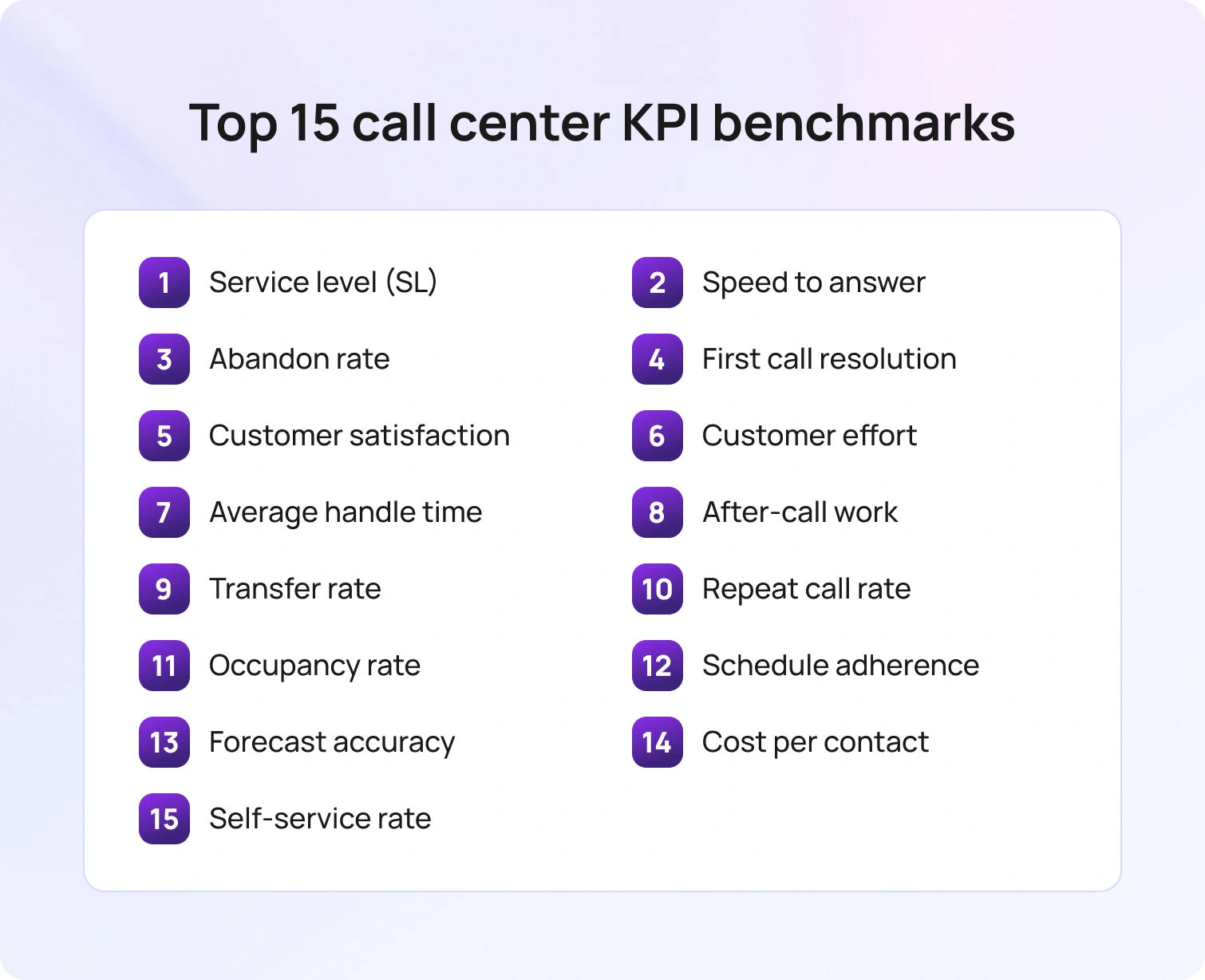
Below are practical call center KPI benchmarks expressed as typical target ranges, not universal rules. Calibrate to your vertical, value segments, and customer journey stage. When in doubt, measure a 90-day baseline, then set targets one notch tighter than your current median.
1) Service level (SL)
What it is: Percent of calls answered within a threshold.
2026 benchmark: Voice queues often sit between 75/30 and 85/20, depending on value and intent. Digital channels should publish response-time SLAs rather than a call-style speed threshold.
Why it matters: SL is your public promise. Hit this, and you cut wait-driven abandonment and poor customer service complaints.
2) Average speed to answer (ASA)
What it is: Time from enter-queue to live answer.
2026 benchmark: 20–40 seconds for voice in mainstream queues; VIP or critical intents trend faster.
Why it matters: ASA influences emotion and primes customer interactions. Long waits spike abandonment rate and repeat calls.
3) Abandonment rate
What it is: The percent of incoming calls that disconnect before being answered.
2026 benchmark: 3–8% for voice after IVR/menu tuning; lower for callbacks. Measure “abandon after X seconds” to remove immediate hang-ups.
Why it matters: Abandonment is a hard cost of delay and a warning light for staffing or menu design.
4) First call resolution (FCR)
What it is: Percent of issues resolved without follow-up or transfer.
2026 benchmark: 70–85% for most call centers, with technical and multi-party cases lower. Track by intent, not centerwide.
Why it matters: FCR drives customer loyalty, reduces repeat volume, and lowers contact center costs.
5) Customer satisfaction (CSAT)
What it is: Post-interaction rating, typically 1–5 or 1–7.
2026 benchmark: 80–90% satisfied on resolved contacts, lower on constrained policies.
Why it matters: CSAT remains the quickest way to assess customer satisfaction at the interaction level.
6) Customer effort score (CES)
What it is: “How much effort did it take to resolve your issue?”
2026 benchmark: Targets vary by scale; aim to keep “difficult” responses below 10–15% on resolved interactions.
Why it matters: CES predicts repeat calls and churn better than satisfaction alone because it captures the effort the average caller invests.
7) Average handle time (AHT)
What it is: Talk + hold + after-call work (ACW).
2026 benchmark: Voice 4–7 minutes for general service; complex tech or regulated queues longer. Chat depends on concurrency and ranges from 6 to 12 minutes per conversation.
Why it matters: AHT converts contact volume into workload and staffing needs. Read it with FCR and quality in mind, so you don’t optimize for speed alone.
8) After-call work (ACW)
What it is: Wrap-up time per contact.
2026 benchmark: 30–90 seconds for mature flows; longer for heavy documentation.
Why it matters: Excess ACW hides process or contact center software issues and reduces agent availability for new calls.
9) Transfer rate
What it is: Percent of contacts moved to another queue or tier.
2026 benchmark: 10–20% for mixed complexity; lower in one-and-done environments.
Why it matters: Transfers extend the customer journey and can signal gaps in routing, knowledge, or agent skills.
10) Repeat call rate
What it is: Share of customers calling back about the same issue within X days.
2026 benchmark: 10–15% for mainstream service when FCR is healthy.
Why it matters: Repeat calls inflate center performance costs and indicate friction with documentation or policy.
11) Occupancy and utilization
What it is: The time agents spend handling work versus waiting.
2026 benchmark: Voice 75–85% occupancy; lower for concurrent chat to avoid overload.
Why it matters: Keeps agents engaged without burnout and protects service quality.
12) Schedule adherence
What it is: A match between planned agent schedules and actual status.
2026 benchmark: 85–92% at the interval level with documented exceptions.
Why it matters: Adherence connects forecasting to reality, ensuring service-level targets remain credible.
13) Forecast accuracy (WAPE/MAPE)
What it is: Error between forecast and actual contacts or workload.
2026 benchmark: Day-level 5–8% for mature voice lines; 10–12% for digital.
Why it matters: Accurate forecasts reduce over-staffing and understaffing, stabilizing response time and agent satisfaction.
14) Cost per contact
What it is: All-in cost divided by the number of contacts handled.
2026 benchmark: Highly variable by industry and channel; the target is a downward trend without harming experience.
Why it matters: Puts operational efficiency and service quality in one view for Finance and Operations.
15) Self-service containment
What it is: Share of intents resolved by IVR, bots, or help center without agent touch.
2026 benchmark: 20–60% depending on automation maturity and intent mix.
Why it matters: High-quality self-service options reduce the number of calls answered and free agents for complex work, lifting FCR on the remaining load.
Call Center KPI Benchmarks by Industry

Every vertical carries different risks, regulations, and emotions. Use these call center KPI benchmarks by industry as starting ranges, then tune them by intent and value tier.
Retail and eCommerce
Customer context: Order status, returns, payments, promotions.
Typical targets: SL 80/20 for voice during business hours, ASA 20–30s, abandonment ≤5%, FCR 75–85%, CSAT 85–90%, CES “difficult” ≤10%.
Notes: High peaks around drops and holidays. Invest in self-service for status and returns to cut repeat calls and raise agent productivity for edge cases.
Banking, Financial Services, Insurance
Customer context: Authentication, fraud, claims, policy changes.
Typical targets: SL 80/20 or faster for high-risk lines, ASA ≤20s on priority, abandonment ≤3–5%, FCR 70–80% with strong compliance notes.
Notes: Transfers may be higher due to entitlements. Tie AHT to quality; rushing increases rework and contact center costs.
Technology and SaaS
Customer context: Setup, billing, troubleshooting.
Typical targets: SL 75/30 for general, VIP faster; FCR 70–85%; AHT can be 7–12 minutes for technical issues; CSAT 85–90%.
Notes: Knowledge freshness and guided workflows are the FCR lever. Track repeat calls within seven days.
Healthcare and Life Sciences
Customer context: Appointments, benefits, medication questions.
Typical targets: SL 80/20 or stricter by regulation, abandonment ≤3–5%, CSAT ≥88% on resolved contacts, transfers controlled by role and privacy rules.
Notes: Compliance extends AHT and ACW; measure empathy and clarity alongside speed to assess customer happiness and service quality.
Travel and Hospitality
Customer context: Changes, disruptions, loyalty.
Typical targets: Highly seasonal. SL flexes by event; ASA 20–40s baseline; FCR 70–80%; abandonment ≤5–8% with virtual hold.
Notes: Proactive messaging reduces spikes. Measure multi-touch journeys rather than single calls in isolation.
Utilities and Telecom
Customer context: Outages, billing, activation.
Typical targets: SL 80/20 normal, surge playbooks for outages; FCR 70–85%; containment high for status updates.
Notes: Separate incident traffic from routine service to prevent benchmarks from blurring during events.
Journey-Lens Benchmarking
Many call centers still look at center metrics in isolation: a voice SLA here, a chat AHT there. In 2026, top programs benchmark the journey:
- Cross-channel FCR. Did the customer get a resolution across the conversation, even if it spanned channels?
- Effort across steps. Use CES to assess how easy the path felt, not just the final call.
- Time to outcome. Replace single-touch averages with “issue start to issue solved” at the intent level.
- Containment quality. Did self-service actually solve the problem, or did it delay an agent interaction and inflate effort?
This lens prevents gaming and aligns targets with the customer journey instead of a siloed queue.
How to Run a Benchmarking Cadence

Think of benchmarking as a tight weekly–monthly rhythm, not a one-off project. You’re building a repeatable loop that compares like with like, turns gaps into owned actions, and shows progress over time. Use the steps below to keep the cadence clear, fair, and relentlessly actionable.
- Define the cohort. Choose the same period last quarter or last year and the same intents.
- Collect clean data. Confirm consistent definitions for calls answered, transfers, repeat calls, and after-call work.
- Compare against references. Use center industry benchmarks plus your own performance history.
- Set target ranges. Publish a floor, target, and stretch per KPI, channel, and intent.
- Attach an action plan. For each gap, assign an owner, a deadline, and the expected impact on customer experience and contact center costs.
Report weekly and monthly. Show trend lines, not snapshots, and include two customer feedback quotes to humanize the data.
Common Pitfalls in Call Center KPI Benchmarking

Benchmarking fails when shortcuts creep in. Guard against these traps so your call center KPI benchmarks stay comparable over time, reflect channel realities, and translate into owned improvements.
- Treating a vendor’s one-size industry average as gospel for your value tiers.
- Mixing definitions across teams so your own performance cannot be trended reliably.
- Optimizing for a single KPI often comes at the expense of others and harms customer interactions.
- Publishing center performance metrics without owners or change logs, which slows improvement.
- Ignoring channel differences. Most call centers need separate targets for voice, chat, email, and messaging.
A 90-Day Plan to Operationalize Benchmarks
Here’s a simple, repeatable rollout that turns benchmarking from a spreadsheet exercise into an operating habit. Use these phases to lock definitions, set targets, and create a weekly rhythm where insights drive action.
Days 1–30: Baseline and definitions
Lock metric definitions, collect twelve months of data, and publish current ranges by channel and top ten intents. Agree on three outcome KPIs for the quarter, such as customer satisfaction score, first call resolution, and abandonment.
Days 31–60: Targets and playbooks
Set floor, target, and stretch for each KPI. Write playbooks for the top five gaps: staffing changes, knowledge fixes, self-service options, and agent training. Turn on a weekly review that shows performance data with one-line causes and one-line actions.
Days 61–90: Measure and iterate
Report call center performance against the new targets, including verbatim customer feedback. Highlight two wins and two risks each week. Adjust targets where the intent mix or seasonality changed. Publish a quarterly “what changed and why” to keep contact center leaders aligned.
How BlueTweak Can Help
BlueTweak makes benchmarking routine. Your channels sit in one workspace, and the core KPIs populate automatically by intent and channel. That includes SL, ASA, abandonment, FCR, CSAT, CES, AHT, ACW, transfers, repeat calls, occupancy, adherence, forecast accuracy, cost per contact, and self-service containment. Leaders see trend lines against floor, target, and stretch, and can pivot from center metrics to underlying conversations in a click.
Clean joins make comparisons trustworthy. APIs and webhooks attach case IDs, intents, brand, language, and queue to every interaction, while AI summaries and sentiment tagging convert raw conversations into structured performance data. That context lets you publish center key performance indicators with one line for the cause, one for the fix, and one for the expected impact, without manual stitching.
Benchmarks become actions, not screenshots. Suggested replies cite the right knowledge article, WFM views align staffing to forecast, SL exposure, and routing rules adjust by intent when repeat calls or transfer rate spike. Teams close gaps with targeted playbooks across staffing, knowledge, and self-service, and BlueTweak tracks outcomes in customer satisfaction, customer effort score, and contact center costs.
If you already own analytics or workforce management software, BlueTweak integrates to keep a single source of truth. If you do not, BlueTweak provides out-of-the-box scorecards, adherence, and intraday views, and intent-level reporting, so you can immediately launch a weekly and monthly benchmarking cadence and measure progress against the 2026 targets outlined in this guide.
Bringing It Together: A Balanced Scorecard for 2026
Great benchmarking pairs numbers with a narrative. Use these call center KPI benchmarks to set intent-level targets by channel, then write short explanations and action plans that tie center KPIs to better customer interactions and lower contact center costs. When you treat benchmarks as a living contract, reviewed weekly, tuned quarterly, you will raise team performance, improve customer satisfaction, and give leaders the clarity they need to invest confidently in call center operations and customer experience.
If you want those call center KPI benchmarks to update automatically and tie directly to actions, BlueTweak brings routing, WFM, knowledge, and analytics into one workspace. Scorecards populate by intent and channel, leaders track trends against targets, and teams get clear next steps. See how it maps to your queues and metrics.

How to Reduce Ticket Volume with Self Service and AI (2026)
Why Reducing Ticket Volume Matters in 2026
In 2026, customers expect instant answers, accurate results, and self-service on every channel. When help is hard to find or feels untrustworthy, simple questions turn into support tickets, queues swell, and confidence dips before the conversation even starts. The shift is structural: most journeys now begin outside your owned surfaces, with 51% of customers starting on third-party platforms like search, YouTube, or ChatGPT. If your content isn’t discoverable and useful there, those queries arrive as tickets from already-frustrated users.
Inside the queue, another gap compounds volume:60% of agents don’t actively promote self-service during interactions, so repetitive questions boomerang back later. Enabling fix-it agents during self-service experience upgrades reduces repeat contacts and protects morale.
Bottom line: lowering support ticket volume isn’t about deflection for its own sake; it’s about removing friction so customers get reliable answers fast, and agents focus on the moments that truly need a human. This article will pinpoint where to start in prioritizing help desk tickets and how to prove impact.
What “Self-Service + AI” Includes (2026)

Self-service only reduces ticket volume when every layer works together: the right content, the right retrieval, and the right handoff. Think of this stack as a closed loop: understand, answer, act, and learn, so most customers solve problems instantly, while complex issues reach the best-equipped human.
Natural language processing (NLP). NLP customer support understands unstructured questions across chat, email, community, and social, so intent, language, and urgency are clear.
Generative AI with grounding (RAG). Drafts accurate first replies from verified knowledge base content and policy, then cites what it used.
AI-powered search. Semantic and vector retrieval return relevant content quickly, improving findability and reducing “no result” dead ends.
Virtual assistants and chatbots. Handle routine tasks and FAQs to deflect tickets, with a clear, respectful path to a human when needed.
Automated ticketing and routing. Applies rules by language, entitlement, and complexity so exceptions land in the right queue with context.
Sentiment and quality analysis. Spots friction early, prevents reopens, and prioritizes threads that need tone-checked coaching or faster follow-up.
System integrations. Connects to product telemetry, billing, CRM, and authentication so self-service can resolve end-to-end actions, not just explain them.
Measurement and feedback. Tracks deflection, search success, and post-self-service CSAT, then feeds insights back into content and assistant skills.
The common thread is precision and auditability. Answers are grounded in approved sources, actions are logged with inputs and variables, and learnings flow into the next iteration, so automation removes work instead of creating more tickets.
12 Proven Use Cases to Reduce Ticket Volume with Self-Service
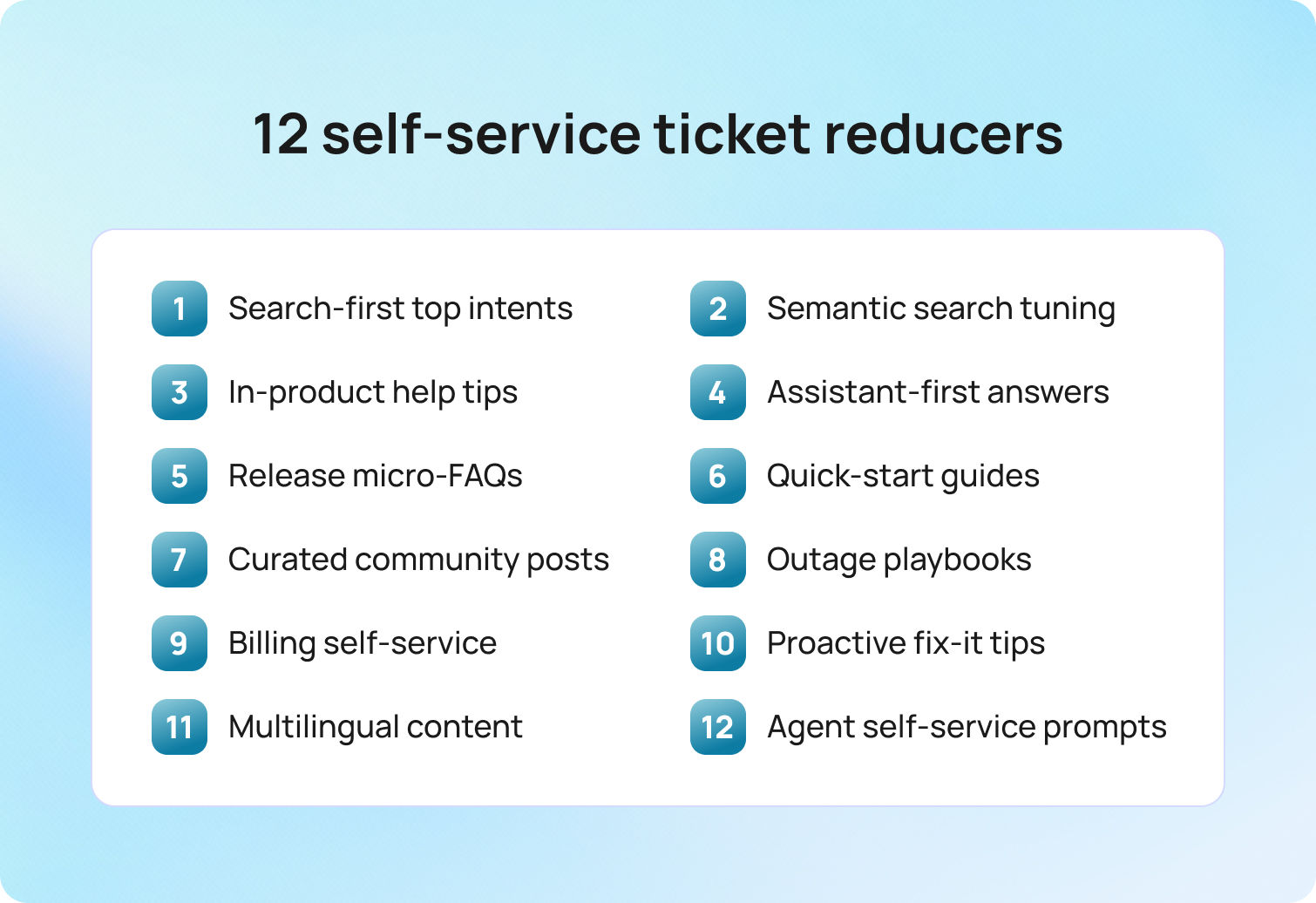
Each use case explains what it is, how it works, why it helps, where BlueTweak fits, and KPIs to track. Use the ones that match your support team and channel mix.
1) Search-first answers for the top 25 intents
What it is
Publish crisp, maintained AI customer support knowledge base (KB) articles for last quarter’s 25 highest-volume intents.
How it works
Each article follows a consistent template: Problem → Short answer → Step-by-step → Edge cases → When to contact support, plus screenshots or a 60-second clip. Add owner + review cadence.
Why it helps
Most customers skim. Clear, structured answers at the top prevent portal/search journeys from turning into tickets.
Where BlueTweak fits
BlueTweak’s smart knowledge base underpins accurate responses, and AI-suggested reply surfaces KB answers to reduce time to first response.
2) AI-powered findability (semantic search + synonyms)
What it is
Vector/semantic search tuned to your taxonomy (product, plan, region) with “did you mean?” and synonym maps.
How it works
Index KB, release notes, and vetted community threads; boost freshness and click-through; instrument “no-result” alerts to drive new content.
Why it helps
Users land on relevant content on the first try, reducing repeat contacts.
Where BlueTweak fits
Use BlueTweak’s AI + API stance and open-to-integration posture to connect your KB/search service and expose results across channels; a suggested reply can surface grounded snippets for agents.
3) Contextual help inside the product
What it is
Inline tooltips, micro-FAQs, and “Need help?” drawers keyed to page/role/state.
How it works
Trigger help based on feature use or errors; surface the exact KB step where confusion spikes; log gaps to your content backlog.
Why it helps
Guides customers without channel-switching and prevents low-complexity tickets.
Where BlueTweak fits
BlueTweak’s API-open approach lets you pipe usage signals into help surfaces and keep answers KB-grounded; agent-side summaries/classification capture context when escalations occur.
4) Assistant-first for simple queries (with human handoff)
What it is
Automation resolves routine questions (“Where’s my invoice?”, “Update my card”, “Reset password”) with a clear path to a person.
How it works
Ground generative answers in approved knowledge base and policy; automate safe actions; escalate when policy or identity checks require humans.
Why it helps
True ticket deflection for repeatable work; agents focus on complex issues.
Where BlueTweak fits
BlueTweak supports AI-assisted replies via suggested replies from the KB, plus automatic routing so escalations land in the right queue with context.
5) Release-note micro-FAQs to preempt spikes
What it is
For every product update, publish a short “What changed?” FAQ (1–3 critical Qs) and link it where users encounter the change.
How it works
Create a KB snippet and agent macro at release; expire or revise in 7–14 days.
Why it helps
Prevents day-one floods from small UX shifts.
Where BlueTweak fits
A smart knowledge base and suggested reply provide agents with ready-to-send guidance; classification/summarization keeps internal context concise during the spike.
6) Visual quick-start guides for new users
What it is
Short “first-10-minute” videos and annotated screenshots that get new users productive fast.
How it works
Embed in onboarding flows and your portal; include “when to escalate” rules to avoid dead ends.
Why it helps
New users resolve basics themselves; agents avoid repetitive walk-throughs.
Where BlueTweak fits
BlueTweak’s knowledge base and suggested replies make these assets reusable across multilingual chat, AI voice bot, and email, ensuring omnichannel consistency.
7) Community answers, curated and surfaced
What it is
Highlight vetted, best-answer community threads for how-to topics and edge cases.
How it works
Moderate for quality; surface alongside KB in search; link from agent macros.
Why it helps
Expands coverage without expanding headcount; reduces long-tail tickets.
Where BlueTweakfits
Use open integration to index curated threads in your search experience and reference them via suggested reply when relevant.
8) Incident playbooks (status + self-service)
What it is
Prebuilt bundles for outages: status copy, top 5 FAQs, IVR/chat prompts, and portal banner text.
How it works
When an alert hits, publish across channels with check-in times; keep a single source of truth that agents and bots reference.
Why it helps
During spikes, clarity deflects the most volume; consistent messaging reduces confusion.
Where BlueTweak fits
BlueTweak is API-open and integration-friendly for ingesting signals; automatic routing and summaries help frontline teams keep responses aligned.
9) Billing & account self-service (guard-railed)
What it is
Self-service flows for safe account tasks (download invoice, update payment method, change address), with a human path for exceptions.
How it works
Automate allowed actions; route policy-sensitive or identity-sensitive cases to agents.
Why it helps
Removes a large chunk of repetitive inquiries; reduces back-and-forth.
Where BlueTweak fits
Use knowledge base-grounded suggested replies for explanations and automatic routing for exceptions; AI summaries speed approval workflows.
10) Proactive “fix-it” tips based on behavior
What it is
Contextual nudges that say “We noticed X—here’s the fix,” delivered in-app or by email.
How it works
Use telemetry to detect common misconfigurations and map each to a KB step or a simple flow.
Why it helps
Solves issues before frustration peaks; prevents avoidable tickets.
Where BlueTweak fits
BlueTweak’s AI + API stance supports tying product signals to knowledge base guidance; classification/summarization keeps agent handoffs crisp if users still escalate.
11) Localization & glossaries for multilingual self-service
What it is
Translate the top 50 articles and common intents; protect brand terms with a glossary.
How it works
Serve localized KB to searchers; preserve terminology; ensure a clear “talk to a person” path for edge cases.
Why it helps
Removes language as a driver of high volume; reduces rework and reopens.
Where BlueTweak fits
BlueTweak provides real-time customer support, AI translation, and language-aware routing (via automatic routing), so escalations land with the right team.
12) Agent enablement to promote self-service
What it is
Prompts, macros, and coaching so agents consistently link the right article/guide.
How it works
Replies include a one-paragraph summary plus “learn more”; train on when to use self-service vs human handling.
Why it helps
Closes the promotion gap, reduces repeat contacts, and improves the support experience.
Where BlueTweak fits
Suggested reply inserts knowledge base-grounded drafts; edit logs and analytics (WFM/analytics support) show adoption and outcomes across channels.
Implementation Roadmap (90 Days)
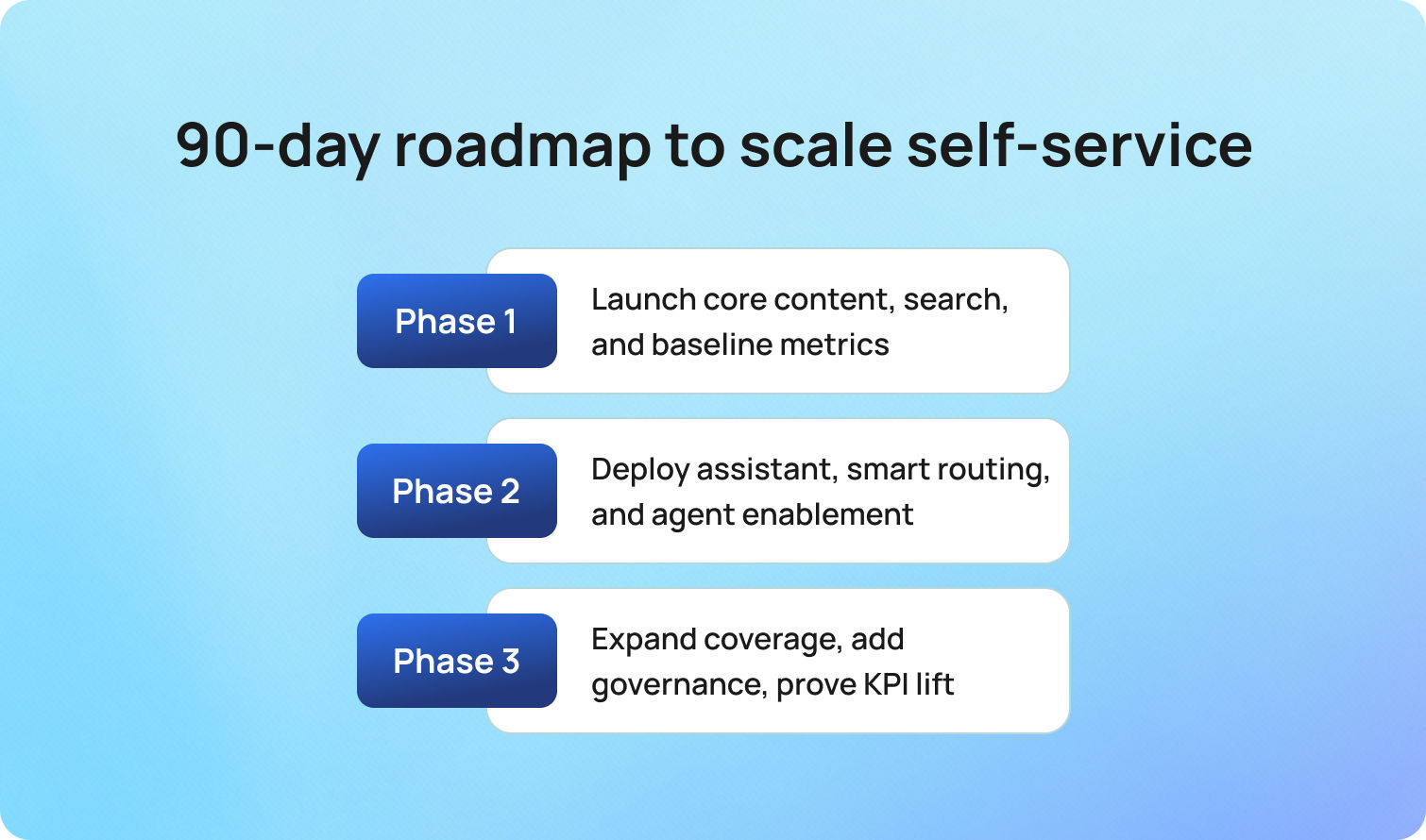
Set the foundation so self-service actually deflects work: ship the must-have content, make it findable, and instrument the basics. In four weeks, you’ll have a measurable baseline and the core loop: content → search → assist → escalate—running end to end.
Phase 1 — Foundations (Weeks 1–4)
- Ship top 25 intents: publish/refresh KB articles + agent macros; add owners and review dates.
- Turn on AI search and analytics; set up no-result alerts to Slack/Jira.
- Add contextual help to 5 friction pages (tooltips/micro-FAQs linked to KB).
- Baseline dashboard: ticket deflection, support ticket volume by intent/channel, CSAT, search success.
Phase 2 — Assist & Escalate (Weeks 5–8)
- Launch assistant for 10 intents with a clear “talk to a person” path; cite KB in replies.
- Enrich routing by language/complexity/entitlement; attach transcript + steps-tried on escalation.
- Enable agents with macro packs and coaching to consistently promote self-service.
Phase 3 — Scale & Govern (Weeks 9–12)
- Localize top 50 articles/intents; enforce glossary and language-aware routing.
- Stand up governance: owners, SLAs, edit/audit logs, and a monthly “what we prevented” report.
- Publish an exec readout with before/after KPIs and next-quarter backlog.
Weekly scorecard: deflection rate, support ticket volume, search success/no-result queries, FRT/FCR on escalations, CSAT after self-service.
Measurement That Ties to Business Outcomes in 2026
Treat measurement as an intent-level story: what customers tried, where self-service resolved the need, and where handoffs or content gaps created avoidable work. Track these narratives over time so CX, Product, and Finance can act on patterns.
- Ticket deflection rate (resolved via article/assistant/community without a ticket).
- Support ticket volume by intent/channel/language.
- FCR and average resolution time (proves clean handoffs when human intervention is needed).
- CSAT & sentiment after self-service and after resolution.
- Search success rate and no-result queries (fuel the backlog).
- Work avoided (articles/assistant usage vs tickets), cost-to-serve per 1k active users.
Common Pitfalls to Avoid

Even strong programs stumble when measurement, governance, or handoffs are fuzzy; align teams on clear definitions and standards so self-service removes work without eroding trust.
- Treating generic auto-replies as deflection; count only issues truly resolved without an agent.
- Allowing poor discoverability, articles that don’t rank or surface in-product still drive tickets.
- Skipping agent enablement; provide macros and coaching to consistently promote self-service.
- Letting content go stale; retire or update and keep owned knowledge clusters current.
- Automating without a human path; ensure an accessible handoff for edge cases and sensitive topics.
- Over-automating complex journeys; reserve skilled agents for higher-risk issues that affect the brand.
Future Outlook: 2026 and Beyond
Self-service is moving from a help center destination to an in-product, moment-of-need layer. Assistants will feel less like clever text and more like governed systems. Answers will be grounded in verified content, actions will be gated by policy, and every step will be logged for audit. The practical outcome is fewer tickets created in the first place because guidance appears exactly where users stumble and can execute safe fixes, not just explain them.
Discovery continues to shift away from owned surfaces. A majority of customer service journeys now start on third-party platforms such as Google, YouTube, and ChatGPT, which means findability and source-of-truth governance matter as much as the prose itself. Meeting customers where they begin is the most reliable way to cut volume before a ticket is opened.
Compliance and sovereignty move from afterthought to design input. The EU AI Act phases in transparency and record-keeping obligations from 2026 to 2027, which pushes teams to demonstrate how an answer was produced and which sources and variables were used. In parallel, cloud providers are expanding sovereign options within the European Union, including AWS's European Sovereign Cloud, which went live in Germany in January 2026. Channel mix keeps tilting toward digital first. Customer service leaders expect self-service and live chat to overtake phone and email in perceived business value within the next two years. That elevates knowledge management, AI-powered retrieval, and clean human handoff from add-ons to core operating capabilities.
Conclusion
The best path to reducing support tickets is practical and measurable: ship high-quality content, make it findable, embed self-service options in-product, and use AI assistants with safe escalation. Track deflection, search success, CSAT, and support ticket volume by intent. With the right foundation, you’ll see fewer tickets, faster first replies, happier support staff, and a better support experience for customers.
BlueTweak brings routing, translation, AI summaries, proposed replies, and reporting into one workspace, so your customer support team can reduce ticket volume while keeping humans on the hardest problems. Book a demo to find out more.

Transforming Customer Support: Best Practices for 2026
Updated in January 2026
The customer support landscape is evolving at a rapid pace, driven by new technologies, shifting customer expectations, and a growing focus on efficiency. In 2026, businesses must adapt to these changes to stay competitive.
Key Best Practices for Customer Support in 2026
- Embrace AI and Automation for Efficiency
Artificial intelligence and automation are no longer optional — they are essential tools for streamlining customer support operations. In 2026, businesses will rely heavily on AI-driven chatbots and virtual assistants to handle a wide range of customer inquiries. These tools can provide instant responses to common questions, process transactions, and guide customers through troubleshooting steps, all without the need for human intervention. When AI handles routine tasks, human agents are freed up to tackle more complex issues, leading to faster resolution time and a better overall experience for customers.
Beyond chatbots, AI can also analyze large amounts of data to predict customer behavior, identify emerging issues, and suggest proactive solutions. This predictive capability allows businesses to anticipate customer needs and reach out before problems escalate, further enhancing the customer support experience.
- Implement Omnichannel Support for Seamless Interactions
Today’s customers expect to interact with businesses across multiple channels, including email, social media, live chat, and phone. In 2026, this expectation is more pronounced, with customers switching between channels during a single interaction. To meet these needs, businesses must implement omnichannel support platforms that allow agents to seamlessly manage interactions across all channels from a unified interface.
Omnichannel support ensures that no matter where or how a customer reaches out, they’ll receive consistent, personalized assistance. Whether a customer starts a conversation via social media and continues it through email or phone, their issue will be handled without the need to repeat information. This level of continuity builds trust and improves the efficiency of the support process.
Read more about: Enhancing Customer Satisfaction: The Power of Omnichannel Customer Support Platforms
- Empower Support Agents with the Right Tools
While automation will handle many tasks, human support agents will continue to play a crucial role, particularly for more nuanced customer issues. In 2026, businesses must ensure that agents are equipped with the tools and resources they need to resolve problems effectively. This includes comprehensive knowledge bases, advanced customer relationship management (CRM) systems, and AI-driven analytics that provide real-time insights into customer behavior.
Moreover, training will be vital. Businesses must invest in regular training to ensure agents are up to date on new tools, technologies, and best practices in customer support. Providing agents with these resources not only helps them resolve issues more quickly but also improves their job satisfaction by enabling them to handle challenging cases more effectively.
Read more about: Communication Mastery: Best Practices for Agents in Customer Support Interactions
- Proactive Customer Support for a Future-Ready Experience
One of the most important trends and best practices in customer support for 2026 is the shift towards proactive service. In the past, businesses often waited for customers to reach out with issues. In the future, companies will use predictive analytics and AI to anticipate potential problems and address them before customers even notice.
For example, a company might proactively contact a customer about an order delay, offering alternatives or solutions before the customer has a chance to complain. This proactive approach builds trust, reduces customer frustration, and demonstrates a commitment to providing exceptional service. Companies that excel at proactive support will be able to differentiate themselves in a crowded marketplace.
Read more about: How to Transform Your Customer Service: Best Practices
The future of customer support is centered around efficiency, personalization, and innovation. By embracing best practices in customer support like AI, omnichannel platforms, and proactive service models, businesses can transform their customer support operations and deliver exceptional experiences.

The Future of Customer Support: 6 Trends to Watch in 2026
Updated on January 2026
Customer support is entering a new era of technological advancements and evolving customer expectations. The year 2026 is expected to bring several transformative customer support trends that will redefine how businesses approach customer service. Companies looking to stay competitive must prepare to adopt these trends to enhance customer experience, increase efficiency, and drive loyalty.
1. AI-Driven Personalization
Artificial Intelligence (AI) will play a pivotal role in offering hyper-personalized customer support by analyzing real-time data and customer behavior. AI systems can learn from customer interactions to deliver more tailored responses, anticipate needs, and provide support that feels individualized.
How to implement:
- Leverage Customer Data: Collect and organize customer interaction data from various channels (email, social media, chat) to feed into AI algorithms.
- Adopt AI-Powered CRM Tools: Choose a customer relationship management (CRM) system with AI capabilities that can automatically personalize responses based on past interactions, preferences, and real-time behavior.
- Test and Refine: Continuously monitor AI-driven personalization to ensure accuracy and relevance. Regularly update algorithms with new customer data to keep responses fresh and timely.
By implementing AI-driven personalization, businesses can deliver more engaging, relevant support experiences that reduce response times and improve satisfaction.
Read more about: The Evolution of Customer Support Technology: From call centers to AI
2. Increased Use of Chatbots
Chatbots have evolved from handling basic tasks to managing more complex customer service inquiries. Customer support trends in 2026: they will be equipped with advanced AI, allowing them to resolve nuanced issues and free up human agents for more critical interactions.
How to implement:
- Choose an Advanced Chatbot Solution: Look for chatbots that offer machine learning capabilities and can handle both common and sophisticated customer queries.
- Integrate with Your CRM System: Ensure that the chatbot has access to customer data and past interactions to provide personalized and informed responses.
- Design a Seamless Handover Process: Ensure that when a chatbot reaches the limits of its capabilities, it can seamlessly transfer the conversation to a human agent without frustrating the customer.
By empowering chatbots to take on more complex tasks, companies can offer faster, more efficient customer support at all hours, improving both customer satisfaction and operational efficiency.
Read more about: The Evolution of Chatbots: Enhancing Customer Support with AI
3. Voice-Powered Support
Implementing voice-powered support not only offers convenience but also positions your company as a forward-thinking player in customer service innovation.
How to implement:
- Develop Voice Assistant Skills: Create custom skills or actions for voice assistants that align with your support services. These should include FAQs, order status updates, and troubleshooting steps.
- Integrate with Support Systems: Ensure that your voice assistant is connected to your customer support databases and can pull relevant information like order details, troubleshooting guides, or customer records.
- Optimize for Natural Language Processing (NLP): Ensure your voice-powered support is designed for conversational interactions, allowing customers to communicate naturally and still receive accurate responses.
Read more about: Voice vs. Text in Customer Support Service: Choosing the right medium for your audience
4. Proactive Support Systems
Proactive support systems anticipate customer issues before they occur and provide solutions without the need for customers to reach out. These systems use predictive analytics to identify potential problems and suggest resolutions preemptively.
How to implement:
- Invest in Predictive Analytics Tools: Use AI tools capable of analyzing customer data trends and predicting future issues. For example, if a user’s device is prone to failure, trigger an alert with troubleshooting instructions.
- Automate Proactive Outreach: Set up automated systems that send notifications or prompts to customers with potential solutions before a problem escalates.
- Monitor and Adjust: Track the effectiveness of your proactive support system and continuously refine your predictive models to increase accuracy.
By implementing proactive support systems, businesses can prevent customer frustration and reduce support ticket volumes, leading to higher satisfaction and loyalty.
Read more about: The Art of Proactive Customer Service: Enhancing the Customer Journey
5. Security
Blockchain technology is an important trend in customer support because it offers enhanced security and transparency, ensuring your customer’s data is well-protected and fostering trust in your company’s handling of sensitive information.
How to implement:
- Adopt Blockchain Solutions for Customer Data: Partner with vendors that offer blockchain-based data protection solutions to safeguard customer information.
- Educate Your Team and Customers: Provide training on blockchain’s benefits in data security to both your support teams and your customers to build trust in the technology.
- Integrate with Existing Support Systems: Ensure blockchain technology works in tandem with your current support platforms, enhancing data security without disrupting workflows.
6. Self-Service Evolution
Self-service options are evolving, with AI playing a key role in empowering customers to resolve more complex issues on their own. AI-driven knowledge bases, smart FAQs, and virtual assistants will make self-service more intuitive and effective.
How to implement:
- Enhance Knowledge Bases with AI: Develop AI-driven knowledge bases that can learn from user queries and update themselves to address new issues and customer needs.
- Deploy Virtual Assistants for Self-Service: Implement virtual assistants that can guide customers through complex tasks, offering suggestions and solutions in real-time.
- Analyze Customer Interactions: Continuously review how customers use self-service options and refine them to ensure they remain relevant, user-friendly, and effective.
Evolving self-service options give customers the autonomy to solve their own issues, reducing the need for human support and improving overall efficiency.
The future of customer support is fast approaching, driven by technological innovations and heightened customer expectations. By adopting customer service trends such as AI-driven personalization, enhancing chatbot capabilities, incorporating voice-powered support, and embracing proactive and immersive technologies, companies can provide exceptional customer experiences. Additionally, investing in blockchain for security and evolving self-service options will further elevate customer support strategies. Implementing these trends thoughtfully will allow businesses to stay ahead of the competition, offering cutting-edge customer service in 2026 and beyond.

Navigating the Future: Customer Support Trends for 2026
Updated in January 2026
In the ever-evolving landscape of business, customer support stands at the forefront as a crucial element for success. As we step into 2026, the winds of change continue to reshape the customer support industry. Technological advancements, shifting consumer expectations, and a renewed focus on personalized experiences are steering the course for customer support trends in the coming year. In this comprehensive article, we'll explore the key trends that are set to define customer support in 2026 and how businesses can adapt to stay ahead in this dynamic environment.
- Artificial Intelligence (AI) and Machine Learning (ML) Dominance
As we move forward, the integration of AI and ML into customer support processes will become more pronounced. These technologies enable businesses to automate routine tasks, allowing human agents to focus on more complex and emotionally charged interactions. Chatbots, powered by AI, will play a pivotal role in handling initial customer queries, providing instant responses, and guiding users through simple problem-solving processes. Machine learning algorithms will continuously improve as they analyze vast amounts of customer data, leading to more accurate predictions and enhanced personalization.Read more:Transforming Customer Service: The Rise of Automation and AI
- Augmented Reality (AR) and Virtual Reality (VR) Revolutionizing Support
The lines between physical and digital experiences are blurring, and AR and VR technologies are becoming integral to the customer support journey. In 2026, we can expect businesses to leverage AR for remote assistance, allowing support agents to virtually guide customers through troubleshooting processes. VR, on the other hand, will find applications in immersive training programs for support staff, enhancing their skills and empathy in handling complex customer issues.
- Rise of Omnichannel Support Experiences
The era of siloed customer support is giving way to a more integrated and seamless omnichannel experience. Customers now expect to transition effortlessly between various communication channels, be it social media, chat, email, or phone, without losing the context of their interactions. In 2026, businesses that successfully implement and synchronize omnichannel support will gain a competitive edge, ensuring consistent and personalized experiences across all touchpoints.Read more:Revolutionizing Customer Support: A Guide to Implementing Omnichannel Solutions
- Emphasis on Proactive Customer Support
Anticipating customer needs before they even arise will be a key focus in 2026. Proactive customer support involves leveraging data analytics and AI to identify potential issues and address them before customers reach out for assistance. Whether it's predicting product malfunctions, providing timely updates, or offering personalized recommendations, businesses will strive to stay one step ahead of customer expectations.
- Human-Centric AI Integration
While AI technologies continue to advance, the importance of human touch in customer support remains irreplaceable. In 2026, businesses will focus on creating a harmonious blend of AI-driven automation and human interaction. Rather than replacing human agents, AI will enhance their capabilities, enabling them to deliver more personalized and empathetic support. Striking the right balance between technology and human touch will be crucial for building trust and loyalty. - Enhanced Data Security Measures
As customer support becomes more reliant on technology, the need for robust data security measures is paramount. With an increasing number of cyber threats, customers are more conscious than ever about the safety of their personal information. In 2026, businesses will invest heavily in advanced cybersecurity measures, ensuring that customer data is protected throughout the support journey. Transparent communication about security protocols will also become a key aspect of building trust with customers.
- Environmental Sustainability in Customer Support Practices
Sustainability is no longer confined to product development and corporate policies; it's extending its reach to customer support practices. In 2026, businesses will prioritize eco-friendly initiatives, such as paperless communication, energy-efficient technologies, and reduced carbon footprints in their support operations. Customers are becoming increasingly environmentally conscious, and aligning customer support practices with sustainable values can enhance brand reputation and customer loyalty.
8. Personalized Customer Experiences
As data analytics and AI capabilities continue to mature, the quest for personalized customer experiences will reach new heights in 2026. Businesses will leverage customer data to create hyper-personalized interactions, tailoring support experiences based on individual preferences, behaviors, and histories. Whether it's recommending products, anticipating needs, or addressing concerns, the era of one-size-fits-all customer support is giving way to a more customized and responsive approach.Read more:Crafting a Personalized Customer Experience: A Path to Brand Loyalty and Success
- Continuous Training and Upskilling for Support Teams
The dynamic nature of customer support requires support teams to adapt to new technologies and evolving customer expectations. In 2026, businesses will prioritize continuous training and upskilling programs for their support staff. This includes training on the latest technologies, communication skills, and emotional intelligence. Empowered and well-trained support teams will be better equipped to handle diverse customer queries and contribute to positive customer experiences.
- Voice Recognition Technology for Enhanced Customer Interactions
The year 2026 holds a plethora of opportunities and challenges for the customer support landscape. Businesses that embrace technological advancements, prioritize customer-centric approaches, and adapt to changing consumer expectations will thrive in this dynamic environment. As AI, AR, VR, and other innovations reshape the support landscape, the human touch remains at the core of exceptional customer experiences. By staying attuned to emerging trends and proactively evolving their strategies, businesses can navigate the future of customer support with confidence and success.Read more:Customer Experience Management: The Key to Building Lasting Relationships
The year 2026 holds a plethora of opportunities and challenges for the customer support landscape. Businesses that embrace technological advancements, prioritize customer-centric approaches, and adapt to changing consumer expectations will thrive in this dynamic environment. As AI, AR, VR, and other innovations reshape the support landscape, the human touch remains at the core of exceptional customer experiences. By staying attuned to emerging trends and proactively evolving their strategies, businesses can navigate the future of customer support with confidence and success.
How To Create Results Driven Customer Support Report (2026)
Why a Customer Support Report Matters in 2026
Customers still judge brands by how quickly and clearly they resolve issues. Leaders, meanwhile, expect support to inform growth, not just handle tickets. A well-designed customer support report connects those goals by showing what changed, why it changed, and what to do next.
Your report turns customer interactions into decisions. It highlights where experience slipped, which queues or intents drove ticket volume, and which fixes will raise satisfaction and reduce effort. Think of it as a monthly operating review for service, written for executives and managers who need outcomes, not screenshots.
Context matters in 2026. More than half of customer service journeys now begin on third-party platforms such as Google, YouTube, and ChatGPT, which means reporting must track what customers try before they ever reach you and whether your answers are discoverable.
Executives are also asking for proof that AI investments improve the customer experience and the cost to serve. Only about one in eight CEOs reports seeing both revenue gains and cost reductions from AI to date, which raises the bar for reports that link support actions to business results.
Use the rest of this article to define the metrics that matter, adopt a practical customer service report template, and build a repeatable reporting process that drives action across the company.
What a Customer Support Report Is and What It Is Not

A customer support report summarizes customer pain points, inquiries, requests, and team outcomes over a specific period, enabling leaders to make informed decisions. It is not a data dump or a screenshot collage. It is a curated narrative that combines a few essential metrics with context, trends, and next steps. It should be fast to assemble from your customer service software, easy for non-support stakeholders to read, and actionable for individual team members and managers.
You will likely produce several customer support reports across timeframes. A weekly quick view to steer the queue. A customer service monthly report sample for leadership. A quarterly view that connects service reporting to product quality and retention.
7 Principles for Effective Customer Service Reports

Great reports do more than recap numbers. They clarify what changed, explain why it matters to customers and the business, and point to specific actions that will raise performance next month. Use the principles below to keep your reporting credible, readable, and relentlessly outcome-focused.
1. Start with purpose
Every customer service report should answer three questions: what happened, why it mattered, and what we will do about it. Stating the goal up front keeps the narrative tight and prevents a slide deck of disconnected charts.
2. Keep the signal high
Select key customer support metrics that reflect outcomes rather than activity. Replace vanity raw numbers with rates, targets, and comparisons so leaders can judge impact at a glance.
3. Write for skimmers
Executives need a quick overview, managers need details by queue, and analysts need links to raw data. Organize the report so each reader can find the layer they need in seconds.
4. Tie results to action
Attach an owner, deadline, and measurable final step to every finding. Close the loop in next month’s report so teams can track progress and learn what actually moved the needle.
5. Compare like with like
Show changes against the same period last month or last year to remove seasonality and campaign noise. Consistent baselines make trends trustworthy.
6. Humanize the data
Pair charts with two or three verbatim quotes from customer feedback. Real voices anchor the story, reveal context you will not see in aggregates, and remind the team why the work matters.
7. Show the cost and the benefit
Balance efficiency and quality. Present handle time and throughput alongside customer satisfaction, first contact resolution, and reopen rates, so support is not reduced to speed alone.
The Customer Service Reporting Process in 2026

A simple, repeatable customer service reporting process will save hours and raise quality.
Plan: Define the audience and the reporting period. Confirm whether the goal is to reduce support ticket volume, speed average response time, increase customer satisfaction, or all three.
Collect: Pull raw data from your customer service software for tickets created, contact resolution, initial response, average time to close, resolution rates, customer effort score, net promoter score, and customer satisfaction score. Export by channel and language.
Clean and segment: Categorize customer issues by product area, topic, and severity. Attach revenue or active user segments if available, so insights map to business impact.
Analyze: Identify the top drivers for spikes in ticket volume, slow response time, or drops in satisfaction scores. Compare to the same period to validate whether a change is meaningful.
Explain: Write findings in plain language. Include the “why” behind each pattern and the operational or product change that will address it.
Act: Propose an action plan with owners and deadlines. Flag items that belong to product or engineering.
Review and publish: Share the draft with the customer service team for accuracy, then circulate to stakeholders and archive the customer service reports so you can trend results over time.
10 Essential Metrics to Include in the Report

These are the backbone of an effective customer service report. Pick the ones that align with your customer service strategy and goals.
- Customer satisfaction
Include the customer satisfaction score, trend lines, and a few quotes. Segment by channel, intent, and language to find pressure points. Show customer satisfaction levels in relation to the changes you made.
- Net Promoter Score
Include the Net Promoter Score if your company collects it. Keep the commentary short and focus on the top two drivers of detractors.
- Customer Effort Score
“How much effort did it take to resolve your issue?” Low effort correlates with loyalty and fewer follow-up contacts. Pair customer effort score with contact resolution for a balanced view.
- Ticket volume and mix
Report ticket volume by intent, channel, and severity. Highlight the top new intents or surges that generated high-ticket volume. Show what moved to self-service if you track deflection.
- Response and resolution
Show initial response and average response time, plus resolution times and resolution rates. Segment by queue and product to make gaps clear. Link to the staffing plan if queues slip.
- First contact resolution
FCR is the heartbeat of customer service performance. Improvements here usually correlate with higher customer satisfaction and lower costs.
- Quality and reopens
Include reopen rates and defect tags that indicate a product quality issue. High reopens suggest content, policy, or training gaps for support agents.
- Escalations and handoffs
Show the percent escalated, which teams received them, and the impact on team performance and the support experience. Handoffs are useful when justified and harmful when overused.
- Cost and productivity
Add cost per support ticket if Finance provides it. At a minimum, track resolved per support agent hour. This is critical for performance reviews and capacity planning.
- Employee satisfaction
Include one line on employee satisfaction or burnout signals. Happy, supported people deliver better service and protect team morale.
The Anatomy of a Customer Support Report Template

Use this outline to create a repeatable customer service report template that your customer support team can ship every month without drama. You can adapt it into a customer support report template for weekly and quarterly views.
Title
Customer Support Report for [Month, Year]
Reporting period
Dates covered and the comparison period.
Executive summary
Three to five bullet points with key findings and the action plan in miniature.
Scorecard
A one-page visual summary of key metrics: ticket volume, average response time, initial response, resolution times, FCR, customer satisfaction score, customer effort score, and net promoter score. Show current values, change vs the same period, and target.
Volume and intent
Top intents and their trend, with notes on product releases or campaigns. Call out any surge in customer requests that produced spillover into other queues.
Quality and experience
CSAT, CES, and NPS trends with short commentary and two quotes from customer feedback. Include a short note on unhappy customers and what is being done to address them.
Operations and staffing
Throughput per support agent, coverage by hour and region, and queue health. Call out outstanding performance from individual agents or individual team members. Include any updates for new hires and training.
Defects and product signals
Top issues linked to product quality or documentation gaps. Present the fastest fixes and expected impact on customer experience.
Action plan
Owner, due date, and expected outcome for each item. This is where continuous improvement becomes real.
Appendix
Breakouts by channel, language, and segment, plus raw data links. Include a customer service report sample chart or customer service monthly report sample page so stakeholders know what “good” looks like.
If you want a formatted starter, create two variants: a narrative customer service report for executives and a visual customer service report template for recurring ops reviews.
How To Write a Customer Service Report That People Read
Start with the narrative before you drop charts. Explain what changed, what it means, and what will happen next. Replace jargon with plain language. Keep charts simple and consistent across customer service reports so trends are easy to compare.
Choose a single time grain per section. If your reporting period is monthly, show monthly trends and reserve daily charts for incident analysis. Always label charts with the target, not just the actual.
Annotate the obvious questions. For example, why did average response time improve while customer satisfaction dipped? Tie the answer to observable events or customer interactions, not guesswork.
Close with gratitude and a medal moment. Recognize outstanding performance from the support team. This keeps the report from becoming purely mechanical and reinforces behaviors you want to scale.
Turning Data Points Into Decisions
You do not need fifty charts to run a great review. You need three things. A clear goal, such as raising customer satisfaction by 2 points or lowering support ticket volume by 10%. Three or four key metrics that prove progress. And a documented action plan that is easy to track next month.
When choosing metrics, pair quality and efficiency. For example, customer satisfaction score and average response time. Or contact resolution and customer effort score. This balance prevents gaming and keeps the customer experience central.
Add a brief risk log. If CSAT rises but reopens with a spike, you may be celebrating incomplete fixes. If ticket volume drops but deflection quality is poor, you may be pushing work to other users or out to social. The report should help you spot tradeoffs early.
Pitfalls to Avoid
Overweighting activity over outcomes will bury your signal. Resist the temptation to list everything your support team did. Focus on what changed for customers and what will change next.
Copying and pasting from your customer service software without commentary will not help anyone make decisions. The tool provides graphs. Your report provides meaning.
Leaving out a real customer service report template guarantees chaos. Standardize once so the team can ship consistently and spend their energy helping customers, not formatting slides.
Ignoring the audience will slow adoption. Executives need decisions and risk. Managers need coaching insights. Analysts need the raw numbers. Make one anchor report, then generate views for each reader.
How BlueTweak Helps
BlueTweak gives you the plumbing and the panels to turn reporting into action. It unifies a multilingual chatbot, AI voicebot, email, and SMS so tickets, intents, and outcomes land in one place. That means your customer support report pulls from a single source of truth rather than four disconnected tools.
Classification and summaries convert raw conversations into clean data. Automatic language and intent tagging, AI ticket summaries, and sentiment signals make it easier to group issues, see drivers, and explain movements in CSAT, FCR, and resolution time without manual rework.
Suggested reply and knowledge usage show what content actually helped. Because replies are grounded in your knowledge base and logged, you can track which articles were suggested and sent, then connect that usage to deflection, reopen rates, and effort.
WFM and standard analytics keep operations visible. Leaders can review staffing, SLA attainment, first-response speed by channel and language, and occupancy, then include the highlights in the monthly report with links back to live dashboards.
APIs and webhooks connect the report to your systems. BlueTweak’s open approach lets you enrich tickets with product or billing context and push summarized insights to your warehouse, so Finance and Product can drill without chasing screenshots.
Governance comes built in. Role-based access, audit logs, and edit history support a defensible reporting process in which numbers can be traced to their sources and updates are documented.
Conclusion
A customer support report that drives results is a disciplined monthly habit. Set a clear purpose, use a consistent customer service report template, and focus on outcomes that matter to customers and the business. Pair efficiency and quality metrics, add a concise action plan, and publish on a reliable cadence. Over time, you will reduce support friction, raise customer loyalty, and turn support into a strategic lever for business growth.
BlueTweak can accelerate every step. It centralizes data, adds an AI-ready structure, and gives leaders the dashboards and guardrails to move from numbers to decisions. See how it fits your stack and workflows. Book a 15-minute BlueTweak demo.

10 Best Ecommerce Help Desk Software Options in 2026
E-commerce customers expect fast, personalized support wherever they shop, whether that's email, live chat, social media, or messaging apps. But many support teams are still juggling disconnected desk tools, multiple business systems, and rising ticket volumes that slow down agents and frustrate customers.
The best e-commerce help desk software brings every support conversation into one place, helping teams automate repetitive tasks, improve agent efficiency, and deliver consistent customer experiences at scale. Platforms like BlueTweak combine omnichannel support, AI-powered automation, workforce management, and customer self-service capabilities in a single solution, making it easier for growing e-commerce businesses to resolve customer issues without adding operational complexity.
In this guide, we compare the best e-commerce help desk software for 2026, covering pricing, features, AI capabilities, and integrations so you can find the right platform for your business.
Why Generic Help Desk Software Falls Short for E-commerce
Choosing e-commerce help desk software isn't just about finding a platform with a Shopify integration. It's about selecting a customer support solution that's built for the realities of online retail.
Many traditional help desk tools were originally designed for general business support. While they may offer basic ticket management and a handful of e-commerce integrations, they often struggle with retail-specific workflows such as order tracking, returns, exchanges, and high-volume customer inquiries. Support teams are left switching between multiple platforms, manually checking order information, and responding to repetitive questions that could easily be automated.
The best e-commerce help desk software combines omnichannel communication, intelligent ticket routing, AI-powered automation, and customer self-service in one platform. Features like knowledge base articles, live chat support, customer sentiment analysis, and workflow automation help e-commerce teams resolve customer issues faster while improving service level agreements and reducing support costs.
The platforms below go beyond basic ticketing to deliver dedicated support for modern e-commerce businesses, helping agents work more efficiently while giving customers faster, more consistent experiences.
Signs You've Outgrown Your Current Help Desk Software
Every e-commerce business reaches a point where basic customer support software starts holding the team back. As order volumes grow and customers expect faster, more personalized service across every channel, disconnected support tools create bottlenecks that impact both agent productivity and the customer experience.
If any of the challenges below sound familiar, it's probably time to invest in e-commerce help desk software that's built for retail workflows rather than generic ticket management.
Common Triggers Pushing Teams Toward Specialized E-Commerce Help Desk Software:
1. Fragmented Tools Creating Chaos
Fragmented support tools create unnecessary work; agents switch between email, a shared inbox, WhatsApp Web, Instagram, your e-commerce platform, and other business systems just to answer a single customer inquiry. Your support team toggles between email, a basic shared inbox for chat, WhatsApp Web for messaging, Instagram for DMs, and your e-commerce store admin panel for order lookups. Instead of resolving issues quickly, they waste valuable time copying information between platforms. Modern help desk software should centralize every support conversation, automatically surface order history, and route tickets to the right team.
2. Missing E-Commerce Platform Integrations
Your current help desk lacks native Shopify, BigCommerce, or WooCommerce apps pulling customer profile details and purchase history. Agents ask customers to repeat order numbers and shipping addresses already in your system. You need e-commerce help desk software that automatically populates order details in tickets.
3. Limited Social Coverage
Customers message you through Instagram, Facebook, WhatsApp, and TikTok, but your desk software only handles email and basic chat. Social customer messages go unanswered because they don't flow into your ticketing system. You need multichannel support that covers where customers actually engage with your business.
4. Manual WISMO and Returns
Basic inquiries flood your support channels daily. Agents manually check tracking, copy-paste shipping updates, and process returns through repetitive steps. You need workflow automation handling routine inquiries with AI agents while escalating edge cases to human agents with full context.
4. AI That Doesn't Understand Retail
Generic chatbots often struggle with returns, exchanges, shipping policies, or product questions because they aren't grounded in your knowledge base articles. The best e-commerce platforms combine advanced AI features with knowledge-base grounding, customer sentiment analysis, and intelligent ticket routing to help agents resolve customer issues faster while maintaining accuracy.
Essential Features to Look For When Evaluating E-Commerce Help Desk Software:
- Order-aware ticketing: Customer timeline showing purchase history, current order status, and past support interactions inside each ticket. Quick action, such as creating refunds, processing exchanges, editing orders, or resending confirmations without leaving the help desk.
- Channels matching retail: Email, live chat, voice, SMS, WhatsApp, Instagram DMs, Facebook Messenger, and TikTok support. Marketplace message capture from Amazon, eBay, or other platforms. Native integrations, rather than third-party integrations requiring middleware.
- AI depth for common scenarios: Transcription and ticket summaries, reducing after-call work. Intent detection identifies WISMO, returns, cancellations, or pre-sale questions. AI-powered reply suggestions grounded in store policies. Proactive messaging alerting customers about shipping delays. Multilingual customer support through an AI chatbot and a voicebot.
- Automation reducing manual work: Low-code flows handling WISMO updates, return request processing, exchange workflows, cancellations, and back-in-stock notifications. Event-based triggers automatically respond to shipment confirmations, deliveries, or refund completions.
- Self-service reducing ticket volumes: Order tracking, address changes, returns/exchanges, and warranty claims handled through customer portals. Escalation to human support carrying full context rather than starting over.
KPIs Proving E-Commerce Help Desk Software Works:
- Contact rate per order
- WISMO inquiry percentage
- First Contact Resolution (FCR)
- Average Handle Time (AHT)
- Deflection and Containment Rates
- Abandonment Rate
- CSAT and Customer Effort Score (CES)
- Repeat purchase rate
- Refund rate
Track these before and after implementation. Platforms that promise e-commerce optimization should prove it through measurable reductions in support ticket volumes relative to order growth.
Multi-brand retailers: Running multiple brands or managing support for multiple marketplaces? Verify native multi-brand routing, per-brand reporting with data isolation, and separate SLAs preventing cross-contamination.
If your team is spending more time switching between tools than solving customer issues, it may be time to rethink your help desk. BlueTweak combines AI-powered automation, omnichannel communication, workforce management, and customer self-service in one platform, helping e-commerce teams improve agent efficiency while reducing support costs.
Use the BlueTweak ROI Calculator to estimate how much time and money your business could save, or book a personalised demo to see how it works with your ecommerce workflows.
10 E-commerce Help Desk Software Options for 2026
Below are the current e-commerce help desk platforms evaluated by retail support teams. Pricing and features come from vendor websites as of January 2026. Where pricing lacks clarity, we note “Contact sales” or “Verify.”
1. BlueTweak: Best for Unified E-Commerce Customer Support
BlueTweak provides an all-in-one CCaaS platform merging voice, chat, email, and social channels with AI automation and workforce management. It's built for mid-market operations (20-100 agents), ecommerce businesses, and BPO teams, and it offers KB-grounded AI and omnichannel ticketing without tool sprawl.
Best for: E-commerce operations wanting comprehensive omnichannel support with AI automation and built-in workforce management.
Key features:
- Native voice, IVR, multilingual support, AI voicebot, transcription
- Chat with an AI customer service chatbot and real-time translation
- Email with AI suggestions and automated ticket summaries
- Customer profile consolidating purchase history and interactions
- Sentiment analysis and automated tagging
- Customer service quality assurance module built in
- Multilingual customer support across 35+ languages
- Workflow automation for routine tasks
- WFM with forecasting and scheduling
- Open APIs for commerce platform integrations
"Modern e-commerce support isn't just about answering tickets faster. It's about giving every agent complete customer context, automating repetitive retail workflows, and using AI to deliver accurate, policy-based responses across every channel. When support, voice, workforce management, and AI all live in one platform, teams can scale without adding operational complexity." — Radu Dumitrescu, Head of Presales & Digital Transformation, BlueTweak
Pricing:
- €65/agent/month (all features included)
- No feature gating; unlimited users
- AI usage priced per interaction (transparent)
Pros:
- Unified platform eliminates the need to integrate separate voice, chat, and AI tools.
- KB-grounded AI prevents incorrect policy responses.
- Included WFM and QA save typical $25-$50/agent/month add-ons.
- Multilingual capabilities through AI voicebot support multiple languages.
- Multi-tenant for agencies managing multiple brands.
Cons:
- Newer brand versus established names.
- Optimized for mid-market; large enterprises may need customization.
- Requires commerce integration setup.
- Smaller app marketplace than legacy platforms.
Curious how much AI-powered automation could reduce your support costs? Use the BlueTweak ROI Calculator to estimate potential savings based on your ticket volume, automation opportunities, and team size. Then, book a personalized demo to see how BlueTweak can streamline your e-commerce customer support.
2. Gorgias
Gorgias delivers e-commerce help desk software purpose-built for Shopify, BigCommerce, and Magento stores. Strong integration of order context and social channel coverage, including Instagram, Facebook, and WhatsApp.
Best for: Shopify-focused stores wanting deep ecommerce integrations with social media support.
Key features:
- Order-aware ticketing with purchase history
- Email, chat, Facebook, Instagram, TikTok, WhatsApp, SMS
- AI Agent for automated resolutions
- Macros for returns, refunds, and order edits
- Revenue statistics and support performance
- Integration with Klaviyo, Recharge, Loop Returns, Yotpo
- Help center with unlimited articles
- Team management and SSO
Pricing:
- Starter: from $10/month (50 tickets)
- Basic: from $50/month (300 tickets)
- Pro: from $300/month (2,000 tickets)
- Advanced: from $750/month (5,000 tickets)
- Enterprise: Custom volume
- Overage: $36 per 100 tickets (Pro tier)
- AI Agent: $0.90-$1.00 per resolved conversation
Pros:
- Deep Shopify and e-commerce platform integrations.
- Strong social channel coverage, including WhatsApp.
- Order context automatically populates tickets.
- Affordable entry pricing for small stores.
- Purpose-built for retail workflows.
Cons:
- Ticket-based pricing creates unpredictable costs as you scale.
- Voice requires an add-on (not included in base pricing).
- Overages can spike bills during peak seasons.
- AI is charged separately per resolution.
- Limited WFM capabilities.
3. Zendesk
Zendesk provides a cloud-based help desk with e-commerce integrations available through marketplace apps. Strong for teams needing enterprise features beyond retail-specific workflows.
Best for: Large retailers needing robust reporting and extensive integrations beyond commerce.
Key features:
- Omnichannel ticketing
- Marketplace apps for Shopify, BigCommerce, WooCommerce
- Knowledge base with multilingual support
- Answer Bot for basic automation
- Workflow automation and routing
- Advanced analytics
- Voice via Zendesk Talk (add-on)
- WFM and QA (add-ons: $25-$35/agent/month each)
Pricing:
- Suite Team: $55/agent/month (annual)
- Suite Professional: $115/agent/month (annual)
- Suite Enterprise: $169/agent/month (annual)
Pros:
- Mature platform with extensive integrations.
- Enterprise-grade security and compliance.
- Strong reporting and analytics.
- Large marketplace ecosystem.
Cons:
- Not ecommerce-specific; requires marketplace apps.
- Costs escalate with essential add-ons.
- Voice requires a separate Talk add-on.
- Generic workflows need customization for retail.
- Complex for small e-commerce stores.
4. Freshdesk
Freshdesk offers cloud-based ticketing with e-commerce integrations through apps. Affordable entry point with AI features as add-ons.
Best for: Small- to mid-sized ecommerce stores looking for affordable ticketing basics.
Key features:
- Ticketing with automation
- Email and social support
- Knowledge base for self-service
- Team collaboration (collision detection, internal notes)
- Marketplace apps for commerce platforms
- AI Copilot (add-on: $29/agent/month)
- Freddy AI Agent (add-on: usage-based)
Pricing:
- Free: $0 (up to 2 agents for 6 months)
- Growth: $23/agent/month
- Pro: $66/agent/month
- Enterprise: $107/agent/month
Pros:
- Affordable pricing for small teams.
- Free plan for initial testing.
- Good marketplace for basic integrations.
- Straightforward setup.
Cons:
- E-commerce features require third-party apps.
- Voice not native (needs integration).
- AI capabilities are paid add-ons.
- Limited order context without customization.
- Basic WFM capabilities.
5. Intercom
Intercom combines chat, an AI chatbot, and basic ticketing with a focus on proactive messaging. Strong for SaaS but adapts to e-commerce through integrations.
Best for: E-commerce businesses prioritizing proactive chat and product education.
Key features:
- Fin AI chatbot (KB-grounded)
- Live chat and messaging
- Product tours
- Basic ticketing
- Help center
- Reporting dashboards
- Multilingual chatbot support (45+ languages)
Pricing:
- Essential: $39/seat/month (annual)
- Advanced: $99/seat/month (annual)
- Expert: $139/seat/month (annual)
- Fin AI: $0.99 per resolved conversation
Pros:
- Strong proactive messaging capabilities.
- Modern chatbot for a better customer experience.
- Good for product education.
- Multilingual AI support.
Cons:
- Not ecommerce-specific.
- No native voice support.
- Limited order management features.
- Costs increase with conversation volume.
- Missing retail-specific automation.
6. Richpanel
Richpanel delivers an e-commerce help desk focused on self-service portals, reducing support ticket volumes. Strong Shopify integration with order tracking and returns automation.
Best for: E-commerce brands looking to reduce agent workload through customer self-service.
Key features:
- Self-service portal (order tracking, returns, exchanges)
- Multi-channel support (email, chat, social, SMS)
- Shopify/ecommerce integrations
- Ticketing and automation
- AI-powered help center
Pricing:
- Pro: $89/agent/month
- Pro Max: $119/agent/month
- Enterprise: Custom
- Self-Service Portal: $99/month add-on
Pros:
- Strong self-service reduces ticket volumes.
- Good Shopify integration.
- Built for ecommerce workflows.
- Order management features.
Cons:
- No native voice.
- Higher pricing than some competitors.
- Limited WFM.
- Smaller brand recognition.
- Best for Shopify; other platforms need work.
7. Re:amaze
Re:amaze provides helpdesk for ecommerce consolidating multi-channel support. Good Shopify and WooCommerce integrations with order context.
Best for: Small ecommerce stores wanting affordable multi-channel support.
Key features:
- Multi-channel (email, social, SMS, chat)
- Order and customer data integration
- Shared inbox
- Chatbots and canned responses
- Knowledge base
- Customer profile with purchase history
Pricing:
- Basic: $29/user/month
- Pro: $49/user/month
- Plus: $69/user/month
- Starter: $59/month (flat, unlimited users)
Pros:
- Affordable for small teams.
- E-commerce platform integrations.
- Order context in tickets.
- Flat-rate Starter option.
Cons:
- Voice requires third-party integration.
- Limited AI capabilities.
- Basic reporting.
- Smaller ecosystem.
- Limited WFM.
8. Gladly
Gladly organizes support around customers rather than tickets, maintaining conversation threads across all channels throughout customer relationships.
Best for: Premium ecommerce brands emphasizing personalized, relationship-driven support.
Key features:
- Conversation-based (no ticket numbers)
- Omnichannel (voice, SMS, email, chat, social)
- Customer profile with full history
- Self-service options
- E-commerce integrations
Pricing:
- Custom pricing (contact sales)
Pros:
- Unique people-first approach.
- Continuous conversation threads.
- Native omnichannel, including voice.
- Good for high-value customers.
Cons:
- Custom pricing is typically expensive.
- Requires a workflow mindset shift.
- Less automation than AI-first platforms.
- Smaller integration marketplace.
- Not ideal for high-volume transactional support.
9. Kustomer
Kustomer provides a CRM platform with timeline views that show the full history of customer interactions. Good for complex ecommerce journeys requiring context.
Best for: E-commerce operations needing a unified customer view across touchpoints.
Key features:
- Customer timeline with interaction history
- Omnichannel support
- Workflow automation
- Knowledge base
- E-commerce integrations
- Analytics
Pricing:
- Enterprise: $89/seat/month (annual, 8-seat minimum)
- Ultimate: $139/seat/month (annual)
- AI Agents: $0.60 per conversation
Pros:
- Strong customer context across channels.
- Good for complex journeys.
- Workflow automation capabilities.
- Omnichannel included.
Cons:
- Premium pricing with minimums.
- Complex setup.
- Voice/SMS billed separately.
- Limited retail-specific features.
- Smaller brand than Zendesk.
10. Zoho Desk
Zoho Desk offers context-aware ticketing with e-commerce integrations through the Zoho ecosystem. Affordable option for budget-conscious stores.
Best for: Small ecommerce stores in the Zoho ecosystem wanting an affordable help desk.
Key features:
- Ticketing with automation
- Multi-channel support
- Knowledge base
- AI assistant (Zia)
- SLA management
- E-commerce integrations via the Zoho ecosystem
Pricing:
- Free: $0 (up to 3 users)
- Express: $9/user/month
- Standard: $20/user/month
- Professional: $35/user/month
- Enterprise: $50/user/month
Pros:
- Very affordable pricing.
- Good for Zoho users.
- AI is included in the upper tiers.
- Basic e-commerce integrations.
Cons:
- Interface feels dated.
- Voice needs separate integration.
- Limited retail-specific features.
- Smaller marketplace than competitors.
- Best within the Zoho ecosystem.
What to Look For in E-commerce Help Desk Software in 2026
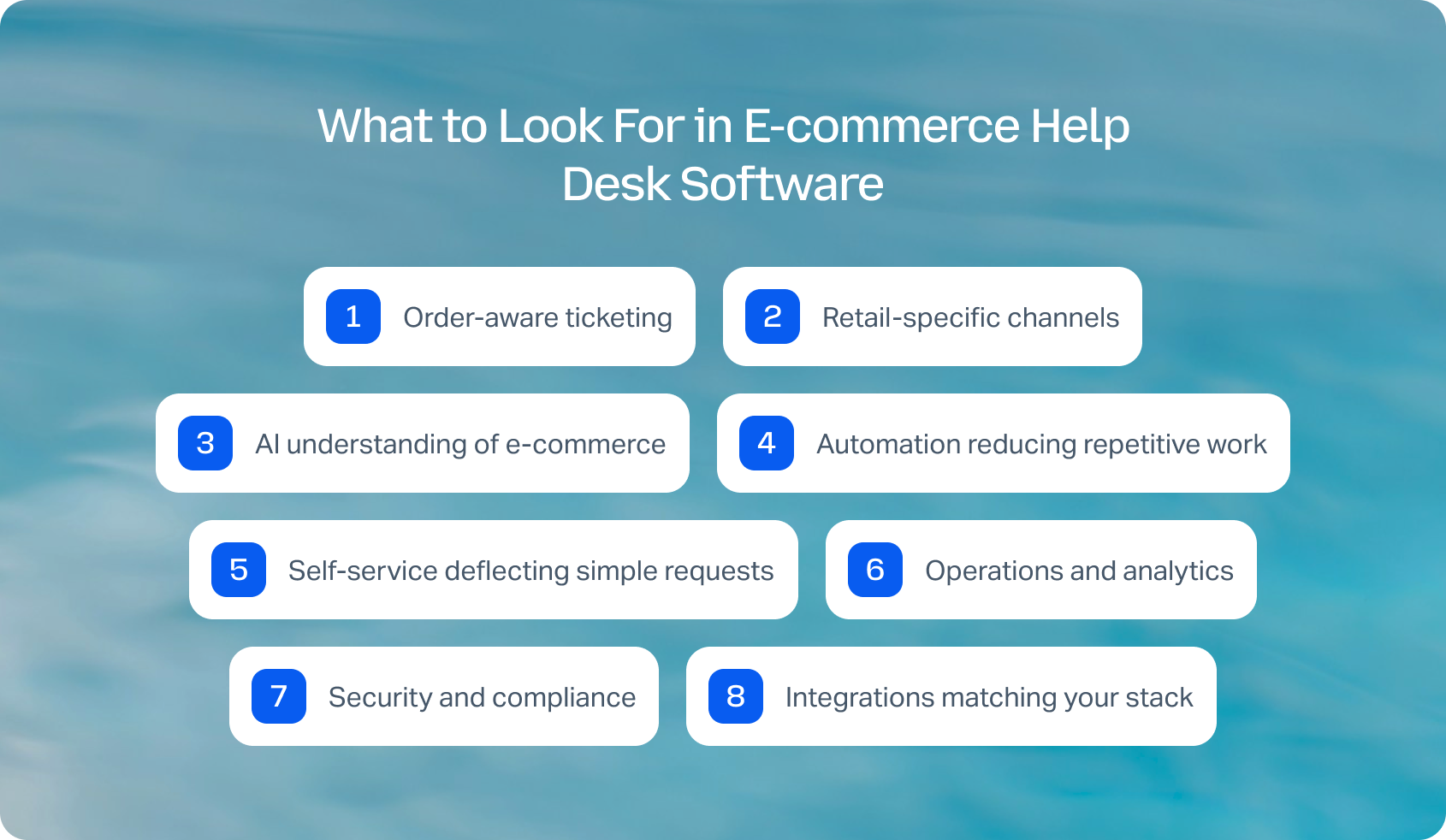
- Order-aware ticketing: Customer and order timelines in every ticket, showing purchase history, current order status, and past interactions. Macros enable agents to process refunds, create exchanges, edit orders, or resend confirmations without leaving the help desk.
- Retail-specific channels: Email, live chat, voice, SMS/WhatsApp, Instagram/Facebook DMs, and TikTok support. Capture marketplace messages from Amazon, eBay, or other platforms. Native integrations beat third-party middleware, which requires constant maintenance.
- AI understanding of e-commerce: Transcription and ticket summaries, reducing manual work. Intent detection automatically identifies WISMO, returns, cancellations, or pre-sale questions. AI-powered knowledge management to ground responses in store policies and prevent wrong information. Proactive messaging alerting customers about delays. Multilingual support through AI-powered chat and voice.
- Automation reducing repetitive work: No-code flows handling WISMO updates, return request processing, exchanges, cancellations, and back-in-stock alerts. Event triggers automatically respond to shipments, deliveries, or refunds. Reduce customer support calls through proactive automation.
- Self-service deflecting simple requests: Order tracking portals, address change windows, returns/exchanges, and warranty claims handled without agents. Escalate complex issues to human support with full context rather than starting over, improving help desk support efficiency.
- Operations and analytics: SLA tracking by channel, store, or region. Backlog aging and reopen rates reveal problem areas. Contact rate per order, WISMO percentage, FCR, AHT, and customer satisfaction metrics. Promo and seasonality dashboards. WFM forecasting peak volumes.
- Security and compliance: SSO/MFA, role-based access, audit logs, PII redaction, GDPR compliance. PCI-aware workflows when handling payment references, protecting customer data.
- Integrations matching your stack: Native apps for Shopify, BigCommerce, WooCommerce, Magento. Logistics integrations (carriers, 3PLs). Payment processor connections. Reviews and loyalty platforms. BI tools. Open APIs and webhooks for custom workflows.
Honest pricing: Seat-based versus usage models (tickets, SMS, WhatsApp, minutes). AI add-ons and their operational costs. Marketplace app fees. Avoid platforms paywalling core features like WhatsApp, voice, or returns automation behind enterprise tiers.
If you're evaluating e-commerce help desk software, don't just compare feature lists. Try a 14-day free trial to see how BlueTweak combines AI agents, omnichannel communication, workforce management, and quality assurance in one platform with transparent pricing.
How We Evaluated These E-Commerce Customer Service Platforms
We reviewed vendor websites, pricing pages, documentation, help centers, and marketplaces. Features were verified against official sources and cross-referenced with published customer stories.
Pricing reflects publicly listed rates as of January 2026. Custom pricing notes “Contact sales.”
Pros and cons derive from documented capabilities and verified feedback, not marketing promises. This evaluation uses public information subject to change; verify directly with vendors before purchasing.
Must-Have Capability Checklist for Customer Support Software
- Order-aware ticketing with timeline and quick actions
- Social/WhatsApp + SMS + voice + chat + email
- AI: summaries, KB-grounded replies, WISMO/returns intents
- Self-service: order tracking, returns/exchanges
- Automations: no-code flows, event triggers
- Analytics: contact rate/order, WISMO %, FCR, AHT, CSAT
- WFM/QA (native or first-party)
- Security/admin: SSO/MFA, roles, audit, GDPR
- Integrations: commerce, logistics, payments, BI
- Transparent pricing (no paywalled core features)
BlueTweak meets all criteria with transparent pricing of €65/agent/month.
Scoring Rubric
- Order context depth: Purchase history, quick actions, timeline visibility
- Channel coverage: WhatsApp/Instagram/SMS/voice plus email/chat
- AI and automation: WISMO/returns handling, KB-grounded responses
- Self-service effectiveness: Deflection rates, escalation quality
- WFM/QA: Forecasting, scheduling, quality assurance
- : Implementation speed, ROI timeline, and response time
Total cost: Seat/usage fees, overages, add-ons, realistic TCO
How to Choose the Best E-Commerce Help Desk Software
The best e-commerce help desk software should do far more than help you track tickets. As your business grows, you need a platform that brings every support conversation into one place, connects with your e-commerce platform and other business systems, and gives agents the tools they need to resolve customer inquiries quickly and consistently.
When comparing vendors, look beyond feature checklists. Consider how each platform performs across the areas that have the biggest impact on your customer experience and operational efficiency:
- Order-aware ticketing with complete customer context
- Omnichannel support, including email, live chat, voice, WhatsApp, and social media
- Advanced AI features, such as knowledge-base-grounded responses, customer sentiment analysis, ticket routing, and workflow automation
- Customer self-service capabilities, including knowledge base articles and self-service portals
- Reporting, workforce management, and analytics that help you improve service level agreements and agent efficiency
- Transparent pricing, integrations, security, and scalability as your support operation grows
If your team is managing high ticket volumes, supporting multiple brands, or relying on disconnected support tools, choosing a unified platform can significantly reduce manual work while improving ticket resolution and customer satisfaction.
For growing e-commerce teams, BlueTweak stands out by combining omnichannel communication, AI-powered automation, native voice, workforce management, quality assurance, and multilingual support in one platform. Instead of stitching together multiple tools, your team can manage every customer interaction from a single workspace while delivering faster, more consistent support.
Book a personalized demo to see how BlueTweak can help you deliver faster, more consistent customer support.



