



TL;DR
Training help desk staff in 2026 means building a continuous, contextual, and measurable program. Start with role clarity and simulations, reinforce with microlearning and spaced repetition, ground everything in a living knowledge base, and coach to real tickets. Track FCR, AHT, reopen rate, and VIP aging to prove impact. BlueHub (by BlueTweak) supports this approach with simulations, in-flow knowledge, sentiment-aware coaching, and analytics tied to forms, routes, and templates, so training turns into a visible performance lift and improves efficiency in help desk operations.
Why Training Determines Speed and Satisfaction
Let’s be honest. Many teams still place new hires straight into live tickets and trust that experience will close the gaps. The result is predictable: slow resolutions, inconsistent tone, and customers who drop out before the issue is fixed. Failing to meet user expectations can lead to dissatisfaction and a loss of trust.
There is a better path. Effective programs mirror real-world situations, use short, focused practice, and demonstrate their value with visible progress in the queue. When you adopt this approach, you protect first-contact resolution, reduce handle time, and cut repeat contacts, including the silent churn from essential customers you did not prioritize.
This guide shows how to train help desk staff without pausing operations. You will learn a practical sequence you can implement this month, from simulations that build confidence to knowledge habits that travel with every ticket, plus the exact performance signals to watch so you can see what changed and why. Well-trained support staff are essential for meeting both organizational goals and user expectations.
17 Ways to Train Help Desk Staff in 2026

Set the foundation with clarity, a key step in building an effective help desk team, then layer skills that translate directly to live tickets. The steps below move from role definition to simulations, knowledge habits, coaching, and measurable lift in the queue. Implementing the right strategies at each stage is essential for long-term success.
1) Start with a one-page role card
Give each role a single page defining its mission, scope, core tools, and two real-world examples that distinguish it from look-alike edge cases. A clear role card helps employees understand their job functions and expectations. Agents act on what they can see at a glance, so place the card inside the workspace where tickets live and link to deeper references only when needed. The result is faster orientation, fewer handoffs, and decisions that remain consistent across shifts.
Use this foundation to build everything that follows in production. Layer in short simulations that mirror your top intents, KCS-style knowledge habits, three concise message templates per intent, a light coaching loop tied to FCR and reopen rate, and analytics that make improvement visible. Starting with a clear role card turns training from information into action. Establishing a clear course for each role ensures alignment and focus throughout the training process.
2) Train with simulations before you go live
Realistic voice and chat scenarios, anchored to your highest-volume intents, build confidence before agents handle live tickets by creating an immersive environment that mirrors real-world help desk challenges. Each run has a clear objective and a simple rubric that scores probing depth, tone control, and clarity of the next step. Recordings enable quick debriefs where one improvement is captured and applied to the very next ticket.
Short, frequent practice outperforms long, infrequent classes. Sessions stay under ten minutes and recur weekly, so skills become reflexive under pressure. These simulations help agents develop essential desk skills needed for live support, including problem-solving and effective communication. Complexity increases over time, moving from straightforward cases, such as outage updates and account verification, to thornier issues, such as refund eligibility with policy edge cases.
Teams that follow this cadence see fewer early escalations, faster time to independence, and first replies that actually unblock the customer.
3) Build a KCS first knowledge loop
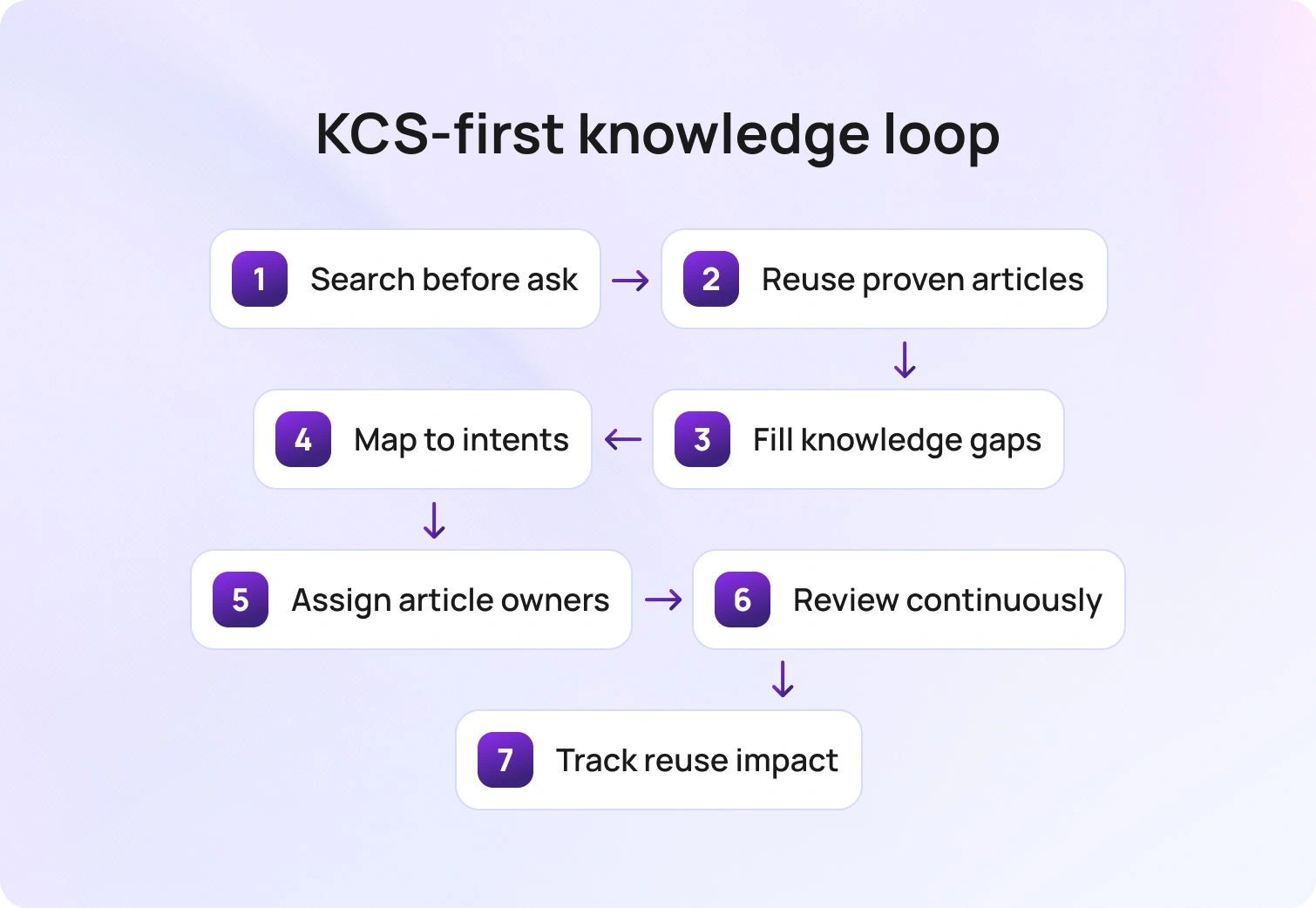
A reliable knowledge base turns every solved ticket into a reusable asset. Thorough documentation is crucial for maintaining consistency and reducing ticket volume, as it ensures that solutions are clearly recorded and easily accessible. In a KCS (Knowledge-Centered Service)-first approach, agents search before they ask, reuse proven articles, refine content when a gap appears, and create new content only when no match exists. The effect is consistency at scale: fewer contradictions, faster answers, and a shared source of truth that travels across shifts and channels.
Implementation works best when guidance appears where the work happens. Map articles to specific forms and intents so the proper steps surface inside the ticket. Give each article an owner and a review date, standardize snippets and screenshots, and publish minor edits continuously rather than saving up for a rewrite. For higher-risk issues, add a brief knowledge check at closure to confirm that the final steps align with policy.
Track simple signals, i.e., article reuse rate, time to update, deflection at intake, and reopens tied to missing guidance, and you will see first contact resolution tighten while repeat contacts fade. Adequate documentation and knowledge sharing also help control ticket volume by empowering users to find solutions independently.
4) Use microlearning for daily improvement
Attention sticks when learning is short, focused, and immediately practical. Microlearning breaks enablement into five- to seven-minute lessons that target a single behavior, allowing agents to practice and return to the queue without losing momentum. Continuous learning opportunities help develop both technical and soft skills in help desk staff. Think of skills like setting a precise next update time, verifying identity in two steps, or attaching the exact evidence a reviewer needs. Each lesson ends with a quick check for understanding, which keeps the signal high and the time cost low.
Over days and weeks, these small wins compound into reliable habits. Coverage remains intact because training fits between tickets, not instead of them. Managers see fewer avoidable follow-ups, faster first replies, and a steady rise in confidence as agents apply each skill in the very following conversation.
5) Space refreshers to protect retention
Skills stick when the brain revisits them over time. Plan brief refreshers days and weeks after the initial lesson so knowledge moves from short-term memory into everyday practice. A simple sequence works well: a two-question quiz to surface knowledge gaps and address them before they impact live performance, a short simulation to apply the concept under light pressure, and a quick review of a recent live ticket to connect learning to results.
This cadence improves recall when it matters most. Agents carry the skill into Monday spikes and incident moments, not just into quiet practice sessions. Leaders see fewer avoidable follow-ups, steadier first contact resolution, and confident execution that holds up across shifts.
6) Coach to a small metric set
Coaching works best when the target is clear, and the feedback is tied to outcomes. Focusing on crucial metrics helps improve performance across the help desk team. Center every session on a short list of operational metrics that matter in the queue: first contact resolution, average handle time, reopen rate, service level attainment, and VIP aging. Share the current baseline, show one recent interaction that illustrates the gap, and agree on a single behavior to practice, such as using an unblocking checklist in the first reply.
Keep the rhythm repeatable and straightforward. Begin with a brief pre-read, review one real ticket together, confirm the specific change the agent will make this week, and schedule a quick follow-up to review the same metric again. This narrow focus turns coaching into visible progress, reduces second touches, and builds confidence by showing agents the cause-and-effect relationship in their own numbers.
7) Standardize three messages per intent

Consistency wins when queues are busy. Effective communication skills are essential for delivering clear, consistent messages to users. For every common request, define three short messages that any agent can use with confidence: a first response that sets the next update time, a progress note that states what changed since the last touch, and a delay note that explains why you are waiting and exactly when you will check again. Clear, repeatable language prevents tone drift, reduces follow-ups, and makes handoffs feel seamless to customers and colleagues. Templates should reside where agents work and auto-merge the essentials, including customer name, ticket ID, promised update time, and any linked knowledge step. Treat reuse as craftsmanship rather than corner-cutting, and refine the phrasing monthly based on QA findings and customer feedback. Over time, these three messages become muscle memory, and your queue shows it through fewer “just checking in” replies and a steadier path to resolution.
8) Teach time to unblock as the first reply goal
The first message should enable progress. A simple test tells you whether it works: after reading the reply, can the customer take a concrete next step without replying? Aim for a single, specific action or request that removes the blocker and keeps the case moving. Developing strong problem-solving skills enables agents to deliver effective solutions in their first reply, ensuring customers can move forward without delay.
Precision matters. Name the exact field to complete, the screenshot to attach, or the command to run, and explain the expected outcome in one line. This approach lowers second-contact rates, improves first-contact resolution, and turns a frustrated exchange into collaborative problem-solving and solution delivery.
9) Train routing and ownership
Speed often rises or falls at the moment of assignment. Teach a simple ownership rule set that removes hesitation: who should claim, when a transfer is justified, and how to complete a clean handoff. A good handoff reads like a brief case file. It includes a one-line summary, the steps already attempted, evidence supporting the next move, and an explicit request to the receiving owner. With this clarity, work no longer bounces between queues, and customers no longer repeat themselves.
Practice the mechanics until they become routine. Use a routing matrix that reflects fundamental skills, languages, products, and risk levels, and let agents rehearse decisions using short scenarios before facing them in a live environment. Add light-load awareness so that claim decisions reflect current capacity and service timers. Effective routing ensures optimal use of available resources and prevents overload on any single agent. As these habits take hold, transfers decline, average handle time falls, and accountability becomes evident from the first touch.
10) Create a lane for security and revenue moments
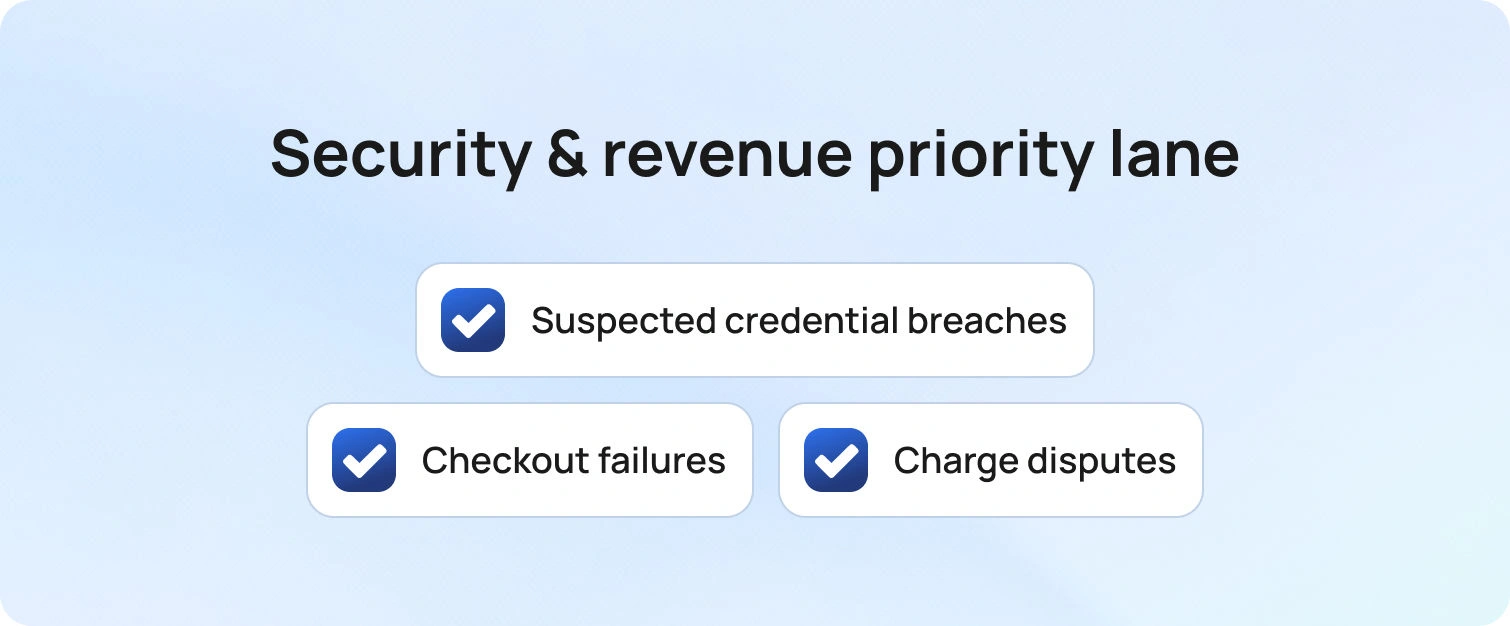
Some requests carry asymmetric risk to trust and revenue, and they deserve a dedicated path. Certain high-risk services require specialized handling and dedicated processes to ensure security and revenue protection. Suspected credential breaches, checkout failures, and charge disputes belong in a clearly labeled lane with higher visibility and faster decision cycles.
Agents working in this lane follow a focused containment checklist covering identity verification, immediate risk reduction, and notification. Customers see a precise next update time, leaders see exposure at a glance, and progress never stalls due to a lack of clarity.
Consistency matters as volume rises. Mark these tickets with priority-raising tags during training so judgment is predictable across shifts and teams. Routing should prioritize the shortest path to a qualified owner with the right tools and approvals, and every handoff should include a concise case summary, the gathered evidence, and the specific action requested. With this structure in place, time-to-containment drops, refunds, and reversals are handled cleanly, and confidence improves for both customers and auditors.
11) Practice sentiment handling
Emotions shape outcomes as much as facts, especially when customers feel stuck. Training should include realistic scenarios that model frustration, urgency, and relief, so agents recognize cues early and respond with steady, confident language. A simple three-part pattern keeps interactions on track: acknowledge the effort already made, state the action underway, and commit to a specific next checkpoint with a time-bound target.
This approach reduces escalation pressure and the risk that VIP cases linger without attention. Teams become predictable under stress, customers feel guided rather than managed, and leaders see fewer unnecessary transfers. Over time, consistent sentiment handling turns tense moments into opportunities to demonstrate care, competence, and follow-through. Recognizing and responding to customer emotions can also boost agent motivation and job satisfaction, helping maintain high-quality support and positive team morale.
12) Certify on the tools you actually use
Certification should reflect the work agents face every day. Industry-recognized certifications, such as CompTIA A+, and up-to-date software training are essential for maintaining high standards in help desk operations. Combine a concise overview of external frameworks with hands-on mastery of your own forms, macros, approvals, reports, and dashboards. Define clear pass criteria, such as completing an end-to-end identity verification flow, resolving a priority-two ticket while meeting timers, and submitting a change with the correct audit trail. Assessment becomes a demonstration of proficiency rather than a memory test.
A production-like sandbox with realistic data lets new hires practice safely and build confidence before they touch live tickets. Close the program with a short capstone scenario and a checklist that an evaluator can score in minutes. Issue an internal credential tied to specific capabilities and refresh it quarterly by reviewing changes to templates, routes, software updates, and policies. Managers gain visibility into readiness, time-to-independence declines, and agents begin live work with the muscle memory they need.
13) Pair rookies with situational mentors
Mentorship works when it is specific to the work. Mentorship programs engage new professionals by exposing them to real-world scenarios and accelerating their development within the help desk team. Instead of a vague buddy system, match each new agent with mentors for defined situations such as incidents, billing, identity, and VIP care.
The mentor’s brief is clear. Review two recent tickets each week, highlight one behavior to strengthen, and demonstrate the gold standard using a live example from your queue. Keep sessions to ten minutes so momentum is never lost, and capture the single improvement you expect to see in the agent’s next set of tickets.
Structure builds consistency. Provide a simple checklist for each situation that covers mission, scope, required evidence, and the expected customer update cadence. Schedule mentor office hours on the team calendar, rotate pairings monthly to broaden exposure, and record outcomes in a lightweight log that captures the coached behavior and the follow-up result. Over a few cycles, new agents gain confidence, handoffs get cleaner, and leaders can see readiness improve without pulling people away from the queue.
14) Turn QA into a learning engine
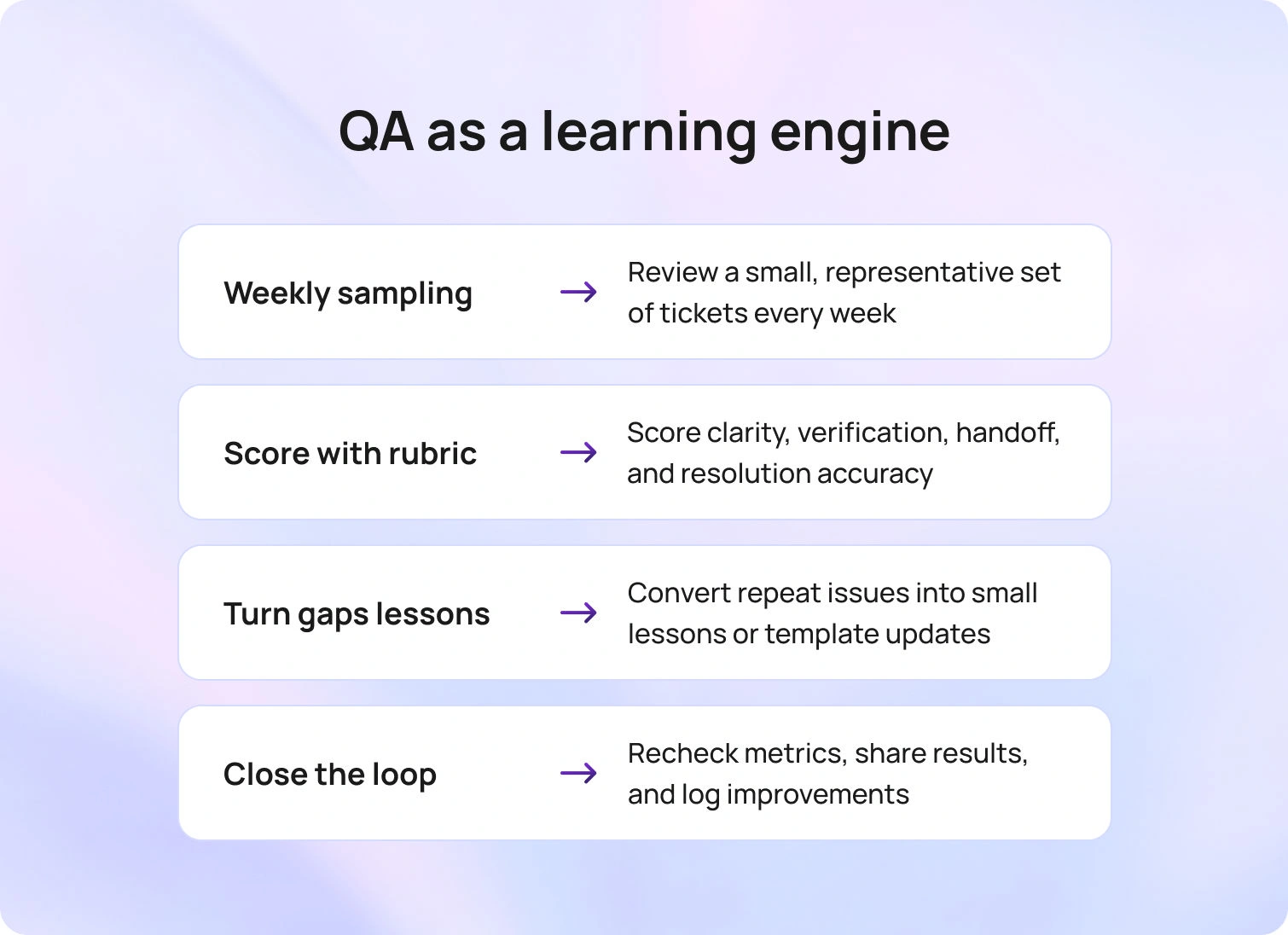
Quality review should be the shortest route from insight to improvement. Regular QA reviews help teams identify common challenges, such as training difficulties, role changes, and problem-solving complexities, and turn them into actionable lessons. Start with a small, representative sample each week and score it against a simple rubric covering verification, clarity of the first reply, completeness of the handoff, and accuracy of the final resolution.
Patterns matter more than one-off misses, so translate recurring gaps into bite-sized lessons and, when needed, minor edits to templates or knowledge. Each lesson includes an owner, an expected behavior change, and a date by which the update will be visible in the queue.
Closing the loop turns review into results. After two weeks, run a quick spot check on the same metric to confirm the shift, publish the before-and-after to the team, and capture any follow-up tweaks in a brief change log. Rotate the sample across intents and shifts to maintain fairness, calibrate reviewers regularly, and keep feedback specific enough that an agent can apply it to the next ticket. Over time, QA becomes a steady engine for sharper first replies, fewer reopens, and coaching that earns back more time than it consumes.
15) Cross-train with shadow days
Understanding the work on either side of a ticket sharpens judgment. Rotate agents through adjacent queues for one day each month to see where requests originate and how downstream teams resolve them. The experience exposes hidden dependencies, clarifies what truly blocks progress, and reveals which details matter most to peers who are ready to take the next step.
Maintaining a transparent change log helps the entire organization stay aligned and informed about process updates.
Capture the learning while it is fresh. Ask for a five-question recap that names one upstream action that created extra work, identifies the single field that most often determines priority, lists the evidence that speeds approval, proposes one template improvement, and notes one behavior to try in the next shift. Over time, these short rotations produce cleaner handoffs, fewer avoidable transfers, and stronger prioritization under pressure.
16) Keep a public change log
Transparency speeds adoption and keeps everyone aligned. Publish a simple record of what changed in templates, forms, routes, and knowledge, along with the reason for the change and the specific metric you expect to move. Measuring the impact of training on the help desk team and desk team is essential for continuous improvement. When the log is easy to find and written in plain language, agents know which behaviors to adjust, leaders can trace decisions, and coaching conversations stay anchored in facts rather than preference.
Consistency matters as much as content. Update the log as part of the release process, link entries from the places agents work, and reference it during standups and one-to-ones. Over time, the log becomes institutional memory, reducing tribal knowledge, shortening onboarding, and clarifying why service levels and satisfaction improved.
17) Measure training ROI in the live queue
Results belong in the queue, not only in a slide deck. Choose one behavior to improve, such as adding a precise next update time in the first reply, publishing the lesson on Monday, and tracking movement for two weeks in first contact resolution, average handle time, and reopen rate. Keep scope tight by focusing on two or three high-volume intents so the signal is clear.
Share what you find in the same rhythm every time. Post a short note with the before and after numbers, a screenshot of the trend, and one sentence that explains what changed. If results are flat, refine the lesson or template and rerun the test. Measured this way, training earns calendar time and budget because the link between practice and performance is visible to everyone. Consistently improving support quality in this way helps build loyal customers over time.
How BlueHub Helps You Execute Help Desk Training
BlueHub (by BlueTweak) turns training into everyday execution by placing guidance exactly where work happens. As a comprehensive service desk solution, BlueHub integrates training, knowledge, and performance management to support best practices in support team management. Simulations run in the same workspace agents use for tickets, keeping practice realistic and making results easy to compare over time. Knowledge is mapped to forms and intents, so the moment an agent opens a ticket, the correct article appears, and suggested replies include the precise steps the customer needs. Templates live beside every case and automatically merge
The next update time, turning your three-message standard into a consistent habit that reduces follow-ups and clarifies ownership. Routing aligns skills, language, and risk tags to move work along the shortest path to completion, while VIP exposure and service timers keep promises visible to agents and leaders. Quality findings translate into brief lessons that agents complete between tickets, and analytics connect each lesson, template, or routing adjustment to movement in first-contact resolution, handle time, reopen rate, service-level attainment, and VIP aging. In one platform, BlueHub unifies training, knowledge, routing, and measurement so you can see the lift without pausing operations.
From Intent to Impact, Fast
You set out to learn how to train help desk staff to protect first-contact resolution, lower handle time, reduce reopens, and keep VIPs visible while the queue keeps moving. The practices in this guide give you a compact, durable program that integrates into your current workflows. You now have simulations that reflect real intents, knowledge capture that improves every day, short lessons that use spacing for retention, and coaching tied to five clear operational metrics.
The outcomes are practical and measurable. Teams that train where the work happens move faster and work more calmly. Investing in well-trained employees leads to more efficient operations and higher customer satisfaction. The core lesson is straightforward. Clear role cards, short, focused lessons, and visible timers change behavior more reliably than long courses.
Begin with a role card for each seat, publish 3 standard messages for each top intent, and select one metric to improve over the next two weeks. Log every change, share the result, and repeat. Keep language clear, keep scope tight, and align every lesson to live tickets. BlueHub brings training, knowledge, routing, and analytics into one place so you can see the lift and keep it. Ready to translate intent into performance? Request a BlueHub demo and get a starter plan mapped to your top intents.

As Head of Digital Transformation, Radu looks over multiple departments across the company, providing visibility over what happens in product, and what are the needs of customers. With more than 8 years in the Technology era, and part of BlueTweak since the beginning, Radu shifted from a developer (addressing end-customer needs) to a more business oriented role, to have an influence and touch base with people who use the actual technology.



