



TL;DR
AI agent customer support scales support operations without scaling headcount. Done right, AI customer service agents handle routine tasks, route complex queries intelligently, and execute policy-safe actions across chat, voice, and email. This guide walks through the steps to launch AI agents for customer support automation that move metrics.
When Volume Outruns Headcount
Most support operations hit the same wall: ticket volume grows faster than headcount, and your existing tools don't actually talk to each other.
You've got dashboards showing AI-powered insights and data-driven insights, but those insights rarely change routing, SLAs, or staffing in real time. Your voice bot doesn't share context with your chat system. Your email queue is a separate universe. And support agents spend half their time hunting for customer information and relevant information across fragmented systems instead of helping customers solve problems.
Add multilingual support and multi-brand operations into the mix, and the chaos multiplies:
- More handoffs
- Higher error rates
- Longer handle times
- Repeat customer inquiries
- SLA breaches
- Rising costs for your business
Customer service departments need better customer experiences across various channels, but fragmented technology stacks make that nearly impossible. Service teams can't deliver consistent service quality when every channel operates in isolation.
This is the problem BlueTweak was built to solve: unifying chat, voice, and email with intelligent routing, workforce management, analytics, and a shared knowledge base in one platform.
But before we get to solutions, let's narrow down what we're actually talking about when we say AI agent customer support.
What Is AI Agent Customer Support?

AI agent customer support refers to policy-guardrailed, task-capable AI entities that can understand customer inquiries, decide on the best action based on customer data and previous interactions, and execute complex tasks across chat, voice, and email.
These aren't the frustrating chatbots from five years ago that forced customers into loops. AI customer support agents integrate with your CRM, order systems, and help desk to access customer information, pull past tickets, and continuously improve their ability to resolve issues. They use natural language processing to understand customer queries and customer needs, then take action within defined limits.
The benefits:
- 24/7 coverage to answer questions and handle service requests without adding night-shift headcount
- Lower Average Handle Time by surfacing relevant information and suggested actions instantly
- Higher containment and deflection on routine tasks
- Better human agent productivity when AI handles repetitive work and feeds insights into routing and workforce management
- Improved customer satisfaction through faster resolution and better customer experiences across the customer journey
The most effective AI customer support agents use multi-agent orchestration:
- One retrieves information
- Another triages intent
- A third executes the action
- A fourth handles quality assurance
This approach increases resolution rates for repetitive, policy-safe work while keeping humans in the loop for complex issues and queries. This matches BlueTweak's approach: AI plus APIs with built-in guardrails, grounded in your knowledge base, and wired into your actual operations, not bolted on as a disconnected layer.
How to Launch AI Agents That Scale Operations
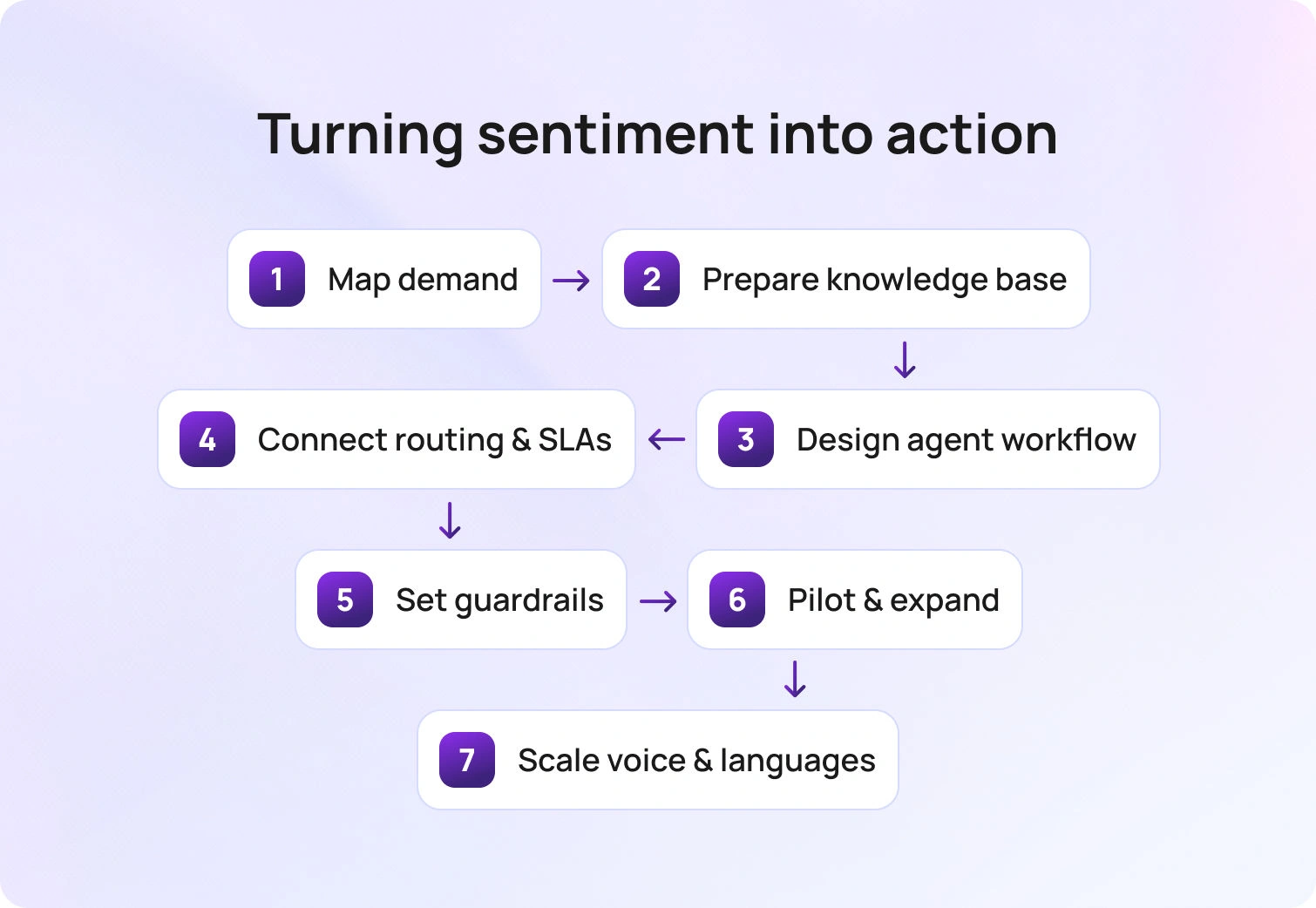
Launching customer support AI agents isn't about flipping a switch. It's about mapping demand, cleaning your knowledge base, designing workflows, connecting systems, and measuring impact. Here's how to do it.
1. Map Demand and Define Automation-Ready Intents
Start by understanding what's actually hitting your support queues and how customers engage with your service teams.
What to do:
Pull 90 days of tickets and calls. Cluster them by intent, language, channel, and brand. Mark, which intents are policy-safe, meaning they have clear rules, defined outcomes, and low risk if executed incorrectly.
Examples of policy-safe intents:
- Order status lookups
- Returns and exchanges (within policy limits)
- Subscription cancellations
- Password resets
- Tracking updates
Analyze customer interactions to understand where human agents spend time on routine tasks versus complex tasks that require judgment.
Deliverables:
- Intent taxonomy (version 1)
- Safe actions matrix (what AI can do, what requires human approval)
- Volume and AHT breakdown per intent
Acceptance criteria:
60–80% of the volume is labeled. You've prioritized 10–20 high-impact intents that represent the bulk of routine work and service requests. This is where your ticketing system and customer service analytics matter. If you can't see intent-level patterns across various channels, you're guessing. For e-commerce companies, this data is fundamental for understanding the customer journey from browse to purchase to post-sale support.
2. Make Your Knowledge Base Production-Ready
Your knowledge base is the foundation of every AI agent interaction. If it's not production-ready, your AI agents will fail to deliver the service quality customers expect.
What to do:
Normalize KB articles with a consistent structure: title, summary, steps, limits, failure states, and citations. Add API references so agents know which systems to call (order lookup, refund processing, account edits). Use natural language instructions that both human agents and AI customer service agents can follow.
Train models on your actual customer interactions and past tickets to ensure AI understands your company's unique terminology and customer preferences.
Deliverables:
- KB quality checklist passed (articles are recent, accurate, and cover edge cases)
- API catalog documenting available actions
- Version-controlled content that can continuously improve based on performance data
Acceptance criteria:
At least 90% of your prioritized intents have full KB coverage and a callable action (via API or workflow). Without this foundation, AI agents will hallucinate answers or give generic responses that frustrate customers . Customer support automation only works when it's grounded in truth and your actual policies.
3. Design the Agent Workflow (Assist → Approve → Auto)
Not every intent should jump straight to full automation. Start with AI-assisted workflows where human agents approve actions before they execute.
What to do:
For each intent, author playbooks that define:
- Required inputs (customer profile, order ID, issue type)
- Validations (eligibility checks, policy limits)
- Steps to resolution
- Fallback paths if something goes wrong
- Escalation criteria for human handoff on complex issues
Design workflows that let your customer service team focus on what matters: building relationships and solving problems that require empathy and judgment.
Deliverables:
- YAML or JSON playbooks for each intent
- Suggested reply templates with KB citations
- Clear escalation criteria
- Data encryption and security protocols for sensitive customer information
Acceptance criteria:
Human agents resolve issues with AI assistance at 80% or higher precision during the pilot phase. Customer satisfaction scores remain stable or improve. Tools like AI ticket summaries and canned responses speed up resolution while maintaining quality. Support agents get real-time access to relevant information without switching between multiple systems.
4. Connect Routing, WFM, and SLAs
AI agents shouldn’t just answer questions. They route work intelligently based on intent, sentiment, urgency, and customer data.
What to do:
Convert intent, sentiment, and urgency signals into a Priority Index. Map that index to specific queues and SLAs. Ensure skill-based and language-based routing so the right agent (human or AI) handles each case. Set thresholds for "hot queues" that need immediate attention.
Consider customer expectations and the customer experience when designing routing rules. Leading companies use AI-powered insights to predict which customers need immediate human attention and which can be served effectively by AI customer service.
Deliverables:
- Routing ruleset
- Hot-queue SLAs
- Intraday workforce management rules (shrinkage, concurrency limits)
- Performance dashboards for managers to track efficiency
Acceptance criteria:
Hot cases land in the correct queue with less than 60 seconds' variance from the target SLA. Customer satisfaction metrics remain above target thresholds. This is where call center workforce management and customer service analytics converge. AI agents optimize the entire flow and help your business deliver better customer experiences.
5. Guardrails, Security, and Approvals
Even the best AI agents for customer support need guardrails. You don't want AI issuing $500 refunds without oversight or editing customer PII without approval.
What to do:
Set role-based approvals for risky actions (refunds above a threshold, account edits, data exports). Implement MFA, audit logs, data encryption, and data retention policies. Use prompts and version control to track what AI said and why.
Double-check that your AI customer service agents engage with customers in ways that meet both customer expectations and regulatory requirements. Users should always know when they're interacting with AI versus human support agents.
Deliverables:
- Policy pack defining approval rules
- Approval matrix by action type and risk level
- Red-team test results (simulated attack scenarios)
- Security documentation for enterprise and regulated industries
Acceptance criteria:
Zero critical policy violations across 200+ test runs. All sensitive customer interactions maintain encryption standards. Administration and security features ensure compliance without slowing down operations. Your customers trust you with sensitive information, and AI agents need to honor that trust. This software-level security is non-negotiable for any company scaling support operations.
6. Pilot, Measure, and Expand
Launch a two-week pilot on 3–5 intents. Measure everything. Fix what breaks. Expand what works.
What to do:
Track these KPIs across all channels:
- First Contact Resolution (FCR): Are issues resolved in one interaction?
- Average Handle Time (AHT): Are resolutions faster?
- Containment: What percentage of inquiries never reach a human?
- Abandon Rate: Are customers hanging up less?
- Recovery ≤24h: For service failures, how fast do you recover?
- Customer Satisfaction (CSAT): Are better customer experiences translating to higher scores?
Run defect reviews twice a week. Look for edge cases, policy gaps, and tone mismatches. Gather data-driven insights to continuously improve AI performance and responses.
Deliverables:
- Pilot scorecard with insights from real-time data
- Fix backlog
- Updated playbooks (v2)
- Go/no-go decision
Acceptance criteria:
Hit your targets. For most service teams, that's a 15–25% reduction in AHT and a 10–20% lift in containment. Customer satisfaction should remain stable or improve. This is where customer service quality assurance tools prove their value. You need visibility into what's working and what's not at the interaction level across conversations and channels.
7. Scale to Voice and Multilingual
Once AI agents are performing well in chat and email, expand to voice and additional languages to deliver services across the whole customer journey.
What to do:
Add call transcription software and prosody signals (tone, pace, emotion) so AI can understand not just what customers say, but how they say it. Enable real-time chat translation or native-language routing so customers receive service in their preferred language and channel.
Deliverables:
- AI voicebot configurations
- Language routing rules
- Multilingual QA sampling plan
- Integration specifications for voice technology
Acceptance criteria:
No CSAT regression on your top two languages. Stable voice quality (MOS scores). Seamless integration between voice and text channels.
Voice is more complex than chat. Customers expect natural conversations. But when done right, AI voicebot systems can handle high-volume inquiries (account balance, order status, appointment changes) and escalate seamlessly to human agents when needed. Multilingual customer support becomes a competitive advantage when AI intelligently handles translation and routing. This is especially valuable for enterprise companies and leading brands serving diverse customer bases.
Scale AI Agent Customer Support with BlueTweak

Everything we've described requires one platform to unify context, ground AI in policy, route intelligently, execute actions safely, and measure impact.
That's what BlueTweak delivers.
- Omnichannel core (chat, calls, email): AI agents see unified context across channels and previous interactions. They consistently propose responses and take action, whether the customer is chatting, calling, or emailing. Customer profile data flows through every customer interaction. This includes social media messengers, so conversations in those channels carry the same unified context and actions.
- Smart Knowledge Base: AI agents are grounded in your knowledge base for accurate, policy-aware suggested replies. Update one article, and the change propagates instantly to all AI agent behavior. This is how you train models effectively and continuously improve performance.
- Automatic Routing and WFM/Analytics: Intent and sentiment signals convert into a Priority Index. Hot cases route automatically. Call center workforce management adjusts staffing in real time based on data and AI-powered insights. Managers see KPI impact by intent, channel, and segment.
- Spam detection, classification, and summarization: Keep queues clean. AI ticket summary provides context for human or AI action, giving support agents instant access to relevant information.
- Real-time chat translation: Multilingual customer support without extra bilingual headcount. Deliver better customer experiences across languages and user preferences.
- Multi-brand operations: Brand-scoped routing, permissions, and customer service analytics enable a single AI framework to serve multiple brands cleanly. Perfect for enterprise companies managing multiple customer service departments.
- Security and Administration: MFA, audit logs, encryption, and administration controls ensure sensitive actions are governed. ISO compliance in progress. This software meets the security expectations enterprise users demand.
BlueTweak doesn't replace your existing tools. It integrates with them and adds the control layer that makes AI agents for customer support automation operational. The platform enables your company to scale support operations efficiently while maintaining the quality and customer satisfaction your brand is known for.
Turn AI Agents Into Real Operational Capacity
If you want to scale without adding headcount, the path is clear. Map demand, harden the knowledge base, design assist to approve to auto workflows, wire routing, and WFM to real signals, set guardrails, pilot, then expand to voice and languages. The outcome is a single operating model in which routine work is handled by AI and complex work reaches the right humans quickly.
BlueTweak gives you one place to do it. Unified context across channels, a knowledge base that actually drives behavior, policy-aware actions, multilingual coverage, and the analytics leaders need to steer by intent, channel, and brand. It does not replace your tools. It connects them and adds the control layer that makes AI agents operational at scale. Request a demo, and we'll show you how AI agent customer support turns operational chaos into scalable efficiency.

As Head of Digital Transformation, Radu looks over multiple departments across the company, providing visibility over what happens in product, and what are the needs of customers. With more than 8 years in the Technology era, and part of BlueTweak since the beginning, Radu shifted from a developer (addressing end-customer needs) to a more business oriented role, to have an influence and touch base with people who use the actual technology.



