AI Support Automation: Where It Delivers Value in 2026



BlueTweak is an AI Customer Support Platform that unifies every conversation, customer record, and automation into one workspace.
Explore more
Insights, trends, and practical ideas from customer experience and AI
Real-world scenarios showing how teams use BlueTweak to deliver better service
The daily blueprint that guides customer support leadership.
ROI and savings calculators for support teams
See how BlueTweak stacks up against leading customer support platforms
AI support automation delivers measurable results across a defined set of interaction types and performs poorly when deployed beyond those boundaries. This article maps where AI customer service automation creates genuine value and where human intervention remains non-negotiable. It is written for CX directors, support operations leads, and customer service teams evaluating or scaling customer support automation in their operations.
Customer service refers to the full range of support interactions a business provides to resolve customer issues, answer customer questions, and maintain customer relationships. AI in customer service is the application of artificial intelligence, machine learning, and natural language processing to those interactions, automating routine tasks, assisting support agents, and analyzing customer data to improve service quality.
AI support automation specifically covers the use of AI systems to handle, route, assist with, and score customer service interactions without requiring human involvement at each step. It ranges from automating repetitive tasks like ticket routing and post-interaction summarisation to enabling autonomous resolution of customer inquiries end-to-end.
Generative AI and conversational AI are the two technologies most actively reshaping customer service processes in 2026. Generative AI powers response generation, personalised support, and post-interaction summarisation. Conversational AI powers the chatbots, voicebots, and virtual assistants that handle customer conversations across chat, voice, and messaging channels.
The distinction that matters most for implementing AI in customer service is between two deployment modes:
AI that assists human agents: suggested reply, knowledge base retrieval, sentiment analysis, and automated support workflows that reduce cognitive load for support agents during live interactions.
AI that replaces human agents: autonomous resolution, where AI agents handle the customer service interaction end-to-end with no human in the loop.
Both have strong use cases. Both have clear performance boundaries. Customer service teams that understand those boundaries before deploying get the efficiency gains without the CX damage.
BlueTweak AI Support Automation Table
| Automation Type | Where It Delivers Value | Where Oversight Is Required |
| AI chatbot / autonomous resolution | Tier-1 routine tasks: FAQs, order status, password resets | Emotionally distressed customers; complex issues; trust recovery |
| Intelligent routing and triage | High-volume intent classification; skill-based assignment | Novel query types; ambiguous intent signals |
| Real-time agent assist | Suggested reply, KB retrieval, sentiment flagging during live interactions | Final response approval on sensitive or high-stakes topics |
| Post-interaction summarisation | All interaction types — low risk, high efficiency gain | None — summarisation is safe to fully automate |
| AI QA scoring | All interaction types — enables 100% QA coverage | Final coaching decisions; performance management actions |
| Proactive outreach | Order updates, delivery alerts, and appointment reminders | Personalised judgment required for complaints, VIP accounts |
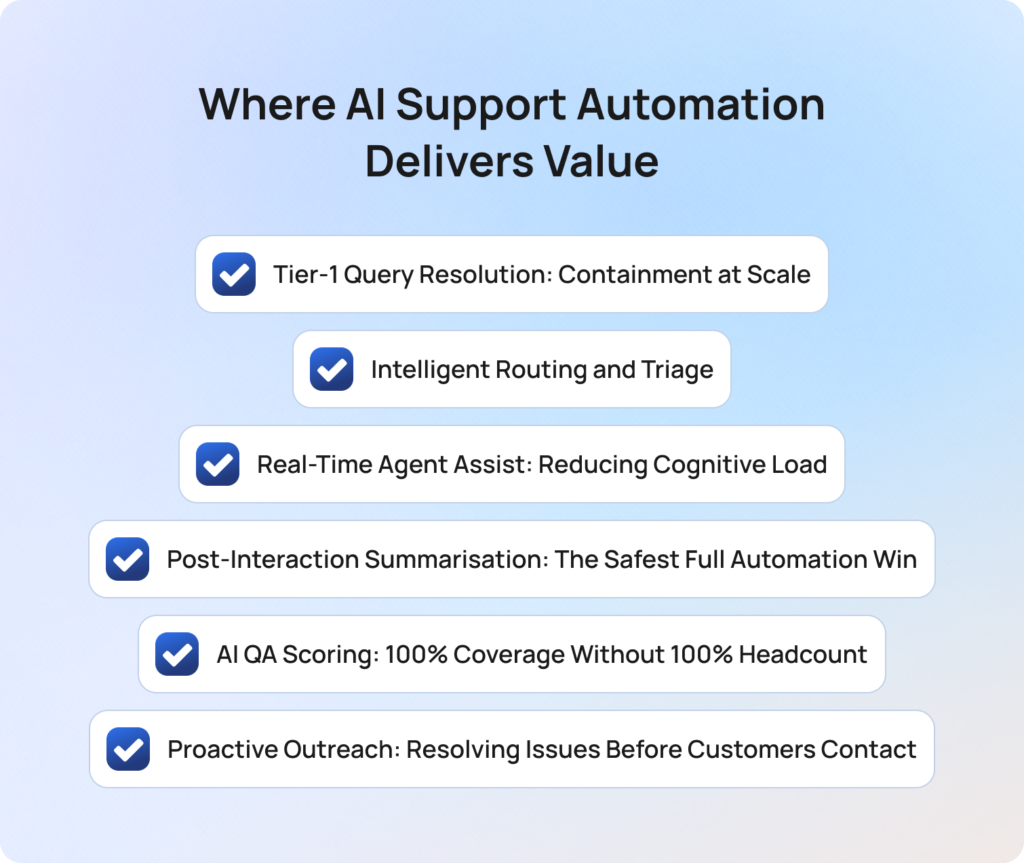
AI in customer service delivers measurable results across six interaction types and workflow stages. The value is most consistent when customer service automation is applied to high-volume, low-complexity customer inquiries with a clear, correct answer, and when the AI is grounded in a well-maintained knowledge base that reflects current products and policies.
AI customer service chatbots and AI voicebots handle customer service FAQs, order status queries, password resets, and account updates end-to-end without human agents. This is the clearest ROI case in AI support automation. When grounded in a maintained knowledge base, AI agents resolve routine tasks at scale, improve agent productivity, and reduce operational costs without increasing headcount.
Automating support deflection using AI in products requires tracking the right metric. The correct measure is containment rate, not deflection rate. Deflection means the customer did not reach a human agent. Containment means the customer issue was fully resolved without a follow-up contact. AI customer service that deflects without resolving transfers the cost rather than eliminating it.
Well-implemented customer support automation deployments achieve 40 to 70 percent containment on tier-1 customer queries.
Key metrics: containment rate, cost per interaction, agent productivity.
AI in customer service classifies incoming support tickets by intent, customer sentiment, urgency, and required skill before any support agents see them. Automated support workflows assign each interaction to the right team based on customer needs, not just the channel used.
This is meaningfully different from rules-based ticket routing. Rules break when customers phrase requests in unexpected ways. AI handles paraphrase, multi-intent customer queries, and new query types without manual updates. Customer service teams that implement intelligent routing reduce misrouting and the repeat contacts it generates.
Support teams that implement AI in customer service routing report measurable improvements in first contact resolution and average handle time.
Key metrics: FCR, AHT, misroute rate, repeat contact rate.
AI in customer service at its safest and most immediately ROI-positive does not replace support agents. It removes friction from customer service interactions. Proposed reply surfaces relevant responses based on the customer’s message. Knowledge base retrieval pulls relevant articles into the agent workspace. Sentiment analysis flags shifts in customer emotions so support agents can adjust their approach in real time.
Human support agents make every final decision. AI customer service tools enable teams to respond faster, more consistently, and with less cognitive load. Customer service automation in this mode delivers personalised support at scale because agents have better information, not because AI replaces the human touch.
Key metrics: AHT, FCR, CSAT variance, agent efficiency.
AI ticket summary generates structured summaries of every interaction immediately after it ends. Issue, actions, resolution, follow-up. The customer has already left. There is no live decision to make. The output is internal. This makes post-interaction summarisation the customer support automation use case with the highest ROI-to-risk ratio.
Automating routine tasks like note-writing eliminates wrap-up time, improves customer data quality in the CRM, and gives QA reviewers better context from past interactions. Customer service teams implementing AI support automation should prioritise this early. The risk is near zero, and the impact on agent efficiency is immediate.
Key metrics: AHT wrap-up, customer data accuracy, QA review efficiency.
Traditional QA reviews 5 to 15 percent of customer service interactions. AI-powered QA reviews 100 percent, applying the same framework to every customer service interaction, AI-handled and human-handled alike. This enables customer service teams to analyze customer data at full scale, gauge customer sentiment across all service interactions, and surface compliance risks that sampling misses.
The coaching decision remains with human agents and supervisors. The data collection is automated. This is how customer service automation enables support teams to improve service quality without proportional increases in QA headcount.
Key metrics: QA coverage, coaching efficiency, improving customer satisfaction rate, and compliance risk reduction.
AI in customer service triggers outbound messages before customers need to contact support. Order updates, delivery alerts, outage notifications, and appointment reminders. The goal is to anticipate customer needs and address customer concerns before they become support tickets. Customer feedback consistently shows that proactive communication improves customer satisfaction more than a faster response to reactive contacts.
This self-service and proactive outreach approach reduces operational costs by eliminating avoidable inbound volume. It works best on transactional notifications. It requires human judgment for personalised support scenarios such as complaints or high-value account communications.
Key metrics: inbound contact volume, customer satisfaction, repeat contact rate.
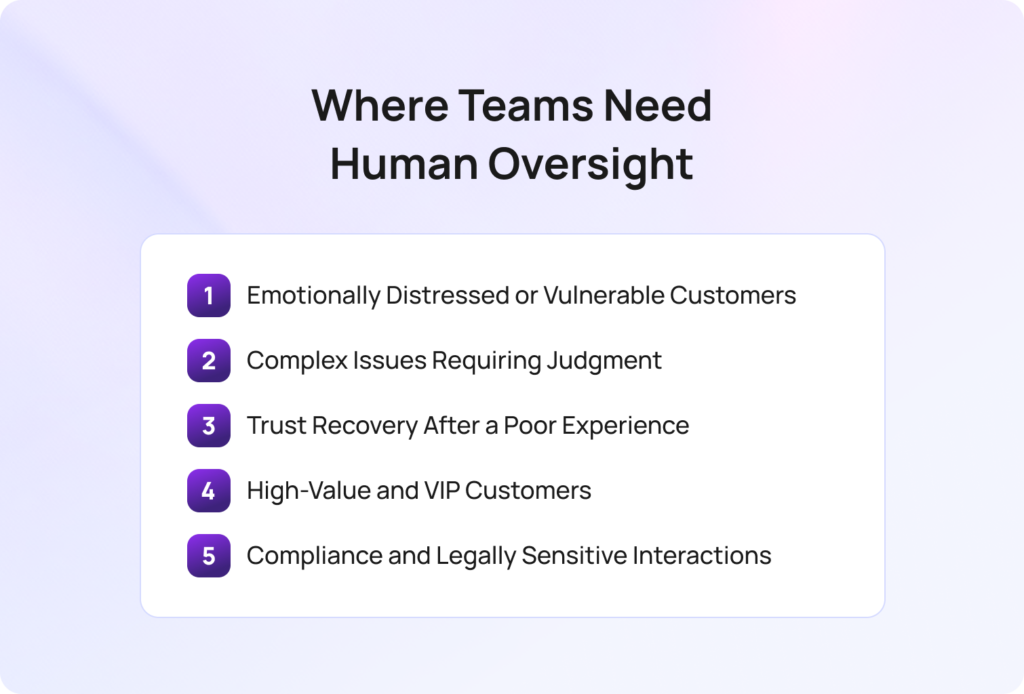
AI support automation has clear performance boundaries. Deploying customer service automation beyond them does not just fail to deliver value. It actively damages customer experience and customer relationships. The five scenarios below are where human intervention is not optional.
The same AI tools that improve customer service on routine customer requests produce poor outcomes on complex, emotional, or high-stakes service interactions. Identifying these boundaries before implementing AI, not after a complaint spike, separates customer service teams that scale AI successfully from those that scale it recklessly.
AI in customer service can detect customer emotions and analyze customer sentiment during interactions. Sentiment analysis can flag distress signals. But the response to a distressed customer requires human empathy that ai systems cannot safely replicate in 2026.
Customer service interactions involving grief, financial hardship, or any form of vulnerability should route to human support regardless of AI confidence score. An ai customer service response that misreads the emotional register causes trust damage disproportionate to the cost of the interaction. Escalation triggers that detect customer emotions should be configured before launch, not after the first incident.
Customer service automation handles tier-1 customer queries well because the correct answer is definitive. Complex issues are different. Billing disputes that involve policy interpretation, technical faults that require diagnosis across backend systems, and complaints that require discretionary resolution all demand judgment that AI systems cannot reliably provide.
The failure mode is not an incorrect answer; the customer rejects. It is a confident, incorrect answer that the customer accepts, leading to a repeat contact or an escalated complaint. That is more expensive than routing the interaction to human agents from the start.
When a customer has already had a poor experience, particularly one where ai customer service contributed to it, the recovery requires human acknowledgement. An AI apology after an AI failure is perceived as insincere. Customer service teams that flag trust recovery scenarios in their automated support workflows should route those customers directly to human support with full context from past interactions.
High-value accounts and VIP customers expect human engagement at key moments regardless of query type. This is a customer service strategy decision, not a complexity decision. Configure routing rules that guarantee a human touch for these segments. The customer relationship requires it.
Customer service interactions involving data access requests, regulatory complaints, or policy exceptions require human review before any response is sent. AI in customer service carries legal and regulatory risk in these categories. Even AI-powered customer service responses in these categories require human approval. Configure intent-based escalation triggers before deployment, not as a post-incident fix.
The customer service teams that get into trouble with AI support automation are almost never the ones who deployed too cautiously. They are the ones who expanded the scope without updating their oversight model. The boundary between what AI agents should handle and what human agents should handle shifts as your product and your customers change. If you are not reviewing it quarterly, it is already out of date.

Radu Dumitrescu, Head of Presale & Digital Transformation at BlueTweak
1. Map your interaction types by automation suitability. Categorise your volume: which customer inquiries are tier-1, definitive, and high-confidence? Which involve emotional complexity, compliance risk, or relationship value? Start automating routine tasks only in the first category.
2. Configure confidence thresholds conservatively. Set escalation thresholds that produce a slightly higher-than-target human handoff rate. Tune down as QA data accumulates. Never set thresholds based on vendor demos. Set them based on your own customer service interactions and query mix.
3. Define the five oversight triggers before go-live. Emotional distress, complex issues, trust recovery, VIP routing, compliance queries. Every ai support automation deployment should have explicit escalation logic for each before the first customer interaction.
4. Measure containment rate, not deflection rate. A deflected customer who follows up is a cost transfer, not a resolution. Track containment separately from deflection from day one.
5. Review oversight triggers quarterly. As customer behavior and customer needs change, the boundary between safe customer service automation and required oversight shifts. Most modern customer service solutions allow teams to implement AI workflows without writing code, reducing the friction of quarterly updates. Build the review into your support operations calendar.
BlueTweak delivers automated AI customer support solutions across all six value use cases in a unified platform, with configurable oversight controls built into each.
AI in customer service starts before the interaction. Customer support automation routes incoming support tickets to the right team based on intent and customer sentiment. The AI chatbot and AI voicebot handle tier-1 customer queries autonomously. Suggested reply enables real-time agent assist for support agents during live customer conversations. AI ticket summary eliminates post-interaction wrap-up. The QA module enables 100% interaction scoring across AI and human agents to improve customer service processes at scale.
Built-in oversight means customer service analytics surfaces containment rate, CSAT delta, and repeat contact rate per interaction type, giving customer service teams the data to manage the automation boundary continuously. Configurable confidence thresholds and escalation triggers route customer service interactions to human agents when automation limits are reached. Human approval workflows on sensitive interactions ensure support agents review before sending.
AI in customer service delivers strong, measurable value across tier-1 resolution, intelligent routing, agent assist, post-interaction summarisation, QA scoring, and proactive outreach. It requires human oversight for emotionally distressed customers, complex issues, trust recovery scenarios, VIP accounts, and compliance queries.
Customer service teams that scale AI support automation successfully are not those who automate the most. They are those who deploy customer service automation precisely, measure containment rather than deflection, and maintain explicit oversight controls at the boundaries. AI improves customer service outcomes when the boundaries are respected. Reducing operational costs through AI automation is achievable without damaging customer experience when the right service strategies are in place.
What is AI support automation?
AI support automation is the use of artificial intelligence, machine learning, and natural language processing to handle, route, and improve customer service interactions without requiring human involvement at every step. Customer service refers to the full range of support interactions a business provides, and ai in customer service now touches most stages of that process, from automated ticketing system routing to autonomous resolution of customer service FAQs. The most important distinction in AI automation in customer support is between AI that assists support agents and AI that replaces them entirely.
Where does AI customer service automation deliver the strongest results?
Customer support automation delivers the strongest results on high-volume, low-complexity customer inquiries with a clear, correct answer. In well-implemented deployments, AI agents achieve 40 to 70 percent containment on these tier-1 customer queries. The ROI case for post-interaction summarisation is also strong across all interaction types, with no meaningful quality risk. Self-service and proactive outreach round out the value case by reducing inbound volume before customers need to contact support.
What customer interactions should not be fully automated?
Five interaction types require human support regardless of AI confidence score: emotionally distressed or vulnerable customers, complex issues requiring policy interpretation or diagnosis, trust recovery scenarios after a poor previous experience, high-value customer relationships, and compliance or legally sensitive queries. Ai customer service deployed across these interaction types does not just fail to deliver value. It actively damages service quality and customer relationships.
How do you measure AI support automation performance correctly?
Track containment rate, not deflection rate. Monitor post-interaction customer satisfaction separately for AI-handled and human-handled customer service interactions. Analyze customer sentiment and track repeat contact rate within 48 hours as a proxy for resolution quality. Customer service teams that aggregate AI and human performance data cannot manage either effectively. Use AI-powered customer service analytics to surface containment rate and customer feedback per interaction type.
How should support teams approach implementing AI in customer service?
Start by mapping customer service processes by automation suitability. Automate routine tasks in the highest-confidence interaction types first. Configure confidence thresholds conservatively and tune them down as QA data accumulates. Define oversight triggers for the five high-risk interaction types before go-live. Most customer service solutions now allow teams to configure automated support workflows without writing code, which reduces deployment time. Review the boundary between automation and human support quarterly as customer needs and customer behavior evolve.
As Head of Digital Transformation, Radu looks over multiple departments across the company, providing visibility over what happens in product, and what are the needs of customers. With more than 8 years in the Technology era, and part of BlueTweak since the beginning, Radu shifted from a developer (addressing end-customer needs) to a more business oriented role, to have an influence and touch base with people who use the actual technology.