How to Prioritize Help Desk Tickets: 21 Strategies for Faster Resolution


BlueTweak is an AI Customer Support Platform that unifies every conversation, customer record, and automation into one workspace.
Explore more
Insights, trends, and practical ideas from customer experience and AI
Real-world scenarios showing how teams use BlueTweak to deliver better service
The daily blueprint that guides customer support leadership.
ROI and savings calculators for support teams
See how BlueTweak stacks up against leading customer support platforms
Prioritization is the lever that turns a noisy queue into a steady flow. Rank by impact and urgency, make timers visible, route by skills and language, surface self-service at intake, and keep routine items short so high-priority work gets real attention. BlueTweak consolidates these rules into a single workspace and brings all support tools and communication channels into a single platform to streamline operations, with conditional intake, skill- and risk-based routing, SLA timers, knowledge in flow, automated workflows for efficient ticket routing and resolution, and analytics that show what changed.
Monday, 9:07 AM. The queue looks deceptively calm at fifty-two tickets, but that surface tranquility is a lie. A critical payroll outage sits three rows down simply because the subject line reads “Cannot access system,” while five password resets shout for attention in all caps. A VIP replies to an old thread, skipping the portal entirely.
Then a device swap request arrives with no model number, bouncing between agents twice before anyone can begin work on it. Your customers feel this disorder as slow, uneven, and frustrating service. Your agents feel it as endless interruptions and stressful guesswork. Customer service and support agents rely on efficient ticket management to handle inquiries and maintain consistent communication; without it, their work becomes chaotic. Your leaders feel it when SLA charts look green while truly important work quietly ages.
A clear, universal prioritization system fundamentally changes the day.
The most common mistake I see in help desk operations isn’t a bad tool or an undertrained team but the absence of a shared definition of urgency. When ‘critical’ means something different to every agent, priority becomes whoever shouts loudest, and the queue reflects politics rather than risk. Once you anchor the entire team to two questions: how many people are affected and how fast is the damage growing, the conversation shifts from opinion to evidence, and resolution times follow almost automatically.
Radu Dumitrescu, Head of Presale & Digital Transformation, BlueTweak
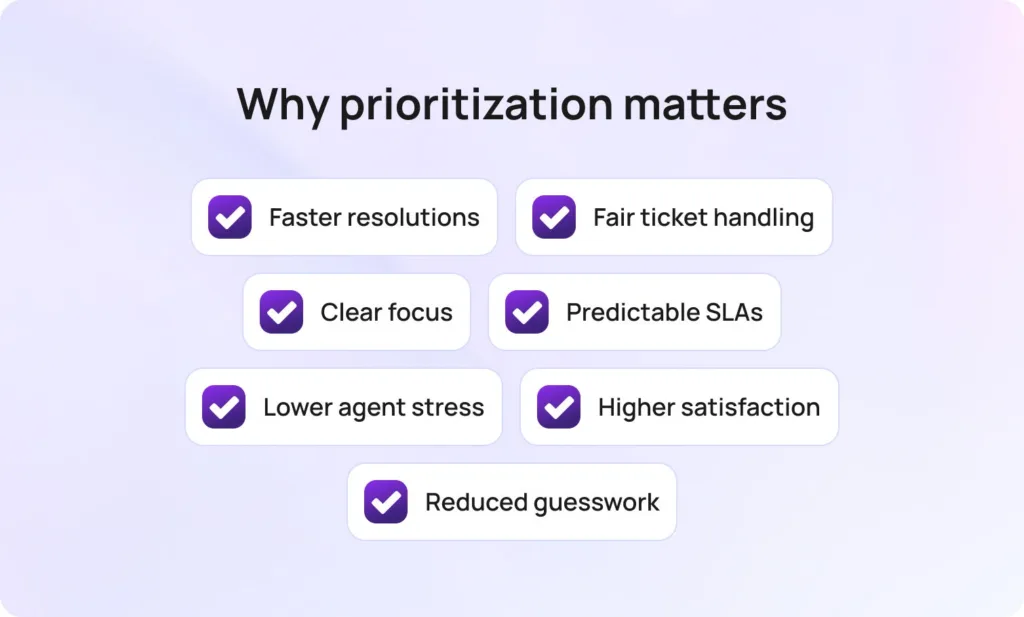
By using factors such as impact and urgency, you establish a shared language in which the loudest voice no longer wins. High-impact work automatically rises to the top and receives a tight, focused communication cadence. Routine requests are routed into a short, well-lit lane and finished quickly.
Instead of hidden rules, promises appear as visible timers, ensuring action occurs before a deadline slips. The result is far more than just faster resolution time. When a well-organized customer support team is in place, it improves customer satisfaction by ensuring that important issues are addressed promptly and consistently. It leads to fairer treatment for everyone, steadier queues for your team, and the mental space for agents to actually think.
The strategies that follow are practical and deeply connected. You will learn to set priorities with clarity, route tickets with confidence, communicate in plain language, and shorten the lifespan of routine tickets so the truly urgent work receives the swift attention it deserves. Efficient ticket management is key to achieving both speed and customer satisfaction.
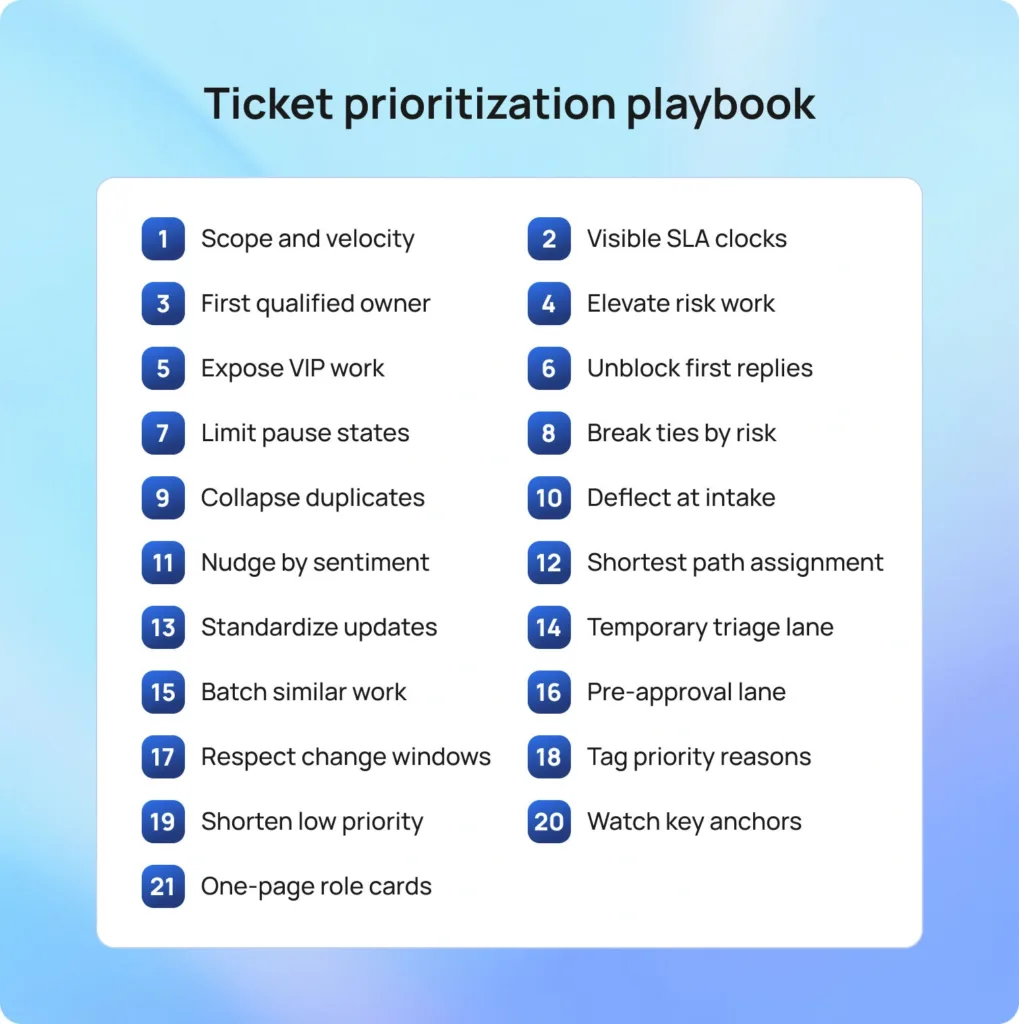
Your working queue needs more than just rules; it needs innovative tools. You need guidelines that your team can apply in under a minute, signals that show exactly when to bend the rule, and small, consistent habits that keep the entire system honest.
The following 21 strategies are the best practices for help desk management. Optimizing help desk operations and desk operations is essential for effective ticket management, as it streamlines workflows, improves resolution times, and ensures your team can handle support requests efficiently. They are designed to cut through the noise, optimize your processes, and ensure that your team is always working on the right thing at the right time. Get ready to turn your chaotic queue into a smooth, efficient operation.
Priority should never become a debate. Two simple questions settle it instantly: How many people or systems are affected (Scope), and how quickly harm will grow if nothing changes (Velocity)? This clarity ensures consistency and speed.
Organizations can prioritize tickets based on predefined criteria such as customer value, urgency, or impact. Priorities can also be set based on factors such as customer plan tiers, spending habits, or the overall impact on business operations, aligning with a prioritization-based approach to optimize support efficiency and response times.
A P1 is an unacceptable, broad outage that puts your money or reputation at immediate risk. P2 captures severe degradation for a large group, which is worsening by the minute. P3 fits contained issues that can wait for a development sprint, and P4 covers cosmetic or housekeeping work you can batch later.
How BlueTweak helps: Priority is determined by your configured rules for ticket fields (and any mapped symptoms). Selecting it starts the right timers and escalations in the queue.
Every priority level needs a mandatory first-response and resolution target that everyone, including your customer, can see. These Service Level Agreements (SLAs) must be visible to your agents. Visible response times and resolution times help ensure that support tickets are handled promptly, meeting customer expectations and improving overall support efficiency. Reminders should arrive well before a breach, and customers should see the same next-update time in their portal view. Using empty acknowledgments just to stop the clock without moving the work only trains people to chase you.
How BlueTweak helps: SLA timers and pre-approved templates are available alongside each ticket. Templates auto-merge the next promised update time, and your customer portal/messages display it when enabled.
Speed starts with the very first person who touches the case. Automated routing by intent, component, language, customer tier, and sensitivity ensures database failures go straight to specialists and access requests funnel into an approval flow before a human wastes time.
Ticket assignments can be automated to assign tickets to the most suitable agents or other teams based on expertise, language skills, and current workload, improving support efficiency and resolution times. The goal is fewer transfers and the shortest possible path to someone who can finish the job. When that first qualified touch lands early, resolution time falls without burning out your team.
How BlueTweak helps: Routing rules combine skill profiles with ticket signals to place work with the right owner. Live workload and SLA-risk indicators make emerging bottlenecks obvious, so teams can rebalance before timers turn red.
Not all P2s are equal. Urgent issues such as a suspected credential breach, a payment failure during checkout, or potential data exposure warrant a higher lane and a tighter update cadence. By raising these asymmetric risks by one level, you protect the business without rewriting your entire process. A short, two-step containment checklist keeps the first five minutes crisp; the normal flow then resumes with more frequent customer updates.
High-priority tickets may also be assigned to customers who contribute more money to the business, ensuring their issues are resolved promptly and supporting key revenue streams.
How BlueTweka helps: When configured, risk tags raise priority by 1 level, trigger a short containment checklist, and automatically apply a more frequent status cadence.
Special handling for your VIPs doesn’t require secret, custom rules. You just need one clean, obvious view that shows their severity, age, and the next promised update. The standard priority definitions still apply, but with earlier warnings and a firmer communication cadence. This lets leaders stop chasing urgent Slack pings for status and focus on clearing genuine blockers.
How BlueTweak helps: A VIP filter surfaces severity, age, and the next promised update, while SLA timers appear alongside each VIP ticket in the queue (and customer portal when enabled) for quick monitoring.
Customers instantly relax when your first message provides an effective initial response, one that either removes the blocker or asks for one specific thing that unlocks the next step. Effective initial responses can set the tone for the entire support interaction, ensuring customers feel heard and supported from the start.
A screenshot of the exact error dialog beats a vague log request, and a single command to run beats a wall of text. Your agents then move immediately to the following action rather than starting a second conversation to clarify the first. This habit drastically drops second-contact rates and builds trust.
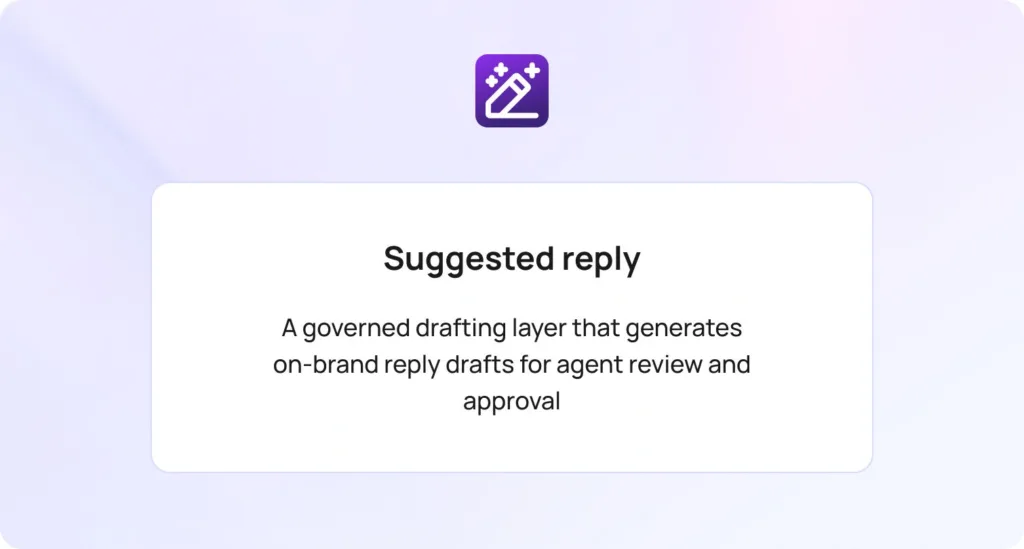
How BlueTweak helps: Suggested replies propose the next best step from the mapped knowledge article, allowing the agent to insert the correct unblocking hint with a single click.
Timers should pause only when you are waiting for a customer or vendor. Everything else keeps aging. Every pause must have a clear reason and a scheduled check-in time to prevent items from slipping into oblivion. When fake pause states disappear, your queues become honest, and your real internal bottlenecks become impossible to ignore.
How BlueTweak helps: When configured, tickets can pause only in Pending customer or Waiting on vendor status; a pause reason is required, and scheduled reminders nudge the customer until they respond or the timer expires.
Two P2s are not equally urgent. When priority levels match, work the older ticket or the one closest to its SLA target. Simple, automatic tie-breakers make the top of the ticket queue obvious and instantly defensible. This significantly reduces stress and prevents arguments over who picks next.
How BlueTweak helps: Queue sorting combines priority, ticket age, and SLA progress to surface the next best ticket at the top based on your configured rules.
Outages inevitably echo across the inbox. Linking all child tickets to a single parent, posting a single, clear status update there, and cascading that note to every linked case eliminates retyping and ensures consistent messaging. Customers hear the same thing, at the same time, with the same next update. Closure becomes one simple motion instead of fifty small ones.
How BlueTweak helps: Auto-clustering can propose a parent, and once tickets are linked, bulk actions (i.e., status, tags, and updates) can be applied to all children in a single step based on your configuration.
The cheapest ticket is the one that never opens. Providing self-service options, such as displaying the correct knowledge article as a customer types, often resolves the issue on the spot. Making essential information available through knowledge articles and forms empowers users to resolve issues independently. If it doesn’t, the form requires the customer to provide exactly what the article expects, including the correct attachment type and size, so the first touch still moves quickly. Volume falls, and what remains arrives complete.
How BlueTweak helps: A centralized knowledge base is available in the portal and the agent console. Agents can insert the correct step into a reply with one click, and customers see those same steps during submission when enabled.
Some messages carry inherent churn risk or involve active revenue. Strong negative sentiment or an active pre-sale conversation deserves a one-level nudge and a quick human review, not a disruptive leap across the entire matrix. This pressure-measured valve maintains system fairness while giving reputation and revenue the timely attention they need.
How BlueTweak helps: Flags can suggest a one-level priority increase and preload an empathetic template with a concrete next step for the agent to review and send.
Round-robin feels fair but guarantees transfers. A simple skills matrix for languages, systems, and certifications gets the ticket to the person or small pool that closes it fastest. For a small team, efficient ticket assignment and workload management are essential to handle support tickets effectively and maintain high responsiveness. Transfers drop, notes stay clean, and customers no longer hear “I am moving this to the right team.” The work finishes where it starts.
How BlueTweak helps: Skills and schedules are within routing, and when performance-based routing is enabled, the engine can favor the pool with stronger historical close rates for that intent.
Every common request should include three short, standardized messages: a first response that sets the next update time, a progress note that explains what changed, and a delay that explains why and when you will check again. Reusing these simple templates removes tone drift and guesswork.
Using email templates and canned responses can streamline communication, maintain consistency, and reduce follow-up emails by ensuring customers receive timely, clear updates. Customers stop asking for updates once they know when the next one will arrive.
How BlueTweak helps: Templates sit beside the queue, auto-merge ticket details, and, when enabled, can send on schedule or on status changes, with optional agent review.
Monday mornings, major launches, and outages don’t care about your schedule. A small, temporary triage lane that quickly confirms priority, tags correctly, requests one missing item, and routes with confidence keeps the main queues moving. The lane shuts down as soon as the wave passes. This ensures the support team maintains momentum without having to rewrite regular roles.
How BlueTweak helps: A triage view shows newly arrived tickets with only the critical fields and offers one-click assignment and routing based on your configured rules.
Context switching kills speed. Allow agents to pull a batch of similar or repetitive tickets in a row for tasks such as device swaps, password resets, or license grants. A small checklist and a smart macro keep outcomes consistent and fast. Routine work declines, leaving more focus on complex issues.
How BlueTweak helps: Filters can serve a “next five” batch of similar tickets, and macros bundle the reply, tags, field updates, and internal steps into a single action.
Access and purchasing requests often stall while someone else decides. Holding them in a specific pre-approval lane with gentle reminders keeps your active queue honest. Once approval lands, routing resumes without a human babysitting the case. You save time for work that can be moved now.
How BlueTweak helps: Conditional intake can launch an approval request, set the ticket to a paused state with a visible reason, and, once the approval is approved, automatically resume routing based on your workflow rules.
Urgency does not erase the calendar. Maintenance windows and freeze periods exist for a reason. Scheduling the fix for the next available safe slot and informing the customer precisely when it will occur reduces risk and builds trust. Reliability counts just as much as speed.
How BlueTweak helps: Maintenance calendars and blackout rules can block unsafe windows and, when you schedule a safe slot, automatically set the status to “Scheduled” with the promised time.
Priority changes aren’t random if you record the reason why. A tiny set of reason tags, like safety, security, revenue, VIP, legal, deadline today, vendor wait, or duplicate to parent, turns judgment into objective data. Reviews move quickly, and process tweaks are much easier to justify. Documenting process changes and actively soliciting feedback from the team can further improve ticket management efficiency.
How BlueTweak helps: One-click tags create a reliable audit trail and feed built-in trend charts, so you track patterns without separate spreadsheets.
Protecting high-priority space means finishing low-priority items quickly. Knowledge articles should mirror your live UI, name the exact fields, and appear during submission and handling. Small, weekly edits keep them accurate without heavy rewrites. The long tail of common issues gets shorter and less noisy.
How BlueTweak helps: Knowledge appears in the portal and the agent console; agents can insert the correct step into a reply with one click, and customers see the same steps during submission when enabled.
Healthy systems improve in small, measurable steps. First response time, time to resolution, SLA compliance, reopen rate, and VIP aging tell you exactly where friction lives. Pick one lever, make a tiny change, and watch for movement next week. Your confidence grows when numbers respond to edits you can easily explain.
How BlueTweak helps: Analytics can tie movement to the exact form, route, or template version you changed, and a built-in change log records who changed what and when. By leveraging ticket analytics, you can make data-driven decisions that inform strategic improvements in your support operations.
People remember what they use frequently. A single-page card for triage, incidents, approvals, and escalations that spells out the mission, scope, handoff triggers, and two clear examples makes decisions faster and more consistent. New hires ramp quicker, and veterans avoid process drift. For new employees, clear role cards help them quickly understand their responsibilities in ticket management and accelerate onboarding. The playbook becomes muscle memory.
How BlueTweak helps: Role cards can open in context within the console and, when mapped to intents or ticket types, display the version that applies to the ticket you are viewing.
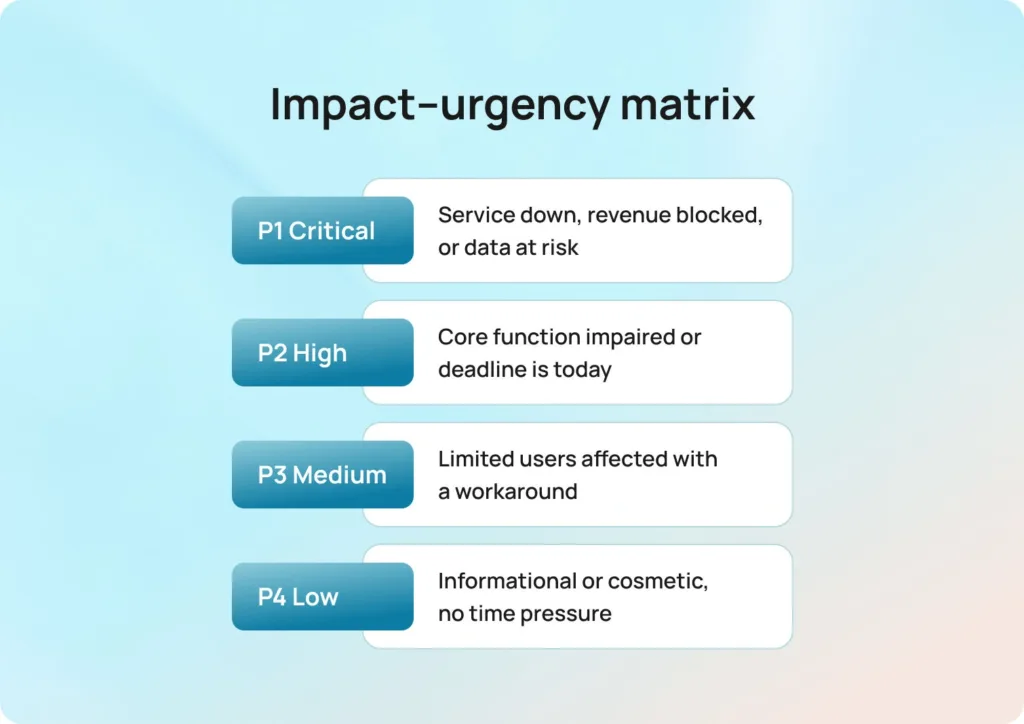
Use this simple matrix to turn noisy queues into clear choices. Define impact and urgency once, then use the four levels below as short, reusable paragraphs you can paste into playbooks, status pages, and training.
These templates can be used by service desks, customer service departments, and customer service teams to standardize communication and streamline support operations.
When describing support channels in your templates, be sure to include phone calls, as many customers expect multi-channel support options such as email, live chat, social media, and phone for a seamless customer experience.
P1 Critical: Service is unavailable for a department, revenue is blocked, or data is at risk.
Examples: payroll system down on payday; suspected credential breach; urgent support request by phone; critical bug in software features.
P2 High: A core function is impaired for many users, or the deadline is today.
Examples: VPN fails at a location; order processing delays during a promotion; multiple customer inquiries about access issues; high-priority support requests.
P3 Medium: One user or a small group is affected with a workable workaround.
Examples: device swap; single mailbox sync issue; customer question about device settings; bug report on non-essential software features.
P4 Low: Informational requests or cosmetic issues without time pressure.
Examples: report formatting; general inquiry about features; low-priority customer questions; non-urgent general inquiries.
First response: “We are investigating the [issue]. Next update by [local time]. If available, please attach a screenshot of the exact error dialog. For urgent issues, you may also contact us via phone call.”
Progress: “We are working with [vendor/team] and will check again at [time]. Current ticket status: [one line].” Desk software can automate ticket status updates, supporting efficient ticket management and streamlining workflows.
Delay: “We are waiting for [approval/logs]. We will review at [time] and update you.”
Approval lane prompt: “Your access request is almost ready. Please confirm the manager’s approval and the role name. Once attached, your request moves automatically.”
Duplicate parent note: “We identified an incident affecting [system]. Your ticket is linked to the parent case. You will receive the next update by [time]. No action is needed from you.”
Reason tags lists: Safety, security, revenue, VIP, legal, deadline today, vendor wait, duplicate to parent.
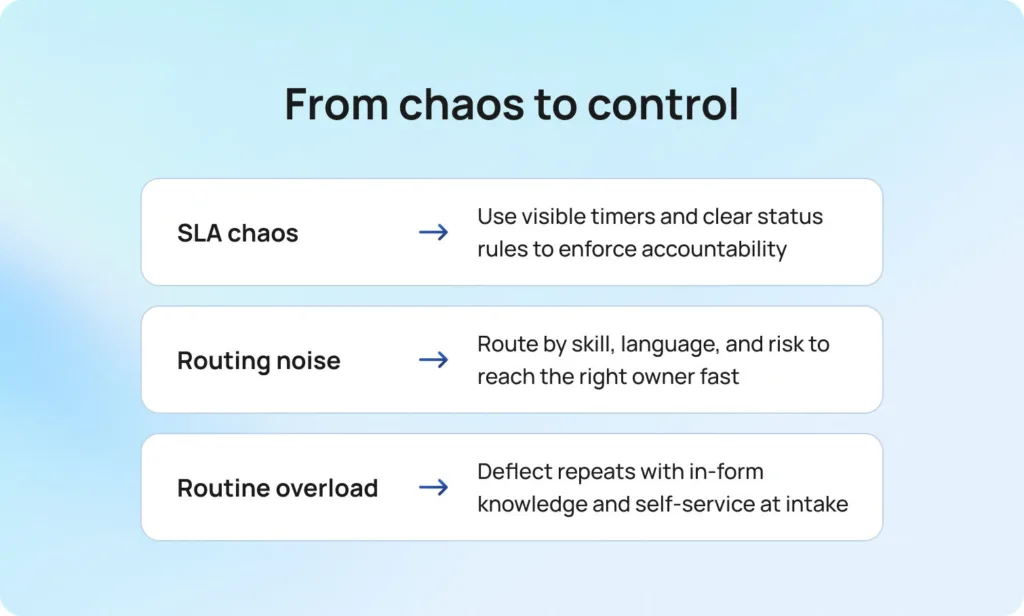
Prioritization works when it is simple enough to use every minute and precise enough to defend in a review. We’ve shown how a plain impact–urgency matrix creates shared judgment, how visible SLA timers enforce accountability, and how intelligent routing prevents unnecessary handoffs. By creating a higher lane for safety, security, and revenue, and by using deflection at intake to shorten routine tickets, you guarantee that truly urgent items receive the focused attention they need. This isn’t just about faster tickets; it’s about weekly, predictable tuning that turns noise into measurable, drama-free progress.
Your next move depends on your most significant pain point.
BlueTweak brings all these essential pieces together into a single seamless screen. Conditional intake sets priority correctly. Skill and risk-based routing put work in the right hands. Timers and templates keep promises visible. Knowledge appears exactly where the work is happening.
By leveraging automation and natural language processing, BlueTweak reduces manual tasks, integrates with other systems, and improves customer support by automating the matching of inquiries to solutions and streamlining workflows. Every action, from inserting a knowledge step into a reply to viewing customer status, is unified. Analytics connect each small process change to a visible result, which is how a policy transforms into a calmer, more confident day for your customers and your team.
Ready to stop guessing and start governing your queue? Book a demo of BlueTweak today to see how easily you can implement these strategies and bring sanity back to your help desk.
Use the impact–urgency matrix first, then sort by SLA proximity and age. Move approvals to Pending states with reminders, group duplicates under a parent, and batch a small set of routine items to free up capacity. A ticketing system like BlueTweak can help you prioritize tickets and manage priority levels efficiently by applying these filters and bulk actions in minutes, so the top of the queue reflects real risk.
Keep the same definitions and SLAs, but add a VIP view with severity, age, and next update time. Incorporate ticket prioritization to ensure VIP requests are handled appropriately while maintaining consistent priority levels for all support tickets. Warn earlier and ensure leaders see exposure at a glance. BlueTweak’s VIP filters and timers maintain cadence while standard work continues to flow.
Teams can anticipate issues by analyzing historical data, monitoring system performance, and reviewing trends in user behavior. This proactive approach helps identify potential problems early, enabling preventive actions and improving overall support effectiveness.
Place answers in the form before submission and in the agent console during handling. Require the right attachments and add a brief verification at closure for higher-risk intents. BlueTweak links article steps to fields and provides in-flow snippets, enabling routine work to be completed quickly and cleanly.
Raise the priority by one level for strong negative sentiment that signals churn risk and for pre-sales blockers tied to active revenue. Keep human review in the loop. BlueTweak flags these signals and presents an approved template that balances empathy with clear next steps.
As Head of Digital Transformation, Radu looks over multiple departments across the company, providing visibility over what happens in product, and what are the needs of customers. With more than 8 years in the Technology era, and part of BlueTweak since the beginning, Radu shifted from a developer (addressing end-customer needs) to a more business oriented role, to have an influence and touch base with people who use the actual technology.