How To Manage a Help Desk And Deliver Faster Resolutions


BlueTweak is an AI Customer Support Platform that unifies every conversation, customer record, and automation into one workspace.
Explore more
Insights, trends, and practical ideas from customer experience and AI
Real-world scenarios showing how teams use BlueTweak to deliver better service
The daily blueprint that guides customer support leadership.
ROI and savings calculators for support teams
See how BlueTweak stacks up against leading customer support platforms
Help desks slow down when intake is incomplete, routing is manual, and status updates are inconsistent. Managing for speed means complete forms at the front door, skill and risk-based routing, SLAs with clear updates, and knowledge surfaced right when it is needed. AI summaries and suggested replies shorten responses, while workforce scheduling and weekly reviews keep queues balanced and improvements compounding. BlueHub by BlueTweak unifies help desk operations by integrating multiple communication platforms to support omnichannel support and efficient ticket management, and supports managing costs in a single workspace, enabling faster, more predictable, and less costly resolutions.
Monday, 9:02 a.m. A VPN ticket arrives without a screenshot or error code, so the analyst guesses and sends a follow-up. By 9:20, four more requests arrive with missing approvals, and the urgent payroll outage slips out of view behind low-impact questions. At 10:15, a VIP emails the COO asking why no update has ever come, even though three analysts have touched the record.
Customers feel uncertainty first through slow responses, then through second and third contacts that should never have been necessary. Frustrated customers experience delays and a lack of updates, leading to dissatisfaction and potential damage to brand reputation. Agents feel it next as tabs multiply, ownership changes, and a dozen tiny decisions replace a clear path to resolution. Leaders see it last when SLAs slip, dashboards disagree, and costs climb without a single significant incident to blame.
Monitoring help desk performance and ensuring that customer expectations are met are critical to preventing these issues, as they provide measurable ways to assess and improve service delivery. Gathering customer feedback through surveys is essential to evaluate customer satisfaction with support interactions and to ensure a high proportion of satisfied customers, which helps identify areas for process refinement and service enhancement. Analyzing customer interactions across all touchpoints further improves support quality by providing a comprehensive view of communication and service effectiveness.
It does not have to run this way. Complete intake turns first responses from guesswork into action. Skill, language, and risk-based routing send work to the right person the first time. SLAs with plain-language updates keep expectations aligned, while knowledge and self-service reduce repetitive questions that clog every queue. AI summaries and suggested replies give analysts momentum, and staffing that matches hourly demand prevents the quiet breaches that erode trust.
Teams that put these pieces together resolve faster, communicate more clearly, and spend less time chasing basics. These better processes lead to improved customer satisfaction. Customers notice the difference immediately because the experience is consistent across chat, voice, email, SMS, and social channels. What follows shows precisely how to manage a successful help desk so Monday feels calm, the backlog stays honest, and resolutions arrive when they should.
Monday, 9:02 a.m. A VPN ticket arrives without a screenshot or error code, so the analyst makes a guess and sends a follow-up. By 9:20, four more requests land with missing approvals, and the urgent payroll outage slips down the view behind low-impact questions. At 10:15, a VIP emails the COO asking why no update has ever come, even though three analysts have touched the record.
Customers feel uncertainty first through slow responses, then through second and third contacts that should never have been necessary. Frustrated customers experience delays and a lack of updates, leading to dissatisfaction and potential damage to brand reputation. Agents feel it next as tabs multiply, ownership changes, and a dozen tiny decisions replace a clear path to resolution. Leaders see it last when SLAs slip, dashboards disagree, and costs climb without a single significant incident to blame.
Monitoring help desk performance and ensuring that customer expectations are met are critical to preventing these issues, as they provide measurable ways to assess and improve service delivery. Gathering customer feedback through surveys is essential to evaluate customer satisfaction with support interactions and to ensure a high proportion of satisfied customers, which helps identify areas for process refinement and service enhancement. Analyzing customer interactions across all touchpoints further improves support quality by providing a comprehensive view of communication and service effectiveness.
It doesn’t have to run this way. Complete the intake first so the initial response turns guesswork into action.
Teams that put these pieces together resolve faster, communicate more clearly, and spend less time chasing basics. Customers immediately notice because the experience is consistent across chat, voice, email, SMS, and social. What follows shows precisely how to run a help desk so Monday feels calm, the backlog stays honest, and resolutions arrive when they should.
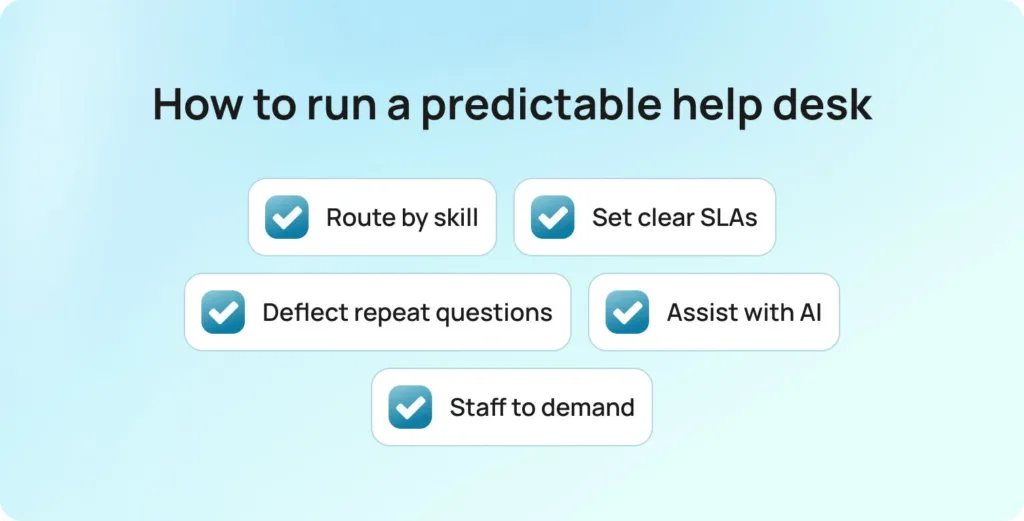
Good management feels predictable to customers and practical to agents. It starts with short, usable help desk workflows that remove guesswork and map the few paths a ticket can take. Forms ask only for what matters and adjust with conditional fields, so a password reset stays quick while an access request gathers approvals, entitlements, and screenshots. The result is a complete ticket that reaches an analyst ready to act, rather than another round of clarifying emails.
From there, work flows in line with how the organization actually operates. Organize and manage queues so routing follows skill, language, and risk—not a single catchall. That keeps load balanced and prevents avoidable reassignments.
SLAs are set by intent, with visible timers for first response and resolution, and customers receive concise updates tied to those timers to keep expectations aligned.
Answers meet people where they are. A searchable knowledge base and a robust knowledge base mirror the current UI, use the exact labels and commands, and appear in the portal during submission and in the agent console during handling. Customers solve simple problems without opening a case through self-service options and self-service portals, and agents resolve the rest without tab hunting or stale articles.
Capacity matches demand instead of fighting it. Efficient queue management and workforce management forecast by hour and language, schedule the right skills for peaks, and protect SLA compliance when volume surges. Analytics then close the loop by tracking key performance indicators such as first-contact resolution, handle time, reopen rate, and customer sentiment, highlighting recurring issues and pointing to one concrete improvement each week.
Tracking team performance and strengthening the team’s ability to resolve issues are central to ongoing success. Together, the help desk and desk teams answer faster, ticket queues stay honest, and service quality remains consistent without adding more tools. The IT team also plays a key role in supporting these operations.
Micro blueprint readers can apply today:
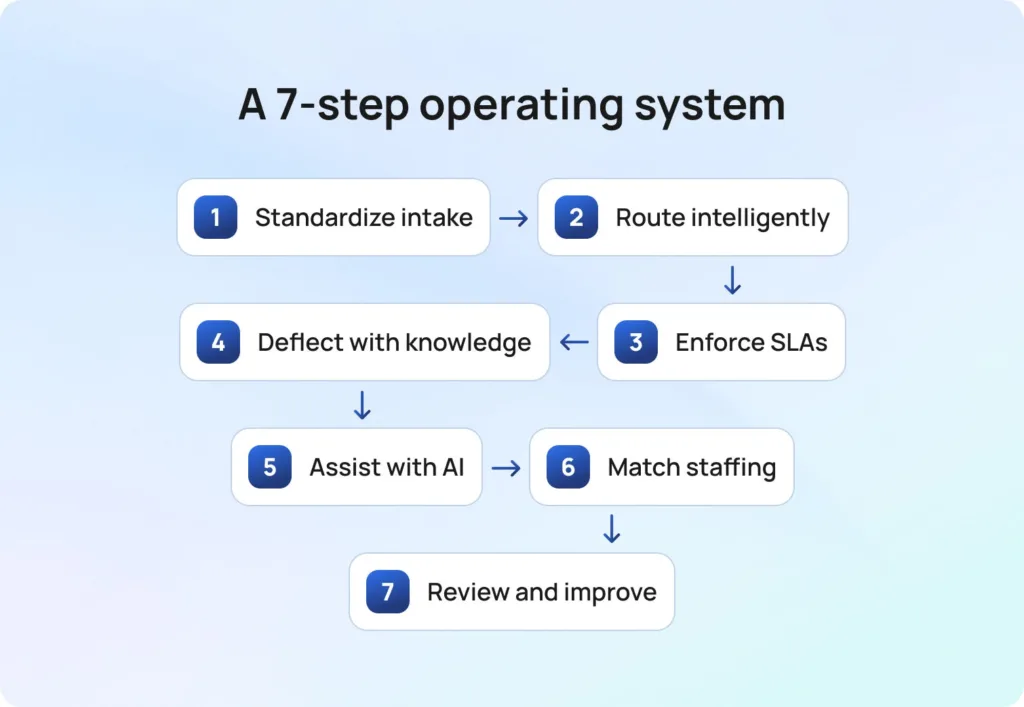
What you will get from the following seven steps is a blueprint you can use this week. Complete intake ends back-and-forth and ensures clean handoffs, while intelligent routing places each ticket with the right expert under SLAs customers understand. Knowledge and self-service deflect repeats, and AI assists agents so replies stay quick and on tone. Staffing matches demand; a brief weekly review keeps improvements compounding, fostering continuous improvement in the support process; and you finish with copy-ready steps you can drop directly into your help desk.
Speed starts at the front door. A well-designed form captures the essentials in one pass: system, brand or location, urgency, entitlement, steps already tried, and the right attachments. Intake forms should also capture and prioritize customer needs, ensuring support is tailored and proactive. A modern help desk system streamlines intake and ensures all required information is collected up front.
Conditional fields keep simple requests quick while expanding only when a case is complex, respecting the customer’s time and giving analysts what they need to act. In-line knowledge suggestions appear as customers type, answering common questions and quietly deflecting duplicates before they become tickets. The result is fewer clarifying loops, cleaner handoffs, and a queue filled with work that can move immediately.
Apply it now
Anti-patterns to avoid
Routing sets the queue’s rhythm. Once intake is clean, intelligent classification clarifies the intent so everyone knows what kind of help is needed. Language and regional cues then route the case to people who can actually speak with the customer and understand the environment.
Priority is driven by real impact, blending severity with customer tier so a payroll outage never hides behind a minor request. Complex work is assigned to specialists who can complete without handoffs, while repeatable requests are routed to the team designed to close them on the first try.
Skilled support teams are essential for handling complex issues and queries. Proper resource allocation and immediate access to relevant information help manage tickets efficiently, keeping the workflow steady.
As a result, queues stay balanced, VIP issues stay visible, reassignments drop, and response times settle into a pace you can trust against SLAs. Effective queue management and VIP customer prioritization are essential for maintaining high service standards.
Routing rule sketch
Signals to watch
SLAs only help when they are visible and tied to action. Set targets for first response and resolution by priority and intent, and put the clocks inside the same queue view that agents use every hour. Clear service-level agreements and tracked resolution times ensure timely responses and high customer satisfaction.
Status changes should do real work. Reminders fire before a breach, and customers receive plain language updates so timelines feel real and predictable. Monitoring response time and practical ticket-queue management help organize and prioritize requests, reduce resolution times, and ensure customers receive timely updates.
Treat closure like a quality gate. Required checks cut reopens, and when risk is high, add a quick verification step to confirm the fix. The payoff is fewer surprises, fewer second contacts, and a steady rhythm the team can trust.
Policy snippet you can copy:
Message templates
Knowledge pays off when it is short, current, and right where the work happens. Articles should mirror the live UI, using the same labels, fields, and commands that customers and agents see today.
Keep the library healthy with steady feedback. A well-maintained knowledge base, paired with quick thumbs-ups or short comments, shows which content helps and which needs a tune-up. Small, frequent edits keep articles accurate without big rewrite projects.
Help people before a ticket exists. During submission, the portal suggests likely fixes and requests the exact details the article requires. Many issues end there, which lowers ticket volume and speeds the rest.
Give customers a place to help themselves. A self-service portal and a customer portal provide round-the-clock access to clear, step-by-step guidance for common questions. Feedback gathered in these portals improves content quality and the overall experience.
Support agents where they work. Inside the console, suggestions follow the case and update as fields change, so no one has to tab hunt or paste stale links during a handoff. The result is fewer repeat requests, faster resolution of what remains, and a team that trusts the content because it reflects reality.
Article pattern that works
Lifecycle habit
Momentum comes from shared context and a clear first move. With one click, AI turns a long thread into a short brief that explains what happened, what is blocked, and what to do next. Shift changes no longer feel like cold starts because the next agent sees the same concise snapshot.
Agents work faster when all conversations are in one place. A unified console brings chat, email, voice, SMS, and social into one place, so support teams can track engagement without having to switch between tabs.
Based on the brief, a suggested reply is drafted using approved knowledge. Tone stays on brand, the analyst edits and sends, and the message lands sooner without sacrificing accuracy.
Voice calls do not lose context. Transcription is included in the same record as chat and email, so the team reads a single, consistent history instead of three partial stories.
Everything moves faster because no one is re-reading, retyping, or asking for details already in the case. Automated workflows and AI give agents the support they need to deliver personalized support efficiently, boosting performance across the entire team.
Practical guardrails
Even strong workflows stall when volume and capacity drift apart. Monitoring ticket volumes and focusing on desk and help desk efficiency are essential for IT teams to maintain optimal performance. Forecasts by hour, channel, language, and intent shape schedules that place the right skills where demand will be.
Real-time views show pressure building in specific queues, which gives leads a chance to rebalance work or open overflow slots before SLAs slip. Short unblock huddles clear the few tickets that jam everything else and share quick fixes with the whole team. The result is steady throughput, fewer fire drills, and a queue that reflects reality.
Staffing playbook
Daily rhythm that works
Speed that lasts comes from a simple, repeatable rhythm. Each week, review five signals: first contact resolution, handle time, SLA hit rate, reopens, and CSAT, and choose one friction point to fix. Those KPIs indicate where the help desk process needs targeted changes rather than another meeting.
Improvements should strengthen the team’s handling of service requests and support services. Capacity grows when asset management is tidy, entitlements are clear, and high-quality service is the standard, not the exception. That combination moves the business, not just the backlog.
Examples make it concrete. A form may need a missing field to complete the intake. A route may require a minor tweak to prevent reassignments. A knowledge article may need a quick edit to align with the new UI. A status template often benefits from more precise language to prevent confusion.
Small, specific changes land quickly and show up in next week’s numbers. The team stays engaged because progress is visible, and the queue stays honest because work flows the way it should. Over time, these quiet wins compound into calmer days and faster resolutions, which is the outcome this entire system is designed to deliver.
Example improvement loop
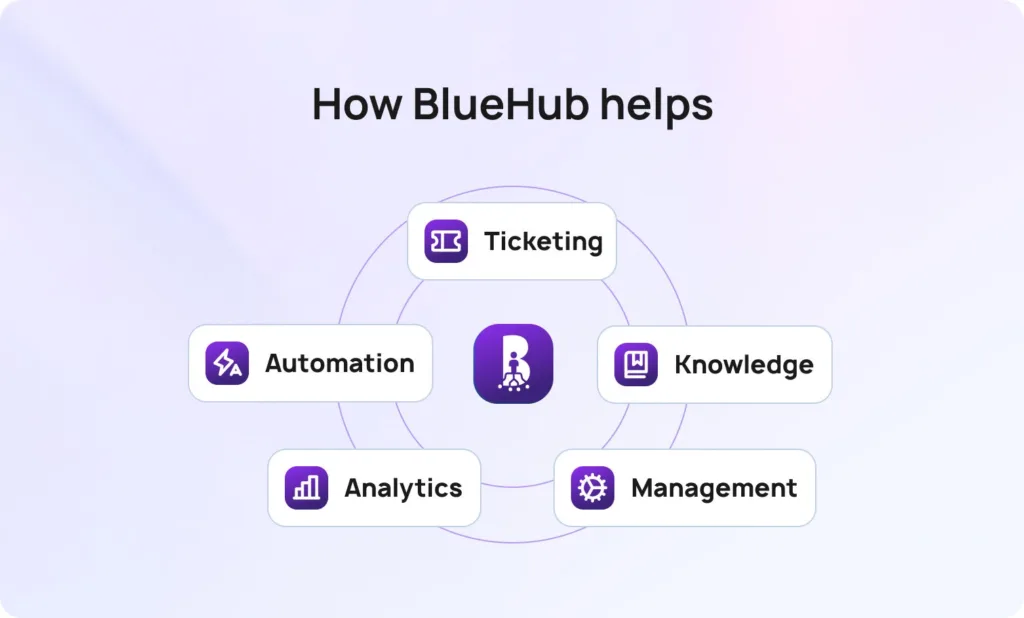
BlueHub (by BlueTweak) implements the seven steps in a single workspace. BlueHub’s help desk software acts as a unified system, integrating multiple communication channels and managing all aspects of help desk operations in a single, cohesive platform. BlueHub integrates seamlessly with Jira Service Management and can function as a service desk or support multiple service desks, streamlining support operations and enhancing workflow efficiency.
Intake that starts strong: Forms collect the correct details on the first try. Fields adapt to context, so simple requests stay short while complex ones capture approvals, entitlements, and screenshots. Analysts start with what they need, not a chase for basics.
Routing that respects reality: Intent, language, severity, and customer tier steer each ticket to the team best positioned to complete it. Complex work goes to specialists, repeatable work goes to the fastest closers, and VIP issues remain visible.
SLAs that everyone can see: Timers for first response and resolution are visible in the queue view, and customers receive plain updates that match each status. Timelines feel real because everyone can see them, which cuts second contacts and missed promises.
Knowledge at the moment of need: The portal suggests likely fixes during submission, and the agent console surfaces the same articles as fields change. Content mirrors the current UI, so answers match what people see on screen.
AI that speeds, not replaces: Long threads collapse into a short brief that explains what happened and what is blocked. Suggested replies are drafted from your knowledge base; the agent edits and sends them, and call transcripts land in the same record as chat and email.
Workforce management next to the queues: Forecasts by hour, channel, language, and intent shape schedules, and real-time views show where pressure is building. Leaders rebalance early, which protects SLAs when demand spikes.
Analysts who drive the next fix: Dashboards tie outcomes to procedures and automation rules, so you can see which change moved first contact resolution, handle time, or reopens. Minor fixes each week add up to steady gains.
The result is a simpler stack that runs the operating model you just read. Tickets arrive complete, routing is predictable, SLAs are met, and customers receive faster, more consistent resolutions without adding more tools.
Well-managed help desk systems integrate intake, routing, SLAs, knowledge base, AI, staffing, and analytics into a single workflow. Clear forms prevent restarts, sensible routing avoids handoffs, and predictable status updates keep customers informed. A focused knowledge base and a light touch of AI enable agents to respond faster without sacrificing tone or accuracy. Workforce management aligns people with demand, and weekly analysis keeps improvements honest.
If you want to see this approach working end-to-end, BlueHub maps each step to no-code workflows your team can use right away. Faster resolutions, fewer bounces, and a support experience customers trust. This integrated approach delivers an improved customer experience and exceptional customer support. See BlueHub in action with a short demo and watch a ticket move from intake to closure with clarity at every step.
The fastest way to cut resolution time is to fix intake and routing so tickets arrive complete and land with the right owner on the first try, then run the queue by visible SLAs, not arrival order. Keep answers up to date with a current knowledge base and self-service in the portal, and give agents momentum with AI summaries and suggested replies they can approve.
Match staffing to hourly demand and review five signals weekly (FCR, handle time, SLA hit rate, reopens, and CSAT) to remove one friction point at a time. BlueHub puts all of this in one workspace, with conditional intake, skill- and risk-based routing, SLA timers, in-flow knowledge, AI assistance, workforce scheduling, and analytics that show what changed and why.
Make clocks visible and updates plain. BlueHub shows first-response and resolution timers in the queue, sends clear status messages at the correct times, and flags breach risk early so teams act before trust slips.
Yes, if AI drafts and humans approve. BlueHub generates ticket summaries and suggested replies grounded in your knowledge base, keeps the agent in review mode, and logs transcripts alongside chat and email to create a shared history.
Deflect repeated questions and make submissions smarter. BlueHub surfaces relevant articles in the portal before a case is created and in the agent console during handling, then gathers quick feedback and prompts updates to keep content useful.
No. BlueHub unifies omnichannel support, agent assist, analytics, and workforce management in a single system, which keeps SLAs consistent, reporting coherent, and staffing decisions aligned with real demand.
As Head of Digital Transformation, Radu looks over multiple departments across the company, providing visibility over what happens in product, and what are the needs of customers. With more than 8 years in the Technology era, and part of BlueTweak since the beginning, Radu shifted from a developer (addressing end-customer needs) to a more business oriented role, to have an influence and touch base with people who use the actual technology.