


Gorgias vs Intercom vs BlueTweak: Which Platform to Use in 2026?

Intercom vs Gorgias vs BlueTweak: When You Need Ticketing, Chat, and Voice Together
Your customer support platform choice shapes how your team handles customer interactions daily. Two platforms consistently appear on shortlists: Intercom vs Gorgias.
Gorgias built its reputation serving ecommerce businesses, particularly those running on Shopify. It automates repetitive tasks like order lookups, shipping updates, and return processing through macros that pull customer data directly from your commerce platform. Support reps handle tickets efficiently because the order context appears automatically.
Intercom took a different path, focusing on in-app messaging and proactive customer communication. SaaS companies choose it when product-led growth drives their business model. The messenger interface enables targeted messaging based on user behavior, making it powerful for feature adoption and reducing support load through self-service.
The Gorgias vs Intercom comparison usually forces a choice between commerce-optimized workflows and messenger-first engagement. If your priority is processing refunds and tracking shipments, Gorgias makes sense. If you need proactive outreach and product tours, Intercom wins. But what if you need both structured ticketing and conversational experiences, plus native voice capabilities?
That's where BlueTweak can help.
BlueTweak provides a unified customer support platform combining ticketing, chat, voice, AI automation, and workforce management in one stack. It’s built for teams managing 20-100 agents across multiple brands and delivers professional contact center capabilities without forcing trade-offs between e-commerce support depth and conversational sophistication.
Below, we examine how Gorgias and Intercom differ, where each fits best, and when BlueTweak's unified approach makes more sense than managing separate platforms.
Customer Support Platforms at a Glance
The table compares Gorgias, Intercom, and BlueTweak across critical decision factors: target audience, core capabilities, channel coverage, AI depth, and knowledge
| Feature | Gorgias | Intercom | BlueTweak |
|---|---|---|---|
| Who It's For | E-commerce brands (Shopify, BigCommerce, Magento). | SaaS companies & product-led growth teams. | Mid-market (20–100 agents), BPOs, & multi-brand. |
| Core Strength | Deep commerce context; automated order edits/refunds. | Proactive engagement; in-app onboarding/tours. | Operational consolidation; native WFM & unified timeline. |
| Channels / Voice | Email, Chat, Social native; Voice usually via partners. | Chat/Messenger primary; Voice via integrations or Fin. | Native Chat, Voice, and Email in one linked workflow. |
| AI Capabilities | Macros/Rules; AI Agent resolves commerce FAQs. | Fin AI (Resolutions) + Copilot (Agent Assist). | KB-grounded AI (Drafts, Summaries, Transcription). |
| KB / Self-Service | Help Center with shipping & return templates. | Modern Help Center; in-app article suggestions. | Smart KB feeds both Agent Assist and AI Bot. |
| WFM / QA | Native Dashboards; WFM/QA usually via partners. | Conversation analytics; WFM via ecosystem partners. | Built-in WFM, QA, and real-time performance analytics. |
| Security & Admin | Roles/MFA; standard audit logs & data residency. | Advanced Roles/MFA; HIPAA & SOC 2 (Expert plan). | Granular Roles, MFA, Audit logs, & strict data controls. |
| Pricing Model | Ticket-based + seats + add-ons. | Seat-based + AI usage ($0.99/res) + volume. | Fixed seat price (€65/agent/mo) all-inclusive. |
Data from vendor websites as of February 2026; "Varies by plan / Verify" where specifics were unclear.
What Each Platform Is
Gorgias
E-commerce help desk built specifically for online stores selling through Shopify, BigCommerce, Magento, and WooCommerce. Automates order-related customer inquiries by pulling purchase history, shipping status, and customer data directly into support tickets. Macros handle common e-commerce scenarios: "Where's my order?" triggers shipping lookup, "I want a refund" pulls order details for instant processing. Voice support requires third-party integrations. Best for ecommerce brands where order management drives most customer queries.
Intercom
Messenger-first platform emphasizing proactive customer engagement and product-led support experiences. Enables businesses to send targeted messaging based on customer behavior: onboarding sequences for new users, feature announcements to specific segments, and support prompts when customers encounter friction. Fin AI agent handles routine customer asks autonomously before escalating complex customer issues to human agents. Voice capabilities require partner integrations. Ideal for SaaS companies where in-product communication and proactive outreach enhance efficiency.
BlueTweak
Comprehensivecustomer service solution unifyingticketing systems, chat, native voice withcall transcription software, AI-powered bots, workforce management, and analytics in one platform. Designed for mid-market support teams and BPO operations managing multiple brands without platform fragmentation. Delivers omnichannel support with KB-grounded AI preventing hallucinated responses, plusmultilingual customer support across voice and text. Faster deployment than enterprise systems, lower total cost than assembling point solutions.
Evaluation Criteria for 2026
See how Gorgias, Intercom, and BlueTweak handle critical platform capabilities determining operational fit.
Channels & Voice Integration: Gorgias covers email, chat, and social media channels with strong e-commerce platform integrations but requires partners for voice. Intercom excels at messenger and live chat with proactive campaigns; voice needs third-party tools. BlueTweak provides native voice, chat, and email with automatic ticket linking—no partner dependencies for core channels.
AI & Automation: Gorgias relies on macros and rules-based automation pulling commerce data; AI features vary by pricing tier. Intercom's Fin AI handles autonomous resolution with usage-based pricing ($0.99 per resolution); Copilot assists agents during conversations. BlueTweak includes KB-grounded suggested reply generation, real-time translation, summarization, and transcription without per-resolution fees.
Knowledge Management: Gorgias offers help center articles optimized for shipping, returns, and product FAQs common in e-commerce stores. Intercom provides a modern Help Center with articles surfacing in messenger conversations based on customer context. BlueTweak's smart KB powers both agent assistance and bot responses simultaneously, with multi-brand content routing ensuring customers see relevant articles automatically.
Operations Tools: Gorgias includes e-commerce dashboards tracking ticket volume and resolution; WFM typically requires partners. Intercom focuses on conversation metrics and bot performance; workforce management comes from existing tools in your tech stack. BlueTweak delivers built-in analytics, WFM, and quality assurance designed for 20-100 agent operations.
Security & Administration: All three provide roles, MFA, and audit capabilities. Verify data residency options and AI decision logging based on your compliance requirements. BlueTweak's administration includes workspace segmentation for multi-tenant operations without enterprise-tier requirements.
Integration Ecosystem: Gorgias prioritizes deep integration with e-commerce platforms (Shopify, BigCommerce, WooCommerce) and commerce tools. Intercom emphasizes product analytics, marketing automation, and growth platforms supporting product-led motions. BlueTweak seamlessly integrates core business systems (CRM, commerce, telephony, BI) with API-open architecture.
TCO & Implementation: Gorgias pricing combines tickets, seats, and add-ons, creating variable monthly costs. Intercom uses seat fees plus AI resolution charges that fluctuate with volume. BlueTweak offers transparentpricing at €65/agent/month, all-inclusive, simplifying budget forecasting.
Feature-by-Feature Comparison

Examine how Gorgias, Intercom, and BlueTweak differ across AI capabilities, knowledge management, channel coverage, case workflows, analytics depth, security controls, and integration breadth.
AI, Automation & Deflection
Gorgias: Macro-based automation pulls order data, customer history, and shipping information into tickets automatically. Rules route tickets based on keywords, tags, or customer segments. AI-driven support features vary by plan.
Intercom: Fin AI agent handles autonomous resolution for common scenarios like password resets, billing questions, and account updates. Proactive bots trigger based on user behavior, page visits, or custom events. Copilot suggests instant responses during live conversations. AI resolution costs ($0.99 per resolved conversation) create usage-based pricing that can spike during high-volume periods.
BlueTweak: KB-grounded ticket summaries condense conversation threads automatically. Proposed replies cite source articles to prevent inaccurate AI suggestions. Real-time translation across 35+ languages supports multilingual operations. Call transcription, post-call notes, and spam filtering work natively across all channels. Learn more aboutimplementing AI customer support challenges.
Knowledge Management & Self-Service
Gorgias: E-commerce help center with templates for shipping policies, return procedures, and product FAQs. Articles integrate with macros so agents insert standardized responses quickly.
Intercom: Modern Help Center with article versioning, publishing workflows, and multilingual support. Articles surface proactively in messenger conversations before customers ask questions.
BlueTweak: Smart knowledge base powers agent suggested replies and bot responses from unified content. Multi-brand article routing displays content relevant to each customer's product line automatically. KB grounding prevents AI from generating incorrect answers.
Omnichannel Support & Voice
Gorgias: Email, chat, SMS support, and social media channels (Facebook, Instagram) with a unified inbox consolidating customer conversations. Voice requires partner integrations. Verify handoff mechanics between voice calls and support tickets carefully.
Intercom: Messenger-first architecture prioritizing in-app chat and proactive outreach. WhatsApp and Facebook Messenger connect through integrations. Voice support via partner tools.
BlueTweak: Native chat, voice, and email with automatic ticket linking, preserving complete interaction history. IVR routes calls, records conversations for quality monitoring, and enables multilingual voicebots handling routine requests. Call transcripts are appended to tickets automatically. Addresses keycustomer pain points across channels.
Case Management & Collaboration
Gorgias: Ticket-based workflows with order context pulled from ecommerce platforms. Macros automate common actions like refund processing, shipping label creation, and inventory checks.
Intercom: Conversation-centric model maintaining continuous threads rather than discrete ticket numbers. Team inbox enables collaboration through internal notes, assignments, and conversation routing. Check whether structured escalation workflows suit your needs if customer journey complexity requires formal SLA tracking beyond conversational threads.
BlueTweak: Unified queue managing support tickets across brands with SLA monitoring, automatic linking of related customer requests, and team collaboration via internal notes and @mentions. Multi-brand workspace segmentation shows agents relevant cases while supervisors maintain cross-brand visibility. Collision detection prevents duplicate work. Supportscustomer support management best practices.
Analytics, WFM & QA
Gorgias: E-commerce dashboards tracking ticket volume, resolution times, customer satisfaction by channel, and agent performance. Integration with e-commerce platforms provides revenue impact analysis. WFM typically requires partner platforms for forecasting and scheduling.
Intercom: Conversation analytics showing resolution time, bot containment, and CSAT by team. Automation reports measure workflow effectiveness. Custom dashboards filter by date, team, and customer segments. Strong conversational metrics but limited traditional contact center KPIs (service levels, abandon rates, adherence).
BlueTweak: Built-in analytics, WFM, and QA tuned for 20-100 agent operations. Real-time dashboards show SLA compliance, sentiment trends, and outcome tracking. Forecasting predicts staffing needs by channel and language skill. Automated scheduling balances business requirements with agent preferences. Adherence monitoring ensures schedule compliance. QA scorecards measure agent performance with calibration workflows.
Security/Admin & Compliance
Gorgias: Role-based permissions and MFA protect account access. Integration with e-commerce platforms requires careful permission scoping. Verify audit logging capabilities and data residency options for your compliance requirements. GDPR compliance documented for European operations.
Intercom: Roles, MFA, and audit logs with GDPR support. SSO is available on higher tiers. API access controls and webhook security protect data. Session management and IP allowlisting on advanced plans. Data export enables portability. Verify data residency controls based on your regional requirements.
BlueTweak: MFA, comprehensive audit logs, and role-based access included inthe base platform without tier restrictions. Workspace segmentation isolates data by brand for multi-tenant BPO operations. ISO certification in progress. Custom roles define granular access. Data location controls support regional compliance. No enterprise tier required for advanced security.
Integrations & Ecosystem
Gorgias: Deep integration with Shopify, BigCommerce, Magento, and WooCommerce, pulling order data, customer history, and product information into tickets. Marketplace apps connect loyalty programs, subscription platforms, and shipping carriers. Optimized for e-commerce brands running unified commerce stacks.
Intercom: Extensive app marketplace covering marketing automation (HubSpot, Marketo), product analytics (Amplitude, Mixpanel), CRM systems (Salesforce), and development tools (Jira, GitHub). Strong for product-led teams running integrated growth stacks. Webhooks trigger external workflows; APIs enable custom builds.
BlueTweak: APIs and webhooks connecting CRM platforms, ecommerce systems (Shopify, WooCommerce), telephony providers, and BI tools. Integration assistance during onboarding accelerates deployment versus self-service marketplace navigation. Simpler multi-brand administration manages brands in a single instance rather than separate portals.
Pricing & 12-Month TCO Modeling
Total cost calculations require factoring in seat licenses, usage-based charges, add-on modules, marketplace subscriptions, and implementation beyond base pricing.
Gorgias pricing:
- Basic: $10/month (50 tickets, 1 user)
- Pro: $60/month (300 tickets, 3 users)
- Advanced: $360/month (2,000 tickets, unlimited users)
- Enterprise: Custom (unlimited tickets, advanced automation)
- Additional ticket packs: $40 per 300 tickets beyond plan limits
- Voice integration: Via partners (separate cost)
- Note: Usage-based tickets create variable monthly costs; overage fees apply
Intercom pricing:
- Essential: $39/seat/month (shared inbox, basic automation)
- Advanced: $99/seat/month (advanced workflows, analytics)
- Expert: $139/seat/month (enterprise controls, SLAs)
- Fin AI Agent: $0.99 per resolution (pay-as-you-go)
- Copilot add-on: $35/agent/month
- Proactive Support Plus: $99/month (flat fee)
- Note: AI resolution fees create unpredictable costs during volume spikes
BlueTweak pricing:
- All-in-One Plan: €65/agent/month (~$70 USD)
- Includes: Omnichannel ticketing, AI features, WFM, QA, knowledge base, analytics, call transcription, voicebot, chatbot
- No tiered plans or hidden fees
- AI usage is transparent and predictable
- For 50 agents: €3,250/month (~$3,500 USD) all-inclusive
12-month TCO for 50 agents:
- Gorgias (Advanced + overages): $50,000-$65,000 (tickets + users + voice partners + marketplace)
- Intercom (Advanced + AI): $85,000-$110,000 (seats + AI resolution volume + voice partners)
BlueTweak: €39,000 (~$42,000 USD) all-inclusive with predictable costs
When Each One Fits
Choose Gorgias if... you're running e commerce businesses on Shopify or similar platforms where order management automation drives support efficiency, most customer conversations involve shipping status, returns, refunds, or product questions that macros handle effectively, you're comfortable adding voice and WFM through partner platforms as needs grow, your team primarily handles transactional support rather than consultative conversations, and usage based pricing aligns with seasonal ticket volume fluctuations. Best for online stores where commerce platform integration and order context automation deliver immediate ROI. Supports effective written customer support workflows.
Choose Intercom if... you're a SaaS company where product-led growth drives business outcomes and in-app messaging shapes customer success, proactive campaigns based on user behavior reduce support load and increase feature adoption, conversational engagement matters more than traditional ticket workflows, you want elegant messenger interfaces customers recognize across products, and you can manage voice capabilities through partner integrations alongside your existing tools. Best for product teams where targeted messaging and bot automation drive retention and expansion. Helps deliverexceptional customer service through proactive engagement.
Choose BlueTweak if... you want omnichannel support (chat, voice, email) with KB-grounded AI and built-in analytics/WFM for mid-market teams (20-100 agents), you need multi-brand routing and reporting for BPO operations or managing multiple product lines, you prefer transparent pricing without decoding usage fees or tier-gated essential features, you want faster implementation (weeks versus months) with dedicated onboarding, and you need professional contact center capabilities without Gorgias's e-commerce-only focus or Intercom's messenger-first limitations. Best for operations seeking comprehensive features supporting both transactional and consultative support in one unified platform. Enables acustomer centric strategy across all channels.
Implementation Considerations

Gorgias: Shopify app installation connects customer data and order information automatically. Macro library setup for common e-commerce scenarios (shipping lookups, refund processing, return creation). Marketplace voice integration selection if telephony is required. Help center article migration for FAQs and policies. Team training focuses on macros and order management workflows. Implementation typically spans 1-3 weeks for straightforward e-commerce setups; longer when integrating multiple commerce platforms or custom workflows.
Intercom: Messenger widget installation in product interfaces. Help Center configuration with article creation and publishing workflows. Bot conversation design using Visual Builder, defining paths and fallback handling. Product event tracking connects user behavior to support triggers. Choose a voice partner and configure integration if phone support is needed. Team training emphasizes conversational engagement and proactive campaign management. Implementation ranges from days for basic messenger to weeks when deploying complex bot flows and product event tracking.
BlueTweak: Unified queue setup consolidating all channels from the start without separate chat/voice/email configuration. Knowledge base import enables KB-grounded AI to suggest replies immediately. Multi-brand routing is configured during onboarding with workspace segmentation. Light IVR setup for call flows and routing. Canned responses library creation for common scenarios. Guided rollout targets weeks with dedicated implementation support, knowledge transfer, and best practices. Built for 20-100 agent operations requiring faster go-live than enterprise platforms. Helps teams adapt to customer expectations efficiently.
How We Evaluated
We reviewed vendor product pages, pricing information, official documentation, help centers, marketplace listings, and trust pages as of February 2026. Features verified against vendor websites and cross-referenced with published case studies where available.
- Channels and voice: Confirmed native capabilities, whether voice requires partner integrations, and how phone conversations integrate with ticketing or messenger workflows.
- AI capabilities: Verified autonomous resolution, agent assistance, KB grounding, and whether AI features include source attribution, preventing hallucinated responses. Checked customer service automation balancing approaches.
- Knowledge base: Assessed whether KB powers both agent assistance and customer self-service simultaneously, multilingual support, and content governance capabilities.
- Analytics, WFM, QA: Confirmed whether workforce management and quality assurance are platform-native, paid add-ons, or require partner integrations, adding vendor complexity.
- Security and administration: Audited MFA, audit logs, custom roles, GDPR compliance, data residency options, and whether advanced security requires premium tier upgrades.
- Integrations: Reviewed marketplace breadth, native connectors for e-commerce platforms and SaaS tools, API quality, and webhook capabilities.
- Pricing transparency: Collected pricing from vendor pages. When usage fees, add-on costs, or tier gates were unclear, marked "Varies by plan / Verify" and recommended sales confirmation before decisions.
Evidence-based assessment: Pros and cons derive from documented capabilities only, excluding third-party ratings, unverified claims, and assumptions about undocumented features.
Must-Have Capability Checklist
- Voice + messaging with native integration (not just add-ons)
- KB-grounded answers with source citations
- AI stack: summarization, proposed replies, translation, transcription
- Analytics and WFM/QA (native preferred over partners)
- Security/admin: MFA, audit logs, custom roles, data controls
- Core platform integrations (ecommerce/CRM/telephony/BI)
- Transparent pricing for essential features
- CSAT and survey capabilities
BlueTweak meets all criteria with transparent €65/agent/month pricing covering omnichannel, AI, WFM, and QA without add-ons.
Scoring Rubric
Evaluate platforms on:
- Target fit: Serves your industry (e-commerce, SaaS, multi-vertical)
- Channel depth: Native voice, chat, email without partner dependencies
- AI coverage: Agent assist, KB grounding, multi-channel support
- Ops maturity: WFM, QA, analytics included versus add-ons
- Implementation speed: Time-to-value and onboarding support
- TCO clarity: Predictable costs versus usage surprises
- Security controls: Built-in compliance without tier upgrades
Final thoughts
Gorgias excels for e-commerce brands prioritizing Shopify integration and order management automation through macros pulling commerce data into support workflows. It streamlines repetitive tasks like shipping lookups and refund processing, but requires partners for voice and workforce management.
Intercom leads for SaaS companies emphasizing messenger-led engagement, proactive campaigns, and product-led growth motions where in-app communication drives customer success. Strong automation capabilities and elegant interfaces suit conversational support, but need partner tools for voice and WFM.
BlueTweak balances omnichannel support, KB-grounded AI, and built-in analytics/WFM for mid-market buyers seeking comprehensive capabilities without platform sprawl. It's positioned for 20-100 agent operations wanting Gorgias's automation depth and Intercom's conversational sophistication, plus native voice—all in one platform with transparent pricing.
When to shortlist BlueTweak: You need omnichannel (chat, voice, email) with KB-grounded AI, native WFM/QA, and multi-brand routing without juggling Gorgias's commerce focus, Intercom's messenger limitations, or managing multiple vendors for voice and workforce tools. Request a demo to see BlueTweak's omnichannel capabilities, AI assist features, and analytics in action.

Gorgias vs Zendesk vs BlueTweak: Which To Implement In 2026?
How to Choose Between Gorgias, Zendesk, and BlueTweak in 2026
Choosing between BlueTweak, Zendesk, and Gorgias in 2026 is less about which platform is “better” and more about how their features deliver value across channels, teams, and usage patterns. For modern e-commerce brands, that often means understanding how well a platform handles customer information, integrates with other e-commerce platforms, and supports increasingly complex operations as ticket volumes grow and VIP customers expect faster, more personalized responses.
Support used to be about resolving tickets. In 2026, it’s about handling messages from multiple channels, empowering agents with AI, reducing handling times, and enabling self-service, all while keeping costs predictable. According to HubSpot’s The State of Customer Service Report, 78% of customers now expect personalisation, and 64% of support leaders are increasing investment in self-service, pushing teams to rethink how customer questions, order tracking, ad comments, and post-purchase queries are handled across online stores.
Support teams today rarely operate in a single channel, a single language, or a single brand. They also can’t afford AI that operates independently of their knowledge base, or analytics that sit outside key performance indicators like resolution time, repeat purchases, and overall sales impact. The wrong choice isn’t a missing feature; it’s a platform that forces teams to stitch together e-commerce integrations, advanced tools, and workflows from multiple vendors, often introducing hidden fees and operational drag.
This guide evaluates Gorgias, Zendesk, and BlueTweak through the lens of depth, predictability, and operational scale; the areas that ultimately determine success beyond launch day, especially for Shopify users and ecommerce teams operating across multiple platforms.
Gorgias vs Zendesk vs BlueTweak Feature Comparison
| Feature | Gorgias | Zendesk | BlueHub |
|---|---|---|---|
| Core Strength | Shopify & E-commerce brands | Ticketing-first flexible ecosystems | Mid-market omnichannel support |
| Main Value | E-commerce helpdesk with order context | Mature platform with broad extensibility | Unified ticketing, AI, & WFM stack |
| Channels & Voice | Email, chat, social, SMS, & native voice | Workspace-based email, voice, & social | Native omnichannel (Chat, Email, Voice) |
| AI Highlights | Automates FAQs & order tasks (Add-on) | AI Copilot & generative workflows | KB-grounded summaries & auto-replies |
| Self-Service | Help Center & self-service portal | Help Center & community forums | Smart KB powering agents & bots |
| WFM / QA | Native analytics; deeper QA via partners | WFM & QA available as paid add-ons | Built-in analytics & WFM dashboards |
| Security / Admin | Roles, MFA, & audit logs | Enterprise controls & audit capabilities | MFA, Roles; ISO certification in progress |
| Pricing Note | Tiered plans + ticket-based usage | Seat-based with multiple paid add-ons | €65/agent/mo (All-inclusive core stack) |
What Is Gorgias, What Is Zendesk, and Where Does BlueTweak Fit?
At a surface level, Gorgias, Zendesk, and BlueTweak all describe themselves as customer support platforms. However, they reflect three different philosophies about how support teams should be structured, extended, and scaled over time.
Each product was built to solve a distinct first problem: Gorgias prioritised ecommerce efficiency, Zendesk prioritised ticketing standardisation, and BlueTweak prioritised operational consolidation. Those starting points still influence how naturally each platform handles voice, AI, workforce management, analytics, and multi-brand complexity today.
Understanding these foundations makes it easier to predict where each tool feels seamless, and where additional configuration, partners, or spend are likely to follow.
Gorgias
Gorgias is an e-commerce-focused help desk designed primarily for Shopify-based brands handling high volumes of order-related enquiries. Its core strength lies in making repetitive ecommerce workflows (think: order status checks, refunds, cancellations, and shipping issues) fast and low-friction for agents.
Because of this focus, Gorgias embeds order data directly into the ticket view and pairs it with powerful macros and rules. For e-commerce teams, this dramatically reduces handle time and training overhead, especially during peak periods like promotions or seasonal spikes.
However, that same focus also defines Gorgias’ boundaries. Voice support, advanced AI automation, workforce management, and QA are typically introduced via integrations or marketplace partners rather than as first-class, native capabilities. This isn’t inherently a weakness, but it does mean that as teams expand beyond chat and email, operational ownership shifts from a single platform to an ecosystem.
Gorgias works best when e-commerce speed is the dominant priority and when teams are comfortable layering additional tools as requirements mature.
Zendesk
Zendesk is one of the most established platforms in customer support, originally built to standardise ticketing across growing teams. Its design reflects this heritage: structured workflows, configurable SLAs, and a robust Help Center that supports self-service at scale.
Zendesk’s greatest strength is breadth. It supports a wide range of industries and use cases, and its marketplace enables teams to extend the platform into voice, CRM, ecommerce, analytics, and workforce tooling. For organisations with complex requirements or existing vendor relationships, this flexibility can be a major advantage.
However, the trade-off here is in assembly. Many of Zendesk’s most valuable capabilities, including advanced AI features, voice, WFM, and deeper analytics, are tied to specific tiers or add-ons. As a result, teams often arrive at a working setup gradually, combining native features with integrations over time.
Zendesk is best suited to organisations that value configurability and ecosystem choice, and that have the operational maturity to manage a more modular stack.
BlueTweak
BlueTweak was designed with a different assumption: that mid-market teams increasingly need the same functional coverage as enterprise support, but without the overhead of stitching together multiple platforms.
Instead of optimising for a single channel or workflow, BlueTweak brings ticketing, chat, voice, bots, KB-grounded AI, analytics, and workforce management into a single operational layer. This approach reduces handoffs between tools and makes capabilities like voice transcription, AI-assisted replies, and SLA reporting immediately usable rather than optional upgrades.
A defining feature of BlueTweak is its support for multi-brand and multi-queue environments, which makes it particularly relevant for BPOs, shared service teams, and organisations supporting multiple products or regions. Rather than treating these as edge cases, the platform assumes complexity from the outset.
BlueTweak fits teams that want to move quickly to a complete omnichannel setup, maintain predictable costs, and avoid long-term tool sprawl as volumes and expectations grow.
What This Comparison Reveals
Looking at these platforms side by side highlights an important pattern: the differences aren’t just about features, but about how much operational effort is required to reach and maintain a “complete” support setup.
- Gorgias minimises friction for e-commerce-first teams early on
- Zendesk maximises flexibility and ecosystem choice over time
- BlueTweak minimises long-term complexity by consolidating core capabilities upfront
That distinction becomes even clearer when comparing AI depth, workforce tooling, analytics, and total cost of ownership.
Gorgias vs Zendesk vs BlueTweak: Feature-by-Feature Analysis

A feature-by-feature comparison only becomes meaningful when it looks beyond availability and into depth, dependency, and operational impact. Most modern support platforms can technically “do” AI, voice, analytics, or automation, but the difference lies in whether those capabilities are native, how tightly they’re integrated into agent workflows, and what’s required to make them reliable at scale.
In the sections below, we assess Gorgias, Zendesk, and BlueTweak based on how each capability behaves in day-to-day operations, what tends to sit behind plan gates or integrations, and how easily teams can extend these features as volume, channels, and complexity increase.
AI, Automation & Deflection
The effectiveness of AI and automation depends heavily on how well they’re grounded in real knowledge and workflows. Superficial automation can reduce effort in the short term, while poorly grounded AI often increases review time and risk.
Gorgias relies heavily on macros and rules to automate common e-commerce interactions such as order status, refunds, and shipping updates. This works well in high-volume Shopify environments where intent is predictable and tightly linked to order data.
AI-assisted replies are available, but coverage and grounding should be verified by plan. More advanced deflection, such as bots or multilingual automation, is typically introduced through partners. As a result, automation in Gorgias is highly effective within e-commerce patterns, but less extensible outside them.
Zendesk offers a broader AI toolkit, including agent assist and bots, but access and depth depend on tier. Zendesk performs best when AI is tightly coupled with a well-maintained Help Center, as suggested replies and deflection are most effective when KB coverage is strong.
In practice, teams often need to invest time aligning content, training AI models, and validating plan eligibility before seeing consistent productivity gains.
BlueTweak approaches AI as an embedded layer rather than an add-on. KB-grounded summaries and proposed replies are designed to reflect existing content, reducing hallucination risk. Real-time translation for chat and transcription for voice extend AI benefits across channels without changing workflows. This makes AI immediately usable for agents, rather than something that requires separate enablement or oversight.
Knowledge Management & Self-Service
Knowledge bases are often evaluated on authoring features, but their real value lies in how consistently they power agents, bots, and self-service experiences.
Gorgias’ help centre is optimised for e-commerce FAQs, with templates tailored to order, shipping, and returns scenarios. This makes the initial setup fast for Shopify brands. However, multilingual controls, versioning, and advanced reporting vary by plan, which can limit scalability for international or multi-brand operations.
Zendesk’s Help Center is one of its strongest components, supporting dynamic content, multilingual sites, and contextual article recommendations. For organisations with a strong self-service strategy, this depth enables meaningful ticket deflection.
The trade-off is maintenance overhead: content governance becomes critical, as AI and automation quality are directly tied to KB hygiene.
BlueTweak treats the KB as a shared intelligence layer. Articles directly inform agent replies, bot answers, and reporting, with built-in support for multi-brand routing. This reduces duplication between “agent knowledge” and “customer knowledge” and makes it easier to see which content actually drives resolution.
Omnichannel & Voice
True omnichannel support is about maintaining context as conversations move between channels, especially when voice is involved.
For Gorgias, email, chat, and social channels are native and tightly integrated with ecommerce context. Voice is typically delivered through integrations, which means queueing, SLAs, and ticket linkage should be validated carefully. For chat-first ecommerce teams, this may be sufficient; for voice-heavy environments, it introduces additional coordination.
Zendesk supports omnichannel ticketing at scale, with voice available via specific tiers or add-ons. IVR, queue management, and post-call notes depend on configuration choices. When set up correctly, Zendesk handles complex routing well, but achieving that state often requires specialist configuration and ongoing administration.
BlueTweak unifies chat, voice, and email into a single workflow. Voice interactions automatically generate tickets with transcripts attached, preserving context without manual intervention. This is particularly valuable for teams handling escalations or blended agent roles.
Case Management, Escalation & Collaboration
Case management determines how well teams handle exceptions, not routine enquiries.
For Gorgias, strong ecommerce macros and order context simplify common escalations. SLA support should be verified by plan, and collaboration is largely focused on agent efficiency rather than cross-team workflows.
Zendesk excels here, with mature ticket hierarchies, SLAs, side conversations, and internal notes. It’s well-suited to organisations that require formal escalation paths and cross-functional collaboration.
BlueTweak provides unified queues across brands and teams, with SLAs and internal collaboration built in. This reduces handoffs and makes it easier to manage shared services or outsourced support models.
Analytics, WFM & QA
Analytics are only valuable when they connect performance, staffing, and service levels.
Reporting in Gorgias is tailored to e-commerce metrics. Workforce management and QA typically require third-party tools, which can fragment visibility between performance and staffing.
Zendesk Explore offers deep reporting capabilities, but WFM and QA depend on tier or integrations. Teams often achieve strong insights, but only after aligning multiple data sources.
BlueTweak includes analytics and WFM natively, with filters for language, brand, and live SLA status. This makes it easier to move from insight to action without exporting data.
Security/Admin & Compliance
Administrative control becomes more important as teams grow and data exposure increases.
- Gorgias focused on supporting roles and MFA; data residency and audit logging should be verified via documentation.
- Zendesk offers robust admin controls, MFA, and audit logs, with some security and AI logging features tied to higher tiers.
- BlueTweak provides MFA, audit logs, role-based access, and mid-market-focused data controls, with ISO certification in progress.
Integrations & Ecosystem
Ecosystems matter most when platforms don’t natively cover everything.
- Gorgias’ deep Shopify and ecommerce integrations are a clear strength, especially for payments and shipping providers.
- Zendesk benefits from one of the largest marketplaces in the category, covering telephony, CRM, ecommerce, and BI. This enables flexibility, but increases dependency on third-party vendors.
- BlueTweak offers APIs and webhooks, Shopify and CRM integrations, and simpler administration for multi-brand environments, reducing integration sprawl for mid-market teams.
Pricing Compared & 12-Month Total Cost of Ownership Modeling
Pricing comparisons between Zendesk vs Gorgias are often misleading because they focus on headline seat costs rather than the full operational stack teams end up paying for. In reality, most support organisations expand their tooling footprint within the first 6–12 months, adding voice, automation, analytics depth, QA, or workforce management as volumes and expectations grow.
To make this comparison meaningful, it’s more useful to look at the total cost of ownership (TCO) over a year: how pricing scales with usage, which capabilities are bundled versus bolted on, and how predictable costs remain as the support operation matures.
Gorgias uses a seat-based pricing model, typically combined with usage-based components and optional marketplace add-ons. For e-commerce teams focused on chat and email, initial costs can appear competitive, especially when core workflows are handled through macros and rules.
Over time, however, costs tend to increase as teams introduce voice support, more advanced automation, or third-party apps for QA, WFM, or bots. Because these capabilities are often delivered through partners, spend becomes distributed across vendors, making it harder to forecast a clean 12-month run rate. Gorgias pricing works best when e-commerce efficiency remains the primary goal and channel expansion is incremental.
Zendesk also follows a seat-based model, but with more pronounced tiering. Core ticketing and Help Center functionality are relatively straightforward to price, while voice, advanced AI features, WFM, and deeper analytics are commonly gated behind higher tiers or sold as add-ons.
In practice, many teams assembling a “complete” Zendesk setup incur additional marketplace costs for telephony, QA, or reporting extensions. This modularity provides flexibility, but it also means that 12-month TCO can vary significantly depending on configuration choices. Zendesk pricing tends to favour organisations with the budget and internal capability to manage a more composable stack.
BlueTweak takes a more consolidated approach to pricing. At €65 per agent per month, the core platform includes ticketing, chat, voice, AI assistance, analytics, and workforce management in a single licence. This simplifies budgeting by reducing the number of decisions required to reach full operational capability.
Telephony minutes and certain AI usage elements are modelled separately, but the foundational support stack remains predictable as teams scale. For mid-market organisations, this structure reduces the risk of incremental tooling spend and makes it easier to align costs with headcount planning rather than feature discovery.
When viewed through a 12-month lens, the key pricing difference isn’t who is cheaper on paper, but how much financial variability each platform introduces as requirements evolve.
- Gorgias spreads costs across seats and partners as complexity grows
- Zendesk centralises capability but often decentralises spend via tiers and add-ons
- BlueTweak front-loadsthe capability to keep ongoing costs clearer and easier to forecast
That distinction becomes especially important for teams planning to add voice, AI, or workforce tooling within the same year, where pricing predictability can matter as much as raw functionality.
When Gorgias, Zendesk, or BlueTweak Is the Right Choice
Choose Gorgias if…
You’re ecommerce-led, heavily invested in Shopify, want fast order-centric workflows, and are comfortable adding voice, AI, and WFM through partners over time.
Choose Zendesk if…
You’re ticketing-first, value a large marketplace, and are willing to assemble voice, AI, and WFM via tiers and integrations.
Choose BlueTweak if…
You want omnichannel support with KB-grounded AI, built-in analytics and WFM, multi-brand routing, and clearer 12-month TCO for a mid-market team.
Implementation Considerations: What It Takes to Get Each Platform Working Well
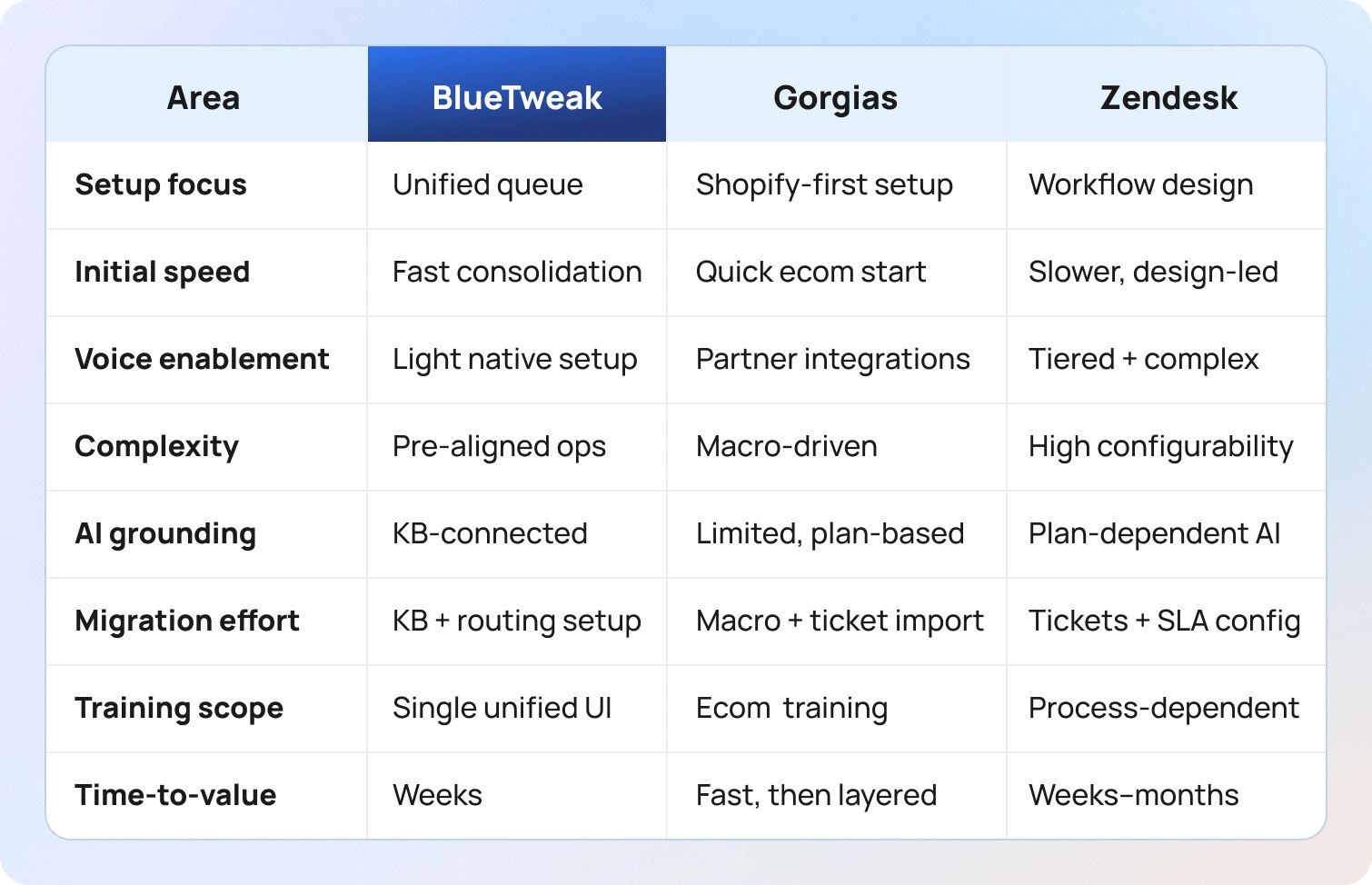
Implementation effort is often underestimated in Gorgias vs Zendesk comparisons because most platforms look similar during demos. The real differences appear after go-live, when teams begin layering channels, enforcing SLAs, onboarding agents, and adapting workflows to real customer behaviour.
Below, we look at what implementation typically involves for each platform, focusing not just on setup steps, but on where time, risk, and internal coordination are usually required.
Gorgias: implementations usually start quickly, particularly for Shopify-native teams. Connecting Shopify and importing existing macros and rules is relatively straightforward, and many teams see value early through faster handling of order-related enquiries.
Complexity tends to increase when teams move beyond chat and email. Selecting and configuring voice or bot partners introduces additional vendor coordination, while historical ticket migration and reporting continuity require planning. Agent training is typically focused on e-commerce workflows rather than broader case management, which works well for retail-led teams but can limit flexibility if support scope expands.
Gorgias implementations succeed most consistently when e-commerce efficiency is the primary goal and channel expansion is planned incrementally.
Zendesk: implementations are more structured, but also more involved. Importing tickets and knowledge base content is only the starting point; real effort goes into configuring SLAs, automations, roles, and views to reflect how teams actually work.
Voice enablement, advanced AI features, and workforce tooling often require activating specific tiers or add-ons, followed by additional configuration or integration work. Change management is a significant factor, particularly for larger teams, as Zendesk’s flexibility means processes must be clearly defined to avoid inconsistency.
Zendesk implementations work best when organisations have dedicated operational ownership and the appetite to invest time upfront in designing workflows.
BlueTweak: implementations are typically oriented around consolidation rather than assembly. Core setup focuses on configuring a unified queue, connecting the knowledge base so AI assistance is properly grounded, and defining multi-brand routing and permissions.
Telephony setup is intentionally lightweight compared to traditional contact-centre deployments, and agents are trained on a single interface that covers chat, voice, and tickets. Because analytics and WFM are built in, teams avoid a second phase of tooling once volumes increase.
BlueTweak tends to deliver faster time-to-value for mid-market teams that want a complete operational baseline without a prolonged configuration cycle.
How We Evaluated Gorgias vs Zendesk vs BlueTweak
To avoid superficial comparisons, this guide was evaluated using only verifiable, first-party sources and a consistent set of criteria across all three platforms. The goal was not to score features in isolation, but to understand how each platform behaves when deployed in a real support environment.
Our evaluation focused on capability depth, delivery model, and operational impact, rather than roadmap promises or third-party sentiment.
Specifically, we:
- Reviewed official product, pricing, help, and marketplace documentation. This ensured all claims could be traced back to vendor-owned sources rather than interpretation.
- Verified support for channels, voice, AI capabilities, knowledge management, analytics/WFM, security controls, and integrations. Where features depended on tiers, add-ons, or partners, this was explicitly noted as Varies by plan / Verify.
- Logged publicly available customer logos and case studies. These were used to validate typical use cases and organisational fit, not to infer satisfaction.
- Excluded third-party ratings, reviews, and hearsay. This avoids bias introduced by marketing incentives or outdated comparisons.
Must-Have Capability Checklist for Modern Support Teams
Rather than treating all features as equal, we assessed each platform against a baseline set of capabilities that most mid-market support teams now consider non-negotiable.
This checklist reflects operational expectations in 2026, not aspirational features.
- Voice and messaging handoff - whether context is preserved as conversations move between chat, email, and voice—and whether this is native or dependent on integrations.
- KB-grounded AI answers - the extent to which AI responses are anchored in approved knowledge, reducing hallucination and review time.
- AI coverage across workflows - including summarisation, proposed replies, translation, and transcription—and whether these are unified or fragmented across tools.
- Workforce management and QA - whether staffing, performance, and quality are handled natively or via partners, and how tightly they integrate with reporting.
- Security and administrative control - availability of MFA, audit logs, role-based access, and data governance features appropriate for growing teams.
- Integration depth - practical connectivity with Shopify, CRM systems, telephony providers, and BI tools, not just marketplace availability.
- Pricing transparency for core AI - clarity around what AI capabilities are included versus usage-based or premium add-ons.
- Customer feedback tooling - built-in CSAT or survey mechanisms that close the loop between support performance and customer sentiment.
Scoring Rubric Used in This Comparison
To keep the comparison consistent, each platform was assessed against the same high-level rubric. This wasn’t used to produce a numeric score, but to ensure trade-offs were evaluated evenly.
The rubric considered:
- Fit for teams with 20–100 agents
- Depth and reliability of omnichannel and voice support
- Breadth and maturity of AI assistance and multilingual coverage
- Availability and integration of WFM and QA
- Time-to-value, including configuration and training effort
- 12-month total cost of ownership, not just entry pricing
- Strength of security and administrative controls
Final Verdict: Gorgias vs Zendesk vs BlueTweak for Mid-Market Teams
In the Gorgias vs Zendesk conversation, both platforms largely deliver what they’re designed for. Gorgias excels for the ecommerce brand that lives inside Shopify, using purchase history and order context to respond faster, while Zendesk delivers a flexible ticketing foundation for teams willing to assemble advanced capabilities across other platforms and integrations.
However, unlike Zendesk’s modular approach, the industry’s shift toward integrated, AI-assisted service (65% of CX leaders report AI is already in daily use),has exposed the operational cost of stitching together point solutions. As teams scale and handle more customer interactions, regardless of how many tickets arrive each day, fragmented tooling can slow agents down, obscure key insights, and introduce unexpected costs.
For mid-market teams seeking:
- Unified omnichannel support (chat, email, voice),
- KB-grounded AI that reduces resolution time,
- Built-in analytics and workforce management,
- Predictable 12-month costs,
- And minimal tool sprawl…
BlueTweak’s platform offers a more balanced, operationally coherent alternative, combining core customer service capabilities with ecommerce integrations in a single environment, without forcing teams to create reminders, manage workflows, or reconcile data across multiple systems.
Customer service remains a decisive growth lever. When support teams can see full purchase history, respond with context, and operate from a single platform, they’re better positioned to protect customer experience, encourage repeat purchases, and turn support into a measurable contributor to long-term revenue.
Want to see how BlueTweak fits your setup? Request a demo today.

Intercom vs Freshdesk vs BlueTweak: Which Solution To Use In 2026?
The Real Choice: Chat-First, Ticket-First, or All-in-One CX
Your support operation has evolved beyond basic email queues. Two platforms dominate evaluation shortlists: Intercom vs Freshdesk.
Intercom built its reputation on conversational engagement: elegant messenger interfaces, proactive messaging campaigns, and chat-first customer experiences. It's the platform SaaS companies pick when in-app support and customer relationship building drive business outcomes.
Freshdesk emerged from traditional help desk foundations: structured ticketing, organized workflows, and approachable administration that growing teams can manage without dedicated system administrators. It's evolved to handle omnichannel support, though depth varies significantly across pricing tiers.
Then, there’s a third option: BlueTweak.
It delivers omnichannel support, AI-powered automation, native workforce management, and call transcription in one platform designed for mid-market teams managing 20-100 agents. It's built for operations needing Intercom's conversational sophistication and Freshdesk's structured workflows without juggling multiple vendors or decoding hidden costs.
Below, we break down everything you need to know about Freshdesk vs. Intercom vs. BlueTweak to find the right customer service solution for your support team.
Customer Service Solutions at a Glance
The table below compares Intercom, Freshdesk, and BlueTweak across the factors that matter most for support platform decisions: who each serves best, core strengths, channel capabilities, AI depth, knowledge management, workforce tools, security controls, and pricing models. Use this to quickly find the right fit before diving into detailed feature comparisons.
| Feature | Intercom | Freshdesk | BlueTweak |
| Who it's for | SaaS & product-led teams | Growing businesses | Mid-market (20-100 agents) & BPOs |
| Core strength | Messenger-led engagement | Ticketing-first help desk | Unified tickets + KB-grounded AI |
| Channels/Voice | Chat primary; Voice via partners | Email/Chat/Voice (plan-dependent) | Native Chat/Voice/Email unified |
| AI Capabilities | Fin AI bot + Copilot | Freddy AI (varies by tier) | Summaries, replies, transcription |
| KB/Self-Service | In-app articles & Help Center | Multilingual portals & widgets | Smart KB feeds agent/bot replies |
| WFM/QA | Reporting; WFM via partners | Solid reporting; WFM via tiers | Built-in Analytics + WFM + QA |
| Security/Admin | Roles/MFA; Data residency | Roles/MFA; Tiered data controls | MFA, audit logs, custom roles |
| Pricing Note | Seat + AI usage + Volume | Seat + add-ons (AI/Analytics) | Reporting: WFM via partners |
Claims from vendor pages; where unclear marked as "Varies by plan / Verify."
What Each Platform Is
Intercom
Messenger-led engagement platform emphasizing conversational support, proactive outreach, and in-product help experiences. Built for product-led growth motions where customer communication happens inside the application. Strong bot capabilities with Fin AI handling common queries autonomously. Help Center articles can be embedded directly in Messenger conversations. Voice support requires partner integrations. Best for teams where chat and in-app messaging dominate customer interactions.
Freshdesk
Ticketing-first help desk with organized workflows, SLA tracking, and administration interfaces that growing teams find intuitive. Omnichannel capabilities are available, though voice and advanced features vary by pricing tier. Marketplace ecosystem supports telephony integrations, e-commerce connectors, and specialized tools. Freddy AI provides automation and agent assistance on higher plans. Straightforward for teams transitioning from email-only support to multi-channel operations.
BlueTweak
Unified platform combiningticketing systems, chat, voice, AI-powered bots, WFM, analytics, and KB-grounded AI in one stack. Built specifically for mid-market teams and BPOs managing 20-100 agents across multiple brands. Native omnichannel support without fragmented tools or partner dependencies. Faster implementation than enterprise platforms, lower total cost than assembling separate point solutions.
Evaluation Criteria for 2026
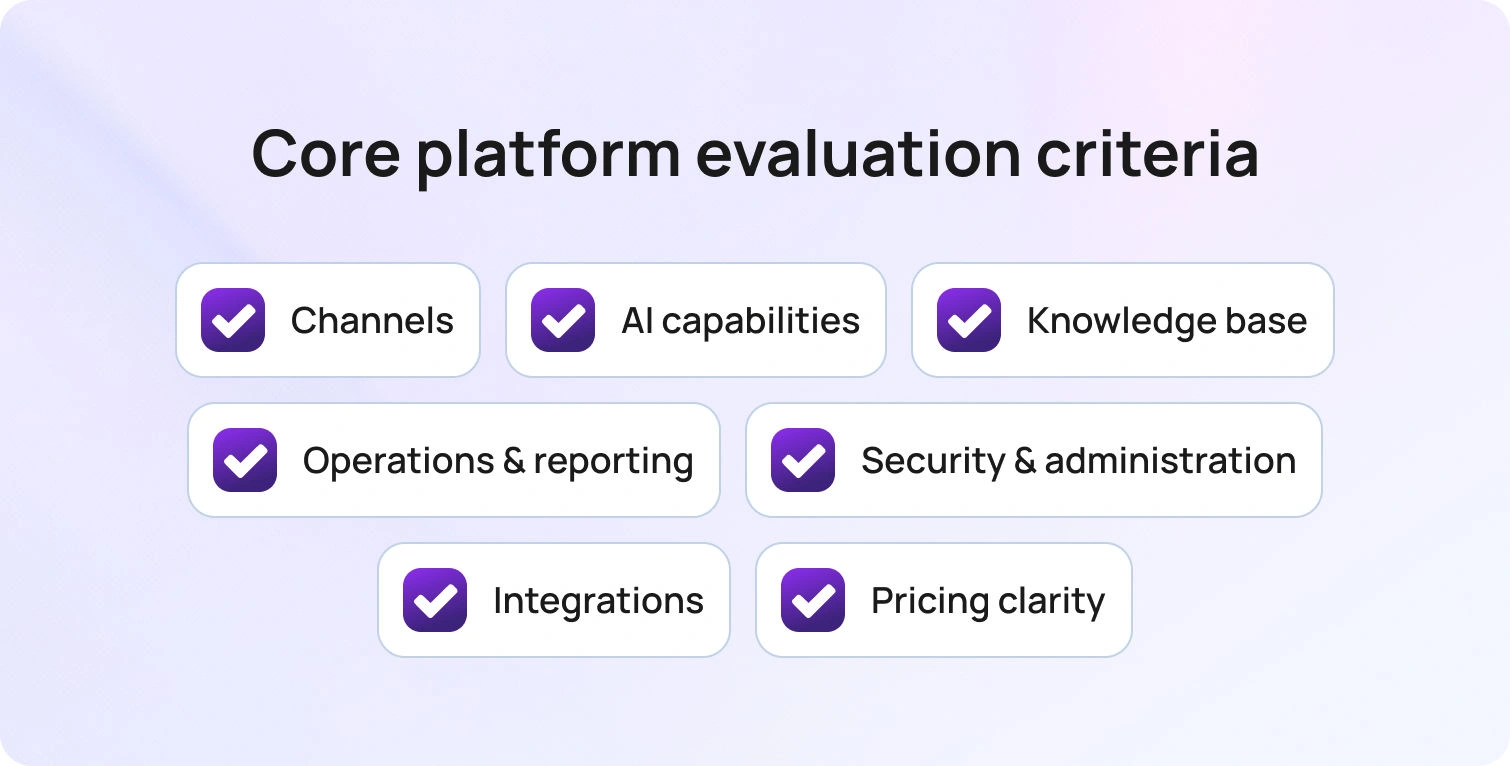
The highlights below compare Intercom, Freshdesk, and BlueTweak across seven factors that determine platform fit: channel depth, AI capabilities, knowledge management, operational tools, security controls, ecosystem breadth, and total cost.
Channels & Voice Handoff: Intercom delivers world-class chat and proactive messaging; voice requires partner integrations. Freshdesk provides a help desk with omnichannel capabilities; voice support often requires a Contact Center add-on. BlueTweak offers native chat/voice/email with unified ticket linking and post-call notes flowing automatically.
AI Coverage: Intercom provides Fin AI bots and Copilot for agent assist; verify KB-grounded drafting depth and source attribution. Freshdesk's Freddy AI varies by plan: basic automation is available on lower tiers, while advanced features require upgrades. BlueTweak includes KB-grounded summaries, proposed replies, real-time translation, and transcription in one stack without usage fees.
Knowledge Base & Self-Service: Intercom features a modern Help Center with in-app article embedding. Freshdesk offers multilingual support portals with SEO optimization. BlueTweak provides a smart KB that powers both agent-suggested replies and bot responses, with multi-brand article routing.
Ops Depth (Analytics/WFM/QA): Intercom focuses on conversation reporting; WFM typically requires external partners. Freshdesk delivers solid reporting; WFM/QA available via tiers or partner integrations. BlueTweak includes built-in analytics, WFM, and QA designed for 20-100 agent operations.
Security/Admin: All three provide roles, MFA, and audit logs. Compare data residency options, AI decision auditability, and brand/tenant controls—BlueTweak offers workspace segmentation for multi-brand operations without enterprise tiers.
Integrations/Ecosystem: Intercom and Freshdesk maintain large app marketplaces with hundreds of integrations. BlueTweak provides an API-open architecture with simpler multi-brand administration, managing all brands in a single instance.
TCO & Time-to-Value: Intercom deploys faster for messenger/chat-led teams, but costs vary with AI usage. Freshdesk offers a friendly setup, though add-on creep increases expenses. BlueTweak delivers fewer vendors, predictable pricing, and faster implementation for mid-market teams.
Freshdesk vs Intercom vs BlueTweak Feature-by-Feature Comparison
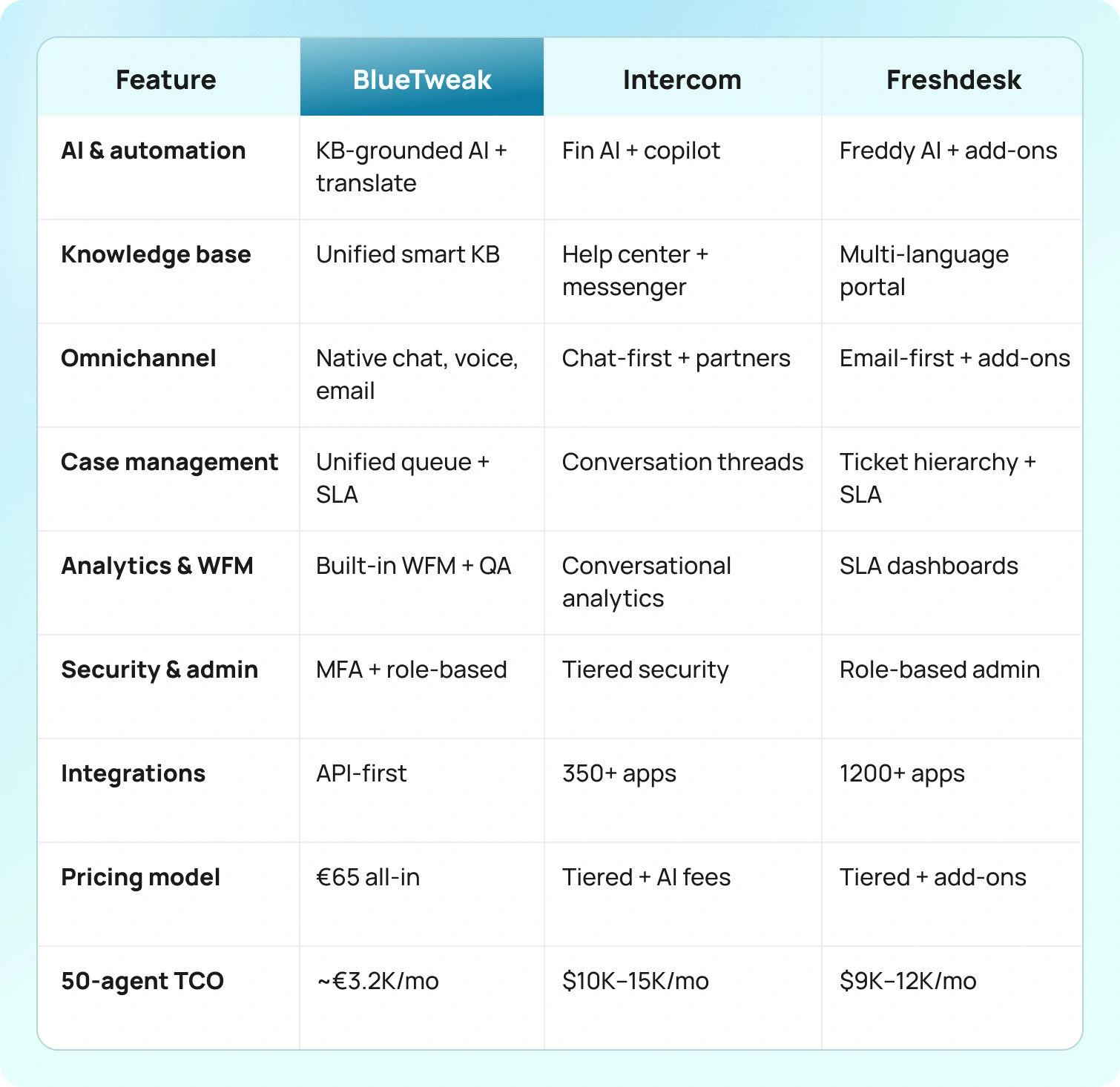
See in more detail how Intercom, Freshdesk, and BlueTweak stack up on AI, knowledge, channels, cases, analytics/WFM/QA, security, and integrations.
AI, Automation & Deflection
Intercom: Fin AI bots deliver autonomous customer support across common scenarios: password resets, billing questions, and account updates. Proactive triggers automatically send messages to users based on behavior patterns, page visits, or custom events defined by product teams. Fin AI Copilot assists agents with suggested responses during live conversations.
Freshdesk: Freddy AI Copilot on the Pro and Enterprise tiers suggests responses and summarizes ticket threads to improve agent efficiency. Freddy AI Agent handles autonomous ticket resolution with session-based billing. Automation depth gated by tiers: basic canned responses and assignment rules on lower plans, advanced workflow automation requiring upgrades.
BlueTweak: KB-grounded ticket summaries, proposed reply generation citing source articles preventing inaccurate suggestions, real-time translation across 35+ languages, call transcription, post-call notes, spam filtering, all working natively across chat, voice, and email without channel-specific feature gaps. Automation rules are route-based on content, sentiment, and language detected.
Knowledge Management & Self-Service
Intercom: Modern Help Center with article editor, version history, and publishing workflows. Articles surface proactively in Messenger based on customer questions before they ask. In-product help embeds contextual guidance directly in application interfaces.
Freshdesk: Multi-language support portals with SEO-optimized FAQ pages driving organic search traffic. Help widgets embed on websites to deflect tickets before customers submit them. Article suggestions during ticket creation guide agents toward documented answers
BlueTweak: Smart knowledge base feeding both agent-suggested replies and bot responses from a unified content source. Multi-brand article routing displays content relevant to each customer's brand or product line without manual filtering. KB grounding prevents AI from inventing answers, as every suggestion cites the source article with a verification link.
Omnichannel Support & Voice
Intercom: Chat-first architecture with Messenger as primary interface. Conversational continuity across channels, with threads started in-app continuing via email without breaking context. Messaging apps (WhatsApp, Facebook) connect through integrations. Voice support via partners; validate voice-to-ticket handoff mechanics carefully.
Freshdesk: Email foundation with chat and voice added through tiers or marketplace. Messaging apps connect via integrations. Voice capabilities often require the Freshdesk Contact Center add-on or third-party telephony integration, depending on the plan.
BlueTweak: Native chat, voice, and email with seamless ticket linking, preserving complete interaction history. Voice includes IVR for self-service routing, call recording for quality and training, and multilingual voicebot handling routine requests with instant human escalation when complexity exceeds automation. Call transcripts automatically append to tickets.
Case Management, Escalation & Collaboration
Intercom: Conversation-centric model maintains continuous threads rather than discrete ticket numbers. Team inbox enables collaboration with internal notes, assignments, and snooze functionality. Check escalation workflows if complex multi-touch customer journeys require structured ticketing beyond conversational threads.
Freshdesk: Structured ticketing with ticket numbers, status workflows (Open, Pending, Resolved, Closed), priority levels, and SLA policies tracking response and resolution commitments. Automation rules route tickets based on keywords, source, and priority.
BlueTweak: Unified queue managing support tickets across all brands with SLA tracking, automatic linking of related customer requests, agent collaboration through internal notes, and @mentions. Multi-brand workspace segmentation shows agents only relevant cases while supervisors maintain visibility across all brands. Escalation workflows route complex issues to specialized teams while preserving full interaction history from initial contact. Collision detection prevents agents from working the same ticket simultaneously.
Analytics, WFM & QA
Intercom: Reporting dashboards track conversation metrics: volume by channel, resolution time, bot containment rate, CSAT by team. Automation reports show workflow effectiveness. Custom reports filter by date ranges, teams, and tags. Intercom offers strong conversational analytics but limited traditional contact center metrics (service levels, abandon rates, agent adherence).
Freshdesk: Strong reporting with customizable dashboards visualizing ticket trends, agent performance, SLA compliance, and customer satisfaction across channels. Canned reports cover common scenarios; custom reports drill into specific metrics. Analytics dashboards track resolution patterns.
BlueTweak: Built-in analytics, WFM, and QA designed for 20-100 agent operations. Real-time dashboards show SLA compliance, sentiment analysis, ticket status distribution, and outcome tagging. Forecasting predicts staffing needs by channel and language skill. Automated scheduling balances business requirements with agent preferences. Adherence monitoring tracks whether agents follow schedules.
Security/Admin & Compliance
Intercom: Roles, MFA, audit logs with GDPR compliance for European operations. SSO on Advanced and Expert plans. API access controls. Webhook security. Data export for portability. Session management controls access duration. IP allowlisting restricts admin access to approved networks on higher tiers.
Freshdesk: Roles and permissions with custom roles on the Enterprise tier, enabling granular access control. MFA secures accounts. Audit logs track changes. GDPR compliance with data processing agreements. SSO typically requires higher tiers. IP restrictions control access by network. Session timeouts limit exposure. Data backup and disaster recovery are documented.
BlueTweak: MFA, audit logs, and role-based permissions are included in the base platform without tier restrictions. Workspace segmentation isolates data by brand for multi-tenant BPO operations managing multiple customers. ISO certification in progress. Custom roles define granular access without enterprise tier requirements. Data controls support regional compliance.
Integrations & Ecosystem
Intercom: Extensive app store covering marketing automation (HubSpot, Marketo), product analytics (Amplitude, Mixpanel), data platforms (Segment, mParticle), CRM systems (Salesforce), and development tools (Jira, GitHub). Strong for product-led teams running integrated stacks where customer intelligence flows between tools. Webhooks trigger external workflows. APIs enable custom integrations
Freshdesk: Large marketplace with telephony integrations (Twilio, RingCentral), e-commerce platforms (Shopify, WooCommerce, Magento), CRM connectors (Salesforce, HubSpot, Zoho), WFM tools, QA platforms, productivity apps. Freshworks ecosystem (Freshsales, Freshservice) shares customer data if adopting multiple products.
BlueTweak: APIs and webhooks connecting core business systems: CRM platforms (Salesforce, HubSpot), e-commerce (Shopify, WooCommerce), telephony providers, BI tools (Tableau, Power BI). Integration assistance during onboarding accelerates deployment versus self-service marketplace navigation. Simpler multi-brand administration manages all brands in a single instance rather than separate Freshdesk portals or Intercom workspaces.
Pricing & 12-Month TCO Modeling
Total cost calculations require factoring in seat licenses, AI usage fees, voice minutes, marketplace subscriptions, and implementation services beyond base platform pricing.
Intercom pricing:
- Essential: $39/seat/month (annual) — shared inbox, basic automation, messenger
- Advanced: $99/seat/month (annual) — advanced workflows, analytics, routing
- Expert: $139/seat/month (annual) — enterprise controls, SLAs
- AI add-ons: Fin AI Agent ($0.99 per resolution), Copilot ($35/agent/month), Proactive Support Plus ($99/month flat)
- Usage-based channels (SMS, voice via partners) are billed separately
Freshdesk pricing:
- Free: $0 (up to 2 agents, 6 months)
- Growth: $23/agent/month
- Pro: $66/agent/month
- Enterprise: $107/agent/month
- AI: First 500 Freddy AI sessions free, then $49 per 100 sessions
- Freddy AI Copilot: $29/agent/month (separate add-on)
BlueTweak pricing:
- All-in-One Plan: €65/agent/month (~$70 USD)
- Includes: omnichannel ticketing, AI features, WFM, QA, knowledge base, analytics, call transcription, voicebot, chatbot
- No tiered plans or feature gating
- AI usage is transparent and predictable
For 50 agents: €3,250/month (~$3,500 USD) all-inclusive. See pricing details.
12-month TCO comparison for 50 agents:
- Intercom (Advanced + AI): $140,000-$160,000 (seat + AI usage + voice partners + implementation)
- Freshdesk (Pro + add-ons): $65,000-$80,000 (seat + AI + voice/Contact Center + marketplace)
- BlueTweak: €39,000 (~$42,000 USD) all-inclusive with predictable costs
When Each One Fits
Choose Intercom if… you're messenger and proactive engagement focused, your product-led growth model relies on in-app customer communication, you want elegant conversational experiences customers recognize across products, bot containment and automated messaging drive support strategy, and you can add voice and WFM capabilities via partner integrations as operational needs grow. Best for SaaS companies where support happens inside the application and conversational continuity matters more than traditional ticketing workflows.
Choose Freshdesk if… you're ticketing-first with structured support operations, you need approachable administration interfaces, growing teams manage without dedicated system administrators, you value marketplace breadth offering specialized tools for unique workflows, you're comfortable assembling voice, advanced AI, and WFM via tier upgrades or marketplace integrations, and transparent pricing at entry tiers matters even if advanced features require add-ons. Best for growing businesses transitioning from email-only support to multi-channel operations with organized ticket management.
Choose BlueTweak if… you want omnichannel (chat, voice, email) with KB-grounded AI and built-in analytics/WFM for mid-market teams (20-100 agents), you need multi-brand routing and reporting for BPO operations or managing multiple product lines, you prefer cost predictability without decoding usage-based AI fees or tier-gated features, you want faster implementation (weeks versus months) with dedicated onboarding support, and you need professional contact center capabilities without enterprise complexity or vendor sprawl. Best for operations seeking comprehensive features in one unified platform.
Intercom vs. Freshdesk vs BlueTweak Comparison for Implementation Considerations

Intercom: Messenger and Help Center configuration emphasizing in-app experiences. Bot flow design using Visual Builder, defining conversation paths and fallback handling. Product event tracking connects customer behavior to support triggers. Smooth onboarding for chat-focused teams familiar with conversational interfaces. Verify voice partner integration if phone support is required. Confirm how calls route into the messenger workflow and whether context preservation meets requirements. Implementation is lighter when avoiding voice complexity.
Freshdesk: Ticket and knowledge base import from legacy systems using migration tools. SLA rules defining response and resolution commitments by priority and customer type. Macro creation for common bulk actions. Voice tier confirmation if telephony is required: Contact Center add-on versus marketplace integration path. Marketplace app selection and governance, preventing integration sprawl. Free tier enables testing before commitment. Free version supports small teams evaluating fit. Growing teams appreciate intuitive UI requiring minimal training for new users.
BlueTweak: Unified queue configuration consolidating all channels without separate chat/voice/email setup complexity. KB grounding enables AI-suggested replies immediately after knowledge import. Multi-brand routing is configured during onboarding with workspace segmentation. Light telephony setup for IVR and call flows. Guided rollout targeting weeks with dedicated support, implementation assistance, smooth onboarding experience, and knowledge transfer. Built for 20-100 agent operations requiring faster go-live than enterprise platforms without sacrificing professional capabilities.
How We Evaluated
We reviewed vendor product pages, pricing information, official documentation, help centers, trust pages, and marketplace listings as of January 2026. Features verified against vendor websites and cross-referenced with published documentation.
- Channels and voice: Confirmed native capabilities, partner integration requirements, and whether omnichannel support worked natively or required separate products and vendor relationships.
- AI capabilities: Verified autonomous resolution, agent assistance, KB grounding, translation, transcription, and whether AI features included source attribution, preventing hallucinated responses.
- Knowledge base: Checked whether KB powered both agent assistance and customer self-service simultaneously, multilingual workflows, versioning, approval processes, and content governance capabilities.
- Analytics, WFM, QA: Confirmed whether workforce management and quality assurance were platform-native, first-party add-ons, or required partner tool integrations, adding vendor relationships.
- Security and administration: Audited MFA, audit logs, custom roles, GDPR compliance, data residency options, and whether advanced security required premium tier upgrades.
- Integrations and ecosystem: Reviewed marketplace breadth, native connectors, API quality, webhook capabilities, and integration assistance during implementation.
- Pricing transparency: Collected pricing from vendor pages. When tier gates, usage fees, or add-on costs were unclear, marked "Varies by plan / Verify" and recommended sales confirmation before purchasing decisions.
- Evidence-based assessment: Derived insights from documented capabilities only, excluding third-party ratings, unverified claims, and assumptions about undocumented features.
The Bottom Line: Which Platform Fits Your Ops
Intercom excels at messenger-led engagement with elegant conversational interfaces, proactive customer outreach, and in-app help experiences. Intercom offers sophisticated bot capabilities and seamless product integration, ideal for SaaS companies and product-led growth teams. The main difference is usage-based AI cost,s creating unpredictable expenses during high-volume periods, plus voice requiring partner integrations.
Freshdesk delivers structured ticketing workflows with approachable administration, strong reporting capabilities, and a large marketplace supporting diverse business models. Freshdesk offers intuitive UI and a free plan for small teams, though advanced features like voice, premium AI, and WFM require tier upgrades or marketplace tools, potentially increasing support costs beyond initial estimates.
BlueTweak balances omnichannel support, KB-grounded AI, and built-in analytics/WFM in one platform for mid-market buyers seeking faster value and reduced vendor sprawl. It's positioned for 20-100 agent operations wanting comprehensive features without Intercom's unpredictable costs or Freshdesk's add-on accumulation, delivering professional contact center capabilities with transparent pricing and faster implementation.
When to shortlist BlueTweak: You need omnichannel (chat, voice, email) with KB-grounded AI, native WFM/QA, and multi-brand routing without juggling separate vendors. You want to reduce support costs through unified platforms while avoiding hidden costs from usage-based pricing or advanced feature paywalls that other competitors impose.
Request a demo to see BlueTweak's omnichannel capabilities, AI assist features, and analytics in action.

Five9 vs Zendesk vs BlueTweak: Which Contact Center to Implement In 2026?
Voice-First, Ticket-First, or Unified CX OS
Your contact center has outgrown basic ticketing. Two platforms dominate the conversation: Zendesk vs Five9.
Five9 built its reputation on voice-first operations: sophisticated IVR, automatic call distribution, and enterprise-grade workforce management. It's the platform contact centers pick when phone calls drive business value and routing complexity matters.
Zendesk came from help desk roots: structured ticketing, workflow automation, and a marketplace ecosystem supporting virtually any integration imaginable. It's evolved to cover omnichannel support, though voice and contact center depth vary significantly by tier.
The Zendesk vs Five9 choice usually forces trade-offs. If you want enterprise-grade voice, then prepare for higher implementation costs and telephony complexity. And if you need extensive integrations, you’ll have to accept that WFM and advanced features require add-ons or partner tools.
Fortunately, there's a third path: BlueTweak.
BlueTweak delivers omnichannel ticketing, AI-powered automation, native workforce management, and call transcription in one platform built for mid-market teams managing 20-100 agents. It's designed for operations needing both Five9's voice capabilities and Zendesk's ticketing workflows without managing multiple vendors or decoding complex pricing structures.Below, we break down everything you need to know about Five9, Zendesk, and BlueTweak to find the right customer service solution for your team.
Contact Center Software Comparison at a Glance
The table below compares Five9, Zendesk, and BlueTweak across the factors that matter most for contact center decisions: who each platform serves best, core strengths, voice capabilities, AI depth, knowledge management, workforce tools, security controls, and pricing models. Use this to quickly eliminate poor fits before diving into detailed feature comparisons.
| Feature | Five9 | Zendesk | BlueTweak |
| Who it's for | Enterprise centers (50+ agents) | Any size (Ticketing-first) | Mid-market & BPOs (20-100 agents) |
| Core strength | Voice-first CCaaS & IVR | Massive marketplace & Ticketing | Unified tickets + KB-grounded AI |
| Voice | Native telephony & predictive dialing | Via Talk add-on/tier | Native Voice + IVR + Voicebot |
| AI Capabilities | Voice AI, transcription, Agent Assist | Plan-dependent bots & AI assist | KB-grounded replies & Translation |
| KB/Self-Service | Via integrations | Mature Help Center & Localization | Smart KB for agents, bots, & brands |
| WFM/QA | Enterprise WFM (Optimum tier+) | Via partners or add-ons | Built-in Analytics + WFM + QA |
| Security/Admin | HIPAA/PCI & Enterprise controls | Roles/MFA & Residency by tier | MFA, audit logs, & custom data roles |
| Pricing Note | Seat + Minutes + Implementation | Seat + add-ons (Voice/AI/WFM) | €65/agent/month all-in |
Claims from vendor pages; where unclear marked as "Varies by plan / Verify."
What Each Platform Is
Five9

Contact center platform with deep native telephony capabilities, sophisticated IVR design, automatic call distribution, and global routing infrastructure. Built specifically for voice-first operations, managing high call volumes across inbound and outbound campaigns. Partner ecosystem supports integrations with CRM systems, workforce optimization tools, and quality management platforms. Typically requires 50-agent minimum and professional services for implementation.
Zendesk
Help desk platform at its core, built around ticketing workflows, email management, and Help Center knowledge base with a massive marketplace ecosystem (1,200+ apps). Voice and contact center capabilities are available through tiers and add-ons. Strong at structured ticket workflows and self-service content management. WFM and advanced analytics typically require partner integrations or higher-tier plans.
BlueTweak
Unified platform combiningticketing systems, chat, voice, AI-powered bots, WFM, analytics, and KB-grounded AI in one stack. Built specifically for mid-market teams and BPOs managing 20-100 agents across multiple brands. Nativeomnichannel customer support without fragmented tools. Faster time-to-value than enterprise CCaaS, lower TCO than stitching together separate platforms.
Evaluation Criteria for 2026
The comparison below breaks down how Five9, Zendesk, and BlueTweak differ across seven critical factors: voice and channel capabilities, AI depth, knowledge management, workforce optimization, security controls, integration ecosystems, and implementation costs.
Channels & Voice Handoff: Five9 delivers the strongest native telephony with advanced IVR, ACD, and predictive dialers; digital channels are available, but voice-centric. Zendesk provides omnichannel ticketing; voice is available through the Talk add-on with tier-dependent depth. BlueTweak offers native chat/voice/email unified with automatic ticket linking and seamless context preservation across channels.
AI Coverage: Five9 excels at voice AI—transcription, post-call notes, Agent Copilot, IVA automation; confirm digital AI scope for chat and messaging. Zendesk's AI features vary by plan; advanced capabilities like summarization and KB-grounded suggestions often require $50/agent/month add-ons. BlueTweak includes KB-grounded summaries, proposed replies, real-time translation, and voice transcription in the base platform without separate fees.
Knowledge Base & Self-Service: Five9 typically requires KB integration with partner platforms or CRM systems; verify multilingual workflows. Zendesk provides a mature Help Center with dynamic content and strong localization flows. BlueTweak delivers smart KB feeding both agent-suggested replies and bot responses with multi-brand article routing.
Ops Depth (Analytics/WFM/QA): Five9 includes enterprise WFM starting at the Optimum tier with forecasting, scheduling, and adherence monitoring. Zendesk offers solid reporting; WFM/QA requires partner integrations or add-ons ($25-35/agent/month). BlueTweak provides built-in analytics, WFM, and QA tuned for 20-100 agent operations with multi-brand views.
Security/Admin: All three offer enterprise-grade controls with roles, MFA, and audit logs. Five9 provides HIPAA/PCI compliance; Zendesk's data residency varies by tier; BlueTweak delivers workspace segmentation for multi-tenant operations without enterprise-tier requirements.
Integrations/Ecosystem: Five9 features a deep CCaaS ecosystem with 350+ AppFoundry integrations and flexible WEM vendor selection. Zendesk dominates with 1,200+ marketplace apps covering virtually any workflow. BlueTweak offers an API-open architecture with simpler multi-brand administration, managing brands in a single instance.
TCO & Time-to-Value: Five9 requires a higher investment ($10,000-15,000/month for 50 agents) with 3-6 month implementations. Zendesk costs escalate with add-ons ($11,000+/month fully loaded). BlueTweak delivers €3,250/month (~$3,500 USD) all-inclusive with weeks-long implementation.
Feature-by-Feature Comparison
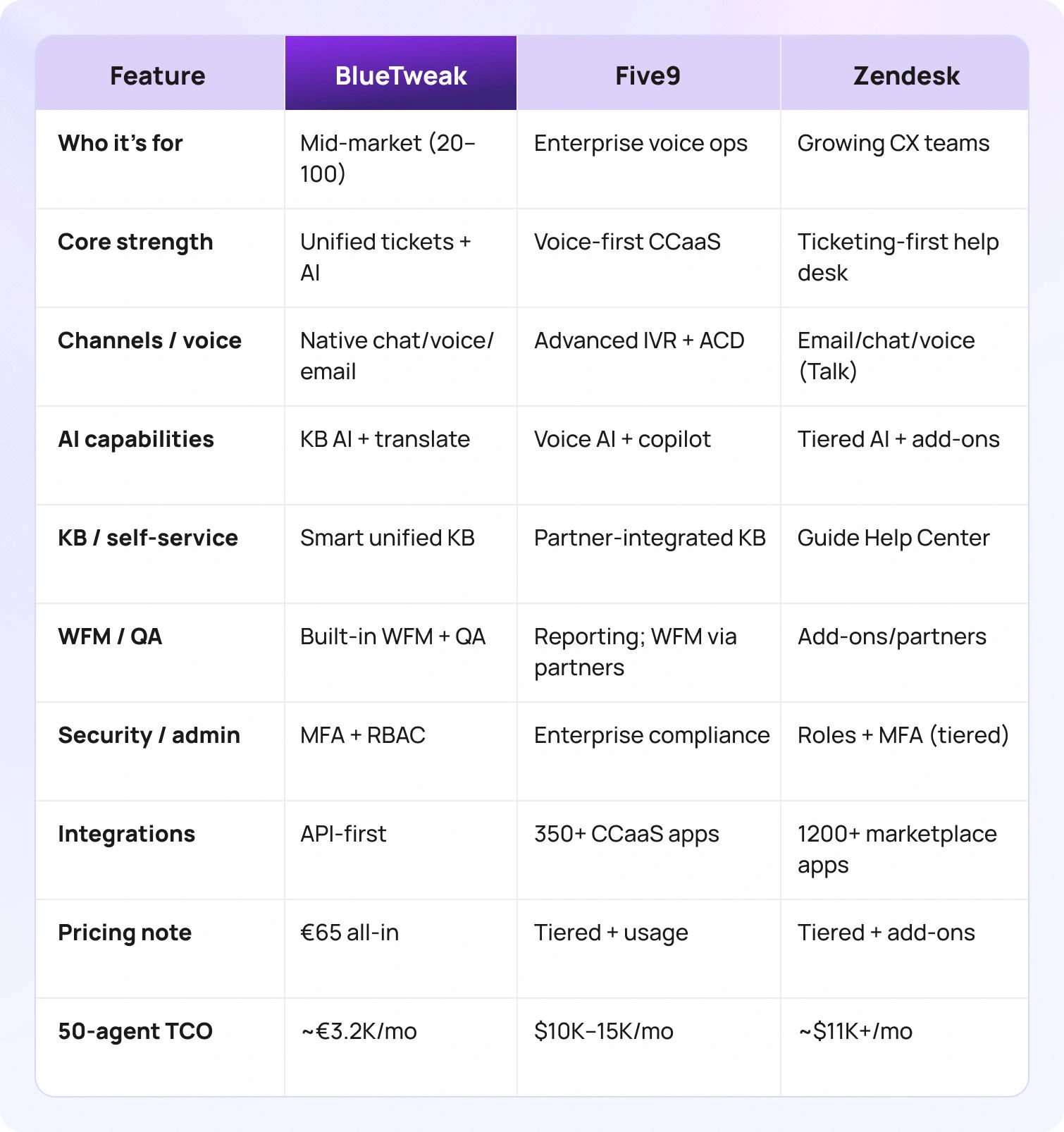
Compare in more detail how Five9, Zendesk, and BlueTweak handle AI, knowledge, channels, case management, analytics/WFM/QA, security, and integrations.
Channels & Voice Handoff
Five9: Strongest native telephony among the three platforms. Advanced IVR with speech recognition, skills-based automatic call distribution, predictive/progressive/preview dialers for outbound campaigns. Global telephony infrastructure with PSTN access across 150 countries. Digital channels (chat, email, SMS, social) are available, but voice remains the architectural foundation.
Zendesk: Omnichannel ticketing consolidates email, chat, messaging, and social channels in unified queues. Voice available through Zendesk Talk, which integrates with ticket workflows.
BlueTweak: Chat, voice, and email unified with automatic ticket linking. Native voice includes IVR, call recording, and multilingual voicebot handling routine inquiries with instant escalation to human agents. Context is preserved across channel switches, so agents see the complete customer experience communication history regardless of how customers reach out.
AI Coverage
Five9: Robust voice AI capabilities, including automatic speech recognition, post-call notes, sentiment analysis, and agent assist during live calls. IVA (Intelligent Virtual Agent) and IVR automation handle self-service scenarios. Agent Copilot provides real-time guidance.
Zendesk: AI assist and bot capabilities vary significantly by plan tier. Answer Bot provides basic automation on higher tiers. Advanced AI object features (ticket summarization, intent classification, suggested replies) often require separate add-ons starting at $50/agent/month.
BlueTweak: KB-grounded summaries condense conversation threads automatically. Suggested replies pull from your knowledge base, preventing hallucinated AI responses. Real-time translation across 35+ languages with context preservation. Call transcription, post-call notes, spam filtering, andcanned responses are included in the base platform.
Knowledge Base & Self-Service
Five9: Knowledge base functionality typically requires integration with partner platforms or CRM systems. Self-service primarily routes through IVR and voice bots.
Zendesk: Strong Help Center (Guide) with content blocks, versioning, publishing workflows, and dynamic content that personalizes articles by customer attributes. Mature localization flows support translation management across multiple languages.
BlueTweak: Smart knowledge base powers both agent-suggested replies and bot responses from the same source of truth. Multi-brand article routing ensures customers see content relevant to their specific brand. KB grounding prevents AI from generating inaccurate responses. Content updates once and flows everywhere: agent workspace, chatbot, voicebot, self-service portal.
Ops Depth (Analytics/WFM/QA)
Five9: Enterprise WFM capabilities are included starting at the Optimum tier. Multi-channel forecasting predicts interaction volumes across voice, chat, and email. Automated scheduling balances business needs with agent preferences. Real-time adherence monitoring and intraday management adjust dynamically.
Zendesk: Reporting solid with Explore analytics on higher tiers. Custom dashboards track ticket volume, resolution times, and CSAT scores. Workforce management and quality assurance typically require partner integrations (Tymeshift, Playvox) or marketplace apps, which add complexity and separate vendor relationships.
BlueTweak: Built-in analytics, WFM, and QA tuned for 20-100 agent operations. Real-time dashboards show SLA compliance, sentiment analysis, outcome tagging, andcustomer support metrics. Forecasting and scheduling handle multilingual customer support skill routing. QA scorecards with calibration workflows measure agent performance.
Security/Admin
Five9: Enterprise-grade security controls with role-based permissions, audit logging, HIPAA, and PCI DSS compliance certifications. SOC 2 certified. End-to-end TLS 1.2 encryption and role-based access control.
Zendesk: Roles, MFA, and audit logs available across tiers, with depth increasing at enterprise levels. Data residency options vary by plan. Verify whether your target tier supports regional data centers.
BlueTweak: MFA, audit logs, and role-based access control included in the base platform. Workspace segmentation isolates call data by brand for multi-tenant operations. ISO certification in progress. Data location controls support regional compliance requirements. Security features designed for mid-market needs without enterprise overkill while maintaining professional-grade protection.
Integrations/Ecosystem and More Apps
Five9: Deep CCaaS ecosystem with pre-built CRM integrations (Salesforce, ServiceNow, Microsoft Dynamics, Oracle, Zendesk). AppFoundry marketplace offers 350+ integrations. Flexible WEM vendor selection allows choice between Five9 native tools, Verint, or Calabrio based on requirements.
Zendesk: Zendesk customers get access to a massive marketplace with 1,200+ apps covering CRM, commerce, BI, productivity tools, and specialized workflows. Sunshine platform enables custom data models and deep integrations. Zendesk integrations support virtually any workflow imaginable, but can create decision paralysis when selecting from hundreds of options.
BlueTweak: APIs and webhooks for core integrations: CRM platforms, e-commerce systems (Shopify), telephony providers, BI tools. Integration assistance is included in onboarding to accelerate time-to-value. Simpler multi-brand admin compared to managing separate instances across platforms.
Pricing & 12-Month TCO Modeling
Understanding total cost requires looking beyond seat licenses to telephony charges, AI usage, WFM add-ons, implementation services, and ongoing administration overhead.
Five9 pricing:
- Digital: $119/user/month (digital channels only: chat, email, SMS, social; no voice)
- Core: $119/user/month (voice only, no digital channels)
- Premium: Contact sales (combines voice + digital; adds Essentials QM)
- Optimum: Contact sales (adds Enterprise WFM + Enterprise QM)
- Ultimate: Contact sales (adds advanced analytics, interaction analytics)
- Minimum 50 users required for most plans
Add telephony minute charges (inbound/outbound), SMS usage fees, implementation services (often required for complex deployments), premium support tiers, and potential CRM connector fees. Usage-based pricing for SMS, AI minutes, and other features complicates monthly budgeting. TCO for 50 agents typically starts at $10,000/month for the Premium tier and scales to $15,000+ for the Optimum before one-time implementation costs.
Zendesk pricing:
- Suite Team: $55/agent/month (omnichannel ticketing, help center, voice, core analytics)
- Suite Professional: $115/agent/month (advanced routing, workflows, multi-brand)
- Suite Enterprise: $169/agent/month (enterprise controls, advanced AI)
- Add-ons: WFM ($25/agent/month), QA ($35/agent/month), Copilot ($50/agent/month)
For comprehensive contact center capabilities, budget Suite Professional with WFM, QA, and AI add-ons: approximately $225/agent/month before voice minutes and marketplace app subscriptions. For 50 agents: $11,250/month base cost.
BlueTweak pricing:
- All-in-One Plan: €65/agent/month (~$70 USD at current exchange rates)
- Includes: omnichannel ticketing, AI features (summaries, suggested replies, translation), WFM, QA, knowledge base, analytics, call transcription, voicebot, chatbot
- No tiered plans or feature gating
- AI usage priced separately per customer interaction (transparent, predictable)
For 50 agents: €3,250/month (~$3,500 USD) all-inclusive. See pricing details and the ROI calculator.
12-month TCO comparison for 50 agents:
- Five9 (Premium/Optimum): $120,000-$180,000 (seat + telephony + implementation allocation + support)
- Zendesk (Suite Professional + add-ons): $135,000-$150,000 (seat + WFM/QA/AI + voice + marketplace apps)
- BlueTweak: €39,000 (~$42,000 USD) all-inclusive with predictable AI usage fees
When Each One Fits
Choose Five9 if… voice is mission-critical with sophisticated IVR requirements, you manage high call volumes (thousands of calls daily) requiring predictive dialers and skills-based routing, you need complex outbound campaign capabilities with compliance features for regulated calling, you operate global contact centers requiring PSTN access across 100+ countries, and you have resources for enterprise implementation with professional services support. Best for organizations where phone calls dominate customer interactions and efficient customer service depends on advanced voice routing and workforce optimization.
Choose Zendesk if… you're ticketing-first with strong self-service requirements and extensive help center content, you need the flexibility of a massive marketplace ecosystem for specialized workflows, you're comfortable managing voice, AI, and WFM as separate add-ons with tier upgrades, you have technical resources to handle implementation complexity and marketplace governance, and your primary channels are email and chat with voice as secondary. Best forhelp desk operations, prioritizing structured ticket workflows and knowledge base content.
Choose BlueTweak if… you want omnichannel (chat, voice, email) with KB-grounded AI and built-in analytics/WFM for mid-market teams (20-100 agents), you need multi-brand routing and reporting for BPO operations or managing multiple product lines, you prefer transparent pricing without decoding add-on structures or usage-based AI fees, you want faster implementation (weeks versus months) with dedicated onboarding support, and you need professional contact center capabilities without enterprise complexity or tool sprawl. Best for operations seeking comprehensive features in one unified, innovative solution.
Implementation Considerations
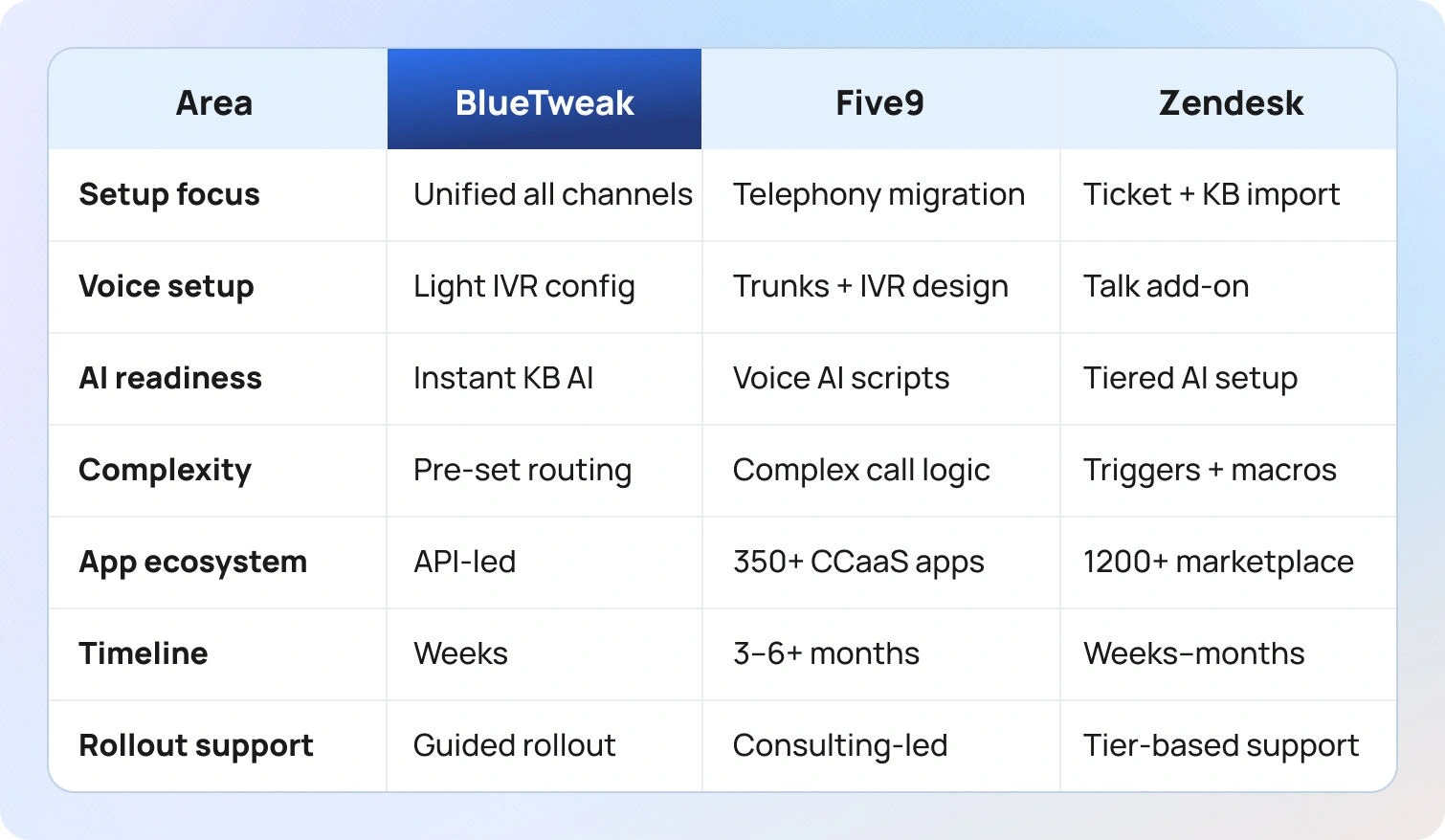
Five9: Telephony migration requires careful planning: number porting, trunk configuration, and testing call flows across regions. IVR design typically needs dedicated resources or consulting support to build speech recognition scripts, call routing logic, and queue configurations. Agent training focuses on voice tooling, disposition codes, screen pops, and CRM integration workflows. Call recording policies and compliance requirements (PCI, HIPAA) need configuration before going live. Implementation timelines often span 3-6 months for mid-sized deployments, longer for global enterprise rollouts with complex routing requirements across multiple regions.
Zendesk: Ticket and knowledge base data migration from legacy systems. Workflow customization through triggers, automations, and macros requires understanding Zendesk's logic engine. Voice and AI add-on setup involves separate configuration steps. Marketplace app selection adds decision cycles, evaluating hundreds of options, testing integrations, and managing multiple vendor relationships. Implementation ranges from weeks for basic email/chat setups to months when extensively customizing workflows, integrating voice, and deploying marketplace apps across multiple brands.
BlueTweak: Unified queue setup consolidates all channels from day one without separate voice/chat/email configurations. KB grounding enables AI-suggested replies immediately after knowledge import, with no extended AI training period. Multi-brand routing is configured during onboarding with workspace segmentation. Light telephony configuration for IVR and call flows without complex trunk management. Guided rollout targets weeks rather than months, with dedicated onboarding support, implementation assistance, and knowledge transfer included in base platform pricing.
How We Evaluated Five9 and Zendesk
We reviewed vendor product pages, pricing information, official documentation, help centers, customer trust pages, and marketplace listings as of January 2026. Features verified against vendor websites and cross-referenced with published case studies where available.
- Channels and voice: Confirmed native voice capabilities, IVR depth, digital channel coverage, and whether omnichannel support requires add-ons or third-party integrations.
- AI capabilities: Verified transcription, summarization, proposed reply generation, real-time translation, and whether AI grounds in knowledge bases to prevent hallucinated responses.
- Knowledge base: Checked whether KB powers both agent assist and customer self-service simultaneously, multilingual article management workflows, versioning, and approval processes.
- Analytics, WFM, QA: Confirmed whether workforce management and quality assurance are native to the platform, first-party add-ons, or require partner integrations.
- Security and admin: Audited MFA, audit logs, role-based access, compliance certifications (HIPAA, PCI, SOC 2), data residency options, PII redaction capabilities.
- Integrations and APIs: Reviewed CRM connectors, telephony integrations, marketplace breadth, BI tools, webhook capabilities, and API documentation quality.
- Pricing transparency: Collected pricing from vendor pages. When specifics on tiers, add-ons, usage fees, or minimum seat requirements were unclear, we recommend sales confirmation before committing.
Evidence-based assessment: Pros and cons derive from documented capabilities only. We excluded third-party ratings, unverified user claims, and assumptions about undocumented features to maintain objectivity.
Final thoughts
Five9 leads on complex voice operations and enterprise routing with sophisticated IVR design, predictive dialers, and global telephony infrastructure. It's the strongest choice for large contact centers where phone calls drive business value, call volumes require advanced workforce optimization, and teams have resources for enterprise implementation with professional services support.
Zendesk wins for ticketing-led operations leveraging a rich marketplace ecosystem with 1,200+ integrations, a collapsible ticket view, and mature Help Center capabilities. It's best for teams prioritizing structured workflows, extensive self-service content, and ecosystem breadth over native voice depth or integrated workforce management.
BlueTweak balances omnichannel support, KB-grounded AI, and analytics/WFM in one platform for mid-market buyers aiming for faster value and lower tool sprawl. It's positioned for 20-100 agent operations wanting comprehensive features without Five9's enterprise complexity or Zendesk's add-on accumulation, offering professional contact center capabilities with simpler TCO and transparent pricing.
When to shortlist BlueTweak: You need omnichannel (chat, voice, email) with KB-grounded AI, built-in WFM/QA, and multi-brand routing in one platform. You want to avoid Five9's implementation complexity and minimum seat requirements or Zendesk's add-on confusion while maintaining professional capabilities across all customer service features.
Request a demo to see BlueTweak's omnichannel capabilities, AI assist features, and analytics in action. Or exploreZendesk alternatives for broader comparisons.

Genesys vs Zendesk vs BlueTweak: Which To Use In 2026?
Choosing the Right Engine for Your Support Team
Choosing the right customer service infrastructure in 2026 is no longer just about picking a "software. It’s about deciding whether your operation is driven by voice, structured ticketing, or unified efficiency.
While enterprise legacy players like Genesys and Zendesk continue to dominate their respective niches, the gap between "complex voice" and "digital ticketing" has created a massive operational headache for mid-market teams. Managing 20 to 100 agents often means either overpaying for enterprise features you won’t use or stitching together a fragmented "Franken-stack" of add-ons for AI, workforce management, and telephony.
In this guide, we break down the three distinct paths for 2026: Genesys Cloud CX for the voice-first enterprise, Zendesk for the marketplace-driven ticketing team, and BlueTweak for the team that needs a high-performance, all-in-one platform without the "add-on" tax.
Customer Service Software Comparison at a Glance
To help you navigate these options, the following table summarizes how each platform handles critical 2026 requirements, from native AI depth to total cost of ownership.
| Feature | Genesys Cloud CX | Zendesk | BlueTweak |
| Ideal For | Enterprise (100+ agents) | Ticketing-first (Any size) | Mid-market (20-100), BPOs |
| Core Strength | Voice-first CCaaS & Routing | Structured ticketing & Marketplace | Unified stack (Voice/AI/WFM) |
| Voice | Native global telephony & IVR | Via "Talk" add-on | Native voice & Multilingual bots |
| AI Capabilities | Transcription & Voice AI | Bots/Assist (Plan dependent) | KB-grounded replies & Translation |
| KB / Self-Service | Via integrations | Mature Help Center & Localized | Smart KB & Multi-brand routing |
| WFM / QA | Built-in (CX 3+ tiers) | Via partners or add-ons | Built-in analytics & WFM |
| Security | Enterprise residency controls | Tier-based residency & MFA | MFA, audit logs, & data controls |
| Pricing Note | Seat + Minutes + Implementation | Seat + Add-ons (AI/Voice) | €65/agent/month (All-in) |
Claims from vendor pages, where unclear, are marked as "Varies by plan / Verify."
What Each Contact Center Platform Is
Genesys Cloud CX

Genesys Cloud CX is a voice-first CCaaS platform designed for enterprise contact centers to manage complex routing, IVR flows, and global telephony at scale. Excels at queue management, ACD (automatic call distribution), and outbound campaigns. Digital channels are available, but voice remains the core strength. More complex implementations typically require professional services and telephony migration expertise.
Zendesk
Zendesk is a ticketing-led suite that began with email and help desk workflows and has expanded to include chat, messaging, and voice capabilities. The massive marketplace ecosystem (1,200+ apps) supports extensive customization. Voice depth, WFM capabilities, and advanced analytics vary significantly by tier and often require add-ons. Strong at structured ticket workflows and self-service knowledge management.
BlueTweak
BlueTweak is a unified platform that combines tickets, chat, voice, AI agent customer support, WFM, analytics, and KB-grounded AI into a single stack. Built specifically for mid-market teams and BPOs managing 20-100 agents across multiple brands. Simpler rollout than enterprise CCaaS, lower TCO than stitching together separate tools. Nativeomnichannel customer support without fragmented systems.
Key Features Comparison

Beyond the high-level differences, the "devil is in the details" regarding how your agents will actually spend their day. Whether it's the depth of call routing or the intelligence of your knowledge base, here is how these three solutions compare across the most critical functional areas
AI, Automation & Deflection
Genesys Cloud CX: Voice AI capabilities include transcription, post-call notes, and sentiment analysis. Agent Copilot (CX 4 tier) provides AI assistance during calls. IVR and bot automation handle routine inquiries.
Zendesk: AI assist and bot capabilities vary significantly by plan tier. Answer Bot provides basic automation on higher tiers. Advanced AI features (ticket summarization, intent classification, suggested replies) often require separate add-ons.
BlueTweak: AI-generated ticket summaries automatically condense conversation threads.Suggested replies are grounded in your knowledge base, preventing hallucinated responses. Real-time translation across 35+ languages maintains context during multilingual customer interactions. Call transcription, post-call notes, and spam filtering are included in the base platform—no separate AI add-ons required.
Knowledge Management & Self-Service
Genesys Cloud CX: Knowledge base functionality typically requires integration with third-party knowledge management platforms. Self-service workflows route through IVR and voice bots.
Zendesk: Mature Help Center (Guide) with content blocks, versioning, and publishing workflows. Dynamic content personalizes articles using Zendesk customer data and attributes. Strong localization flows support translation management across multiple languages. Articles surface in both the agent workspace and customer-facing portals. SEO optimization and analytics show which content drives deflection.
BlueTweak: An advanced, smart knowledge base that powers both agent-suggested replies and bot responses from a single source of truth. Multi-brand article routing ensures customers see content relevant to their specific brand. KB grounding prevents AI from generating inaccurate responses.
Omnichannel & Voice
Genesys Cloud CX: Native telephony with global PSTN access, advanced IVR design tools, and sophisticated call routing by skills, language, and priority. The strongest platform for complex voice operations that require detailed queue management. Outbound campaign capabilities support proactive calling. Digital channels (chat, email, messaging) are available, but voice remains the core of the architecture.
Zendesk: Omnichannel ticketing consolidates email, chat, and messaging in unified queues. Voice available through Zendesk Talk, which integrates with ticketing workflows. Confirm handoff details between channels.
BlueTweak: Chat, voice, and email unified with an automatic ticket system, linking, and transcription flowing into conversation history. Native voice includes IVR, call recording, and multilingual AI voicebot handling routine inquiries with instant escalation to human agents when needed. Context is preserved across channel switches, so agents see the complete customer interaction history regardless of how customers reach out.
Case Management, Escalation & Collaboration
Genesys Cloud CX: Contact center workflows emphasize queue management and real-time agent status. Confirm how escalations flow from voice interactions into structured ticketing—some implementations require middleware to bridge voice queues and case management systems.
Zendesk: Ticket hierarchy, SLAs, and side conversations are native to the platform. Structured workflows support complex escalation paths with conditional routing. Internal notes, @mentions, and collision detection prevent duplicate work. Strong at managing high-volume ticket operations with detailed audit trails.
BlueTweak: Unified queue across all brands with SLA tracking and agent collaboration AI tools built in. Internal notes and @mentions facilitate teamwork. Ticket linking automatically links related customer requests. Multi-brand workspace segmentation ensures agents see only relevant cases while supervisors maintain visibility across all brands.
Analytics, WFM & QA
Genesys Cloud CX: Enterprise WFM and QA capabilities included starting at CX 3 tier ($155/agent/month). Deep routing analytics show queue performance, abandonment rates, and service levels. Workforce engagement management (WEM) provides forecasting, scheduling, and adherence monitoring. Quality management includes call recording, evaluation forms, and calibration workflows.
Zendesk: Reporting solid with Explore analytics on higher tiers. Custom dashboards track ticket volume, resolution times, and CSAT scores. WFM and QA typically require partner integrations (Tymeshift, Playvox) or marketplace apps. Analytics focus on ticket metrics; the depth of voice analytics varies by Talk tier.
BlueTweak: Built-in analytics, WFM, and QA tuned specifically for 20-100 agent operations. Real-time dashboards show SLA compliance, sentiment analysis, and outcome tagging. Forecasting and scheduling handle multilingual skill routing. QA scorecards with calibration workflows measure agent performance. Multi-brand views segment reporting by client or product line.
Security/Admin & Compliance
Genesys Cloud CX: Enterprise-grade security controls with role-based permissions, audit logging, and compliance certifications (PCI, HIPAA, SOC 2). Verify data residency options and whether regional data controls meet your compliance requirements. Security features scale with tier.
Zendesk: Roles, MFA, and audit logs available across tiers, with depth increasing at enterprise levels. Data residency options vary by plan. Verify whether your target tier supports regional data centers. Check whether AI decision logs and PII redaction capabilities are included or require separate add-ons.
BlueTweak: MFA, audit logs, and role-based access control included in the base platform. Workspace segmentation isolates data by brand for multi-tenant operations. ISO certification in progress. Data location controls support regional compliance requirements. Security features designed for mid-market needs without enterprise overkill.
Integrations & Ecosystem
Genesys Cloud CX: Strong CCaaS ecosystem with telephony provider integrations, CRM connectors (Salesforce, Microsoft Dynamics), and workforce optimization partners. AppFoundry marketplace offers 350+ integrations. API access supports custom development. Best for teams already invested in enterprise software stacks.
Zendesk: Massive marketplace with 1,200+ apps covering CRM, commerce, BI, and productivity tools. Sunshine platform enables custom data models and integrations. Active developer community with extensive documentation. The breadth of integrations supports virtually any workflow imaginable, but can lead to decision paralysis.
BlueTweak: APIs and webhooks for core integrations: CRM platforms, e-commerce systems (Shopify), telephony providers, and BI tools. Seamless integration assistanceis included in onboarding to accelerate time-to-value. Simpler multi-brand admin compared to managing separate instances across platforms. Focused on essential connections rather than overwhelming marketplace breadth.
Pricing & TCO Modeling
Understanding total cost requires looking beyond seat licenses to include telephony, AI usage, WFM add-ons, implementation services, and ongoing administration.
Genesys Cloud CX pricing:
- CX 1: $75/user/month (voice-only contact center with IVR and basic analytics)
- CX 2: $115/user/month (omnichannel with digital channels added)
- CX 3: $155/user/month (adds full WEM, forecasting, scheduling)
- CX 4: $240/user/month (enterprise AI with Agent Copilot and journey management)
- Digital-only options: CX 2 Digital at $95/user/month, CX 3 Digital at $135/user/month
Add telephony minutes, implementation services (often required for complex deployments), premium support, and potential consulting fees. TCO for 50 agents typically starts at $7,500/month for CX 1 and scales to $12,000+ for CX 3 before telephony and services.
Zendesk pricing:
- Suite Team: $55/agent/month (omnichannel ticketing, help center, voice, core analytics)
- Suite Professional: $115/agent/month (advanced routing, workflows, multi-brand)
- Suite Enterprise: $169/agent/month (enterprise controls, advanced AI)
- Add-ons: WFM ($25/agent/month), QA ($35/agent/month), Copilot ($50/agent/month)
For 50 agents at Suite Professional with WFM and AI add-ons: approximately $9,500/month before voice minutes and marketplace app costs.
BlueTweak pricing:
- All-in-One Plan: €65/agent/month (~$70 USD at current rates)
- Includes: omnichannel ticketing, AI advanced features, WFM, QA, knowledge base, analytics, call transcription
- No tiered plans or feature gating
For 50 agents: €3,250/month (~$3,500 USD), with transparent AI usage fees and no surprise add-ons. See pricing details.
TCO detailed comparison for 50 agents (estimated monthly):
BlueTweak: €3,250 (~$3,500 USD) all-inclusive
Genesys Cloud CX 3: $10,000-$15,000 (seat + telephony + implementation allocation)
Zendesk Suite Professional + add-ons: $9,000-$12,000 (seat + WFM/QA/AI + voice)
When Each One Fits
Pick Genesys Cloud CX if… voice is mission-critical with complex IVR requirements, you're managing 100+ agents across global contact centers, you need sophisticated call routing and outbound campaign capabilities, and you have resources for enterprise implementation with professional services support. Best for organizations where phone calls dominate customer interactions and digital communication channels are secondary.
Pick Zendesk if… you're ticketing-first with strong self-service requirements, you need extensive marketplace integrations for specialized workflows, you're comfortable managing voice and WFM as separate add-ons, and you have technical resources to handle implementation complexity. Best for help desk operations where email and chat are the primary channels.
Pick BlueTweak if… you want omnichannel support with KB-grounded AI and analytics/WFM built in for mid-market teams (20-100 agents), you need multi-brand routing and reporting for BPO operations or multiple product lines, and you prefer simpler TCO without decoding add-on structures. Best for teams wanting comprehensive capabilities without enterprise implementation timelines or fragmented tool sprawl. Learn how to evaluate help desk software using these frameworks.
Implementation Considerations
Genesys Cloud CX: Telephony migration requires careful planning. IVR design typically needs dedicated resources or consulting support. Agent training focuses on voice tooling, queue management, and disposition codes. Implementation timelines typically range from 3-6 months for mid-sized deployments, longer for enterprise rollouts with complex routing requirements.
Zendesk: Ticket and knowledge base import from legacy systems. Workflow customization through triggers, automations, and macros. Voice and AI add-on setup requires separate configuration. Marketplace app selection and integration adds decision cycles. Implementation can range from weeks for basic setups to months when extensively customizing workflows across multiple brands.
BlueTweak: Unified queue setup consolidates multiple channels from day one. KB grounding enables AI-suggested replies immediately after knowledge import. Multi-brand routing is configured during onboarding with workspace segmentation. Light telephony configuration for IVR and call flows. Guided rollout targets weeks rather than months, with dedicated onboarding support included.
How We Evaluated

We reviewed vendor product pages, pricing information, official documentation, help centers, and marketplace listings as of January 2026. Features verified against vendor websites and cross-referenced with published documentation.
Evidence-based assessment: Pros and cons are derived solely from documented capabilities. We excluded third-party ratings, unverified claims, and assumptions about undocumented features.
Channels and voice: We confirmed native voice capabilities, IVR depth, and digital channel coverage. Noted whether omnichannel support required add-ons or third-party integrations.
AI capabilities: We verified transcription, summarization, proposed-reply generation, translation, and whether AI is grounded in knowledge bases to prevent hallucinations.
Knowledge base: We confirmed that KB supports both agent assist and customer self-service, multilingual article management, and versioning workflows.
Analytics, WFM, QA: We confirmed whether workforce management and quality assurance are native, first-party add-ons, or require partner integrations.
Security and admin: We audited MFA, audit logs, role-based access, data residency options, and PII redaction capabilities.
Integrations and APIs: We reviewed CRM connectors, telephony integrations, BI tools, webhooks, and API documentation.
Pricing transparency: We collected pricing from vendor pages. When specifics on tiers, add-ons, or usage fees were unclear, we marked "Varies by plan / Verify" and recommended sales confirmation.
Final Thoughts
Genesys Cloud CX leads in complex voice operations and enterprise routing with sophisticated IVR and global telephony capabilities. It's the strongest choice for large contact centers where outbound phone calls drive business value, and teams have the resources for an enterprise implementation.
Zendesk wins for ticketing-led operations with extensive marketplace integrations and strong self-service capabilities. It's best for teams prioritizing structured workflows, help center content, and ecosystem breadth over native voice depth.
BlueTweak balances omnichannel support, KB-grounded AI, and analytics/WFM in one platform for mid-market support teams seeking fast implementation and transparent pricing. It's designed for 20-100 agent operations, offering comprehensive features without enterprise complexity or fragmented tools.
When to shortlist BlueTweak: You need omnichannel (chat, voice, email) with KB-grounded AI, built-in WFM/QA, and multi-brand routing on a single platform. You want to avoid the implementation complexity of Genesys or the add-on confusion of Zendesk while maintaining professional capabilities across customer service software features.
Request a demo to see BlueTweak's all-in-one omnichannel capabilities, AI assist features, and analytics in action.
Intercom vs Zendesk vs BlueTweak: Which Is the Best Support Platform?
Choose the Right Platform for Modern Customer Support
Your support team has outgrown basic ticketing. Two platforms keep appearing: Intercom and Zendesk.
Intercom built its reputation on conversational support: in-app messaging, proactive engagement, and a chat-first approach. Zendesk came from traditional help desk roots: structured ticketing, workflow automation, and SLA management at scale.
The Zendesk vs. Intercom vs. BlueTweak choice usually comes down to trade-offs. Want modern messaging? Accept limited voice and usage-based AI costs. Need enterprise ticketing? Prepare for implementation complexity.
However, there's a third path.
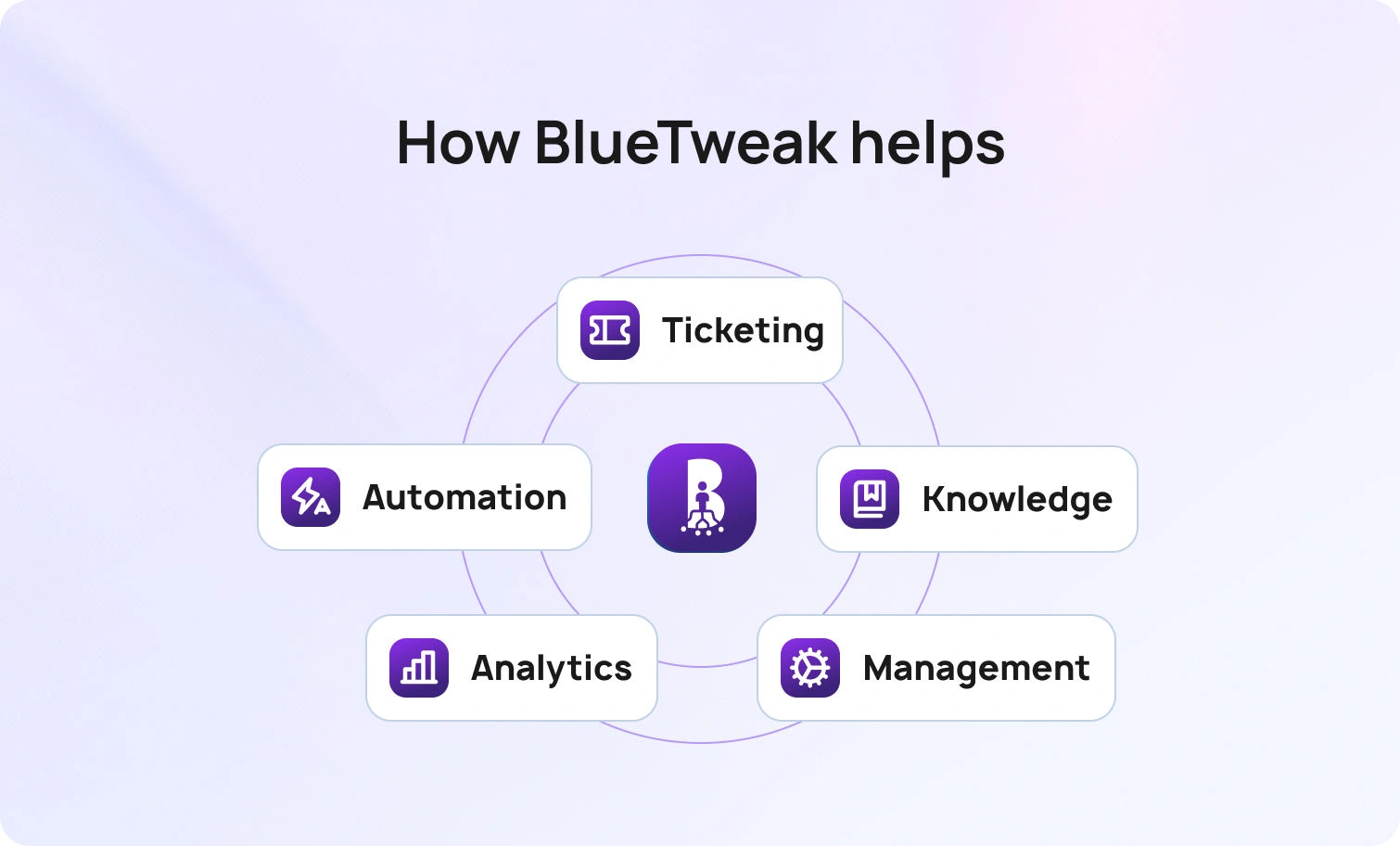
BlueTweak delivers omnichannel ticketing, AI-powered automation, native workforce management, and transparent pricing. It’s built for teams needing both Intercom and Zendesk capabilities without managing multiple vendors.
Below, we’ll break down everything you need to know about Intercom, Zendesk, and BlueTweak to find the right support platform for your team.
Help Desk Platforms for Customer Support Teams 2018 → 2026
Back in 2018, channel silos ruled. Email lived in one system, chat was a bolt-on widget, and voice required a separate call center platform. AI meant basic keyword matching. Reporting was an afterthought. If you wanted omnichannel support, you stitched together three disconnected tools and hoped agents could context-switch fast enough.
Now, in 2026, omnichannel is table stakes, not a premium feature. Both Zendesk and Intercom have evolved to cover email, chat, and messaging channels—though they approach integration differently. Knowledge bases now power both agent assistance and customer self-service. AI has moved from keyword matching to actual classification, summarization, and knowledge base-grounded suggested replies. Strong WFM and analytics are expected, not nice-to-haves. Open APIs connect everything.
Ultimately, you need to unify your channels, knowledge base, and analytics under one roof. Avoid stacking point tools that fragment customer data, inflate TCO, and force agents to context-switch between systems.
The platforms that survived the last seven years consolidated capabilities. The ones that didn't became integration projects.
What Matters in 2026: Everything Under the Same Umbrella
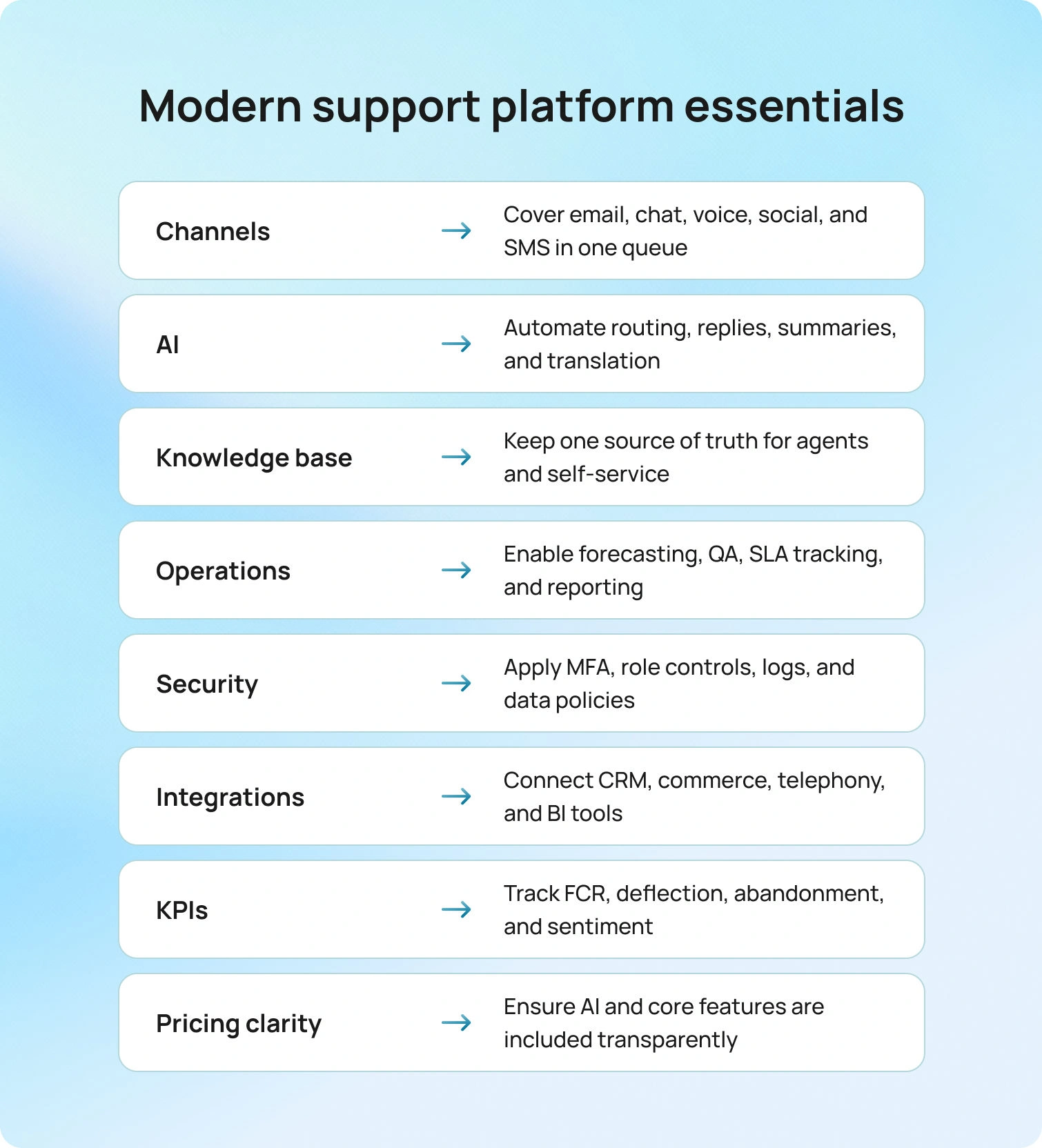
It’s easy to get overwhelmed by features, reviews, and marketing claims. And while some of those things are important, here are the elements you need to focus on the most:
- Channels
- AI
- Knowledge base
- Operations
- Security
- Integrations
- KPIs
- Pricing clarity
Channels
Email, chat, and voice are non-negotiable. Social and SMS are increasingly expected. Your ticketing system needs unified queuing so agents can see the full customer journey.
AI
Classification routes tickets. Summarization condenses threads. Suggested reply drafts knowledge base-grounded responses. Real-time translation supports multilingual teams. Spam detection keeps queues clean.
Knowledge Base
Must surface answers for agents, power self-service portals, feed your AI chatbot, and update everywhere simultaneously.
Operations
Teams need workforce management for forecasting and scheduling, QA for sampling interactions, SLA dashboards, and reporting tracking metrics that matter: FCR, containment, abandonment, and sentiment.
Security
MFA, audit logs, role-based permissions, and data retention are compliance requirements. Workspace segmentation by brand or client matters for multi-account teams.
Integrations
CRM sync, commerce integrations, telephony, and BI tools. Open APIs and webhooks tie everything together.
KPIs
FCR, containment rate, deflection, abandonment, concurrency, and sentiment shifts tell you whether help desk operations are improving.
Pricing Clarity
Core AI shouldn't require add-ons. Prefer plans where AI isn't locked behind separate SKUs.
Feature-by-Feature Comparison: Intercom vs Zendesk vs BlueTweak
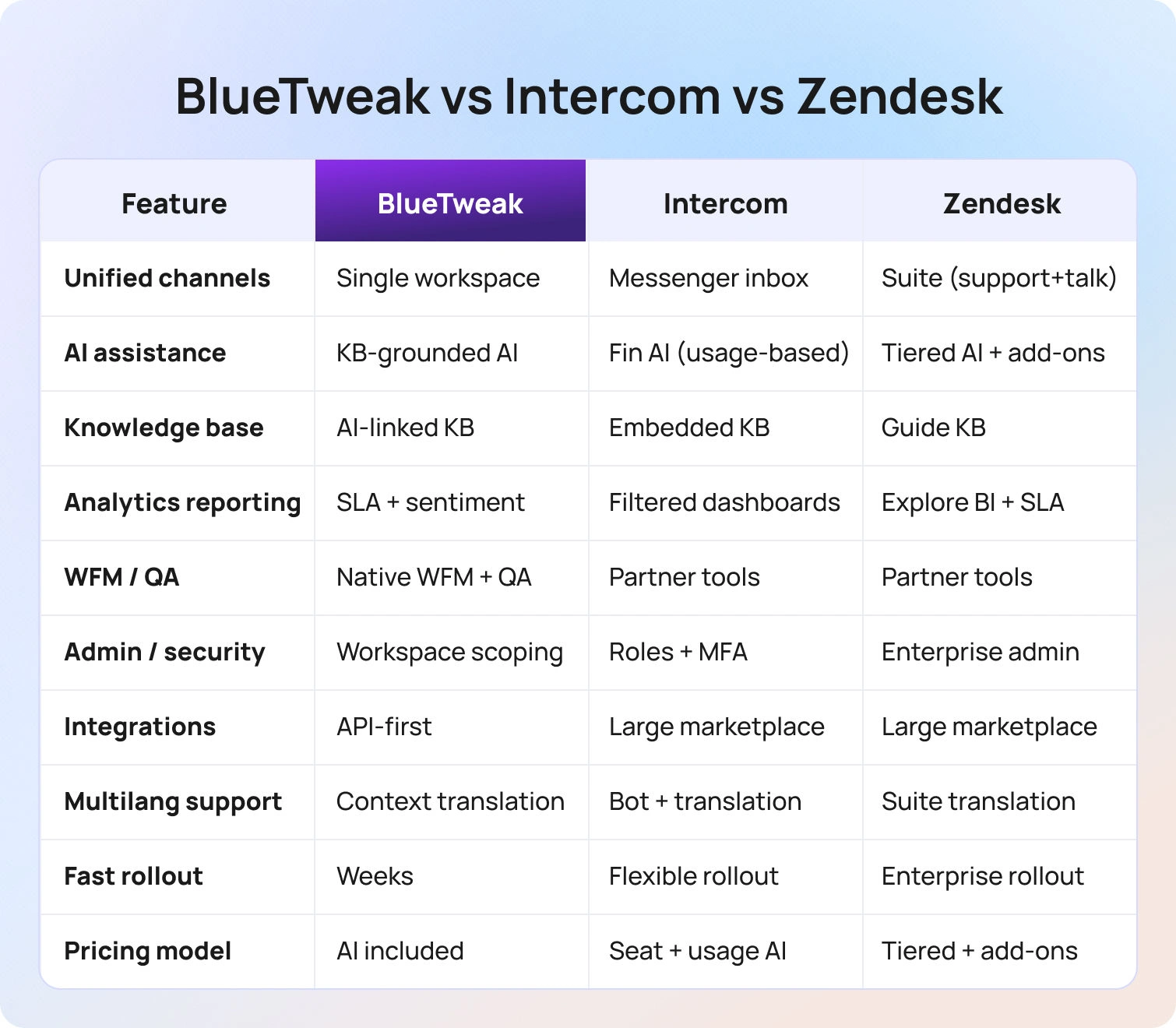
1. Omnichannel Coverage
Unified intake for email, chat, voice, social/SMS with single-queue routing.
- BlueTweak: Unified Inbox with multi-brand routing. AI voicebot handles routine calls with instant escalation. Single workspace; no separate instances for multiple brands. True omnichannel customer support.
- Intercom: Intercom Messenger with inbox functionality. Emphasizes continuity—chat continues via email or in-app without separate cases. Verify voice scope and partner integrations.
- Zendesk: Zendesk Suite bundles Support, Messaging, and Talk. Skills-based routing by expertise and language. Talk integrates voice seamlessly with ticketing functionality.
All three cover chat/email. Voice depth and single-queue execution are swing factors. BlueTweak: multi-brand routing. Zendesk: integrated Talk. Intercom: conversational continuity.
2. AI Assistance
Summaries, classification, proposed reply, spam filtering, live translation, and post-call notes.
- BlueTweak: AI Ticket Summary condenses threads. Suggested Reply drafts KB-grounded responses. Spam filtering. Real-time translation. Post-call notes.
- Intercom: Fin AI (GPT-4) handles 50% of common queries autonomously. Fin AI Copilot suggests replies. Fin resolutions billed at $0.99 each; adds up fast at volume.
- Zendesk: Zendesk AI agents deliver summaries, suggested responses, and intent classification. Talk transcription. Sentiment analysis. Advanced AI often requires monthly add-ons of $50 per agent.
Prioritize KB-grounded replies. BlueTweak emphasizes grounding. Intercom's Fin is sophisticated but usage-based. Zendesk is powerful but often requires add-ons.
3. Knowledge Base and Self-Service
Agent KB + public KB, search quality, widgets, bot source citation.
- BlueTweak: Knowledge base grounds AI replies and chatbot answers, reducing hallucinations. Canned responses for consistency.
- Intercom: Articles, power agent assist, and portals. Messenger-embedded help. Multi-language support.
- Zendesk: Guide with versioning and publishing workflows. Help Center widgets. Multilingual with translation management.
Choose a stack that grounds both agent assist and bots in the same KB. BlueTweak tightly couples KB with AI outputs.
4. Analytics and Reporting
Real-time dashboards, SLA tracking, KPI depth (FCR, Containment, Sentiment), outcome tagging.
- BlueTweak: Real-time SLA dashboards with built-in analytics. Sentiment analysis. Outcome tagging. Post customer interaction summaries.
- Intercom: Dashboards with channel/team/time filtering. Automation reports. Verify containment and sentiment depth by plan.
- Zendesk: Explore analytics with custom dashboards and BI features. SLA/CSAT standard. Data export and API access.
Look for sentiment and outcome tagging feeding back into routing. BlueTweak analytics inform actions. Intercom/Zendesk lean post-hoc.
5. WFM and QA
Forecasting, scheduling, adherence, and QA scorecards.
- BlueTweak: WFM (forecast/schedule) and QA (scorecards/calibration) native. Data flows automatically; no middleware.
- Intercom: WFM/QA via partners. Confirm native versus marketplace.
- Zendesk: WFM/QA through partners (Tymeshift, Playvox). Native analytics support planning.
Native improves time-to-value. BlueTweak includes both. Intercom/Zendesk use partners (effective, but add steps/costs).
6. Administration and Security
Roles, MFA, audit logs, data retention, AI/routing guardrails.
- BlueTweak: Central admin with workspace/brand scoping. AI/routing controls. MFA/audit.
- Intercom: Roles, MFA, audit logs. Verify AI guardrail configurability.
- Zendesk: Admin Center with centralized control. Audit logging scales on enterprise tiers.
All three handle competently. BlueTweak's workspace scoping is useful for multiple brands/clients.
7. Integrations and Extensibility
CRM, commerce, telephony, BI; APIs/webhooks.
- BlueTweak: CRM/commerce/telephony/BI connectors. Open APIs. Integration assistance in onboarding.
- Intercom: Large marketplace. App store. Proactive orchestration. Verify telephony path.
- Zendesk: Extensive marketplace. Sunshine platform for custom data models. Active developer community.
Breadth vs depth decides implementation speed. Intercom/Zendesk has larger ecosystems. BlueTweak prioritizes core integrations.
8. Multilingual Support
Real-time translation with KB grounding, bot languages, voice handoff with context.
- BlueTweak: Real-time translation maintains context. Multilingual voicebot. Context-preserving handoff.
- Intercom: Translation and bot language capabilities. Verify the scope by plan.
- Zendesk: Translation across Messaging/Guide/Talk. Voice handoff maintains context.
Double-check text, voice coverage, and context carryover. BlueTweak excels at maintaining context during language switches.
9. Implementation and Onboarding
Set up KB ingest, enabling suggested reply and change management.
- BlueTweak: Guided rollout. KB ingestion immediately enables AI Suggested Reply. Documented best practices. Fast implementation (weeks).
- Intercom: Migration center tools. Fin AI setup trains on historical data. Self-service and assisted options.
- Zendesk: Migration kits. Professional services for enterprise. Zendesk AI trains on historical data. Can span months for complex implementations.
Fast path: import KB, map intents, enable suggested replies. BlueTweak prioritizes speed. Intercom offers flexibility. Zendesk scales with complexity.
Pricing and TCO Framework
Use this to compare more than just list pricing. It factors in the real total cost: licenses, required add-ons like AI, telephony, and WFM, plus implementation, integrations, training, and ongoing admin work. This framework helps tie each cost line to ROI and time-to-value, so your budget reflects how the platform will actually operate in your world, not a sales-deck fantasy.
Seat vs Usage (at a Glance)
Customer service software pricing usually combines per-agent licenses with usage-based add-ons. Understanding that splitting early prevents budget blowups down the line.
- Included in seat (typical): Core ticketing, standard channels (email/chat UI), basic analytics, standard SLAs, standard storage.
- Usage/add-ons (typical): AI (summaries/suggested reply), WFM, telephony minutes, advanced analytics, bots/automation flows, extra storage/retention, SSO/premium security, sandboxes, HIPAA/industry packs.
BlueTweak: Simple plan with core AI features included. €65 per agent per month covers omnichannel ticketing, AI features (ticket summary, suggested reply, spam filtering, real-time translation), multilingual AI voicebot and chatbot, workforce management, QA scorecards, knowledge base, pre-built analytics dashboards, and call transcription. See pricing and ROI calculator.
Intercom: Intercom pricing for base plans runs roughly $29 to $132 per seat per month (billed annually) and covers core inbox and messaging. AI is priced separately: Fin AI Agent costs $0.99 per resolution, and Fin AI Copilot costs $29 per seat per month. Proactive Support Plus is another $99 flat per month. In practice, costs can climb quickly as AI usage and Intercom user base grow.
Zendesk: Zendesk starts at $55 per agent per month for Suite Team, with Suite Professional at $115 and Suite Enterprise at $169, adding more analytics, routing, and security. AI, voice, analytics, and workforce management often sit outside base tiers. Advanced AI (Copilot) is reported to cost around $50 per agent monthly, WFM runs about $25 per agent monthly, and Talk minutes and Explore analytics may trigger overages or tier upgrades.
What to Collect (Apples-to-Apples Checklist)
When modeling total cost, collect:
- Seats & contracts: Agent count by tier; monthly versus annual; overage terms.
- AI metering: Included versus add-on? Per-message, per-token, or per-seat pricing?
- Channels & volume: Monthly tickets; percentage email/chat/voice/social; peak versus average.
- Telephony: Minutes in/out, AHT, recording/transcription charges, numbers/DIDs.
- WFM: Included versus add-on? Forecast/schedule licensing?
- Automation/bots: Per-flow, per-session, or included? Containment assumptions?
- Storage/retention: Limits, archival fees, legal hold.
- Security/SSO: SSO/SCIM, audit logs, data residency, enterprise packs.
- Services/onboarding: Migration, implementation, premium support SLAs.
- Hidden costs: Marketplace apps, data export fees, API rate limits/overages.
Worked Model (The 50-Agent Scenario)
Let’s see how the pricing works with a real-world scenario.
Scenario: 50 agents, 3 brands, 4 languages, 40,000 tickets per month, 30% voice.
Inputs:
- Seat price per tier
- Included AI (Y/N)
- AI metering
- Minutes per month
- Recording
- Bot sessions and containment percentage
- WFM/QA add-ons
- Storage
- Services
Outputs:
- Monthly platform cost (seats + add-ons + usage)
- Telephony subtotal
- AI subtotal
- All-in monthly and 12-month TCO
- Optional: cost per resolved ticket and per agent
The biggest movers are usually AI metering, voice minutes, and bot containment. A 10% shift in bot containment can swing monthly costs by hundreds or thousands, depending on the pricing model.
BlueTweak makes this simple: One plan including core AI chat features. See pricing and try the ROI calculator for your inputs. €65 per agent per month, all-in, eliminates surprise add-on bills.
How We Evaluated
We only used public vendor sites for our research and evaluation: features, pricing pages, docs/help centers, trust pages, and marketplaces as of January 2026.
And as for use cases and ideal clients, we looked at public logos and case studies (if available on vendor sites).
Must-Have Capability Checklist
- Omnichannel intake (email, chat, voice; social optional)
- KB-grounded answers (agent assist + bots)
- AI: classification, summarization, suggested reply, translation
- Analytics with 2-3 KPIs (FCR, Containment, Abandon, Concurrency, Sentiment)
- WFM/QA native or first-party
- Security/admin: MFA, audit logs, roles
- Integrations + APIs
- Pricing that includes core AI (not only add-ons)
Scoring Rubric
- Fit for 20–100 agents
- Voice/omnichannel depth
- AI coverage (agent assist + KB grounding)
- WFM/QA
- Time-to-value
- Total cost to operate (TCO)
- Security & control (roles, audit, MFA, data residency)
Conclusion
Intercom excels at chat-first engagement, proactive customer relationship journeys, and conversational support that feels modern. It’s best for SaaS teams where in-app messaging is primary, and voice isn't mission-critical. The trade-off is that usage-based AI costs can spike, voice capabilities should be verified, and WFM/QA requires partners.
Zendesk delivers ticketing breadth, marketplace ecosystem depth, and integrated voice through Talk. It’s best for high-volume operations requiring strict SLA management, deep customization, and enterprise security. The trade-off is increased implementation complexity, longer timelines, and unpredictable costs with add-ons.
BlueTweak is positioned as a single-platform omnichannel with KB-grounded AI, built-in WFM/analytics, and simple pricing, making it strong for 20-100-agent teams and multi-brand operations that need comprehensive features without fragmented ticketing tools. It’s the best for a holistic ticketing system that handles customer inquiries and customer conversations at scale across channels.
When to shortlist BlueTweak: If you want omnichannel (voice, email, chat, social), KB-grounded AI, WFM/QA, and simple pricing in one platform. It’s built for teams managing 20-100 support agents who need both Intercom and Zendesk capabilities without juggling multiple vendors or decoding complex add-on structures.
Request a demo to see BlueTweak's omnichannel capabilities, AI assist features, and analytics in action. Or check pricing for transparent costs and an ROI calculator.
Looking for more alternatives? Check out Intercom alternatives and best Zendesk alternatives for broader comparisons.

10 Best AI Chatbots for Customer Support in 2026
Before You Choose: Why Multilingual + GDPR Is Non-Negotiable in 2026
Customer support volume has shifted from email-only to omnichannel messaging, with teams handling inquiries across WhatsApp, chat, voice, and social media in 15+ languages. Human agents alone can't scale this efficiently, which is why AI chatbots and voicebots are stepping in to automate routine inquiries.CFOs now focus on total cost of operation, data sovereignty, and whether your AI chatbot actually grounds answers in your knowledge base or hallucinates under pressure. Common pitfalls include:
- Add-on sprawl: Separate vendors for chat, voice, translation, WFM, and QA (each with its own contract, integration headaches, and siloed analytics).
- Unclear data flows: No DPA (Data Processing Agreement), vague sub-processor lists, or missing data residency options that put you at risk during GDPR audits.
- Text-only bots: Platforms that call themselves multilingual but only handle chat, forcing you to bolt on telephony and voicebot capabilities separately.
We evaluated 10 platforms against a consistent checklist and scoring rubric to help you find exactly what each customer service AI chatbot delivers, where it falls short, and when to shortlist BlueTweak for an all-in-one approach. Here are the top five:
| Platform | Best For... | Key AI Feature | GDPR / Residency | Pricing (2026) |
|---|---|---|---|---|
| BlueTweak | Omnichannel Teams | Native Multilingual Voicebot | EU-Native (Full) | €65/agent (All-in) |
| Intercom | SaaS / In-app Chat | Fin AI Agent | Standard DPA | $29/seat + fees |
| Zendesk | Enterprises | Answer Bot | Regional Options | $55/agent + AI |
| Ada | Chat-First Teams | No-Code Automation | Enterprise DPA | Custom Quote |
| Gorgias | Shopify Stores | Order Automation | Standard DPA | $10/mo + fees |
AI Technology Overview: From Translation Add-Ons to GDPR-Ready, Multilingual CX (2018→2026)
A typical 2018 setup might include Zendesk for ticketing, Twilio for voice, Google Translate API for chat, a standalone chatbot builder (such as Drift or Chatfuel), and manual quality assurance via call recording exports. Customer data flowed through five systems with no unified customer profile, no shared context between channels, and weak oversight of what information the AI chatbot could access.However, growth in messaging and voice volume, as well as the increasing complexity of multi-brand operations for BPOs, and stricter privacy expectations, drove the shift. Older stacks (one vendor for ticketing, another for chat, a third for telephony, separate translation APIs, spreadsheet-based WFM) created unclear data paths, siloed analytics, inconsistent terminology, and high agent handoff rates.To accommodate, teams moved from chat-only existing tools with menu-based IVR systems and translation plug-ins to unified omnichannel platforms
with multilingual AI chatbots and voicebots that ground answers in the knowledge base and provide transparent data governance.Now, it's important to prioritize:
- Native multilingual capability across voice and text channels
- Knowledge base grounding with embeddings + LLM to prevent hallucinations
- Clear GDPR posture (DPA/SCCs, sub-processors, data residency options, DSAR tooling, audit logs)
- Unified analytics over piecemeal add-ons
Double-check the platform handles customer interactions end-to-end—bot deflection, seamless agent escalation,suggested replies
, and post-interaction analysis—without requiring custom development or third-party middleware.These changes demonstrate the importance of using our must-have checklist and scoring rubric for every vendor evaluation.
10 Best AI Customer Service Chatbots With Multilingual Support & GDPR Compliance
These platforms pair knowledge-grounded chatbots with agent copilot tools to deflect routine work and speed resolution. Each was evaluated using the checklist and rubric above.
1. BlueTweak – Editor's Choice

BlueTweak is an AI-native customer service solution
that unifies ticketing, chatbot, agent assist, analytics, and workforce management. It handles email, chat, SMS, WhatsApp, Facebook Messenger, and voice in a unified inbox with shared customer profiles.The platform grounds AI in your internal knowledge base using embeddings + LLM, preventing hallucinations with natural language processing while enabling instant answers to complex queries across text and voice channels.Multilingual support
is available for both chatbots and voicebots, featuring real-time translation and native fluency in over 35 languages. GDPR compliance includes DPA with SCCs, EU data residency, a public sub-processor list, DSAR automation, and audit logs tracking every interaction.Who Uses It
: BPO providers and internal CX teams (20–100+ agents) across e-commerce, telecom, finance, and healthcare, managing multilingual support at scale.Key Features
- Customer support automation: Intelligent routing, auto-classification, sentiment analysis prioritizing urgent customer issues.
- AI voicebot & chatbot: Multilingual conversations (35+ languages) grounded in your KB; seamless agent handoff with full context.
- Copilot assist: Call transcription, AI ticket summary, and suggested replies in under 10 seconds using KB and past tickets.
- Omnichannel inbox: Email, chat, SMS, WhatsApp, Facebook Messenger, unified with shared customer profile history.
- WFM built-in; QA available via add-on: Forecasting, real-time adherence dashboards, shift planning, automated scoring, feedback loops, coaching workflows.
- Multilingual AI: Real-time translation across multiple channels; native fluency for consistent terminology.
- €65/agent/month all-in (ticketing, omnichannel, AI chatbot, AI voicebot, copilot tools, WFM, QA, analytics, integrations)
- AI usage priced separately per interaction (transparent, predictable)
- No feature gating; unlimited users and integrations included
- Bundles agentic AI (voicebot + chatbot), agent copilot tools, native WFM/QA, and full omnichannel in one subscription
- Multilingual across voice and text with KB-grounding to prevent hallucinations
- GDPR-ready: DPA, SCCs, EU data residency, DSAR automation, audit logs
- Transparent pricing; no voice or AI add-ons
- Fast time-to-value (weeks, not months); onboarding support from the BlueTweak team
- Built for BPOs: multi-tenant, multi-brand configuration in one instance
- Suggested replies reduce first response time to under 10 seconds
- Call transcription and ticket summaries free agents from note-taking
- Newer brand compared to Zendesk/Salesforce legacy (though proven with 15M+ customer interactions).
- AI usage scales with volume; per-interaction pricing AI model requires volume forecasting.
to see how BlueTweak's unified AI customer support platform handles voicebot deflection, agent copilot workflows, and real-time workforce analytics in one subscription—no feature gating, no surprise fees.
2. Zendesk
is a cloud-based helpdesk platform with AI add-ons for ticket summarization, customer intent detection, and chatbot automation. It covers email, chat, voice (via Twilio partnership), and messaging, but charges separately for advanced AI, WFM, and voice features.Who Uses It
: SMBs to enterprises across industries; strong in SaaS, e-commerce, and tech support.Key Features
- Omnichannel ticketing with macros and automation
- Answer Bot (knowledge-base chatbot, text-only)
- AI-powered workflow automation and intelligent routing
- Basic reporting dashboards
- Zendesk Talk (voice via Twilio third-party integration)
- Marketplace with 1,200+ app integrations
- Suite Team: $55/agent/month (billed annually)
- Suite Growth: $89/agent/month (billed annually)
- Suite Professional: $115/agent/month (billed annually)
- Suite Enterprise: $150+/agent/month (billed annually)
- Voice, WFM ($25/agent/month), QA ($35/agent/month), and premium AI features cost extra
- Mature ecosystem with an extensive app marketplace
- Familiar UI for many support teams
- Strong integration library for CRM and commerce platforms
- Public DPA with SCCs available
- Voice is partner-dependent (Twilio), not native
- WFM and advanced AI are gated behind enterprise tiers, inflating TCO
- No native voicebot, only text-based Answer Bot
- AI chatbots are limited compared to LLM-native platforms
3. Intercom
combines live chat, a custom AI chatbot (Fin AI), and helpdesk ticketing, with a focus on proactive engagement and sales conversations. It includes basic email/messaging but limited native voice support.Who Uses It
: SaaS companies, product-led growth teams, and digital-first businesses engaging customers via in-app chat.Key Features
- Fin AI chatbot (GPT-powered, KB-grounded, text-only)
- Live chat and messaging
- Product tours and proactive campaigns (Series)
- Basic ticketing system
- Reporting dashboards
- Multilingual support (45+ languages)
- Essential: $29/seat/month (billed annually)
- Advanced: $85/seat/month (billed annually)
- Expert: $132/seat/month (billed annually)
- Fin AI Agent: $0.99 per resolution (minimum 50 resolutions/month = $49.50 baseline)
- Fin AI Copilot: $35/seat/month for unlimited agent assist
- Proactive Support Plus: $99/month base
- No native voice; integrations required for telephony
- Strong chatbot UX with modern interface
- Proactive messaging capabilities
- Quick setup for digital preferred channels
- Multilingual chatbot
- Expensive at scale
- No native voice or voicebot
- Analytics is limited compared to contact-center platforms
- Unpredictable costs; AI resolution fees balloon during peak volumes
4. Freshdesk (Freshworks)
offers ticketing, email, chat, phone (Freshcaller), and Freddy AI for chatbot and real-time assistance. WFM and advanced analytics are available in higher tiers or separate Freshworks products.Who Uses It
: SMBs and mid-market teams; popular in retail, hospitality, and education.Key Features
- Omnichannel ticketing (email, chat, phone, social)
- Freddy AI chatbot (text-only)
- Ticket automation and workflow rules
- Freshcaller (cloud telephony add-on)
- Team collaboration tools
- Basic reporting
- Free: $0 for up to 2 agents (limited features)
- Growth: $15/agent/month (billed annually)
- Pro: $49/agent/month (billed annually)
- Enterprise: $79/agent/month (billed annually)
- Freddy AI Copilot: $29/agent/month (add-on)
- Freddy AI Agent: $100 per 1,000 bot sessions (usage-based)
- WFM via separate Freshworks suite
- Affordable entry point
- Easy onboarding with an intuitive interface
- Decent AI chatbot for text channels
- Voice and WFM bolt-ons inflate TCO
- Freddy AI is less advanced than LLM-native platforms
- Per-session AI pricing is unpredictable (deflecting more tickets = higher costs)
5. Salesforce Service Cloud (Einstein for Service)
integrates CRM data with omnichannel case management and Einstein AI for predictive routing, chatbots, and sentiment analysis. Voice via third-party CTI or Amazon Connect integration.Who Uses It
: Enterprise companies already in the Salesforce ecosystem; finance, healthcare, and B2B services.Key Features
- Einstein Bots (text chatbot, no voicebot)
- Omnichannel case management
- Einstein AI for case classification and routing
- Field service management
- Einstein analytics and dashboards
- Workflow automation
- Secure CRM integration
- Service Cloud Essentials: ~$75/user/month
- Enterprise Edition: ~$165/user/month
- Unlimited Edition: ~$330/user/month
- Einstein AI add-on: $50/user/month (requires Enterprise or Unlimited Edition)
- Agentforce add-on (newer AI): $125/user/month
- Voice, WFM, and advanced features require higher tiers or additional products
- Deep CRM context for Salesforce-native organizations
- Enterprise-grade security and compliance
- Powerful for teams already invested in Salesforce
- Complex setup requiring months of implementation
- Voice not native; requires third-party integration
- Einstein Bots text-only (no voicebot)
- WFM via separate products
6. Genesys Cloud CX
is a contact-center platform with native voice, digital channels, WFM, QA, and AI for predictive routing, sentiment analysis, and agent assist.Who Uses It
: Large contact centers (100+ agents) in telecom, financial services, healthcare, and utilities.Key Features
- Omnichannel (voice, chat, email, SMS, messaging)
- Genesys AI (routing, bots, transcription, analytics)
- Native WFM and QA tools
- Real-time analytics and chatbot performance monitoring
- Workforce engagement management
- Genesys Cloud CX 1: ~$75/user/month (voice-only)
- Genesys Cloud CX 2: ~$115/user/month (includes digital + AI features)
- Genesys Cloud CX 3: ~$155/user/month (adds WFM)
- Genesys Cloud CX 4: ~$240/user/month (adds AI Customer Experience Orchestration)
- Minimum monthly contract commitment: $2,000 (roughly 27 agents on CX 1)
- AI Experience tokens: 250 named or 350 concurrent tokens per org/month included; additional tokens cost extra
- Enterprise contracts often require custom quotes
- Full contact-center stack with robust voice
- Native WFM/QA included in higher tiers
- Strong compliance controls for regulated industries
- Gartner Magic Quadrant Leader (11+ consecutive years)
- Overkill for <100 agents
- Steep learning curve
- Slower time-to-value
- Complex AI token system adds cost unpredictability
7. Ada
is a no-code AI chatbot platform (text-only) that automatically handles customer inquiries via chat and messaging. No native ticketing, voice, or WFM. It integrates with external helpdesks.Who Uses It
: E-commerce, fintech, SaaS; companies seeking chatbot-first automation with low IT overhead.Key Features
- GPT-powered chatbot (text-only)
- Knowledge-base grounding
- Multilingual support (45+ languages)
- Analytics dashboard
- Integrations (Zendesk, Salesforce, Shopify)
- Custom pricing only; no public paid plans
- Per-resolution or per-conversation pricing model
- No free plan; contact sales for a quote
- Fast chatbot deployment
- Strong text automation
- Multilingual capabilities (45+ languages)
- Easy for non-technical teams
- No transparent pricing (requires sales contact)
- Text-only (no voice or voicebot)
- No native ticketing or WFM
- Must integrate with a separate helpdesk
- Limited visibility into agent workflows or quality assurance
8. LivePerson
is a conversational messaging platform that specializes in messaging-first customer engagement across web, mobile apps, SMS, and social channels, utilizing generative AI and LLM orchestration.Who Uses It
: Enterprise brands (retail, telecom, finance, hospitality) prioritizing digital-first, messaging-based engagement over voice.Key Features
- Conversational Cloud platform (messaging-first)
- Omnichannel messaging (SMS, WhatsApp, Apple Business Chat, Facebook, web, app)
- Generative AI and LLM orchestration (Bring Your Own AI)
- Intent Manager and Conversation Builder (no-code AI chatbot builder)
- Agent Assist and Conversation Copilot
- Analytics Studio (voice + text conversation analysis)
- Integration with Apple Pay for in-chat transactions
- Compliance (GDPR, HIPAA, PCI DSS, CCPA)
- Custom pricing only (no public plans)
- No free option; free trial available
- Messaging-first platform (ideal for digital-first brands)
- Handles 1 billion+ conversations monthly
- Strong LLM/generative AI capabilities
- BYOAI (Bring Your Own AI) flexibility
- Deep social and messaging integrations
- No transparent pricing (requires sales contact)
- Expensive for SMBs
- Messaging-focused; limited native voice
- Complex setup and navigation
- Not ideal for voice-heavy contact centers
9. HubSpot (Chatbot)
combines CRM, marketing automation, and customer service with a free chatbot builder and live chat. It's designed for inbound marketing teams that want unified customer data across sales, marketing, and support.Who Uses It
: SMBs and mid-market companies using HubSpot CRM; strong in SaaS, professional services, and B2B.Key Features
- Free chatbot builder with conversation flows
- Live chat widget with team inbox
- Ticketing system with automation
- Knowledge base and help center
- Email integration and team collaboration
- CRM integration (contact history, deal tracking)
- Basic AI features in paid tiers
- Reporting and analytics
- Free: $0 (includes basic chatbot, live chat, ticketing for up to 2 users)
- Service Hub Starter: $15/seat/month (2-seat minimum = $30/month)
- Service Hub Professional: $90/seat/month (5-seat minimum = $450/month)
- Service Hub Enterprise: $150/seat/month (10-seat minimum = $1,500/month)
- AI features are limited to Professional and Enterprise tiers
- No native voice or voicebot
- Free plan available with basic chatbot and ticketing
- Seamless CRM integration for HubSpot users
- Easy setup with no-code chatbot builder
- Unified platform for marketing, sales, and service
- Strong for inbound lead generation
- Limited AI capabilities compared to dedicated platforms
- No native voice or voicebot
- No native WFM or QA tools
- Chatbot flows are basic (rule-based vs conversational artificial intelligence and machine learning)
- Limited multilingual support
10. Gorgias
is an e-commerce-focused helpdesk with deep integrations for Shopify/BigCommerce/Magento, as well as AI Agent capabilities for order management, refunds, and product recommendations.Who Uses It
: E-commerce brands (especially Shopify stores) with moderate to high order volumes.Key Features
- Deep e-commerce integrations (Shopify, BigCommerce, Magento)
- AI Agent (text-only chatbot) for order tracking, cancellations, and refunds
- Omnichannel inbox (email, chat, SMS, social, voice)
- Automated workflows and macros
- Revenue-driving features (upsells, product recommendations)
- 100+ e-commerce app integrations
- Starter: $10/month (50 tickets included)
- Basic: $60/month (300 tickets included)
- Pro: $360/month (2,000 tickets included)
- Advanced: $900/month (5,000 tickets included)
- AI Agent resolutions: $0.90–$1.00 each (annual vs monthly billing)
- Overage fees apply beyond plan limits
- Best-in-class for Shopify/e-commerce stores
- Order management directly in Helpdesk
- Revenue-focused features (product recommendations, cart recovery)
- Affordable entry point for small e-commerce teams
- Primarily Shopify-focused; limited value for non-e-commerce
- AI Agent text-only (no voicebot)
- Complex pricing: pay for AI resolutions + they count toward ticket limits
- No native WFM or QA tools
What Counts as GDPR-Ready, Multilingual in 2026
Not all platforms that claim GDPR compliance actually deliver the controls teams need. Here's what to verify before signing:GDPR essentials
- DPA/SCCs: Data Processing Agreement with Standard Contractual Clauses for EU data transfers.
- Sub-processors: Public, updated list of all third-party AI providers (OpenAI, Anthropic, Google) the platform uses.
- Data residency: Options to store customer data in EU or other regional data centers, not just US-only cloud.
- DSAR tooling: Built-in features to handle data subject access requests (view, export, delete customer data).
- Audit logs: Granular records of who accessed what data, when, and why—critical during compliance reviews.
- Native vs translation: Does the AI chatbot support multiple languages natively (trained on multilingual datasets) or rely on real-time translation APIs that introduce latency and errors?
- KB grounding: Can the chatbot pull context from your internal knowledge base, CRM, or external APIs to answer queries accurately, or does it generate responses from a generic model?
: Confirm multilingual support for chat (not just translated UI labels), and evaluate any voice features separately if you plan to automate phone calls.
The Importance of GDPR Compliance
Choosing a customer service AI chatbot without verified GDPR compliance exposes your organization to regulatory penalties, reputational damage, and operational disruption. Here's what's at risk:
- Regulatory penalties: GDPR fines can reach €20 million or 4% of global annual revenue, whichever is higher. In 2023, the Irish Data Protection Commission fined Meta €1.2 billion for inadequate data transfer mechanisms—a direct result of unclear sub-processor agreements and missing SCCs.
- Reputational damage: A data breach or non-compliance disclosure triggers customer churn, especially in finance, healthcare, and insurance, where trust is the foundation. Support teams that can't demonstrate secure data handling lose enterprise contracts.
- Operational disruption: Without DSAR tooling and audit logs, responding to data subject requests becomes a manual, time-consuming process. Platforms that store customer data in non-EU data centers without SCCs force you to halt operations during compliance reviews.
- Third-party liability: If your AI chatbot relies on external LLMs (OpenAI, Google, Anthropic) without clear DPAs, you inherit their compliance gaps. Many platforms don't disclose sub-processor relationships until after the contract is signed, leaving you liable for their data handling.
- Loss of customer trust: Customers expect transparency about how AI handles their data. Platforms that can't explain where human conversations are stored, who accesses transcripts, or how long data is retained create friction during sales cycles and support interactions.
GDPR compliance isn't a checkbox. It's a competitive advantage. Sales teams that choose GDPR-ready platforms with transparent data governance win enterprise deals, pass audits faster, and sleep better knowing customer interactions are protected.
How We Evaluated Each AI-Powered Chatbot
Our ranking process ensures you can compare platforms objectively, without marketing spin or unverified claims. Here's how we assessed every AI customer service chatbot:
- Features: Checked against the must-have checklist below using public documentation, product demos, and vendor support articles. We prioritized platforms that bundle AI chatbot, voicebot, agent copilot tools, and customer support automation in base subscriptions rather than charging per feature.
- Who uses it: Drawn from public case studies, customer logos on vendor websites, and third-party review platforms (G2, Capterra). If user segments weren't clear, we noted and evaluated them based on the stated positioning (SMB vs. mid-market vs. enterprise).
- Pricing: From published pricing pages. If absent, we noted the stated model (per-agent, per-resolution, tiered) and flagged "contact sales."
- Pros/cons: Evidence-based strengths and gaps tied directly to checklist criteria and rubric scores. No superlatives ("best-in-class," "industry-leading") unless supported by third-party benchmarks. We focused on what teams at 20–100 agents will encounter: setup complexity, integration quality, support responsiveness, and whether AI chatbots actually reduce ticket volume or just shift work to agents.
Must-Have Capability Checklist
Every platform below was evaluated against these baseline requirements:
- Multilingual AI & Voice: Supports 10+ languages with native fluency and conversational IVR for 60–80% routine deflection.
- KB-Grounded Accuracy: Uses RAG (Embeddings + LLM) to pull context from your internal knowledge base, preventing AI hallucinations.
- True Omnichannel: A single inbox for email, WhatsApp, SMS, and voice with a unified customer profile.
- GDPR & Data Sovereignty: Mandatory DPA/SCCs, regional data residency (EU/US), and granular audit logs for compliance.
- Operational Alignment: Built-in Workforce Management (WFM) and Quality Assurance (QA) to avoid "tool sprawl."
- Pricing Integrity: Flat "all-in" per-agent rates; no hidden per-resolution fees that balloon during peak volume.
Scoring Rubric
After confirming baseline capabilities, we scored each platform on these dimensions:
| Dimension | What We Look For |
|---|---|
| Mid-Market Fit | Scaled for 20–100 agents; avoids SMB limitations or enterprise complexity. |
| AI Coverage | Balance of "Agentic AI" (autonomous) and "Copilots" (agent assistance). |
| Native WFM/QA | Ability to forecast, schedule, and score interactions without 3rd-party add-ons. |
| Time-to-Value | Deployment in weeks, not months of professional services. |
| Total Cost (TCO) | Full visibility into voice, AI, and integration costs for 50-agent scenarios. |
| Security Controls | MFA, role-based permissions, and DSAR automation for data requests. |
Choosing the Right GDPR-Ready, Multilingual Chatbot
The best AI chatbot for improving customer service delivers multilingual coverage, a knowledge base foundation to prevent hallucinations, a clear GDPR posture, and native WFM/QA capabilities. It does this without gating features behind enterprise SKUs or charging unpredictable per-resolution fees.If you're running a 20–100 agent team and need everything in one platform, BlueTweak delivers. It's the only solution that bundles agentic AI (voicebot + chatbot), agent copilot tools (call transcription, ticket summaries, suggested replies), native workforce management, quality assurance, and full omnichannel capabilities in one €65/agent/month subscription.No feature sprawl, no surprise fees, no voice or AI add-ons; just transparent pricing and fast deployment.Schedule a 30-minute demo
and learn how BlueTweak replaces five tools while delivering measurable gains in ticket deflection, first response time, and agent productivity.
FAQ
Want to see BlueTweak for yourself? Sign up to our free 14-day trial!
Free trial



