



TL;DR
The Intercom vs Zendesk debate hinges on operational philosophy: Intercom prioritizes conversational engagement with proactive messaging, while Zendesk delivers structured ticketing for high-volume operations. Both platforms serve different needs, but there's a third option that combines the best of both approaches: BlueTweak.
Choose the Right Platform for Modern Customer Support
Your support team has outgrown basic ticketing. Two platforms keep appearing: Intercom and Zendesk.
Intercom built its reputation on conversational support: in-app messaging, proactive engagement, and a chat-first approach. Zendesk came from traditional help desk roots: structured ticketing, workflow automation, and SLA management at scale.
The Zendesk vs. Intercom vs. BlueTweak choice usually comes down to trade-offs. Want modern messaging? Accept limited voice and usage-based AI costs. Need enterprise ticketing? Prepare for implementation complexity.
However, there's a third path.
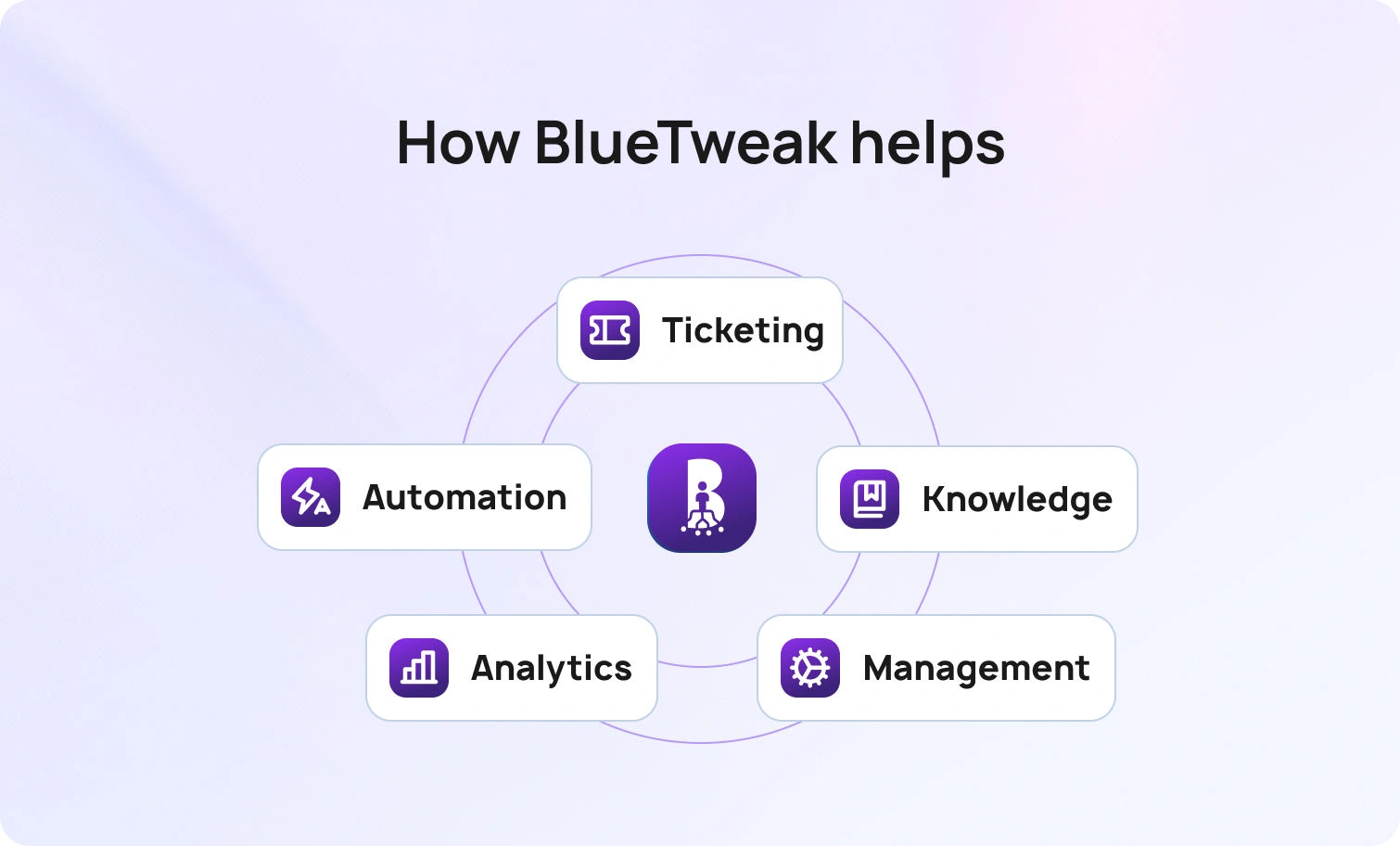
BlueTweak delivers omnichannel ticketing, AI-powered automation, native workforce management, and transparent pricing. It’s built for teams needing both Intercom and Zendesk capabilities without managing multiple vendors.
Below, we’ll break down everything you need to know about Intercom, Zendesk, and BlueTweak to find the right support platform for your team.
Help Desk Platforms for Customer Support Teams 2018 → 2026
Back in 2018, channel silos ruled. Email lived in one system, chat was a bolt-on widget, and voice required a separate call center platform. AI meant basic keyword matching. Reporting was an afterthought. If you wanted omnichannel support, you stitched together three disconnected tools and hoped agents could context-switch fast enough.
Now, in 2026, omnichannel is table stakes, not a premium feature. Both Zendesk and Intercom have evolved to cover email, chat, and messaging channels—though they approach integration differently. Knowledge bases now power both agent assistance and customer self-service. AI has moved from keyword matching to actual classification, summarization, and knowledge base-grounded suggested replies. Strong WFM and analytics are expected, not nice-to-haves. Open APIs connect everything.
Ultimately, you need to unify your channels, knowledge base, and analytics under one roof. Avoid stacking point tools that fragment customer data, inflate TCO, and force agents to context-switch between systems.
The platforms that survived the last seven years consolidated capabilities. The ones that didn't became integration projects.
What Matters in 2026: Everything Under the Same Umbrella
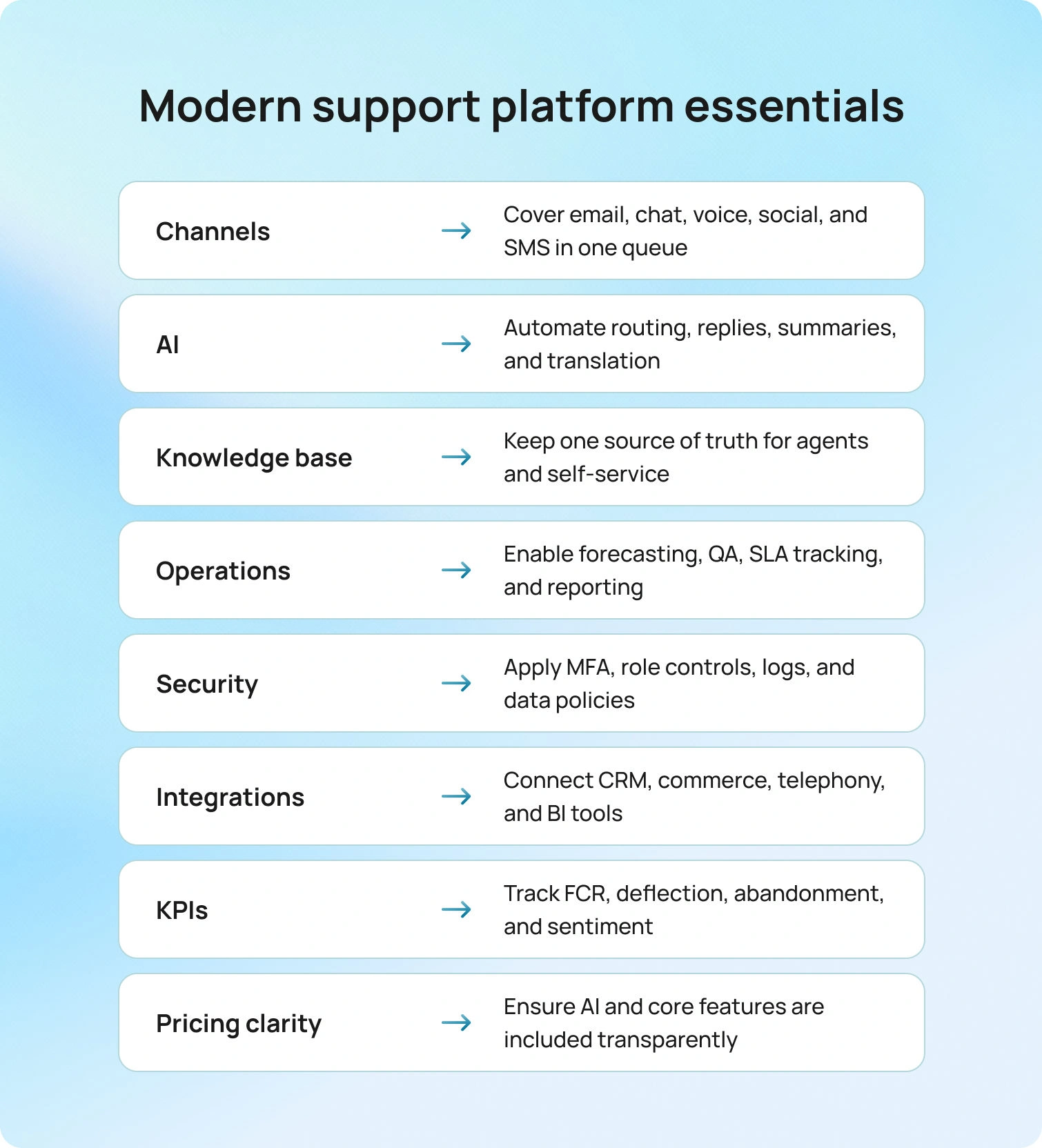
It’s easy to get overwhelmed by features, reviews, and marketing claims. And while some of those things are important, here are the elements you need to focus on the most:
- Channels
- AI
- Knowledge base
- Operations
- Security
- Integrations
- KPIs
- Pricing clarity
Channels
Email, chat, and voice are non-negotiable. Social and SMS are increasingly expected. Your ticketing system needs unified queuing so agents can see the full customer journey.
AI
Classification routes tickets. Summarization condenses threads. Suggested reply drafts knowledge base-grounded responses. Real-time translation supports multilingual teams. Spam detection keeps queues clean.
Knowledge Base
Must surface answers for agents, power self-service portals, feed your AI chatbot, and update everywhere simultaneously.
Operations
Teams need workforce management for forecasting and scheduling, QA for sampling interactions, SLA dashboards, and reporting tracking metrics that matter: FCR, containment, abandonment, and sentiment.
Security
MFA, audit logs, role-based permissions, and data retention are compliance requirements. Workspace segmentation by brand or client matters for multi-account teams.
Integrations
CRM sync, commerce integrations, telephony, and BI tools. Open APIs and webhooks tie everything together.
KPIs
FCR, containment rate, deflection, abandonment, concurrency, and sentiment shifts tell you whether help desk operations are improving.
Pricing Clarity
Core AI shouldn't require add-ons. Prefer plans where AI isn't locked behind separate SKUs.
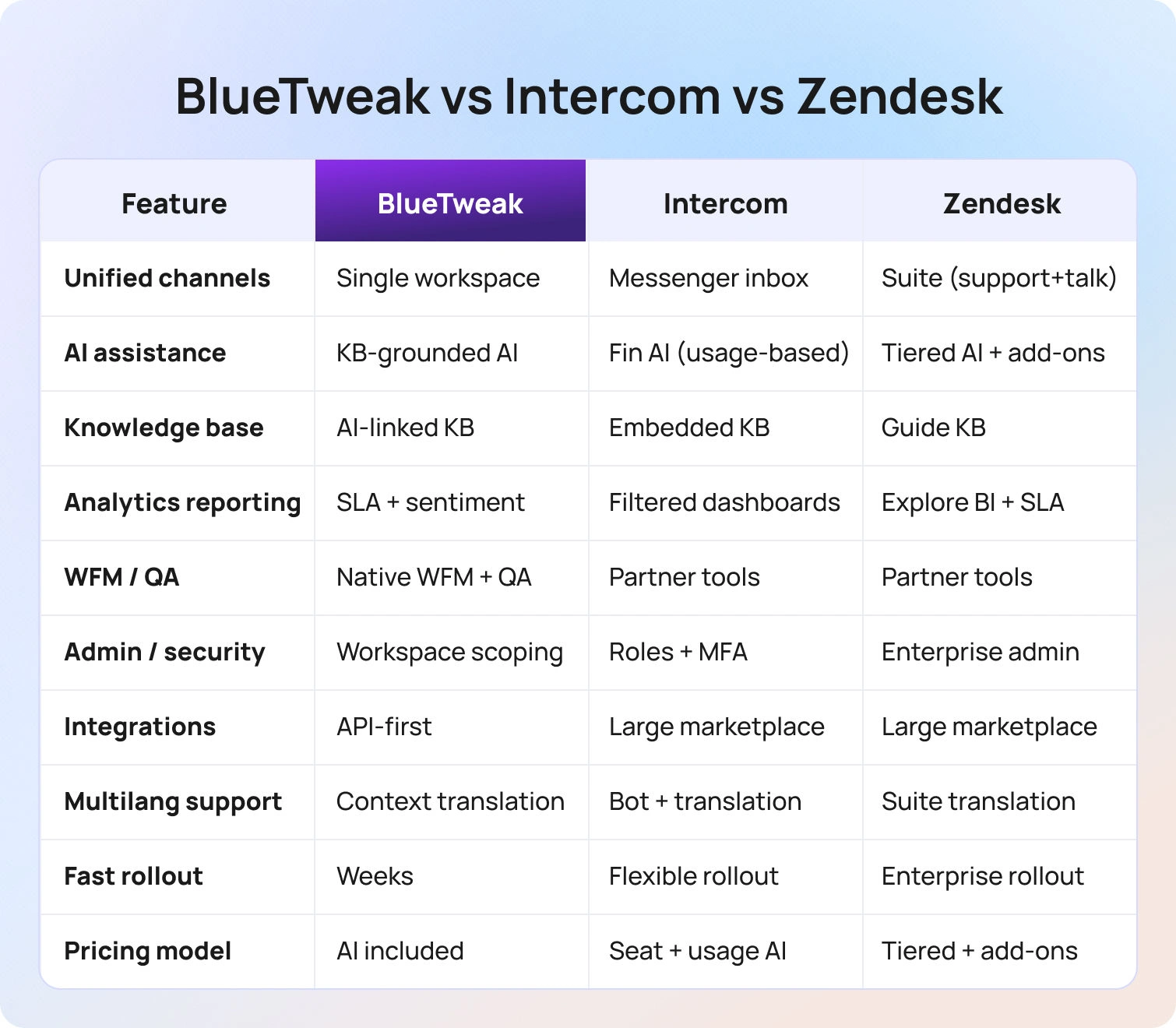
Feature-by-Feature Comparison: Intercom vs Zendesk vs BlueTweak
1. Omnichannel Coverage
Unified intake for email, chat, voice, social/SMS with single-queue routing.
- BlueTweak: Unified Inbox with multi-brand routing. AI voicebot handles routine calls with instant escalation. Single workspace; no separate instances for multiple brands. True omnichannel customer support.
- Intercom: Intercom Messenger with inbox functionality. Emphasizes continuity—chat continues via email or in-app without separate cases. Verify voice scope and partner integrations.
- Zendesk: Zendesk Suite bundles Support, Messaging, and Talk. Skills-based routing by expertise and language. Talk integrates voice seamlessly with ticketing functionality.
All three cover chat/email. Voice depth and single-queue execution are swing factors. BlueTweak: multi-brand routing. Zendesk: integrated Talk. Intercom: conversational continuity.
2. AI Assistance
Summaries, classification, proposed reply, spam filtering, live translation, and post-call notes.
- BlueTweak: AI Ticket Summary condenses threads. Suggested Reply drafts KB-grounded responses. Spam filtering. Real-time translation. Post-call notes.
- Intercom: Fin AI (GPT-4) handles 50% of common queries autonomously. Fin AI Copilot suggests replies. Fin resolutions billed at $0.99 each; adds up fast at volume.
- Zendesk: Zendesk AI agents deliver summaries, suggested responses, and intent classification. Talk transcription. Sentiment analysis. Advanced AI often requires monthly add-ons of $50 per agent.
Prioritize KB-grounded replies. BlueTweak emphasizes grounding. Intercom's Fin is sophisticated but usage-based. Zendesk is powerful but often requires add-ons.
3. Knowledge Base and Self-Service
Agent KB + public KB, search quality, widgets, bot source citation.
- BlueTweak: Knowledge base grounds AI replies and chatbot answers, reducing hallucinations. Canned responses for consistency.
- Intercom: Articles, power agent assist, and portals. Messenger-embedded help. Multi-language support.
- Zendesk: Guide with versioning and publishing workflows. Help Center widgets. Multilingual with translation management.
Choose a stack that grounds both agent assist and bots in the same KB. BlueTweak tightly couples KB with AI outputs.
4. Analytics and Reporting
Real-time dashboards, SLA tracking, KPI depth (FCR, Containment, Sentiment), outcome tagging.
- BlueTweak: Real-time SLA dashboards with built-in analytics. Sentiment analysis. Outcome tagging. Post customer interaction summaries.
- Intercom: Dashboards with channel/team/time filtering. Automation reports. Verify containment and sentiment depth by plan.
- Zendesk: Explore analytics with custom dashboards and BI features. SLA/CSAT standard. Data export and API access.
Look for sentiment and outcome tagging feeding back into routing. BlueTweak analytics inform actions. Intercom/Zendesk lean post-hoc.
5. WFM and QA
Forecasting, scheduling, adherence, and QA scorecards.
- BlueTweak: WFM (forecast/schedule) and QA (scorecards/calibration) native. Data flows automatically; no middleware.
- Intercom: WFM/QA via partners. Confirm native versus marketplace.
- Zendesk: WFM/QA through partners (Tymeshift, Playvox). Native analytics support planning.
Native improves time-to-value. BlueTweak includes both. Intercom/Zendesk use partners (effective, but add steps/costs).
6. Administration and Security
Roles, MFA, audit logs, data retention, AI/routing guardrails.
- BlueTweak: Central admin with workspace/brand scoping. AI/routing controls. MFA/audit.
- Intercom: Roles, MFA, audit logs. Verify AI guardrail configurability.
- Zendesk: Admin Center with centralized control. Audit logging scales on enterprise tiers.
All three handle competently. BlueTweak's workspace scoping is useful for multiple brands/clients.
7. Integrations and Extensibility
CRM, commerce, telephony, BI; APIs/webhooks.
- BlueTweak: CRM/commerce/telephony/BI connectors. Open APIs. Integration assistance in onboarding.
- Intercom: Large marketplace. App store. Proactive orchestration. Verify telephony path.
- Zendesk: Extensive marketplace. Sunshine platform for custom data models. Active developer community.
Breadth vs depth decides implementation speed. Intercom/Zendesk has larger ecosystems. BlueTweak prioritizes core integrations.
8. Multilingual Support
Real-time translation with KB grounding, bot languages, voice handoff with context.
- BlueTweak: Real-time translation maintains context. Multilingual voicebot. Context-preserving handoff.
- Intercom: Translation and bot language capabilities. Verify the scope by plan.
- Zendesk: Translation across Messaging/Guide/Talk. Voice handoff maintains context.
Double-check text, voice coverage, and context carryover. BlueTweak excels at maintaining context during language switches.
9. Implementation and Onboarding
Set up KB ingest, enabling suggested reply and change management.
- BlueTweak: Guided rollout. KB ingestion immediately enables AI Suggested Reply. Documented best practices. Fast implementation (weeks).
- Intercom: Migration center tools. Fin AI setup trains on historical data. Self-service and assisted options.
- Zendesk: Migration kits. Professional services for enterprise. Zendesk AI trains on historical data. Can span months for complex implementations.
Fast path: import KB, map intents, enable suggested replies. BlueTweak prioritizes speed. Intercom offers flexibility. Zendesk scales with complexity.
Pricing and TCO Framework
Use this to compare more than just list pricing. It factors in the real total cost: licenses, required add-ons like AI, telephony, and WFM, plus implementation, integrations, training, and ongoing admin work. This framework helps tie each cost line to ROI and time-to-value, so your budget reflects how the platform will actually operate in your world, not a sales-deck fantasy.
Seat vs Usage (at a Glance)
Customer service software pricing usually combines per-agent licenses with usage-based add-ons. Understanding that splitting early prevents budget blowups down the line.
- Included in seat (typical): Core ticketing, standard channels (email/chat UI), basic analytics, standard SLAs, standard storage.
- Usage/add-ons (typical): AI (summaries/suggested reply), WFM, telephony minutes, advanced analytics, bots/automation flows, extra storage/retention, SSO/premium security, sandboxes, HIPAA/industry packs.
BlueTweak: Simple plan with core AI features included. €65 per agent per month covers omnichannel ticketing, AI features (ticket summary, suggested reply, spam filtering, real-time translation), multilingual AI voicebot and chatbot, workforce management, QA scorecards, knowledge base, pre-built analytics dashboards, and call transcription. See pricing and ROI calculator.
Intercom: Intercom pricing for base plans runs roughly $29 to $132 per seat per month (billed annually) and covers core inbox and messaging. AI is priced separately: Fin AI Agent costs $0.99 per resolution, and Fin AI Copilot costs $29 per seat per month. Proactive Support Plus is another $99 flat per month. In practice, costs can climb quickly as AI usage and Intercom user base grow.
Zendesk: Zendesk starts at $55 per agent per month for Suite Team, with Suite Professional at $115 and Suite Enterprise at $169, adding more analytics, routing, and security. AI, voice, analytics, and workforce management often sit outside base tiers. Advanced AI (Copilot) is reported to cost around $50 per agent monthly, WFM runs about $25 per agent monthly, and Talk minutes and Explore analytics may trigger overages or tier upgrades.
What to Collect (Apples-to-Apples Checklist)
When modeling total cost, collect:
- Seats & contracts: Agent count by tier; monthly versus annual; overage terms.
- AI metering: Included versus add-on? Per-message, per-token, or per-seat pricing?
- Channels & volume: Monthly tickets; percentage email/chat/voice/social; peak versus average.
- Telephony: Minutes in/out, AHT, recording/transcription charges, numbers/DIDs.
- WFM: Included versus add-on? Forecast/schedule licensing?
- Automation/bots: Per-flow, per-session, or included? Containment assumptions?
- Storage/retention: Limits, archival fees, legal hold.
- Security/SSO: SSO/SCIM, audit logs, data residency, enterprise packs.
- Services/onboarding: Migration, implementation, premium support SLAs.
- Hidden costs: Marketplace apps, data export fees, API rate limits/overages.
Worked Model (The 50-Agent Scenario)
Let’s see how the pricing works with a real-world scenario.
Scenario: 50 agents, 3 brands, 4 languages, 40,000 tickets per month, 30% voice.
Inputs:
- Seat price per tier
- Included AI (Y/N)
- AI metering
- Minutes per month
- Recording
- Bot sessions and containment percentage
- WFM/QA add-ons
- Storage
- Services
Outputs:
- Monthly platform cost (seats + add-ons + usage)
- Telephony subtotal
- AI subtotal
- All-in monthly and 12-month TCO
- Optional: cost per resolved ticket and per agent
The biggest movers are usually AI metering, voice minutes, and bot containment. A 10% shift in bot containment can swing monthly costs by hundreds or thousands, depending on the pricing model.
BlueTweak makes this simple: One plan including core AI chat features. See pricing and try the ROI calculator for your inputs. €65 per agent per month, all-in, eliminates surprise add-on bills.
How We Evaluated
We only used public vendor sites for our research and evaluation: features, pricing pages, docs/help centers, trust pages, and marketplaces as of January 2026.
And as for use cases and ideal clients, we looked at public logos and case studies (if available on vendor sites).
Must-Have Capability Checklist
- Omnichannel intake (email, chat, voice; social optional)
- KB-grounded answers (agent assist + bots)
- AI: classification, summarization, suggested reply, translation
- Analytics with 2-3 KPIs (FCR, Containment, Abandon, Concurrency, Sentiment)
- WFM/QA native or first-party
- Security/admin: MFA, audit logs, roles
- Integrations + APIs
- Pricing that includes core AI (not only add-ons)
Scoring Rubric
- Fit for 20–100 agents
- Voice/omnichannel depth
- AI coverage (agent assist + KB grounding)
- WFM/QA
- Time-to-value
- Total cost to operate (TCO)
- Security & control (roles, audit, MFA, data residency)
Conclusion
Intercom excels at chat-first engagement, proactive customer relationship journeys, and conversational support that feels modern. It’s best for SaaS teams where in-app messaging is primary, and voice isn't mission-critical. The trade-off is that usage-based AI costs can spike, voice capabilities should be verified, and WFM/QA requires partners.
Zendesk delivers ticketing breadth, marketplace ecosystem depth, and integrated voice through Talk. It’s best for high-volume operations requiring strict SLA management, deep customization, and enterprise security. The trade-off is increased implementation complexity, longer timelines, and unpredictable costs with add-ons.
BlueTweak is positioned as a single-platform omnichannel with KB-grounded AI, built-in WFM/analytics, and simple pricing, making it strong for 20-100-agent teams and multi-brand operations that need comprehensive features without fragmented ticketing tools. It’s the best for a holistic ticketing system that handles customer inquiries and customer conversations at scale across channels.
When to shortlist BlueTweak: If you want omnichannel (voice, email, chat, social), KB-grounded AI, WFM/QA, and simple pricing in one platform. It’s built for teams managing 20-100 support agents who need both Intercom and Zendesk capabilities without juggling multiple vendors or decoding complex add-on structures.
Request a demo to see BlueTweak's omnichannel capabilities, AI assist features, and analytics in action. Or check pricing for transparent costs and an ROI calculator.
Looking for more alternatives? Check out Intercom alternatives and best Zendesk alternatives for broader comparisons.

As Head of Digital Transformation, Radu looks over multiple departments across the company, providing visibility over what happens in product, and what are the needs of customers. With more than 8 years in the Technology era, and part of BlueTweak since the beginning, Radu shifted from a developer (addressing end-customer needs) to a more business oriented role, to have an influence and touch base with people who use the actual technology.



