Support Ticket Automation: Reduce Manual Work in 2026



BlueTweak is an AI Customer Support Platform that unifies every conversation, customer record, and automation into one workspace.
Explore more
Insights, trends, and practical ideas from customer experience and AI
Real-world scenarios showing how teams use BlueTweak to deliver better service
The daily blueprint that guides customer support leadership.
ROI and savings calculators for support teams
See how BlueTweak stacks up against leading customer support platforms
Support ticket automation, as enabled through platforms like BlueTweak, helps support teams manage incoming tickets, improve response time, and automate repetitive tasks using AI-powered automation and intelligent ticket routing. By using advanced automation platforms with AI agents and natural language processing, businesses can streamline support workflows, reduce operational costs, and boost customer satisfaction. For organisations looking to scale customer support efficiently, investing in an automated ticketing system is now a competitive necessity.
Support ticket automation is the practice of replacing manual handling of customer inquiries with intelligent workflows, AI models, and business rules that can automatically create, categorise, route, prioritise, and even resolve tickets. Its focus is on rethinking how support operates at scale.
Automation exists on a spectrum. On the one end, basic rule-based systems rely on triggers, macros, or keyword logic to perform predictable actions. They are useful for repetitive, low-complexity tasks but quickly hit limits as ticket volume and complexity grow. At the other end of the scale, AI-driven automation uses machine learning, natural language understanding, and smart workflows to detect intent, suggest or autonomously deliver responses, and continuously optimise routing, all while learning from past interactions.
This evolution marks a fundamental shift for support teams. Organizations are no longer aiming simply to offload work from agents; in 2026, these businesses need autonomous, end-to-end ticket resolution that improves operational efficiency, shortens response times, and consistently enhances the customer experience.
In simple terms, support ticket automation is the process of using AI and workflows to automatically manage and resolve customer support tickets with minimal human intervention.
Support teams are facing a perfect storm of high ticket volumes, tighter budgets, and rising customer expectations. Manual triage and repetitive tasks slow down response times and lead to burnout, lower agent satisfaction, and inconsistent service.
In this environment, automation has become essential. Teams that automate effectively see measurable improvements in key performance indicators such as average handle time (AHT), first-contact resolution (FCR), and customer satisfaction (CSAT). By offloading repetitive sorting, prioritising, and routing work, agents are free to focus on higher-value, complex tasks.
But there’s a strategic distinction to be made: simply automating processes isn’t enough. Many teams misuse automation as a deflection tactic rather than an end‑to‑end resolution strategy.
“Too often, teams implement automation as a tick‑box exercise instead of a transformation engine,” says Radu Dumitrescu, Head of Presale & Digital Transformation at BlueTweak. “The most successful organisations think in terms of autonomous resolution, not just skipping a few clicks.”
According to Gartner’s 2026 Customer Service & Support survey, over nine out of ten service leaders are under executive pressure to adopt AI in support environments, underscoring the organisational urgency behind automation initiatives.
Unlike traditional rule-based systems, modern AI-powered automation platforms can adapt in real time, learning from past interactions to continuously improve routing and resolution accuracy.
Legacy rule‑based systems were fine when ticket volumes and customer expectations were low. Today, they can’t scale:
By contrast, modern automation (especially when powered by AI orchestration for support ticket automation) enables organisations to operate more efficiently and accurately across high‑volume environments.
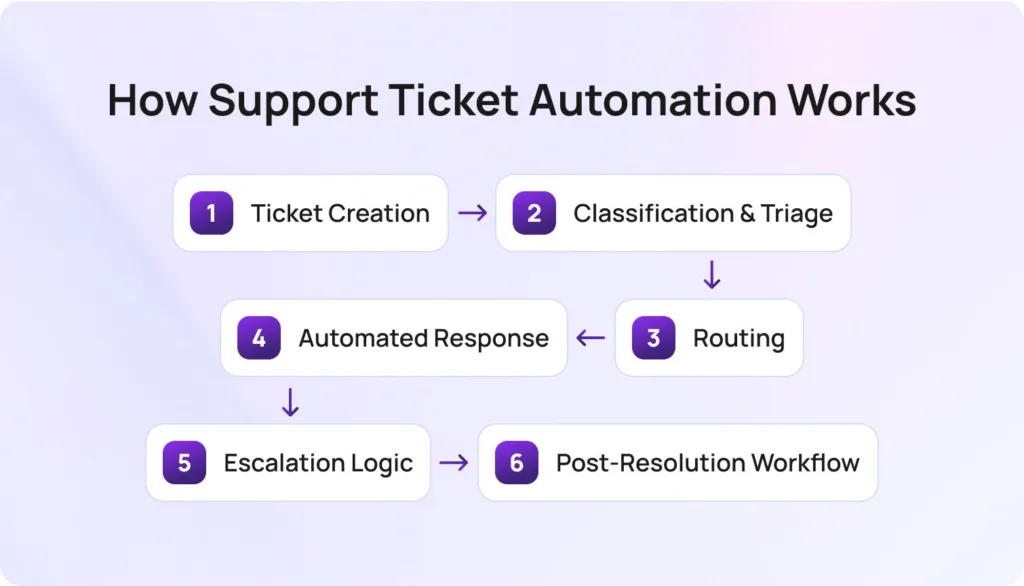
Support ticket automation isn’t magic; it’s a structured workflow that begins the moment a customer interacts with your brand. Here’s how the lifecycle typically unfolds:
This structured flow is what separates tactical automation from genuinely transformative support ticket workflows. This is the model BlueTweak uses to power scalable, AI-driven support operations.
No, while modern AI-powered automation can resolve a large percentage of routine tickets, human agents remain essential for complex, sensitive, or high-value customer interactions. The goal is not replacement, but augmentation, allowing support teams to focus where they add the most value.
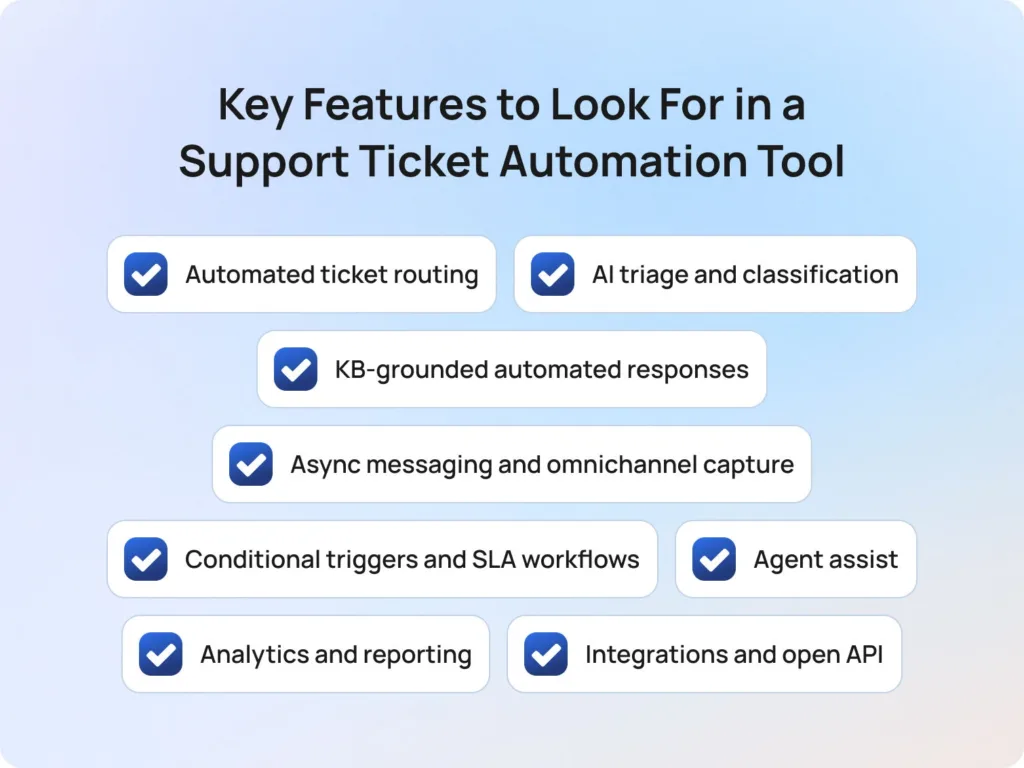
In 2026, choosing the right platform is critical. BlueTweak’s platform is designed to address the growing gap between basic automation and true AI orchestration for support ticket automation.
Once you understand how support ticket automation works, the next step is choosing a platform that can actually deliver on its promise. Not all tools operate in the same way, and the gap between basic automation and true AI orchestration for support ticket automation is where most buying decisions are won or lost.
This is the backbone of any automation strategy and one of the most critical capabilities to get right. At a basic level, routing relies on predefined rules such as keywords, ticket type, or channel. More advanced platforms layer in AI to enable skill-based and load-balanced assignment, ensuring tickets are dynamically routed based on agent expertise, availability, and historical performance. BlueTweak’s approach combines both rule-based logic and AI-driven decisioning, allowing teams to scale routing accuracy without constantly maintaining manual rules.
Manually tagging and prioritising tickets is both time-consuming and error-prone. Modern tools use AI to detect intent, analyse sentiment, and assign priority scores in real-time, without requiring complex rule setup. BlueTweak’s automation engine continuously learns from past interactions, improving classification accuracy over time and reducing the operational overhead typically associated with maintaining taxonomy rules.
The difference between helpful automation and frustrating automation often comes down to the source of truth. Generic canned responses quickly fall short, especially in complex environments. Instead, leading platforms ground responses in a live knowledge base, ensuring that both automated replies and agent suggestions are accurate, consistent, and up-to-date. BlueTweak enables this by tightly integrating knowledge management into its automation workflows, so every response is contextually relevant and aligned with approved content.
Customers don’t think in channels, and your automation shouldn’t either. Whether tickets originate from email, chat, voice, social media, or web forms, automation needs to ingest and process them consistently. BlueTweak’s platform supports true omnichannel automation, including multilingual support ticket automation, ensuring workflows operate seamlessly across all touchpoints, not just traditional email queues..
Automation isn’t just about speed; it’s about control. Robust platforms allow teams to define conditional triggers based on time, priority, or customer attributes, which enables escalation rules, SLA breach alerts, and time-based actions. With BlueTweak, these workflows are configurable yet scalable, helping teams maintain SLA compliance without micromanaging every edge case.
Not every ticket should be fully automated, and that’s where agent assist comes in. AI provides suggested replies, summarises ticket history, and recommends next-best actions, allowing agents to resolve complex issues faster and more consistently. BlueTweak’s agent assist capabilities ensure that even human-handled tickets benefit from automation, bridging the gap between efficiency and quality.
Automation without visibility is a risk. Teams need clear insights into metrics like automation rate, deflection rate, first-contact resolution, average handle time, and SLA compliance. These metrics not only prove ROI but also highlight areas for optimisation. BlueTweak provides comprehensive reporting dashboards that enable teams to continuously refine their automation strategy based on real performance data.
Automation doesn’t operate in isolation; it must connect seamlessly with CRMs, ecommerce platforms, voice systems, and business intelligence tools. Without strong integrations, even the best automation workflows will break down. BlueTweak’s open architecture ensures that automation can be embedded across the wider tech stack, enabling truly end-to-end workflows without data silos.
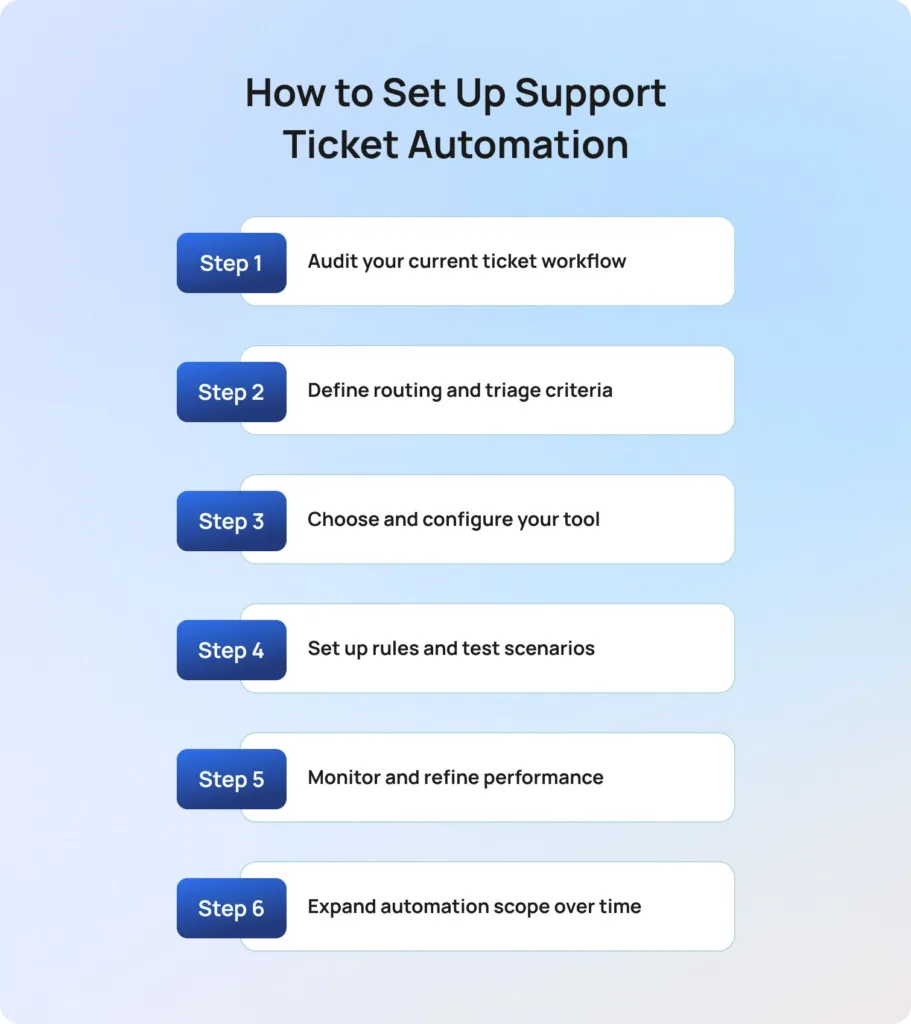
If you’re wondering how to automate customer support tickets, the key is to follow a structured, iterative approach that balances speed with control. As Radu Dumitrescu explains: “The real value of automation isn’t speed alone, it’s consistency at scale, across every customer interaction.”
Implementing support ticket automation successfully requires more than turning on a few rules. The process should be structured, iterative, and focused on both speed and control.
1. Audit your current ticket workflow
Start by understanding how your support operation functions today. Analyse ticket volume by channel, identify your most common ticket categories, and assess metrics like average handle time and resolution rates. This step highlights where manual effort is highest and where automation will have the greatest impact.
2. Define routing and triage criteria
Establish how tickets should be categorised and prioritised. This includes mapping intent types, priority tiers, channels, and agent skill groups. Getting this right is critical for automating support ticket routing effectively, as it determines how accurately tickets are assigned from the outset.
3. Choose and configure your tool
Before going live, ensure your platform is ready to support automation at scale. This means validating knowledge base quality, confirming integration readiness across systems (CRM, ecommerce, voice), and defining escalation logic. BlueTweak, for example, is designed to unify these elements into a single orchestration layer.
4. Set up rules and test scenarios
Begin with a narrow scope and build confidence gradually. Configure routing rules, AI classification models, and response workflows, then rigorously test edge cases to ensure tickets are handled correctly under different conditions. This step is where many automation projects succeed or fail.
5. Monitor and refine performance
Once live, track key metrics such as automation rate, misrouting rate, CSAT, and SLA compliance. Establish a feedback loop with agents to identify gaps and continuously improve workflows. Automation should evolve alongside your support operation.
6. Expand automation scope over time
With a stable foundation in place, layer in additional capabilities such as post-resolution surveys, CSAT triggers, proactive messaging, and autonomous resolution. This phased approach ensures scalability without compromising customer experience.
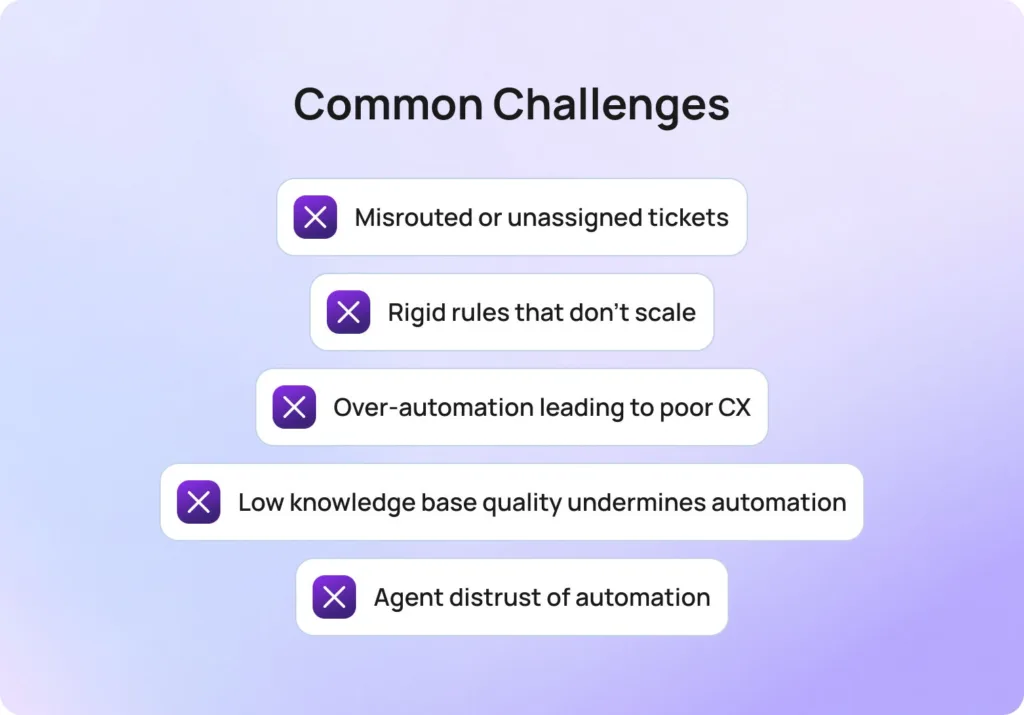
Even with the right strategy, teams often encounter challenges when automating support tickets. The difference lies in how quickly these issues are identified and addressed.
Misrouted or unassigned tickets: This usually stems from weak classification logic or incomplete routing rules. The fix is to strengthen AI triage models and introduce fallback routing conditions to ensure no ticket is left unassigned.
Rigid rules that don’t scale: Rule-based systems break down as ticket volume and complexity increase. If your workflows require constant manual updates, it’s time to introduce AI-driven routing that can adapt dynamically to patterns and workload changes.
Over-automation leading to poor CX: If customers are struggling to reach a human agent or are receiving irrelevant responses, automation has gone too far. Recalibrate by tightening escalation rules and introducing confidence thresholds for automated replies.
Low knowledge base quality undermines automation: AI is only as good as the content it relies on. Outdated or inconsistent knowledge bases lead to inaccurate responses. Treat KB maintenance as a core operational function, not a one-time setup task.
Agent distrust of automation: When agents feel automation creates more problems than it solves, adoption drops. Involve agents in workflow design, surface AI suggestions transparently, and position automation as an assistive tool, not a replacement.
According to Deloitte’s 2026 State of AI in the Enterprise research, 61% of organisations say improving data quality and access is critical to AI success, reinforcing that implementation challenges, not just technology, are often the biggest barrier to effective automation.
Most automation tools solve isolated problems (think: routing, responses, or reporting) but fail to connect them into a cohesive system. This is where many support teams struggle to scale.
BlueTweak takes a different approach; support ticket automation is treated as an orchestration challenge rather than a collection of features. Instead of layering disconnected tools, BlueTweak unifies AI triage, routing, knowledge management, and workflow automation into a single system designed for end-to-end resolution.
This means teams can move beyond basic automation and into true autonomous support operations where tickets are not just processed faster, but resolved more intelligently. By combining AI-driven decisioning with configurable workflows and deep integrations, BlueTweak enables organisations to automate at scale without sacrificing control or customer experience. For organisations evaluating adoption, BlueTweak’s transparent pricing plans make it easy to scale automation while controlling costs.
A strong example of this in practice can be seen in BlueTweak’s own customer base; faced with high volumes of standardised support tickets and time-consuming manual responses, the company implemented BlueTweak to automate classification, streamline workflows, and improve scalability. As a result, the business reduced interaction times, improved team efficiency, and enhanced overall customer satisfaction, demonstrating how a structured, AI-driven approach to support ticket automation can deliver measurable operational and customer experience gains.
[EMBED https://www.youtube.com/watch?v=D3PNes0nzmA]
Support ticket automation has evolved from a tactical efficiency play into a strategic pillar of modern customer service automation. As customer support teams face rising volumes of customer requests and increasing expectations for faster response time, the ability to automate ticket handling (from ticket routing to resolution) is now essential for maintaining both performance and experience.
By implementing an automated ticketing system that combines AI automation, workflow rules, and intelligent ticket management, organisations can eliminate repetitive tasks, reduce human error, and create more consistent outcomes across every customer interaction. This not only improves agent performance and reduces agent workload, but also enables more scalable support operations that adapt to demand without compromising quality.
The real advantage, however, lies in how these systems evolve. With AI-powered automation, automation platforms can continuously analyse customer feedback, identify patterns, and generate valuable insights that refine the entire support process over time. This creates a feedback loop where automation doesn’t just execute, it improves.
For organisations still relying on fragmented ticketing software or outdated manual processes, the gap will only widen. The future of customer support belongs to those who can orchestrate intelligent, end-to-end automation across multiple channels, ensuring every ticket reaches the right team, at the right time, with the right context.
Ready to see how you can transform your support operations? Book a demo with BlueTweak today and discover how to automate ticket workflows at scale.
Support ticket automation refers to the use of automation platforms, AI, and workflow logic to manage support requests without manual intervention. This includes automatically creating tickets when customers submit tickets, classifying the customer’s issue, performing ticket routing, and even resolving common queries through AI-powered automation. It helps support teams reduce repetitive tasks and improve response time.
Automated ticket routing uses predefined workflow rules or AI models to assign incoming tickets to the right team based on factors like intent, priority, agent availability, and expertise. More advanced systems use AI-powered classification and historical data to optimize routing decisions, improving both resolution speed and team efficiency while reducing misrouted tickets.
Yes, modern automated ticketing software, like BlueTweak, can autonomously resolve a significant portion of routine customer requests using AI agents, natural language processing, and knowledge base integrations. While complex issues still require human intervention, many support workflows can now be fully automated, allowing teams to focus on higher-value interactions.
By reducing response time, improving accuracy, and ensuring consistent handling of customer conversations, customer support automation directly impacts customer satisfaction. Faster resolutions, fewer errors, and better routing all contribute to a smoother experience, especially when automation works seamlessly across multiple platforms and multiple channels.
When evaluating an automated ticketing system, focus on key features such as AI-driven ticket routing, intelligent classification, omnichannel support, reporting tools, and strong integrations with existing tools. The best systems also provide data analytics to track performance metrics like response time, service level agreements, and agent performance, enabling continuous improvement.
As Head of Digital Transformation, Radu looks over multiple departments across the company, providing visibility over what happens in product, and what are the needs of customers. With more than 8 years in the Technology era, and part of BlueTweak since the beginning, Radu shifted from a developer (addressing end-customer needs) to a more business oriented role, to have an influence and touch base with people who use the actual technology.