20 Customer Service Email Templates For Faster, Friendlier Support in 2026



BlueTweak is an AI Customer Support Platform that unifies every conversation, customer record, and automation into one workspace.
Explore more
Insights, trends, and practical ideas from customer experience and AI
Real-world scenarios showing how teams use BlueTweak to deliver better service
The daily blueprint that guides customer support leadership.
ROI and savings calculators for support teams
See how BlueTweak stacks up against leading customer support platforms
Customer service email templates help your customer service team respond quickly, improve response time, and deliver consistent, high-quality support. This guide includes 20 ready-to-use customer service email templates, plus a proven structure to improve customer satisfaction and the overall customer experience. In 2026, leading customer support teams combine email templates with knowledge base content and AI-assisted drafting to produce faster, more accurate email responses while maintaining a strong brand voice.
Customer expectations haven’t just increased, they’ve accelerated. Faster replies are now the baseline, not a differentiator. At the same time, support teams are handling more volume, more channels, and more complexity than ever before.
That’s where customer service email templates still deliver outsized value. They reduce average handling time, improve consistency, and eliminate avoidable errors, especially for repeatable requests. But what’s changed is how templates fit into the modern support stack.
According to McKinsey, companies that invest in personalization and modern customer experience capabilities, combining technology, data, and operational improvements, see significant gains in efficiency and customer satisfaction. The lesson here isn’t to replace templates with AI, it’s the opposite. Templates provide the guardrails AI needs to stay accurate, compliant, and on-brand.
This shift reflects a broader move toward more structured, customer-centric operations, where understanding customer needs and resolving issues efficiently becomes a core capability of any modern support team.
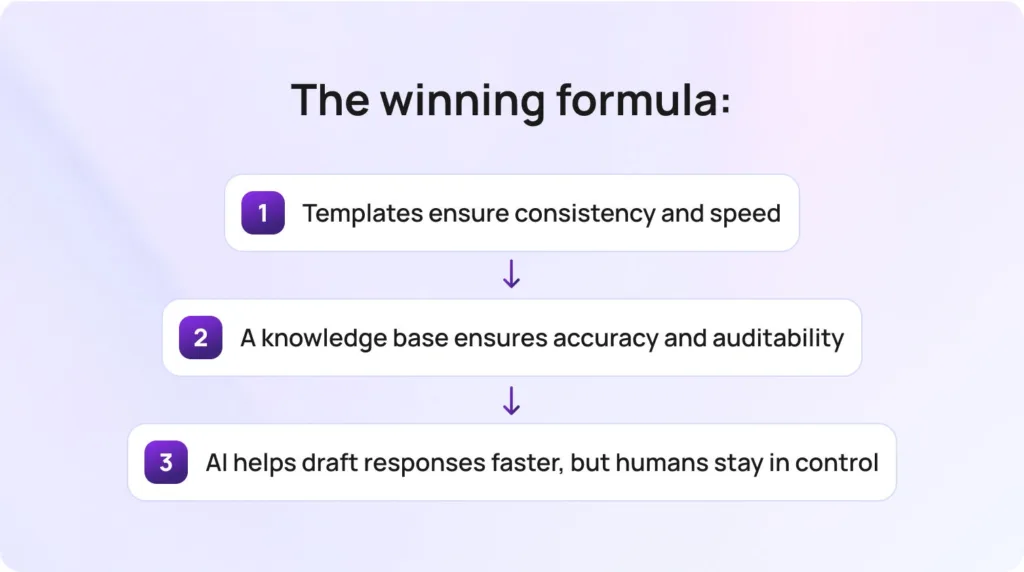
In 2026, the winning formula looks like this:
Used together, they transform email support from reactive to operational. Platforms like BlueTweak help customer support teams bring these elements together, combining email templates, knowledge, and AI to improve response time and deliver more consistent customer experiences at scale.
Below are 20 best customer service email templates, grouped by common support scenarios.
A strong first response sets the tone and prevents unnecessary follow-ups.
Use when: Confirming receipt and setting expectations
Subject options:
Email body:
Hi {FirstName},
Thanks for reaching out. We’ve received your request, and our team is reviewing it now.
To help us resolve this as quickly as possible, could you confirm:
We’ll update you within {ETA}.
Best,
{AgentName}
Optional internal note (for agent only): Ensure required fields are requested upfront to avoid back-and-forth.
Escalation trigger: Missing critical account info after 2 follow-ups
Use when: Additional details are needed to proceed
Subject options:
Email body:
Hi {FirstName},
Thanks for your message. To move forward, we just need a bit more detail:
Once we have this, we’ll take the next step right away.
Best,
{AgentName}
Optional internal note (for agent only): Avoid asking for full sensitive details, stick to secure identifiers only.
Escalation trigger: Customer unable to provide required verification
Use when: Transferring ownership to a specialist team
Subject options:
Email body:
Hi {FirstName},
Thanks for your patience. I’ve shared your request with our {TeamName} team, who are best placed to help.
They’ll review and follow up within {ETA}. You don’t need to do anything further right now.
Best,
{AgentName}
Optional internal note (for agent only): Include full context and previous correspondence in handoff.
Escalation trigger: No response from the receiving team within the SLA
Use when: Providing an update without resolution
Subject options:
Email body:
Hi {FirstName},
Just a quick update – we’re still working on your request and haven’t forgotten about it.
We’ll share the next update by {ETA}.
Thanks for your patience,
{AgentName}
Optional internal note (for agent only): Always set a clear next update time to prevent churn.
Escalation trigger: Issue exceeds expected resolution time
These customer service email templates handle high-volume order and delivery queries (including tracking number and tracking information requests) quickly, while keeping customers informed and reassured.
Use when: Customer asks for order status
Subject options:
Email body:
Hi {FirstName},
Your order {OrderID} is currently {Status}.
Estimated delivery: {ETA}. You can track it here: {TrackingLink}.
Let us know if you need anything else.
Best,
{AgentName}
Optional internal note (for agent only): Confirm tracking link is active before sending.
Escalation trigger: Tracking unavailable or stalled
Use when: Order is delayed
Subject options:
Email body:
Hi {FirstName},
We wanted to let you know that your order has been delayed due to {Reason}.
The new estimated delivery date is {ETA}. We’ll keep you updated if anything changes.
Thanks for your patience; we appreciate it.
Best,
{AgentName}
Optional internal note (for agent only): Offer compensation if delay exceeds policy threshold.
Escalation trigger: Delay exceeds SLA or customer dissatisfaction
Use when: Order marked delivered but missing
Subject options:
Email body:
Hi {FirstName},
Our records show your order {OrderID} was delivered.
We recommend checking:
If it’s still missing, let us know, and we’ll investigate with the carrier.
Best,
{AgentName}
Optional internal note (for agent only): Initiate carrier claim after customer confirmation.
Escalation trigger: High-value order or repeated delivery issues
Use when: Customer requests an address update
Subject options:
Email body:
Hi {FirstName},
Thanks for your message. We can update your address if your order hasn’t shipped yet.
Please confirm the new address: {NextStep}
Once confirmed, we’ll update it right away.
Best,
{AgentName}
Optional internal note (for agent only): Verify order status before confirming change.
Escalation trigger: Order already shipped
Clear, policy-aligned responses are essential here; these templates help you set expectations while maintaining trust. Refunds are typically processed within a set number of business days, depending on the original payment method.
Use when: Customer submits a refund request, and you need to confirm receipt
Subject options:
Email body:
Hi {FirstName},
Thanks for your request. We’ve received your refund request for order {OrderID}.
Our team is reviewing this in line with our policy here: {PolicyLink}.
We’ll confirm the outcome within {ETA}. If we need anything further, we’ll let you know.
Best,
{AgentName}
Optional internal note (for agent only): Check eligibility window and payment method before confirming timeline.
Escalation trigger: Refund exceeds threshold or falls outside standard policy
Use when: Refund has been approved and processed
Subject options:
Email body:
Hi {FirstName},
Good news, your refund for order {OrderID} has been approved.
The amount will be returned to your original payment method within {ETA}.
If you don’t see it after this time, feel free to reach out, and we’ll take a closer look.
Best,
{AgentName}
Optional internal note (for agent only): Confirm refund method matches original payment route.
Escalation trigger: Payment failure or refund delay beyond SLA
Use when: Customer needs to return or exchange an item
Subject options:
Email body:
Hi {FirstName},
You can return or exchange your item using the steps below:
Once received, we’ll process your return within {ETA}.
Let us know once it’s been shipped, and we’ll keep an eye out for it.
Best,
{AgentName}
Optional internal note (for agent only): Check if prepaid label applies based on region/order value.
Escalation trigger: High-value item or missing return tracking
Use when: Request falls outside the refund/return policy
Subject options:
Email body:
Hi {FirstName},
Thanks for your request. After reviewing the details, this falls outside our policy guidelines: {PolicyLink}.
While we’re unable to process this request, we’d still like to help where possible. {NextStep}
If you have any questions, feel free to reply – we’re here to help.
Best,
{AgentName}
Optional internal note (for agent only): Always offer alternative (store credit, discount, etc.) where allowed.
Escalation trigger: Customer disputes policy or threatens a chargeback
When emotions run high, the right structure helps agents stay calm, take ownership, and move the conversation toward resolution.
Use when: Customer expresses frustration or anger
Subject options:
Email body:
Hi {FirstName},
I understand how frustrating this situation must be, and I appreciate you bringing it to our attention.
Here’s what I’m doing to help:
I’ll personally make sure this is followed through and update you by {ETA}.
Best,
{AgentName}
Optional internal note (for agent only): Acknowledge emotion, avoid defensiveness, take ownership.
Escalation trigger: Threats, chargebacks, or abusive language
Use when: Customer reports a bad experience
Subject options:
Email body:
Hi {FirstName},
I’m sorry to hear about your experience. That’s not the standard we aim to deliver.
We’re reviewing what happened and taking steps to address it. In the meantime:
Thank you for your feedback. It helps us improve.
Best,
{AgentName}
Optional internal note (for agent only): Log feedback internally for QA review.
Escalation trigger: Repeated complaints or public escalation risk
Use when: Customer is frustrated by being passed around
Subject options:
Email body:
Hi {FirstName},
I’m sorry for the back-and-forth – you shouldn’t have to repeat yourself.
I’ll take ownership of your request from here and ensure it’s resolved.
Next step: {NextStep}
Update by: {ETA}
Best,
{AgentName}
Optional internal note (for agent only): Keep single-thread ownership until resolution.
Escalation trigger: Complex cross-team dependency
These templates ensure customers stay informed during technical issues, with clear updates, next steps, and realistic timelines, including directing customers to a status page where appropriate.
Use when: Customer reports bug
Subject options:
Email body:
Hi {FirstName},
Thanks for flagging this. We’ve logged it with our technical team.
To help us investigate further, could you confirm:
We’ll keep you updated as we learn more.
Best,
{AgentName}
Optional internal note (for agent only): Attach logs or reproduction steps where possible.
Escalation trigger: Critical bug affecting multiple users
Use when: Issue already identified
Subject options:
Email body:
Hi {FirstName},
We’re aware of an issue currently affecting {Feature}.
Our team is actively working on a fix. In the meantime, you can try:
We’ll provide another update by {ETA}.
Best,
{AgentName}
Optional internal note (for agent only): Use consistent messaging across all affected tickets.
Escalation trigger: Enterprise customers or SLA breach risk
Use when: Providing structured resolution steps
Subject options:
Email body:
Hi {FirstName},
Let’s try the following steps to resolve this:
Once completed, let me know the outcome, and we’ll take it from there.
Best,
{AgentName}
Optional internal note (for agent only): Keep steps concise and ordered logically.
Escalation trigger: Steps fail, or issue persists
For sensitive topics like billing and security, these templates prioritize clarity, accuracy, and customer confidence.
Use when: Customer questions a charge
Subject options:
Email body:
Hi {FirstName},
Thanks for reaching out about this charge.
Here’s what we can see on our end:
We’re reviewing this further and will update you by {ETA}.
Best,
{AgentName}
Optional internal note (for agent only): Cross-check billing system and subscriptions.
Escalation trigger: Potential fraud or dispute
Use when: Verifying account safely
Subject options:
Email body:
Hi {FirstName},
To help us securely access your account, we need to verify a few details.
Please confirm:
For your security, please do not share full passwords or sensitive information.
Best,
{AgentName}
Optional internal note (for agent only): Follow security protocol strictly—never request full credentials.
Escalation trigger: Suspicious activity or failed verification
Not every ticket should get a templated response, and knowing the difference is what separates efficient teams from robotic ones.
Templates work best when the situation is predictable and repeatable. In these cases, speed and consistency matter more than originality. A well-written customer service email template ensures customers get a clear, accurate response without unnecessary delays, while also reducing the cognitive load on agents handling high volumes.
Use a template when the request follows a familiar pattern, such as order status updates, refund requests, or common troubleshooting steps. These scenarios typically rely on known policies, standard next steps, and repeatable workflows, which makes them ideal for structured responses.
By contrast, fully custom replies are essential when nuance matters more than speed. High-severity issues, sensitive personal situations, or cases involving legal or financial implications require a more tailored approach. In these moments, customers are looking for reassurance, ownership, and careful handling. This is especially important for customer service agents handling complex or emotional situations, where clear, thoughtful communication can make the difference between a resolved issue and a negative experience.
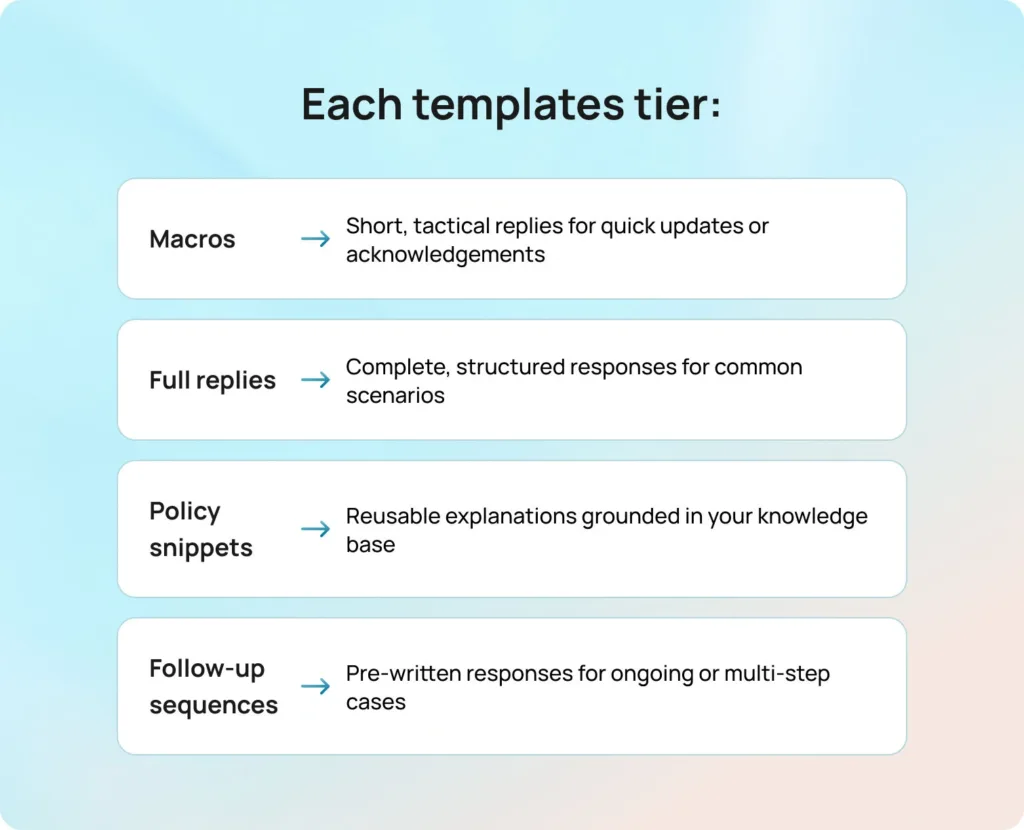
It’s helpful to think about templates not as a single format, but as a spectrum of support tools. Most teams benefit from structuring their customer service email response templates into tiers, depending on the complexity of the interaction:
The goal is to remove friction where possible, so agents can focus their attention where it matters most. At their best, templates don’t replace human judgment; they support it.
Before diving into the sample customer service email templates, it’s worth understanding what separates a good template from one that actually improves performance.
Standard, pre-written responses aren’t the most effective way of addressing customer concerns. Templates, when used well, are structured frameworks that guide agents toward clarity, empathy, and action. In 2026, that structure matters even more, as templates increasingly power AI-assisted replies and need to hold up under automation as well as human use.
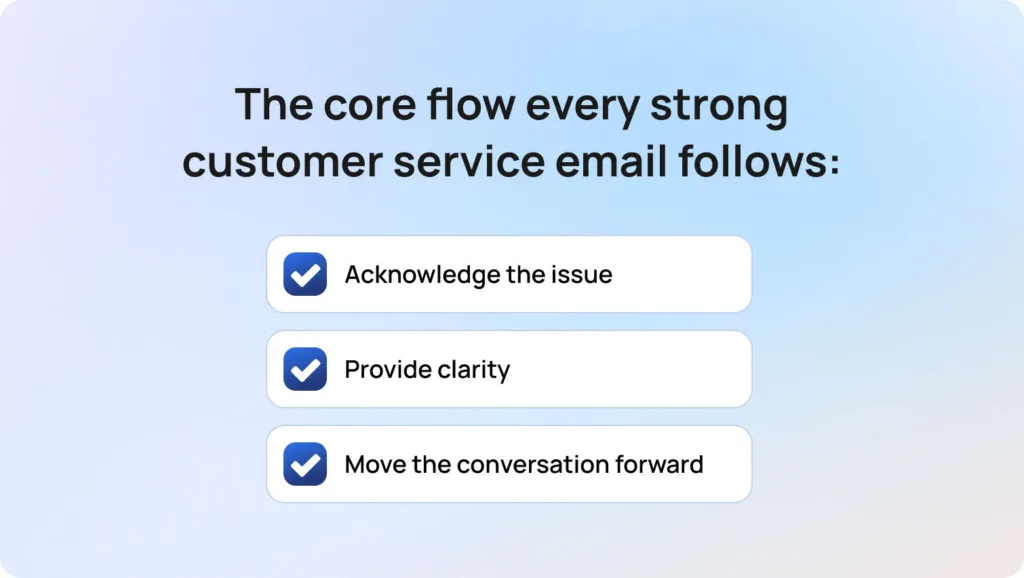
At a high level, every strong customer service email template follows the same core flow:
The difference lies in how clearly and consistently that structure is applied.
It starts with the subject line. This should be clear, neutral, and specific enough to set expectations before the email is even opened. Overly urgent or vague subject lines can create confusion, or worse, unnecessary concern.
From there, the opening line should acknowledge the customer’s situation and establish a human tone. This doesn’t mean over-apologizing, but it does mean showing that the issue has been understood. A simple, direct acknowledgment is often more effective than a long-winded expression of empathy.
The body of the email should focus on two things: what’s already been done, and what needs to happen next. This is where light structure, such as short paragraphs or occasional bullet points, can improve readability, especially for more complex responses.
Where relevant, templates should also guide customers toward self-serve options. Linking to your knowledge base not only speeds up resolution but also reduces repeat queries and builds customer confidence.
Finally, every template should close with clarity. That means:
Including a reference like a case ID can also help maintain continuity across longer threads.
To make templates scalable and adaptable, it’s important to use consistent placeholders that agents can quickly personalize before sending. These typically include key details like the customer’s first name, order ID, or the last four digits of an account identifier, along with operational fields such as estimated timelines, relevant policy links, next steps, and the assigned agent’s name. Using standardized placeholders ensures every response feels tailored, while still maintaining speed and consistency across the team.
Tone also plays a critical role. The best templates are flexible enough to adapt; whether that means a more formal tone for sensitive issues, or a shorter, more conversational style for quick updates.
This structure underpins all the best customer service email templates that follow. When applied consistently, it turns templates from simple shortcuts into a reliable system for delivering fast, high-quality support. As more teams introduce AI into their workflows, maintaining this structure becomes even more important, helping support agents avoid inconsistent or inaccurate automated responses.
Even the most well-crafted sample customer service email templates can feel flat if they come across as scripted. The key is to write like a human solving a problem, not a system processing a ticket. Personalization is important, but it should be meaningful: including the customer’s first name or specific order details adds warmth, but overusing names or generic phrases can feel forced.
It’s also critical to keep each email focused. Sticking to one clear question or action per message prevents confusion and reduces unnecessary back-and-forth. Structure is your friend (it helps guide the customer through the conversation), but it shouldn’t feel restrictive. Every email should clearly indicate the next step, so the customer knows exactly what to do or expect. Apologies, if needed, should always be proportional: one sincere acknowledgment is enough; repeated apologies can weaken trust.
Some common phrases to avoid include overly formal or overused lines like “We apologize for any inconvenience caused” or “Your patience is greatly appreciated.” Instead, aim for natural, straightforward language that shows empathy, clarity, and a commitment to solving the customer’s issue.
Striking the right balance between automation and empathy is critical, especially as more customer support teams look to scale without losing the human touch.
Templates are only effective if they are actively maintained and properly integrated into your support workflows. A shared, governed library ensures that every agent has access to the most up-to-date templates, and assigning clear ownership per category prevents outdated responses from lingering in circulation. Linking templates directly to your knowledge base guarantees accuracy and consistency, while weekly reviews of real tickets help identify gaps or improvements.
For any customer service department, this means moving beyond static documents and building a system where templates, workflows, and performance tracking are tightly connected.
Mapping templates to specific intents and tags further streamlines operations, allowing agents to select the right response quickly and maintain quality across the team. Training is just as important: new agents should practice using templates in realistic scenarios rather than simply reading them. This hands-on experience reinforces both tone and policy compliance, making templates a true productivity tool rather than a static resource.
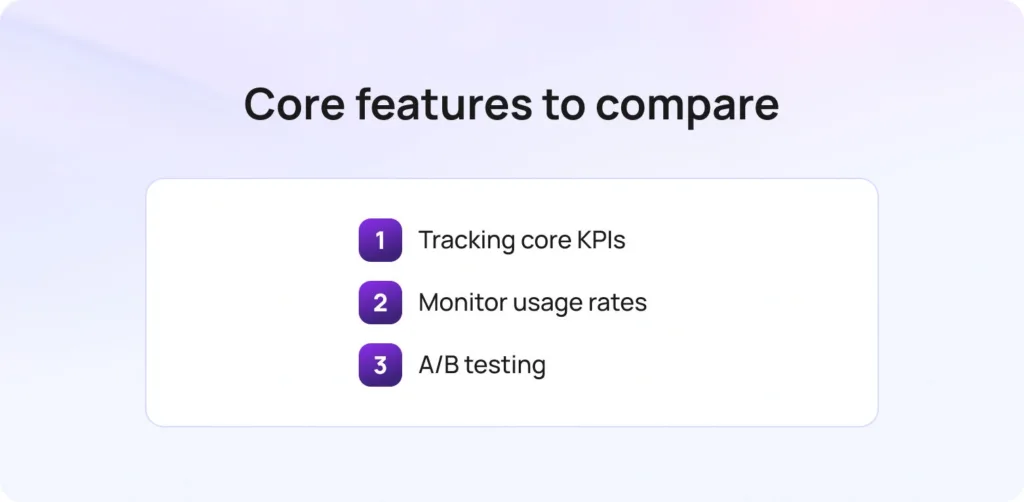
Templates should do more than just save time; they should improve outcomes. Start by tracking core KPIs such as first response time, time to resolution, reopen rate, customer satisfaction (CSAT), and escalation rate. These metrics reveal whether templates are helping agents resolve issues efficiently while maintaining a positive customer experience.
At a more granular level, monitor template usage rates, edit frequency, and adoption of saved responses. This helps identify which templates are truly effective and which might need refinement. A/B testing is also invaluable: experimenting with subject lines, opening sentences, and CTA placement can optimize engagement and response rates, giving your team data-backed insights into what works best for your customers. These insights not only improve individual email responses but also help teams build a more customer-centric strategy over time.
This set of customer service email templates was developed by analyzing common support scenarios across e-commerce, SaaS, and service teams. Templates were grouped by intent, allowing agents to quickly select the right response for any situation. Flexible placeholders were added to ensure messages remain personalized without sacrificing efficiency.
We also incorporated escalation triggers and guardrails, giving agents guidance on when to escalate complex issues or exceptions. Every template remains fully customizable to match your company’s policies, timelines, and tone of voice, making them both practical and adaptable for 2026 workflows. These patterns reflect broader trends shaping modern customer support, where speed, personalization, and consistency are no longer trade-offs but expectations.
Templates are just the starting point. The real impact comes when they’re embedded into your workflows and supported by the right systems. This kind of operational approach is becoming more accessible as modern customer service software evolves, with flexible solutions designed to support teams of all sizes.
BlueTweak helps teams move from static templates to dynamic, high-performing support operations, where speed, consistency, and quality are built in by design.
Instead of starting from scratch, agents begin with strong, AI-assisted drafts grounded in your templates and knowledge base. They review, refine, and send, keeping humans firmly in control while dramatically reducing response time.
That’s where BlueTweak goes beyond traditional tooling. It connects templates, automation, and knowledge into a single, operational system:
With everything connected (think: templates, knowledge, and AI) teams can move faster without sacrificing quality. The result is faster replies, better consistency, and support that scales without feeling robotic.
Customer service email templates remain one of the most effective ways for any customer service team to deliver fast, reliable support at scale. When used correctly, they help support agents respond in a timely manner, reduce errors, and maintain consistent service quality across every customer interaction.
But templates alone aren’t enough. The teams delivering great customer service in 2026 are the ones that treat templates as part of a wider system, one that combines structured email templates, knowledge base guidance, and AI-assisted drafting. This approach helps customer service agents handle more volume, improve response time, and ensure every reply aligns with your brand voice.
Whether it’s helping a frustrated customer, resolving a customer complaint, or supporting technical support queries, the goal is always the same: deliver clear, accurate, and human responses that improve the overall customer experience. When your entire team is working from the same foundation, it becomes much easier to stay aligned, reduce back-and-forth, and keep everyone on the same page.
If you’re ready to move beyond static templates and build a smarter, more scalable approach to customer support, now is the time to take the next step.
Request a demo of BlueTweak to see how you can turn customer service email templates into faster response times, better customer satisfaction, and more consistent service across your entire team, without losing the human touch.
Customer service email templates are pre-written responses that help customer service representatives handle common customer queries quickly and consistently. These templates are designed to improve response time, reduce errors, and ensure every message aligns with your brand voice and service standards.
Customer service teams should use email templates for repeatable scenarios like order updates, refund requests, or technical support queries. Templates are especially useful when you need to respond quickly and maintain consistent service, while more complex or sensitive issues may require a fully customized response.
Well-written customer service email response templates help teams respond faster, provide clear next steps, and reduce confusion. This leads to better customer satisfaction, as customers feel informed, supported, and confident that their issue is being handled in a timely manner.
The best customer service email templates include a clear subject line, a personalized greeting, a concise explanation of the issue, and clear next steps. They should also provide helpful resources where relevant and leave room for further questions, ensuring customers feel supported throughout the interaction.
To make customer emails feel more natural, focus on meaningful personalization, keep the tone conversational, and avoid overused phrases like “we sincerely apologize”, or “please don’t hesitate to reach out if you have any queries”. Instead, acknowledge the issue directly (e.g., “sorry to hear this”) and guide the customer toward a clear resolution. This helps ensure customers feel heard while maintaining efficiency.
As Head of Digital Transformation, Radu looks over multiple departments across the company, providing visibility over what happens in product, and what are the needs of customers. With more than 8 years in the Technology era, and part of BlueTweak since the beginning, Radu shifted from a developer (addressing end-customer needs) to a more business oriented role, to have an influence and touch base with people who use the actual technology.