How To Create A Help Desk Ticketing System In 10 Easy Steps



BlueTweak is an AI Customer Support Platform that unifies every conversation, customer record, and automation into one workspace.
Explore more
Insights, trends, and practical ideas from customer experience and AI
Real-world scenarios showing how teams use BlueTweak to deliver better service
The daily blueprint that guides customer support leadership.
ROI and savings calculators for support teams
See how BlueTweak stacks up against leading customer support platforms
For teams researching how to create a help desk ticketing system, start with clear SLAs, unify intake, standardize ticket fields, and configure simple ticket routing. Add knowledge base articles, AI summaries, and scoped bots. Close the loop with analytics, workforce planning, and steady iteration. BlueTweak appears as an example platform that unifies ticketing, chat, voice, bots, knowledge, analytics, and WFM.
Support quality tracks directly to the system behind it. Fragmented tools create missed SLAs, duplicate handling, and frustrated customers. A cohesive support ticketing system transforms every interaction into a structured ticket that flows to the correct queue, reaches the appropriate support agents, and provides answers that align with brand and policy. Reliable helpdesk systems provide easy navigation for users, capture additional information without friction, and convert conversations into auditable, searchable closed tickets.
This article outlines a practical, platform-agnostic playbook for creating a help desk ticketing system that scales from a 20-agent desk to a 100-agent operation.
A stable help desk support system starts with standard definitions. Establish operating hours, languages, escalation paths, and a priority level framework. Decide which channels will be live at launch. Identify privacy and security requirements, including access controls and data retention policies. Choose a realistic footprint for Phase 1, typically involving email and web forms that feed a single queue. Note how a unified platform, such as BlueTweak, can reduce integration risk by providing ticketing, bots, email notifications, analytics, workforce planning, and a knowledge base in a single stack. Alignment at this stage limits future redesign work.
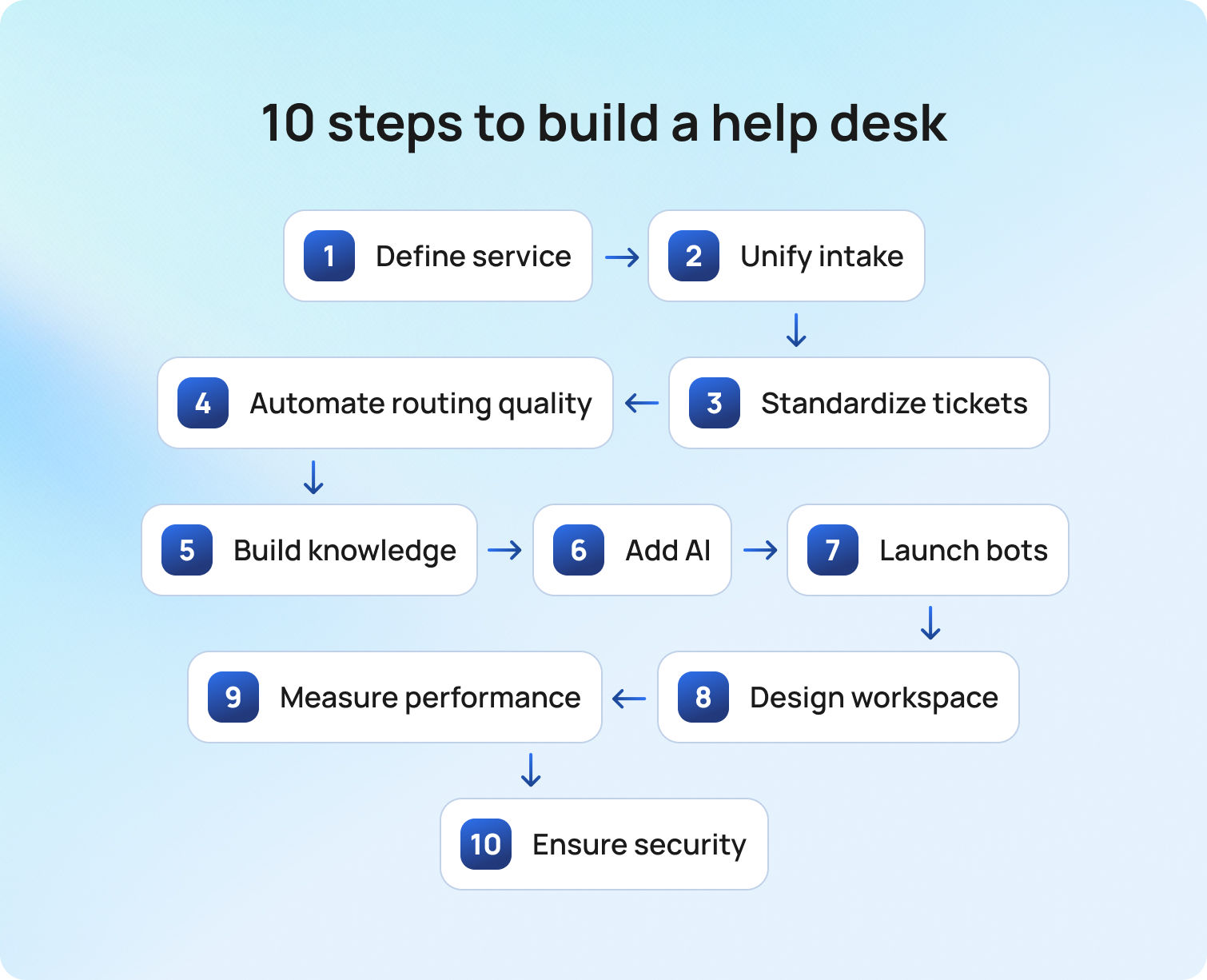
Teams often ask for a concise path from zero to reliable operations. The steps that follow cover planning, configuration, workflows, analytics, and improvement practices. Each step references familiar concepts such as ticket list, to-do list, new ticket creation, and sending notifications on status changes.
Start with policy, not code. Document target response and resolution times per priority. Specify which teams are assigned to which categories, and describe ownership states such as new, open, pending, on hold, solved, and completed. Map escalation criteria that move a ticket to Tier 2 or a specialist queue.
When SLAs are explicit, a system can automate workflows that pause timers during waits, reopen upon customer replies, and alert supervisors before breaches occur. BlueTweak supports SLA policies, timers, and escalations inside the help desk configuration, which makes response targets auditable and consistent across brands.
A ticketing system works best when every interaction arrives in one place. Bring email, web forms, chat, voice, social, and SMS into a unified queue. Normalize each interaction into a single record with an ID, contact profile, timestamps, and a conversation timeline.
A dedicated intake form can create tickets from site pages, while a specific email address, such as support@company.com, automatically converts inbound mail into tickets. Enable spam filtering to ensure agents only review important emails, and auto-acknowledgments on inbound emails so the queue remains clean and requestors receive confirmation.
BlueTweak consolidates voice, chat, email, and social interactions into a single ticket object, enabling support teams to manage a unified backlog instead of multiple ones.
A clean schema supports accurate reporting and reliable ticket routing. Define the required fields, including category, subcategory, priority, channel, brand, product, language, and region. Use picklists to prevent free-text drift. Add descriptions, attachments, and custom fields only when a clear report or automation requires them. Ensure agents can fill a ticket quickly without guessing. Configure validation to prevent a ticket from being closed without the necessary fields.
BlueTweak supports multiple ticket forms, collision detection, and custom fields, which simplify ticket management at scale.
Manual sorting does not survive a surge. Start with simple rules based on keywords, customer tier, language, and order context. Add skills-based routing to protect specialist queues. Provide a fallback queue that is always staffed. Utilize automatic routing and classification, then layer on intent detection and language detection as the volume grows. As data grows, enable AI classification to detect intent, priority signals, or sentiment.
BlueTweak’s routing and intent features help reduce human triage and shorten the time to first meaningful reply, ensuring the right support staff touches the right ticket at the right time.
A knowledge base is most effective when it mirrors top ticket drivers. Start with the 25 to 50 intents that generate the largest share of volume, then expand to long-tail content. Write short, single-purpose articles with clear steps, images where helpful, and version control. Route regulated content through approvals. Link each article to a macro, a chatbot node, and a form where appropriate. Publish public content for customers and private content for internal policy.
In BlueTweak, the knowledge base integrates with suggested replies, bots, and ticket forms, which multiplies the impact of each improvement.
Long threads and call recordings slow work. Concise AI summaries present the context that matters, so agents can respond with clarity. Suggested replies grounded in knowledge base articles accelerate drafting and improve consistency. When those suggestions use retrieval from an approved knowledge base, answers stay accurate.
BlueTweak is API‑open and works hand in hand with AI, automating ticket summaries and suggested replies, including multilingual assist, so support agents spend less time reading and more time solving.
Bots succeed when the scope is clear and escalation is smooth. Start with high-frequency, low-risk flows such as order status, shipping and returns, appointment changes, and password resets. Use button-driven steps for deterministic flows, then layer intent recognition. Retrieval augmented generation (RAG), grounded in the knowledge base, reduces hallucinations. For telephony, target Tier 1 calls and support mid-call language switching. Configure human handoff so the agent receives full context.
BlueTweak’s AI chatbot and voicebot can serve as references for this guarded approach to automation.
A productive desk view gathers everything into one place. The ticket thread, customer profile, past cases, KB suggestions, macros, forms, and internal notes should be visible without needing to switch tabs. Collision detection prevents parallel replies. Clear ownership and timestamps provide status at a glance.
BlueTweak’s agent workspace demonstrates how a single screen can reduce fatigue and error rates, particularly in multi-brand operations.
Measurement drives improvement. Add Transfer Rate, Containment Rate, Abandon Rate, Concurrency, and Sentiment Score for voice and chat. Offer live dashboards for intraday decisions and scheduled reports for weekly reviews. Connect analytics to staffing with forecasting and scheduling, then monitor adherence.
Because BlueTweak includes analytics and WFM, supervisors move from insight to action without exporting data. Mature reporting keeps leadership aligned on trends and resource needs.
Security planning must not be deferred. Enforce multi-factor authentication, role-based permissions, session controls, and audit logs to ensure security and compliance. Encrypt data in transit and at rest. Set regional backups and disaster recovery plans. Document integration boundaries and vendor responsibilities. Establish date-based retention rules for tickets and recordings, and define the access privileges for each role.
BlueTweak ships the controls IT and compliance expect, which streamlines approval for go-live.
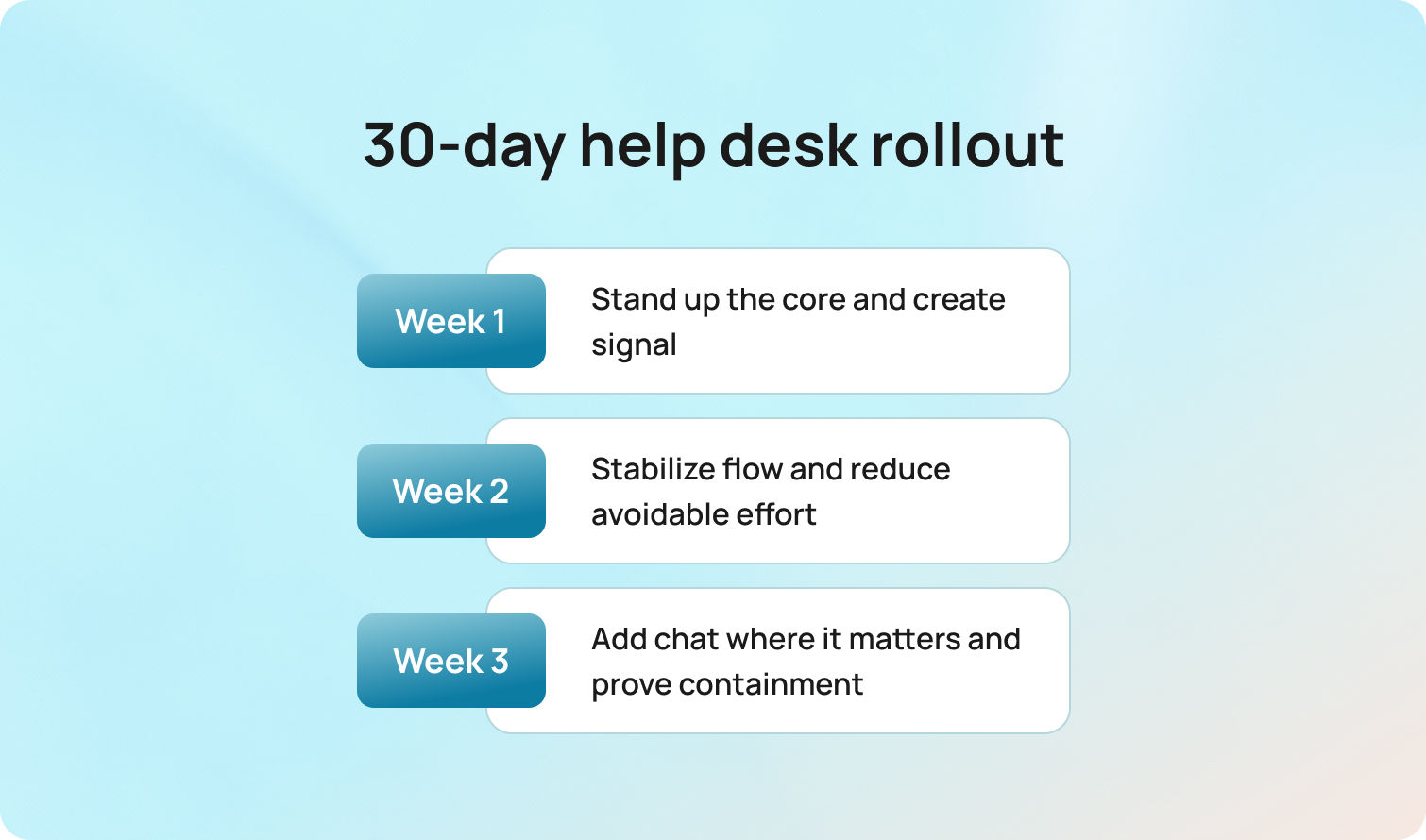
The first seven days are about visibility, not perfection. With SLAs, queues, and intake forms agreed, work starts landing in the right places. The primary mailbox and main phone line come online, and auto-acknowledgments set clear expectations for customers. Routing stays intentionally simple to establish baselines rather than chase edge cases. Supervisors operate from a live dashboard, and to-do hygiene keeps silent pileups at bay. A brief, twice-daily ticket review (10–15 minutes) identifies risks and blockers before they escalate.
BlueTweak fit: a unified email/voice queue and AI Ticket Summary for fast internal context (assist mode only).
By Friday: cleaner intake, fewer “lost” tickets, and a shared view of SLA exposure.
Now that the plumbing is in place, the shape of the work matters. Categories and tags bring order; priority rules and escalation timers prevent hot items from cooling in the queue. Ten knowledge base articles cover the top intents, each paired with a macro, so “one click to consistent” becomes real. Ownership transitions and reopen handling are clarified to stop ping-ponging.
BlueTweak fit: Suggested Reply switches on for email (human-reviewed), while supervisors watch draft-to-send ratios to protect quality.
By week’s end: fewer back-and-forths on everyday issues, faster first responses, and a measurable AHT dip for the named intents.
Attention shifts from “seeing the work” to “shaping demand.” Chat appears on the two highest-volume pages, chosen for impact rather than breadth. Three dials deserve close tracking: containment (what the bot resolves), sentiment (whether tone is cooling), and handoffs (if human pickup feels seamless). The knowledge base expands to twenty articles, and message templates undergo a clarity review. Side conversations support cross-team input, ownership transitions are made explicit, and a daily backlog-age report keeps aging tickets visible—and actionable. Multi-brand environments extend routing to include brand, product, and language, so customers feel known rather than shuffled.
BlueTweak fit: real-time chat translation, sentiment tracking, and analytics that spotlight containment and deflection.
Expected outcome: higher chat containment without a CSAT dip, smoother handoffs, and shrinking queue age.
With text channels steady, limited voice automation becomes viable. A small voicebot footprint handles one or two Tier-1 flows (e.g., order status, PIN resets), while guaranteed human handoff and complete context transfer remain non-negotiable. Insights from Week 3 inform two additional chat flows. A weekly operations review now anchors decisions—SLA risk, category trends, reopens, and bot containment guide the plan—and WFM schedules align staffing with actual demand curves rather than anecdotal evidence.
BlueTweak fit: voicebot with human-in-the-loop controls plus unified ticketing, bots, analytics, and WFM, so tuning happens in one place—not across four vendors.
By Day 30: stable SLAs on hot queues, visible containment wins, and a playbook ready to scale without compromising quality.
The financial case for a modern help desk usually rests on three levers. Deflection removes work before it reaches the queue. AI assistance shortens the handling time for the remaining work. Consolidation lowers license and integration overhead. A conservative approach avoids inflated promises. Use a control group in the first month, measure baseline handle times and FCR, then track changes as features roll out.
A consolidated stack simplifies the model by replacing multiple contracts and data pipelines with a single service and process for managing outcomes.
Treat improvement like a weekly release. Review the top ten intents by volume and by SLA risk. Update or split knowledge base articles that generate bounce backs. Link each article to a macro and a bot step. Tune templates that show high reopens. Use transcription review in voice to refine prompts and add missing intents. Monitor the watch backlog age and adjust routing if a queue becomes a bottleneck. Validate definitions in analytics to ensure metrics align with leadership goals.
Because BlueTweak shares a single content and automation backbone across ticketing, bots, and analytics, each change quickly ripples across the system.
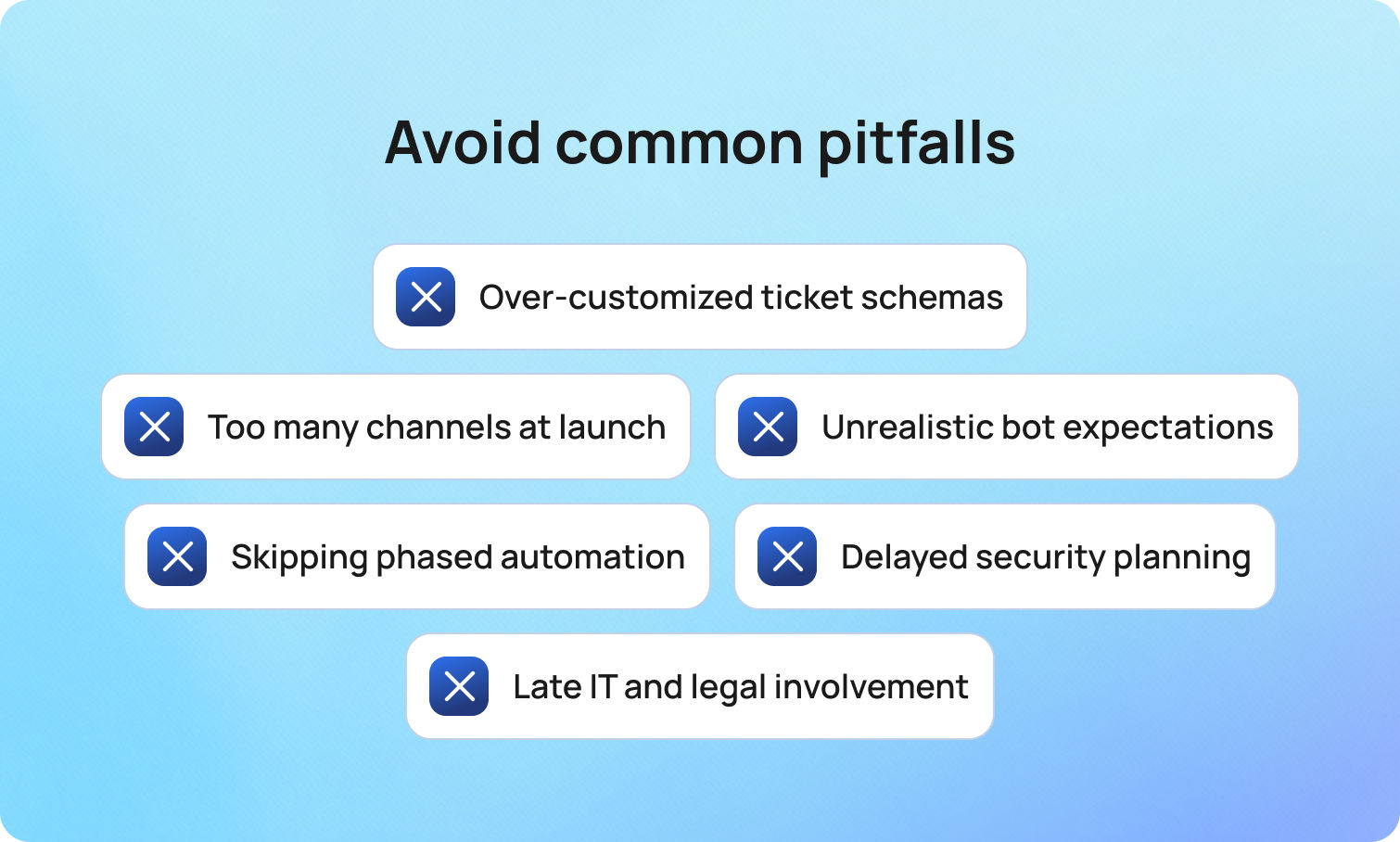
Over-customizing the schema slows every agent. Keep forms short and focused on fields that drive automation or reporting. Launching too many channels on day one spreads resources thin. Begin with email and forms, then add chat once routing and analytics are steady.
Expecting a bot to solve everything immediately creates disappointment. Start with guided flows, then add intent detection and retrieval from the knowledge base. Ignoring security early invites delay at go-live. Engaging IT and legal in step one keeps the organization on schedule.
BlueTweak mitigates several risks by centralizing features and governance on a single platform.
A high-performing support system is a coordinated set of processes, not a pile of tools. Clear SLAs and queues establish predictable service. Unified intake and a tidy schema keep work visible and measurable. Intent-based ticket routing and AI assistance shorten the path to resolution.
A knowledge base powers both self-service and faster human replies. Scoped bots resolve common issues and escalate gracefully. Analytics and workforce management align staffing to demand. Security and resilience preserve customer trust.
Automation should progress in deliberate stages. Begin with assistive features such as summaries and suggested replies. Move to human-in-the-loop approvals for repetitive resolutions. Graduate to fully automated outcomes for low-risk intents once data proves reliability. Guardrails preserve accuracy, privacy, and tone. With this approach, support teams gain confidence, customers receive consistent answers, and closed tickets reflect real resolution rather than quick dismissals.
BlueTweak serves as an example throughout because it unifies ticketing, chat, voice, bots, knowledge base, analytics, and workforce planning in a single stack. Consolidation reduces tool sprawl, accelerates integration, and simplifies reporting. CTA: See BlueTweak in action and map the first month using this playbook.
Book a focused 30-minute demo to see the end-to-end flow, from submitting tickets to managing outcomes and measuring results.
A narrow first step works best. Enable email and a web form that creates a new ticket in a single queue. Configure three automations: auto-acknowledgment on creation, SLA timers by priority, and simple keyword routing. Publish ten knowledge base articles for the top drivers and enable AI summaries to speed agent comprehension. Chat and voice can follow when routing and analytics are stable. Platforms like BlueTweak provide these capabilities out of the box.
Collision detection, clear ownership states, and side conversations prevent duplicate replies. A live queue view helps supervisors spot work at risk. In BlueTweak, presence indicators, assignment locks, internal notes, and notifications live in the same workspace, so teams coordinate without breaking the record.
Not always. If your platform includes forecasting, scheduling, and real-time dashboards, a separate purchase may be unnecessary. The advantage of a single stack is faster feedback from metrics to staffing, fewer exports, and consistent definitions. BlueTweak bundles WFM and analytics with omnichannel ticketing, so plans and outcomes stay connected.
Multi-factor authentication, role-based access, session management, audit logs, encryption in transit and at rest, and documented backups form the baseline. Add IP restrictions and regional storage where risk or regulation requires them. BlueTweak supports MFA, audit logging, and data location options to align with governance needs.
Start with category, subcategory, priority, channel, brand, product, language, region, and a structured description, plus attachments when needed. Limit custom fields to those that drive workflows, routing, or targeted analytics. BlueTweak ticket forms support conditional fields and validation, so agents move quickly while reporting stays reliable.
As Head of Digital Transformation, Radu looks over multiple departments across the company, providing visibility over what happens in product, and what are the needs of customers. With more than 8 years in the Technology era, and part of BlueTweak since the beginning, Radu shifted from a developer (addressing end-customer needs) to a more business oriented role, to have an influence and touch base with people who use the actual technology.