



TL;DR
Scaling a help desk team sustainably means shaping demand at the front door, routing by skill and risk, putting clear communication and knowledge at the point of work, and using AI plus workforce management to remove repetitive tasks and protect people’s energy; BlueHub (by BlueTweak) brings those pieces into one workspace so teams resolve more, burn out less, and customer satisfaction rises.
Why Scaling a Help Desk Team Without Burnout Matters
Backlogs rarely explode overnight. They creep in when intake is vague, routing is manual, and communication is inconsistent. Customers feel it first through slow responses, unclear timelines, and avoidable escalations. Agents feel it next as repetitive tasks multiply, context switching increases, and breaks vanish. Leaders feel it last when SLAs slip, customer satisfaction scores dip, and hiring cannot keep up with churn.
A healthy help desk does three things well. Delivering high-quality service through consistent standards and meeting customer expectations is essential for long-term success. It shapes demand with self-service and knowledge. It moves real work to the right people with predictable rules. It protects capacity with schedules, coaching, and sensible metrics. Help desks serve as centralized hubs for technical issue resolution and internal IT support, streamlining ticket management and enabling proactive support. Do those three at scale, and the customer experience improves while the team’s energy stops leaking away.
Adopting industry best practices and benchmarking against recognized standards is essential to ensure help desk operations consistently meet customer expectations and deliver exceptional customer experiences. Engaging key stakeholders, including customers, business leaders, and IT teams, is crucial to ensuring quality and compliance in service delivery.
This article provides a practical operating model for managing a help desk team across multiple channels, brands, and time zones. You will see the structures, playbooks, and tools that keep service desk operations calm and consistent, plus the habits that prevent burnout without sacrificing speed.
The Management Operating System: 9 Pillars
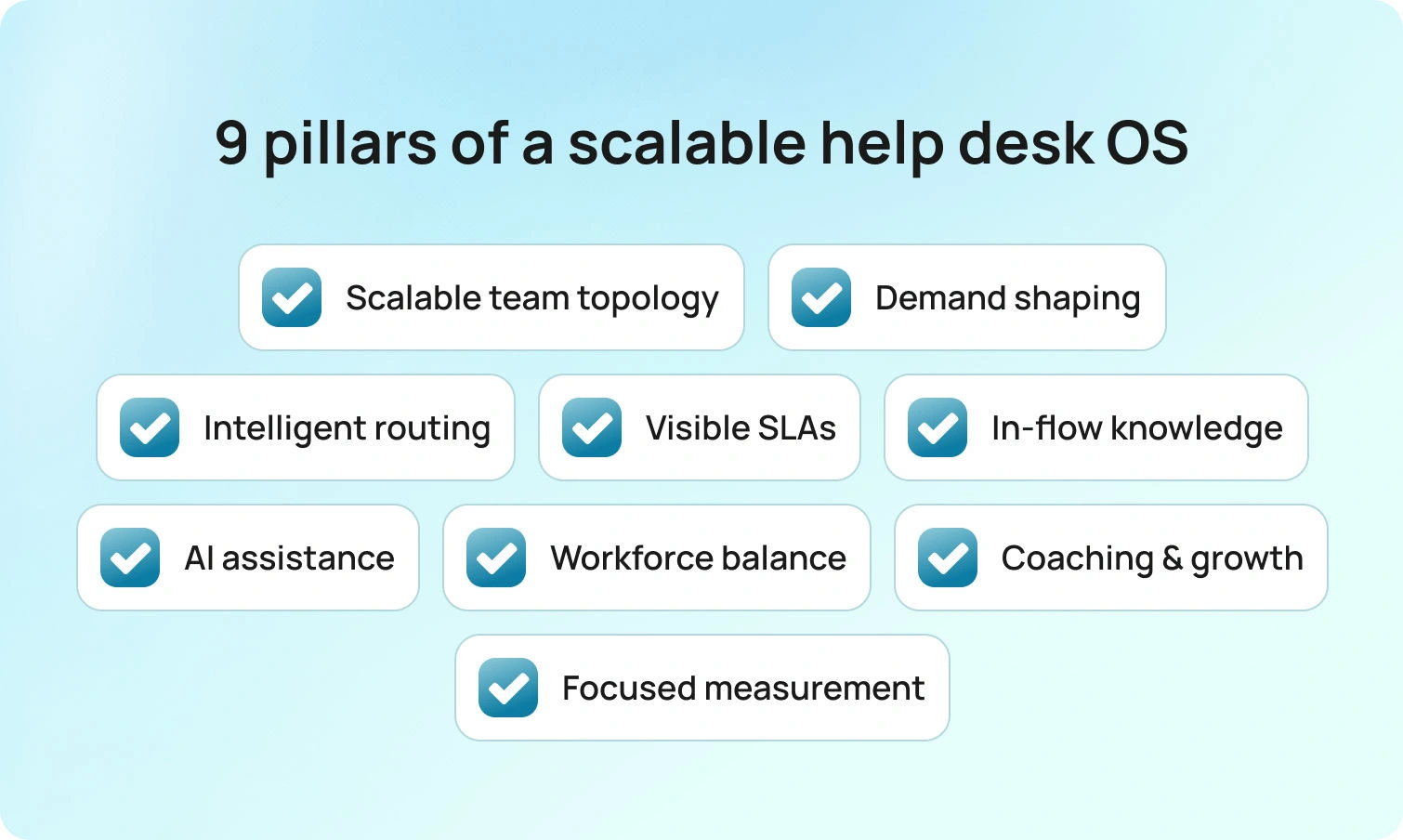
These pillars show exactly how work moves from intake to coaching, so your team resolves faster, communicates clearly, and stays healthy as volume grows.
The operating system is built on key strategies and a commitment to continuous improvement to optimize help desk performance.
1) Team Topology That Scales
A service desk team runs more smoothly when roles are explicit and light, with each team member’s responsibilities clearly defined to enhance efficiency and accountability. Assigning specific duties and automating repetitive tasks for each team member further improves team efficiency and ensures accountability. L1 (frontline) handles verification, triage, and well-documented fixes; L2 (specialists) takes on deeper diagnosis, configuration changes, and cross-team coordination; L3 (engineering or vendor) owns product defects and durable fixes.
Empowering support agents through ongoing training and fostering a supportive workplace culture enables them to provide more effective customer support. Providing tailored training, soft skills development, and regular feedback mechanisms for help desk agents enhances customer service and operational efficiency. During peak hours, a triage role monitors the firehose and filters incoming tickets before they reach the queues. A rotating desk captain manages spikes, approvals, and vendor blockers, so agents stay focused on cases rather than on orchestration.
For IT service desk teams, assign name owners for incidents, requests, problems, and changes, even if they sit in the same pod. The IT service desk team plays a critical role in managing system changes, minimizing disruptions, and ensuring effective communication with users. That clarity cuts back and forth, speeding service requests that cross other departments.
Artifacts to copy:
Role cards with mission, scope, and handoff rules. L1 = verification and documented fixes; L2 = advanced diagnosis and configuration; L3 = defects and durable fixes. Clear handoff triggers keep work moving without debate.
On-call calendar and escalation matrix with names and targets. One live schedule shows who covers each domain and the expected acknowledgment time, while the matrix maps severity paths and after-hours behavior, so the next step is obvious.
Captain’s checklist (daily forecast, coverage, blockers, top risks). A single page aligns staff to peaks, surfaces dependencies, and flags likely trouble—so the plan is posted early, agents stay focused, and customers stay informed.
2) Shape Demand at the Front Door
Volume is not solely determined by headcount, but at the point of entry. Intake forms should collect system, location or brand, urgency, entitlement, steps taken, and the appropriate attachment types. A help desk system can streamline the collection and management of support requests by ensuring all relevant information is captured at the point of entry. Conditional fields keep simple requests quick and expand for complex ones.
The self-service portal should suggest answers inside the form based on keywords and categories, not after submission. Self-service portals empower users to resolve common issues independently, reducing agents' workload and improving overall efficiency. Customers get help faster, and agents avoid preventable ping-pong.
Add a short pre‑submission checklist for common use cases, such as password resets, access requests, device swaps, or VPN access. Pair it with a self-service knowledge base that includes screenshots matching today’s UI. Tie each article to the same fields the form expects. The effect is immediate: fewer tickets for repetitive tasks that drain energy, and better starting data for the remaining tickets.
Micro‑templates:
Short, copy-and-paste prompts you can add to your intake form and portal to reduce back-and-forth and improve first-touch quality.
- Field hint: “Attach a screenshot of the exact error dialog. Please redact personal data.” Why: reduces back-and-forth and speeds up first response.
- Attachment rule: “Logs accepted: .txt or .log, max 5 MB. For screenshots, use .png or .jpg.” Why: prevents unusable files and repeated requests.
- Pre-check (password/MFA): “Tried self-reset and device restart? If not, run both now and note results.” Why: deflects quick wins and gives L1 precise starting data.
- Pre-check (access request): “Manager approval attached, role requested, start date confirmed, justification provided.” Why: stops approvals from stalling in the queue.
- Error copy capture: “Paste the exact error text or code shown on screen.” Why: improves searchability and knowledge suggestions.
- Privacy note: “Remove personal identifiers from attachments. If unsure, tick ‘redaction needed,’ and we will guide you.” Why: protects data and sets expectations.
- Submit blocker: “Almost there: select your device type and add a screenshot to continue.” Why: ensures completeness at the door instead of in the queue.
Deflection success copy: “This article should resolve the issue. If not, submit the form, and we will pick up with these details.” Why: keeps the path clear, regardless of whether self-service works.
3) Route By Skill, Language, and Risk
Routing sets the queue’s rhythm. Start by automatically classifying intent, detecting language, and assigning priority based on real impact, blending severity with customer tier. Automated ticket routing is essential to ensure support requests are directed to the right agents quickly, streamlining workflows and reducing response times.
Complex work should be assigned to specialists who can complete it without handoffs, while repeatable requests should flow to the team with the quickest, most reliable closure. VIP items deserve a dedicated view with clear timers so they never get lost amid low-impact work. Clear ownership, visible priorities, and short paths to the right expertise turn routing from a guessing game into a steady heartbeat the whole team can trust.
Keep the model simple and consistent across channels. Queues organized by intent and risk make the workload visible at a glance, helping leaders balance capacity early and helping agents manage tickets efficiently across multiple channels, so they can focus on what they do best. Service requests that require approval can be paused in a pre-approval lane with automated reminders, while incidents move directly to action with the next step already defined. The outcome is fewer reassignments, faster first qualified touches, and more predictable resolution times.
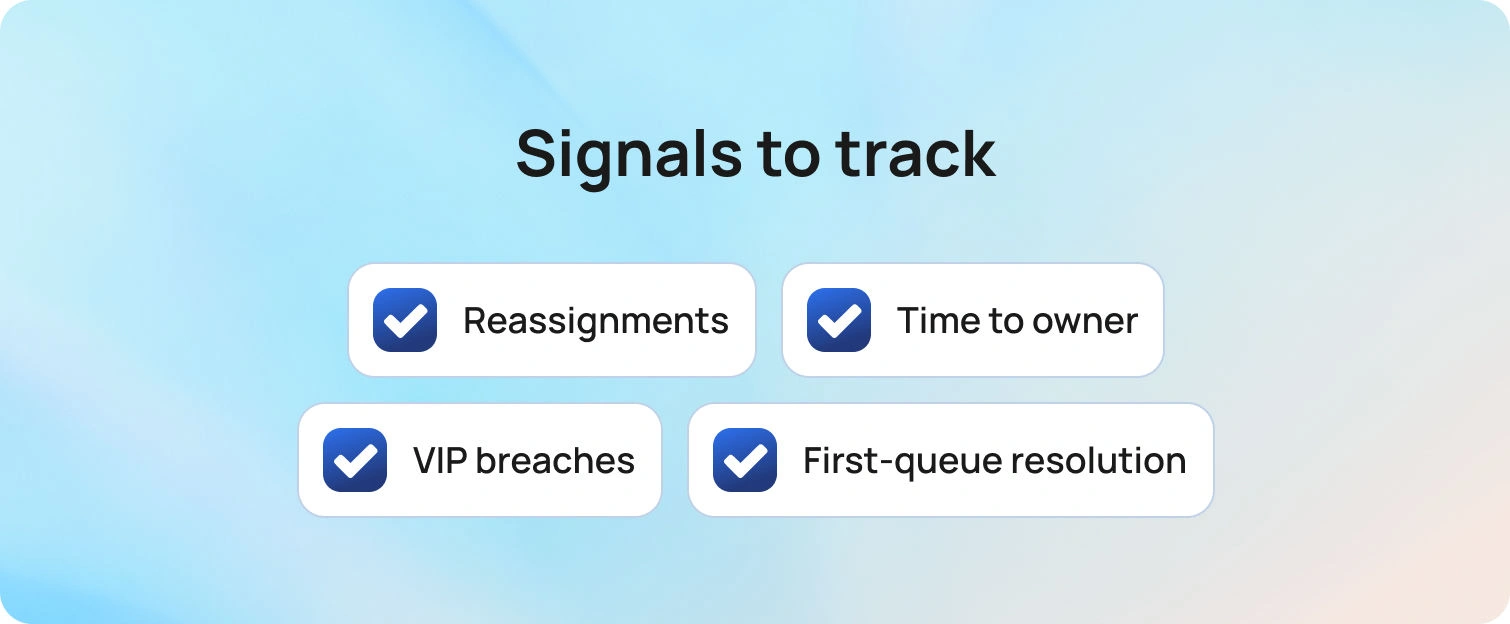
Signals to track: reassignments per ticket, minutes to first qualified owner, VIP breach ratio versus overall, and the percentage of tickets resolved in their initial queue.
4) Make SLAs and Communication Visible
SLAs work only when clocks are visible, and status language is plain. Put the first-response and resolution timers in the same view that agents use all day. Trigger reminders before a breach and send concise, clear status updates. Utilize multiple communication channels, such as email, phone, social media, and live chat, to keep stakeholders informed with timely updates. Keep the status model simple: New, In progress, Pending customer, Waiting on vendor, Resolved, Closed.
Build a customer communication playbook with three reusable templates per intent: first response, progress update, and delay notice. Map each to a target time and a trigger. Proactive communication is essential for building trust, so ensure your playbook supports this approach. Customers trust timelines when messages arrive at consistent moments, delivering consistent updates, and match what they see in the customer portal.
Copy‑ready lines:
- First response: “We are investigating and will update you by 14:00 local time.”
- Delay: “We are waiting for vendor logs and will check again at 10:00.”
5) Put Knowledge Where People Actually Work
Knowledge works when it is concise, current, and accessible. Articles should mirror the live UI and list the exact fields and commands. Surface them in the portal during submission and in the agent console during handling. Use a one‑click rating or a two‑line comment to collect customer feedback and agent notes. When agents deviate from the article path, nudge the owner to review the deviation. Short edits made weekly beat lengthy rewrites that never ship.
Pair the knowledge base with a brief author’s guide: scope, title pattern, verification step, expected output, and related issues. Implementing effective knowledge management systems is essential for capturing and sharing expertise, ensuring that valuable information is accessible across the organization.
That shared structure keeps desk agents writing consistently, fosters a culture of knowledge sharing among team members, and gives customer service teams confidence that articles will match reality.
6) Use AI to Remove Toil Without Removing Judgment
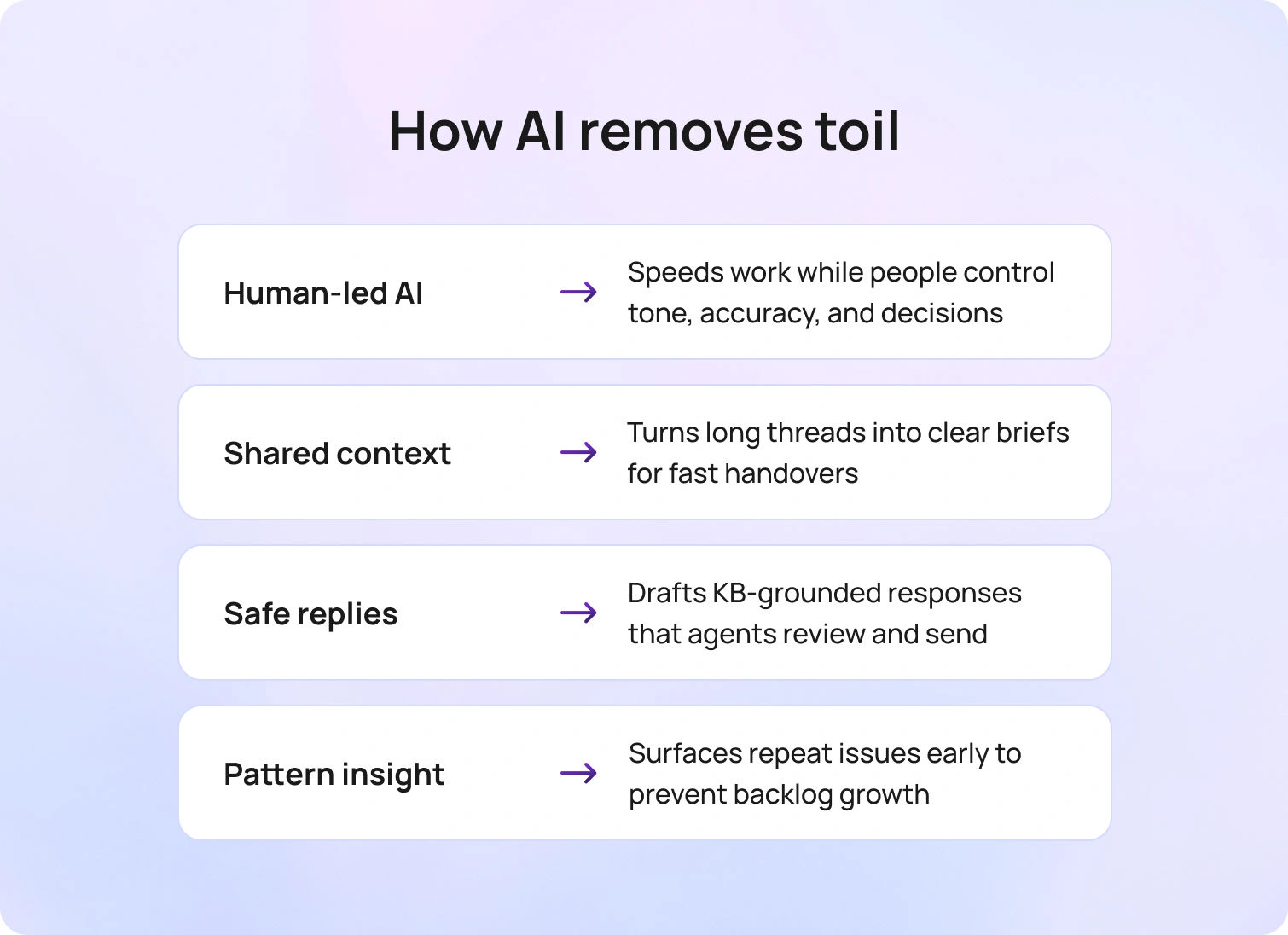
AI should feel like a strong assistant, not a replacement. The goal is to build momentum: faster context understanding, quicker first drafts, and fewer repetitive steps, while people retain control of tone, accuracy, and final decisions.
Context comes first. Long email chains and chat logs collapse into a short, brief that states what happened, what is blocked, and what to do next. Shift handovers no longer feel like cold starts because the next analyst sees the same concise snapshot, linked to the ticket and the relevant knowledge article. When a customer writes in a different language, automatic detection and in-place translation keep everyone in the same conversation without exporting text to another tool.
Drafting then becomes easier, not risky. Suggested replies are pulled from approved knowledge and current SOPs, so the wording stays on-brand and citations point to the exact article section that supports the answer. Agents review, personalize, and send, so response time drops without sacrificing the human judgment customers expect. When a fix requires command or policy text, the draft includes the exact snippet and a short explanation of why it applies, reducing back-and-forth.
Voice should not be a blind spot. Call transcription is stored in the same record as chat and email, so the entire history is visible to the entire team. Follow-ups no longer start with “what did we say on the call,” and problem investigations have the quotes and timestamps needed to move faster. Repeated phrases and error codes are searchable, enabling practical clustering and trend analysis in day-to-day work. AI-powered predictive support can anticipate ticket volumes, detect anomalies, and recommend preventive actions, helping teams proactively address issues before they escalate.
Patterns deserve attention, too. Auto-clustering highlights repeat tickets by symptom, device, version, or region, helping leaders identify a root-cause candidate before the backlog swells. A brief weekly review highlights key cluster insights, such as knowledge updates, a new intake field, or a routing rule that routes work to the right team sooner.
Guardrails make this safe and reliable. High-risk intents use an approval step before a message is sent or a change is applied. Anything that touches sensitive data or policy gets mandatory human review. Every AI-generated draft is labeled as a draft; edit history is stored with the case; and acceptance rate and edit distance are tracked, enabling managers to identify where content or process needs work by leveraging performance data. Grounding responses in your own knowledge base prevents hallucinations and maintains consistent compliance language.
Used this way, AI removes toil while agents keep the call. Customers get faster, more transparent communication. Analysts spend more time solving and less time re-reading or retyping. Automation saves agents valuable time, allowing them to focus on complex, high-priority issues. Leaders see cleaner notes, fewer repeats, and a steady increase in first-contact resolution without asking the team to work longer hours.
Guardrails: Label AI content as Draft, log edits, and review acceptance rate weekly to spot content gaps and process friction.
7) Workforce Management and a Healthy Pace
Even great workflows stall if shifts fight the volume curve. Forecast by hour, channel, language, and intent. Schedule skills to match peaks. These practices help drive operational efficiency by optimizing support processes and ensuring resources are allocated where they are most needed. Keep small overflow pools trained on common intents for short spikes. Protect deep‑work windows for L2 and L3 so complex cases do not get drowned out by interruptions.
Build a humane cadence. Ten‑minute standup covers yesterday’s misses, today’s forecast, and one fix, fostering open communication within the team. Midday check rebalances queues and confirms coverage for late‑day peaks. The end-of-day handoff uses a two-line template: current status, following action, and known risks. Encourage breaks that agents actually take. The point is not to squeeze every minute but to maintain a positive work environment where people can think clearly.
Wellbeing signals: occupancy over 85 percent for weeks, rising after‑hours pings, and a growing stack of partial lunches. Treat those as risks, not badges of honor.
8) Coaching, Careers, and Continuous Learning

Teams move faster and stay healthier when growth is visible, and feedback is specific. Make coaching part of the work week, not a quarterly event. Pick two tickets per person, read them together, praise one behavior to keep, and coach one to adjust. Use process improvements to enhance team performance by identifying areas for efficiency gains and leveraging analytics or automation where possible. Keep the comments concrete: what worked, what to try next time, and what “good” looks like in your playbook. Patterns from these short sessions feed your next update to templates, SOPs, or the knowledge base.
Learning sticks when people teach each other. Run a monthly brown-bag session where an agent walks through a thorny problem, shows the steps that solved it, and the team documents the fix in internal documentation. The presenter gets recognition, and the whole desk gains a repeatable path. Rotate the slot so newer analysts can build confidence and specialists can spread their expertise.
Careers should have a clear path. Create a simple ladder that moves from L1 to specialist or team lead, with parallel tracks for technical depth and people leadership. Structured career development and ongoing training are essential for professional growth and employee motivation. Tie advancement to mentoring, knowledge contributions, incident leadership, and quality metrics, not only volume. Give managers a small budget of time for shadowing, pair work on complex tickets, and short project assignments that stretch skills without risking SLAs.
Learning needs to fit the day. Offer short online courses and product change notes that agents can complete in focused windows. Pin key updates inside the console so the lesson appears where the step is used. Track who authored or updated articles and celebrate those contributions in team meetings. Continuous learning then feels like part of the job, not extra homework.
Measure the habits, not just the outcomes. Look for coaching touches per person, knowledge edits shipped, and the share of tickets that now follow the documented path. As those numbers rise, reopen rates fall, handoffs get cleaner, and agents see a future that does not require burning out to get ahead.
Encourage teams to regularly brainstorm and implement desk improvement ideas to boost efficiency, performance, and customer satisfaction.
9) Measure What Matters, Improve One Thing at a Time
Track a small set of key performance indicators: first contact resolution, handle time, SLA hit rate, reopens, and CSAT, while also tracking key metrics to monitor progress. Add queue health metrics: minutes to first qualified owner, percentage with more than one reassignment, and backlog age by intent. Use analytics to identify bottlenecks in help desk processes. Meet weekly to pick one friction point to fix. Add a missing intake field, tune a route, tighten a status template, or update one article. Tiny, specific edits shipped weekly beat grand redesigns that stall.
Close the loop with a one‑page “change log” that pairs every tweak with the metric it should move, and review desk metrics to ensure improvements are practical. Share it in your intranet so team members see how small shifts lift team performance and positively impact overall help desk performance.
How BlueHub Helps Teams Scale Without Burning Out

Morning used to start with guesswork. Tickets arrived half-completed, a VIP incident went unnoticed amid routine requests, and the team spent its first hour chasing basics. WithBlueHub (by BlueTweak) in place, the first ten minutes feel different. As help desk and desk software, BlueHubstreamlines support tickets, unifies communication, and ensures requests are routed efficiently. Intake forms adapt to context, so simple requests stay short and complex ones collect approvals and screenshots. Analysts open cases that are ready for action rather than another round of back-and-forth. Integrating with Jira Service Management can further enhance help desk operations through customizable workflows, SLA monitoring, and automation.
By midmorning, the queues are steady. BlueHub classifies intent, detects language, and assigns priority based on real impact, so complex work lands with specialists and repeatable requests flow to the fastest closers. VIP items sit in a dedicated view with visible clocks. People know what they own and why it matters, which removes the quiet stress of constant triage.
Customers hear from you before they need to ask. First response and resolution timers are in the same view agents use, and status templates send plain updates at the right times. The portal suggests likely fixes during submission, and the agent console surfaces the same articles as fields change. Answers match the current UI, so confidence grows on both sides of the conversation. Managing customer interactions effectively across channels ensures a seamless and high-quality support experience.
Afternoon handoffs no longer feel like cold starts. Long threads collapse into a short, brief that explains what happened, what is blocked, and what to do next. Suggested replies draw from your knowledge base, so the tone stays on-brand while the analyst edits and sends. Call transcripts are stored in the same record as chat and email, giving the team a single, clean history and fewer duplicates. Using internal notes enhances cross-team coordination and keeps everyone aligned without cluttering inboxes. Integrating Microsoft Teams facilitates real-time collaboration and information sharing within help desk workflows.
Leads stay ahead of the curve. Workforce management sits next to the queues, not in a separate tab. Hourly, channel, language, and intent forecasts inform schedules, and real-time views show where pressure is building. Two cases move to a quieter queue before SLAs slip. The team feels supported rather than rushed.
Improvement becomes routine instead of an overhaul. BlueHub ties outcomes to the exact form, route, article, or template that changed. First-contact resolution improves after an intake tweak. Handle time falls when a reply template is tuned. Reopens the drop once a verification step is added. Minor fixes every week add up to calmer days and steadier results. BlueHub streamlines IT workflows, reducing manual tasks and improving productivity.
For service providers and multi-brand teams, the same story holds. Multi-tenant reporting keeps each client’s data clean while one support team serves many. Leaders see what is happening across brands without losing the detail needed to act. Service desks and support teams work together to resolve technical issues and deliver support efficiently. Internal IT teams benefit from automation, request management, and stakeholder engagement to improve IT service delivery and operational efficiency.
The net effect is simple to feel and easy to measure. Tickets arrive complete, routing is predictable, customers receive timely updates, and agents finish the day with energy to spare. BlueHub turns good practice into a daily rhythm, enabling teams to scale without burning out.
From Survival Mode to a Sustainable, High-Performance Help Desk
Scale comes from a simple system you can run every day. Shape demand at the front door, route by skill and risk, keep SLAs and communication visible, and put current knowledge in the path of work. Use AI to remove repetitive steps while people make the decisions that matter. Match staffing to real demand, coach with concrete examples, and improve one friction point each week so gains compound.
If you want the whole model running in one place, BlueHub maps each step to no-code workflows your team can use right away. Intake becomes complete, routing becomes predictable, and updates arrive on time. Agents finish their days with energy to spare, and customers receive fast, consistent resolutions across every channel. See BlueHub in action with a 15-minute demo and watch a ticket move from intake to closure with clarity at every step.

As Head of Digital Transformation, Radu looks over multiple departments across the company, providing visibility over what happens in product, and what are the needs of customers. With more than 8 years in the Technology era, and part of BlueTweak since the beginning, Radu shifted from a developer (addressing end-customer needs) to a more business oriented role, to have an influence and touch base with people who use the actual technology.



