



AI customer support utilizes classification, summarization, and knowledge-base-grounded answers to assist customers and agents across email, chat, and voice channels, thereby enhancing the overall customer experience. It automates intake, suggests replies, powers chatbots, and provides real-time analytics. Teams achieve cost savings, improved customer satisfaction, and scalability without proportional increases in headcount.
From Backlogs to Breakthroughs with AI
Your support team is drowning in volume. Agents spend half their time reading long email threads, searching for answers, and manually routing tickets. Customers wait longer than they should. Repeat contacts pile up.
Ultimately, your costs rise while satisfaction scores remain stagnant.
AI customer support addresses this by automating the repetitive tasks that slow down your team. It classifies incoming requests, summarizes conversations, suggests replies grounded in your knowledge base, and routes tickets to the right agent based on intent, language, and priority.
Customers get instant responses. Agents focus on complex issues that need human judgment. Everyone wins.
This isn't about replacing human customer service teams, though. It's about giving them better tools so they can deliver exceptional service without burning out. AI handles routine inquiries and assists with research, tone consistency, and multilingual support. Humans stay in the loop for approval, coaching, and empathy.
If you're managing a growing support operation and wondering whether AI can actually deliver business value, this guide shows you how it works and which metrics prove ROI.
What Is AI Customer Support?
AI customer support refers to artificial intelligence that assists customers and agents across email, chat, and voice using classification, summarization, knowledge-base-grounded answers, and intelligent routing (under human oversight).
It's not a single tool. It's a set of capabilities that work together:
AI customer service chatbots answer customer inquiries directly, grounded in your knowledge base, so they don't hallucinate or guess.
- Agent Assist provides suggested replies, ticket summaries, and real-time translation, enabling support agents to handle cases more efficiently without needing to switch between tools.
- Automation classifies incoming requests, detects spam and duplicates, routes tickets to the correct queue, and triggers workflows based on intent or customer sentiment.
- Knowledge AI powers search, article recommendations, and answer generation, ensuring relevant responses remain consistent across all channels.
The best implementations follow a phased approach: assist, approve, and then automate. You start by letting AI flag priorities and suggest responses while agents approve everything. Once you're confident in accuracy, you can automate safe actions, such as status updates or order tracking.
Modalities include customer service chatbots for self-service, agent copilot features embedded in your ticketing system, an AI voicebot for phone interactions, analytics that detect intent and sentiment, and workforce management integration that forecasts demand.
How AI in Customer Service Differs from Traditional Support
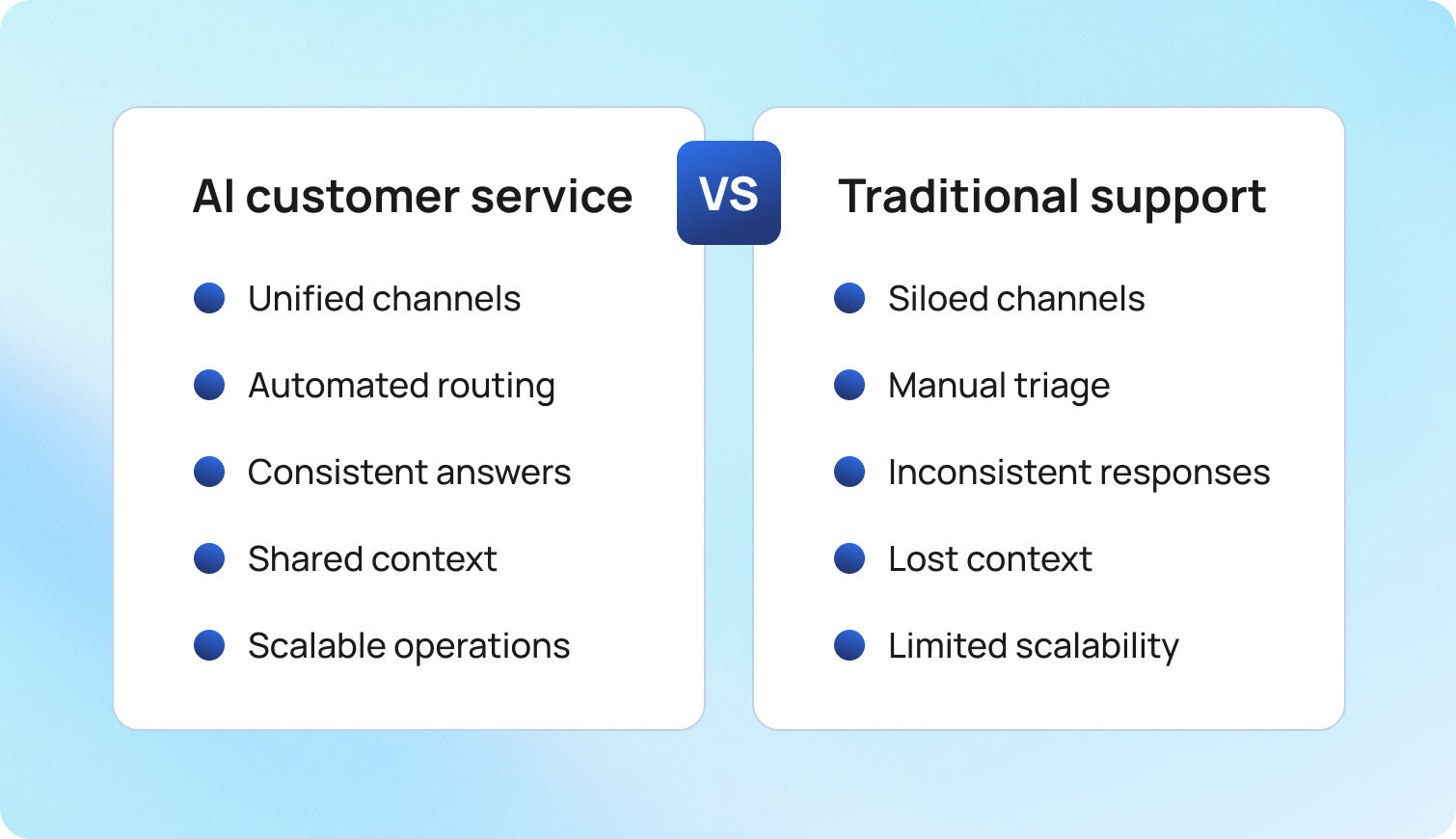
Traditional customer service operations rely on siloed tools. Email lives in one inbox. Chat happens on another platform. Voice calls get logged separately. Your agents must manually triage every request; responses vary depending on who answers, and context is lost when customers switch channels or when tickets are bounced between queues.
AI in customer service centralizes everything.
One record of truth captures customer interactions throughout the entire customer journey. Automated intake routes customer requests based on intent, brand, language, and urgency. Knowledge-base-grounded responses keep tone and accuracy consistent. Smart routing and SLAs work across all channels, ensuring customers receive the same high-quality service regardless of whether they email, chat, or call.
The shift isn't just about speed. It's about consistency and scalability. Traditional support often struggles to maintain service quality when volumes spike. AI-powered customer support handles surges without compromising first-contact resolution or customer satisfaction.
Why AI Customer Service Matters in 2025
Customers expect instant support regardless of time zone or channel. They don't want to repeat the problem when switching from chat to email or when a ticket gets reassigned. They want answers in their native language without having to wait for a bilingual agent to become available.
AI for customer support delivers always-on help through chatbots and voice assistants that handle routine inquiries outside business hours:
- Seamless handoffs preserve context when escalating to human agents
- Real-time translation enables multilingual customer support without staffing native speakers for every language
- Mobile apps integrate AI capabilities, allowing customers to get help wherever they are.
This means customers receive immediate answers to simple questions and faster, more informed assistance from agents when issues become complex. Customers enjoy the speed and convenience while still having access to human expertise when needed.
Cost-to-Serve and Operational Resilience
Customer service costs scale linearly in traditional models. More tickets mean more agents. Product launches, outages, or seasonal spikes force expensive hiring surges or overtime. The contact center becomes a cost center that leadership constantly pressures to reduce.
Generative AI for customer support changes the math. Automated intake and containment reduce the volume that reaches agents. Agent-assist features improve agent efficiency, allowing each person to handle more cases per hour. Better first-contact resolution reduces repeat contacts, which drive up the cost per issue.
During incidents—such as a service outage affecting thousands of customers—AI systems handle the surge by auto-responding with status updates through interactive voice response systems or chat, and routing only unique problems to agents. This operational resilience protects revenue by keeping response times acceptable when traditional teams would otherwise be overwhelmed by a backlog.
The financial impact is evident in three ways: lower operational costs per resolved issue, deferred hiring as volume increases, and higher retention rates because customers are less likely to churn due to slow or inconsistent support, allowing companies to gain valuable insights into their operations.
How Customer Service AI Drives Results
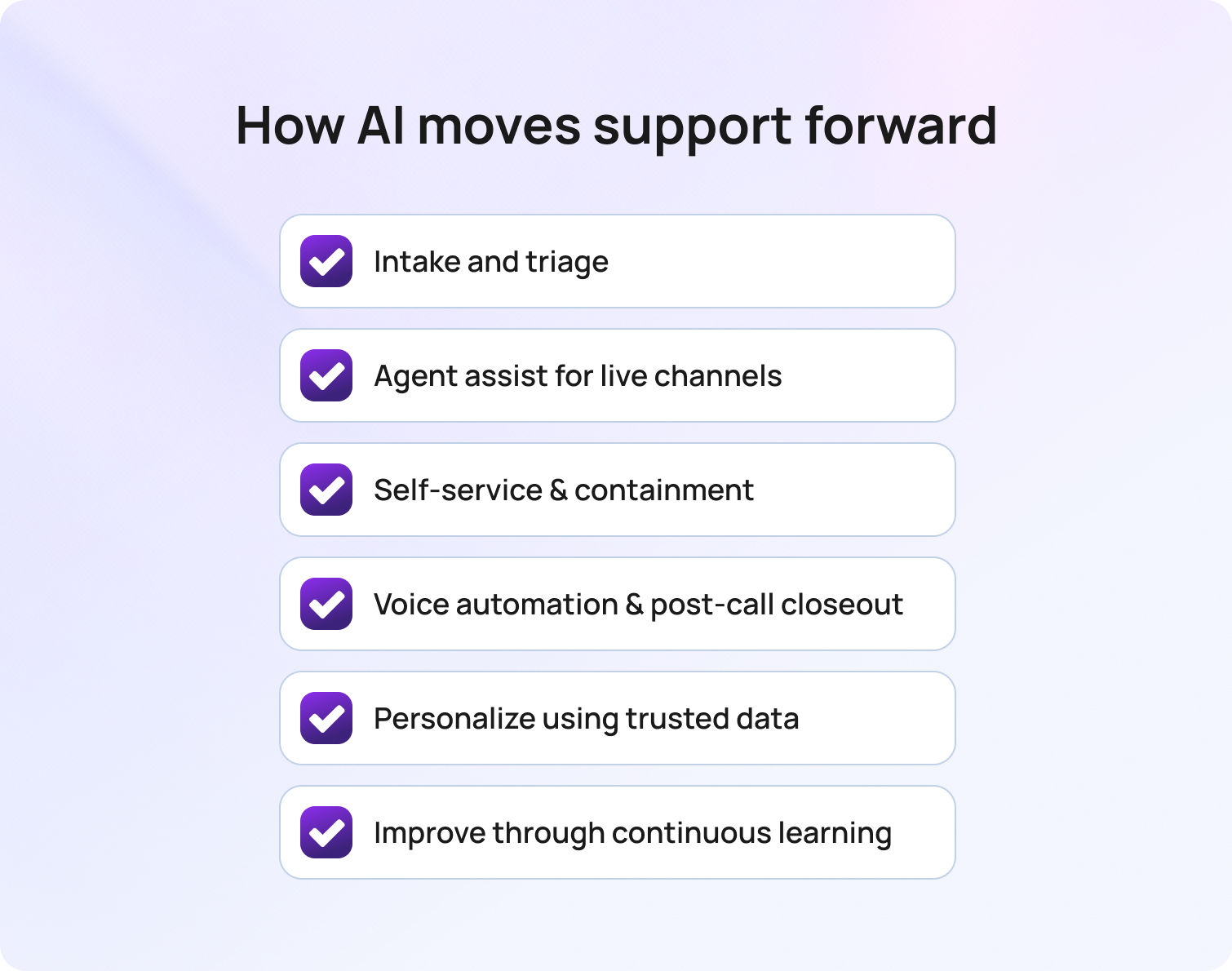
This section translates AI capabilities into measurable outcomes you can track month over month.
1. Intake and Triage
Auto-classification detects intent, language, and brand using machine learning. Spam and duplicate filtering keep queues clean. Priority rules flag urgent cases based on customer sentiment, account value, or issue type.
This helps tickets land in the correct queue the first time. Agents don't waste time reading spam or routing misclassified requests. High-priority cases get handled within SLA instead of sitting in a backlog. The customer service team can focus on solving problems instead of sorting through noise.
BlueTweak automates classification and routes intelligently across channels through its unified ticketing system.
2. Agent Assist for Live Channels
AI ticket summary condenses long email threads or chat transcripts into key points. Suggested reply tools pull knowledge-base articles and draft responses that agents can personalize and tailor to their needs. Real-time translation handles multilingual customer conversations. Canned responses become smarter by learning which macros are most effective for specific intents. These AI tools simulate human-like conversations while maintaining consistency and coherence.
Agents read less, respond faster, and maintain a consistent tone. They don't hunt through documentation or write from scratch. Context loads automatically from the customer profile, so they don't ask redundant questions. This approach significantly improves agent productivity.
BlueTweak integrates AI-generated ticket summaries and suggested replies directly into the agent workspace, eliminating the need for support teams to switch between tools.
3. Self-Service and Containment
Knowledge-base-grounded AI customer service chatbot answers customer inquiries without agent involvement. Guided flows handle status lookups, eligibility checks, or appointment scheduling. Proactive notifications reduce inbound volume by updating customers before they ask. Conversational AI enables human-like conversations that understand customer behavior and adapt responses accordingly.
Now, customers can resolve issues without needing to contact an agent. Fewer new emails, chats, and calls hit the queue. Backlog shrinks. Abandonment rates drop because wait times stay low. Customer engagement improves when people can self-solve on their schedule.
BlueTweak's chatbot is grounded in the same knowledge base agents use, ensuring consistency between automated and human responses.
4. Voice Automation and Post-Call Closeout
The AI voicebot handles Tier-1 intents, including account balance checks and order status. Call transcription software converts customer conversations into searchable text using natural language processing. Post-call notes auto-populate the ticket so agents don't spend minutes typing summaries. Voice assistants can handle increasingly complex tasks as AI models continue to improve.
This leads to shorter calls. Searchable voice records enable better quality assurance and root-cause analysis. Agents move on to the next customer more quickly, and historical data from transcripts helps identify trends in customer needs.
BlueTweak integrates voice transcription with ticketing, ensuring that every interaction is documented and searchable for customer service quality assurance reviews.
5. Quality, Coaching, and Operations
Auto-QA flags interactions with negative sentiment, policy violations, or compliance risks, while sentiment analysis tracks how emotions shift during the conversation. Adherence signals inform workforce management, enabling staffing to flex according to demand, while predictive analytics forecast volume patterns to guide capacity planning.
With that foundation, coaching becomes targeted instead of random. Managers use data to identify skill gaps and celebrate wins, staffing adjusts to real-time volume rather than relying on weekly estimates, and interactions are reviewed systematically rather than through sporadic sampling.
BlueTweak provides customer service analytics with sentiment tracking and QA sampling built in, enabling you to gain real-time insights from customer feedback.
Core Concepts You Need to Know
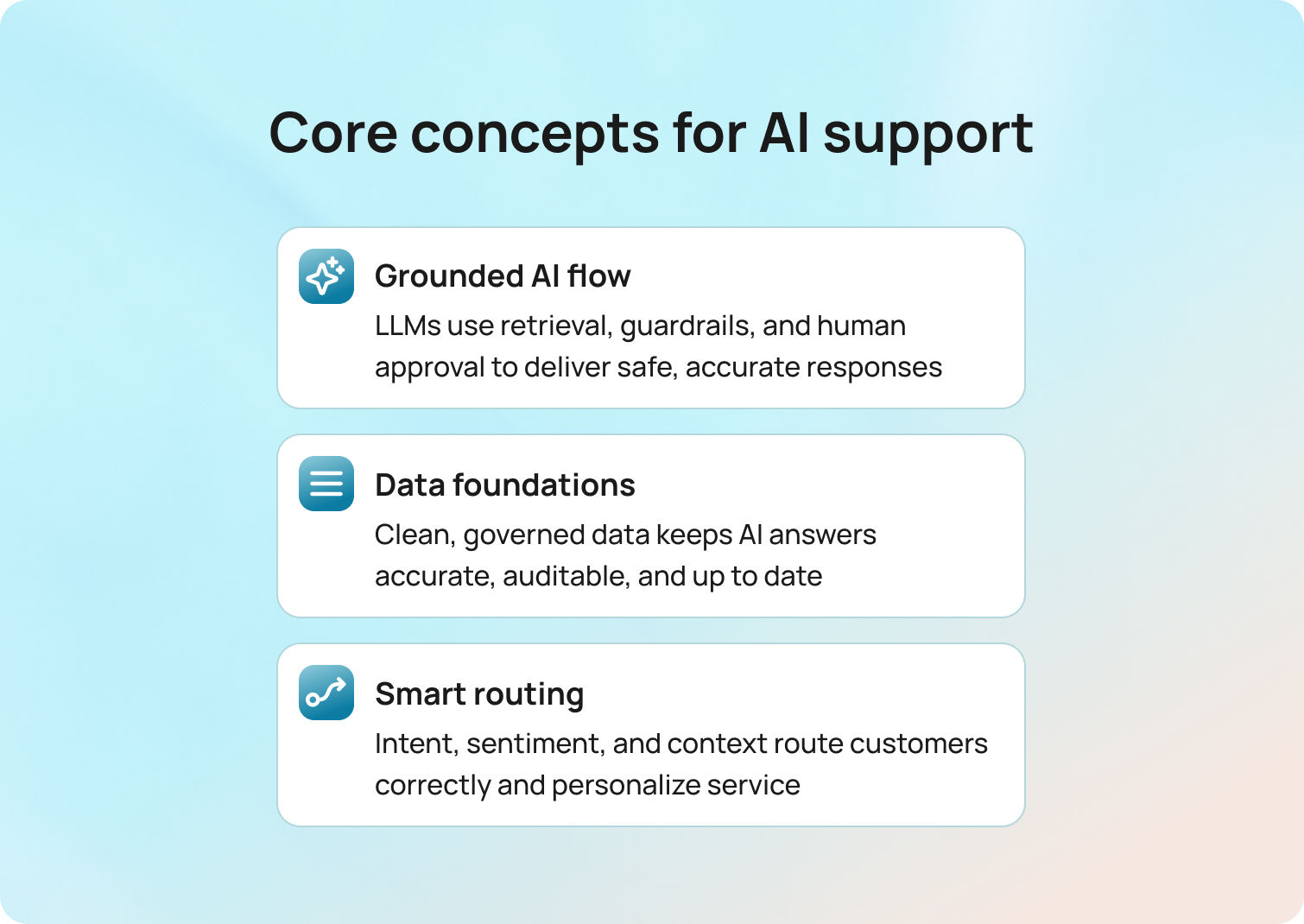
This section aligns teams on the essentials, so the playbooks that follow are straightforward to implement.
LLMs, Retrieval, Guardrails, and Human-in-the-Loop
Large language models enable natural language processing, facilitating the understanding of customer queries and the generation of responses. But LLMs alone aren't enough. They need retrieval systems that ground answers in your knowledge base so they don't hallucinate facts or invent policies.
Guardrails constrain outputs. You define what AI can and can't say, which actions require approval, and when to escalate to a human. This prevents AI from promising refunds it can't authorize or making up shipping timelines.
Human-in-the-loop means phasing automation safely: assist agents with suggestions, let them approve before sending, then automate only the safest actions once accuracy is proven. More complex tasks, edge cases, and situations that require empathy are handled by human agents.
This approach balances AI technology with human oversight to understand customer preferences and deliver personalized support.
Data Foundations
Clean CRM and helpdesk records feed AI systems. If your customer data is fragmented or outdated, AI suggestions will be wrong. Your knowledge base needs to be authoritative and versioned. When you update an article, that change should propagate to chatbot responses, suggested replies, and agent search results immediately.
Privacy and data residency matter. Customer conversations may contain sensitive information. Prompt and response logging enables audits but requires secure storage and retention policies to ensure data integrity. Analyzing customer data helps you understand customer behavior and identify trends, but only when done ethically and securely.
BlueTweak's unified ticketing system and knowledge base ingestion maintain context, ensuring that AI recommendations remain accurate and customer relationships remain strong.
Routing, Intent, Customer Sentiment, and Personalization
Auto-classification identifies intent (refund, technical issue, order status), brand, and language automatically. Layered with sentiment and urgency signals, it pushes frustrated or high-value customers to the front. Routing then factors in customer tier and history—so VIPs are directed to faster queues or assigned to specialized agents—without requiring manual triage.
Translation activates automatically when customers write in a language your agent doesn't speak, thereby enhancing human interaction. This prevents delays and frustration while building stronger customer relationships.
BlueTweak offers automatic routing, multilingual detection, and live context through the customer profile view, so agents always know who they're helping and what has already happened.
How to Implement Generative AI in Customer Suppor
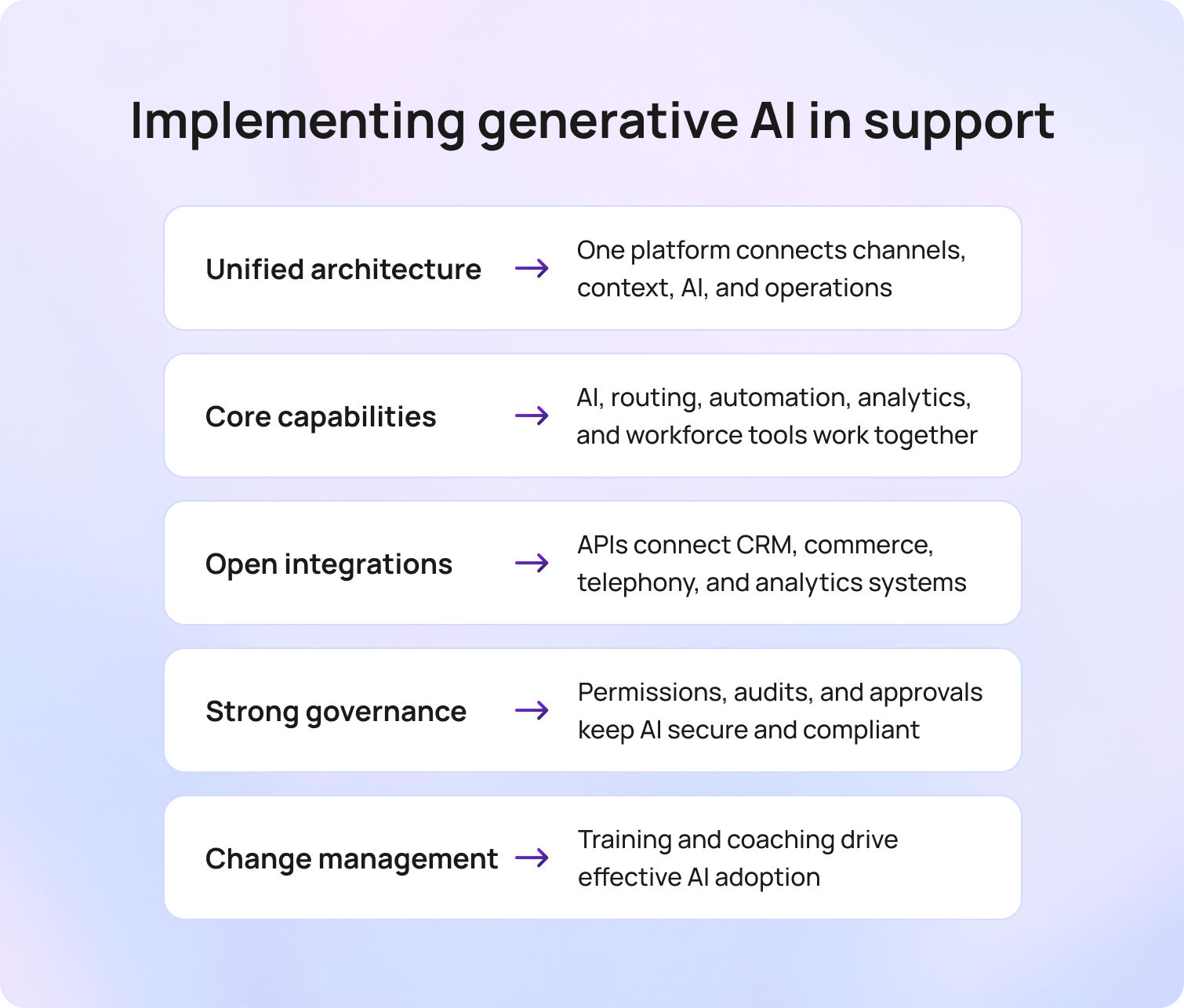
Begin with the architecture required to run omnichannel AI reliably, then proceed to a practical capabilities checklist, integration patterns, and the governance and change management necessary to ensure the rollout's success.
Architecture Overview
You need one platform (or a tightly integrated set) that handles channels (email, chat, voice), routing, knowledge base, agent assist, bots, analytics, workforce management, quality assurance, and administration.
Context should never drop between systems.
The alternative is stitching together separate vendors for chat, email, telephony, knowledge management, and analytics. Integration gaps create data loss, routing failures, and reporting headaches.
BlueTweak is a customer service solution that combines channels, knowledge base, AI assist, analytics, and workforce management in one stack, so you're not managing five vendors.
Capabilities Checklist
These capabilities work together. If your chatbot can't hand off to a live agent with complete context, or if your analytics don't feed workforce management, you will quickly hit operational limits.
- Unified queue where email, chat, and voice appear together
- Routing by brand, skill, language, and intent
- AI ticket summaries that condense prolonged interactions
- Suggested replies and smart macros grounded in your knowledge base
- Spam and duplicate detection
- Real-time chat translation
- AI chatbot and voicebot for self-service
- Workflow automation for routine tasks
- Real-time and historical analytics
- Workforce management for forecasting and scheduling
- Quality assurance sampling and evaluation
Integrations
Connect with CRM systems (Salesforce, HubSpot), helpdesks (Zendesk, Intercom), commerce platforms (Shopify, Magento), telephony providers, and business intelligence tools. APIs and webhooks enable data flow between systems. SSO and SCIM provision users automatically.
BlueTweak is API-open and app-friendly, so you can integrate with existing tools without rebuilding your stack.
Governance
Role-based permissions guarantee your agents can’t override routing rules or access sensitive data. Multi-factor authentication protects accounts. Audit logs track who changed configurations or reviewed customer records.
Bias and error monitoring catch systematic issues, like AI under-prioritizing specific customer segments or generating responses that violate policy. Red-team tests simulate edge cases before launching new automation. Approval gates for prompts, automation rules, and knowledge-base changes prevent unreviewed changes from being sent to customers.
BlueTweak offers centralized administration with workspace scoping, allowing teams supporting multiple brands to operate independently while leadership maintains oversight.
Change Management and Training
Agent enablement starts before launch. Train support agents on how to use suggested replies, when to override AI recommendations, and how escalation rules work.
Macro governance defines who can create or edit templates and how they're reviewed. Runbooks document what to do when AI systems behave unexpectedly. Coaching loops use AI-flagged interactions to improve performance.
Without effective change management, even the most advanced AI tools can be overlooked or misused. The goal is to assist agents, not confuse them.
10 Metrics to Track
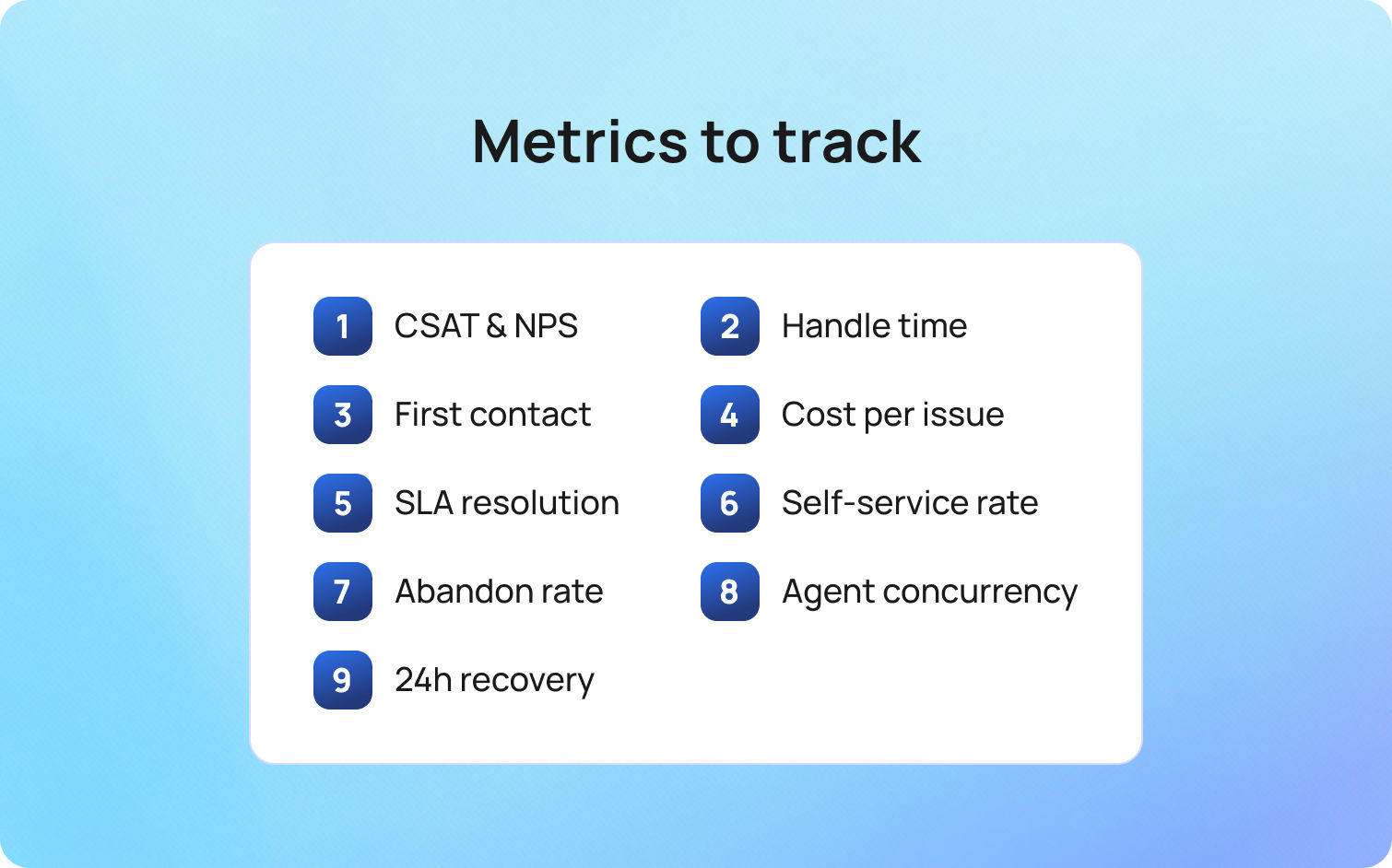
Track these metrics monthly. Compare pre-AI and post-AI baselines. Publish deltas so that everyone understands what's improving and where adjustments are needed.
- Customer satisfaction (CSAT) and Net Promoter Score (NPS) measure whether customers are happy with the support they receive.
- Average handle time (AHT) shows efficiency gains. If AI-generated ticket summaries and suggested replies are effective, AHT can be reduced without compromising quality.
- First-contact resolution (FCR) measures whether issues are resolved during the initial interaction. A higher FCR means fewer repeat contacts and lower overall costs.
- The cost per issue is calculated by dividing total support costs by the number of tickets resolved. This metric captures both labor and operational efficiency.
- Resolution rate measures the percentage of issues closed within SLA.
- Containment and deflection rate show how often customers self-solve through chatbots or knowledge-base articles without contacting an agent.
- Abandon rate tracks customers who give up before getting help. Lower abandonment rates signal better capacity planning.
- Concurrency measures the number of simultaneous conversations that agents can handle. AI-assist features often allow agents to manage more chats or emails simultaneously.
- 24-hour recovery rate shows how many negative sentiment cases shift to neutral or positive within a day (a proxy for how well you handle upset customers).
SLA adherence ensures that you consistently meet response and resolution targets across all channels.
From Assist to Automate: What’s Next
AI customer support isn't a one-and-done project. Start with assistance—let AI flag priorities, summarize tickets, and suggest replies while agents review and approve everything. Then move to approve mode for routine inquiries where agents review and send AI-drafted responses. Finally, automate safe actions, such as status updates or proactive notifications, once accuracy is proven.
Focus on outcomes instead of features. Track first-contact resolution, average handle time, containment and deflection rates, and SLA adherence. If those metrics improve, AI is working. If they don't, tune your knowledge base, adjust routing rules, or revisit which tasks you're automating.
If you want omnichannel channels, knowledge-base-grounded AI, and straightforward operational integration in one place, shortlist BlueTweak. It's built to deliver customer support automation that assists your team, rather than replacing them. Request a demo to see it in action.

As Head of Digital Transformation, Radu looks over multiple departments across the company, providing visibility over what happens in product, and what are the needs of customers. With more than 8 years in the Technology era, and part of BlueTweak since the beginning, Radu shifted from a developer (addressing end-customer needs) to a more business oriented role, to have an influence and touch base with people who use the actual technology.



